Buy anything from 5,000+ international stores. One checkout price. No surprise fees. Join 2M+ shoppers on Desertcart.
Desertcart purchases this item on your behalf and handles shipping, customs, and support to Senegal.
🚀 Unlock the future of play with the ultimate 3-in-1 coding robot kit!
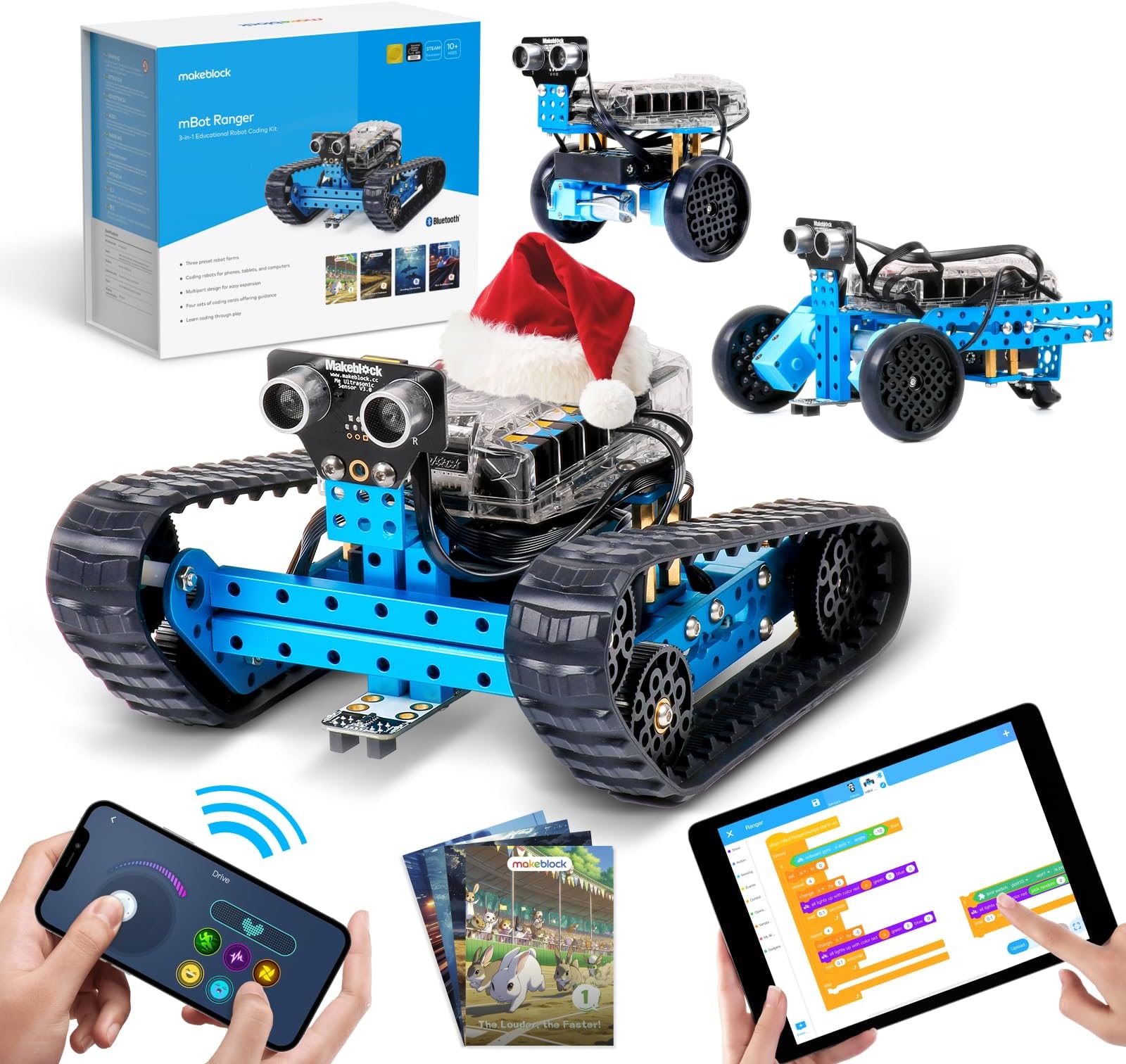
The Makeblock mBot Ranger is a premium 3-in-1 robotics kit designed for kids aged 8-12, combining hands-on building with coding education. Featuring three robot modes—a tank, self-balancing bird, and racing car—it supports both Scratch and Arduino programming via the mBlock5 app. Built with durable aluminum and equipped with multiple sensors, it offers all-terrain play and 16 STEM projects that enhance creativity, logical thinking, and technical skills. Perfect for young innovators seeking a fun, educational, and interactive robotics experience.


| ASIN | B01DY3OTHO |
| Age Range Description | Kid |
| Best Sellers Rank | #74,521 in Toys & Games ( See Top 100 in Toys & Games ) #665 in Educational Science Kits |
| Brand Name | Makeblock |
| Color | Blue |
| Customer Reviews | 4.3 out of 5 stars 742 Reviews |
| Educational Objective | Coding, Thinking, DIY, Building Programmable Robot |
| Global Trade Identification Number | 06928819504400 |
| Included Components | 180 encoder motor(2), 62T Wheel Without Step(4), 62T Wheel(2), 90T Tyre(2), 90T Wheel(2), Battery Holder(1), Beam0824-112(2), Beam0824-48(1), Bracket 3X3(1), Bracket U1(1), Brass Stud M4x30+6(1), Copper Bush 4X8X4mm(8), Me Auriga(1), Plastic Spacer 4X7X10(4), Plate 135º(2), Plate T-type(1), Plate0324(2), Track(2), Universal Wheel(1), plate for battery Holder(1) |
| Is Assembly Required | Yes |
| Item Dimensions | 8.6 x 6.5 x 4.72 inches |
| Item Type Name | Robot For Kids |
| Item Weight | 1600 Grams |
| Manufacturer | Makeblock |
| Manufacturer Maximum Age (MONTHS) | 480.0 |
| Manufacturer Minimum Age (MONTHS) | 120.00 |
| Manufacturer Part Number | 90092 |
| Manufacturer Warranty Description | 1 Year Warranty Against Manufacturer Defects |
| Material Type | Durable,Sturdy and High Quality Aluminum |
| Model Number | Makeblock DIY mBot Ranger |
| Number of Batteries | 6 AA batteries required. |
| Operation Mode | Automatic |
| Power Source | Battery Powered |
| Set Name | 3 in 1 |
| Size | Large |
| Subject Character | Robot car |
| Supported Battery Types | 6 AA |
| Theme | Christmas, Construction, Easter, Halloween |
| UPC | 712073012551 193122000079 793631897711 767520331075 |
| Unit Count | 1.0 Count |
A**A
Amazing STEM Toy — Engaging, Educational, and So Much Fun!
he Makeblock mBot Ranger 3-in-1 Robotics Kit has been an absolute game-changer! My child (age 8-12) loves it, and honestly, so do I. From the moment we opened the box, we knew this was a high-quality product designed to inspire creativity and learning. First off, the build experience is fantastic. The kit transforms into three different robot configurations — a tank, a self-balancing vehicle, and a three-wheeled racing car. Each design is fun to construct and teaches important engineering and problem-solving skills. The step-by-step instructions are clear and easy to follow, perfect for kids who are building something more advanced than just blocks. What really sets this robot apart is the coding element. My child has had a blast learning Scratch programming — the drag-and-drop interface makes it easy to understand logic and sequencing. The transition from visual Scratch coding to more advanced Arduino programming opens the door to deeper learning and endless customization. It’s amazing to watch their confidence grow as they program the robot to move, react to sensors, and perform tasks.
C**A
12 yo approved.
I took a chance on these. My son has gotten a couple of cheaper robots for Christmas gifts from relatives, and none of them have ever worked because they were missing pieces or the gears didn’t fit together properly. I was worried that now that my son is in seventh grade. It was a little late to buy something like this, but I ended up getting it for Christmas and he’s really enjoyed it periodically. He brings it out with something new. He’s figured out how to do on it so far we’ve only done one configuration, and his father did help him with it, but I wouldn’t be surprised i if I find it taken apart sometime soon, everything has worked smoothly with this, and the pieces are solid
I**A
An awesome intro to robots for a 9 year old girl and her dad!
This review is for the first version mBot Ranger, the next generation should be shipping from Amazon in August of 2016 and should be even easier but it is no reason to wait to order. I purchased three different Makeblock robot models for our three girls. This mBot Ranger is for our middle girl who is 9 years old. The first build was the tank. I let my daughter do the complete build on her own although I did tighten a couple screws when she was done. I was there the entire time to guide her and explain the instructions but she did the wrenching, had fun and it was good father daughter time. The build was easy for her but not too easy. We mistakenly put the larger wheels on the rear of the treads which made the treads too tight. Once this was fixed we downloaded the MakeBlock app on the iPhone and were ready to go, or so we thought! The app said that we needed to update firmware so I downloaded the Makeblock app on a windows laptop, connected the bot via USB and attempted the easy update but it failed. After much troubleshooting I ended up changing the MakeBlock App Board setting from mBot to Auriga and was able to update it fine. Once this happened it was off to the races, literally. The next evening my daughter disassembled the tank and built the self-balancing “Nervous Bird”. This did not take her very long and she did it without my knowledge so she had no help. She likes the “Nervous Bird” so much that she has not built the race car yet but she did help her 6 year old sister build the mBot starter without help as well. I would like to point out that this is not just a remote control toy you take out of the box and play with. These are made to build and learn from so the problems we ran into are all part of the experience. When we got stuck I combed through the forums and found the answers or just tried different things. Now that the sample builds are functional we can get into the programming in Scratch, this is where the real fun will start. If there was any fault I could point out it would be that these robots eat through AA batteries so I did order a couple 12v, 6000 mAh rechargeable Lithium battery packs for the bigger robots. This should supply more and longer lasting power! The couple of challenges we faced in this build, I believe you can quickly and easily overcome by reading this review. If you run into a problem we did not, the MakeBlock forums are a great place to find the answers. You will just have to sift through posts from people who gave up or expected this to be handed to them. Each of our girls love their robots. This is a good introduction to robotics and a great platform for learning programming and the Arduino.
E**A
Great gift for the Lego and Techy geeks kiddos out there.
Gave this to my son for his 13th birthday. He loved putting it together. It was easy for him to work with the app that came with it. He ended up taking the treads off the wheels because it bogged the robot down so badly that it didn't move at all. He's not tried too much of the programming, just used the preset programs in the app, but summer isn't over yet! I would definitely recommend this for any kid that like to build using Lego's and such. It is also good for the computer players because of the programming component. I suggest having some basic tools near by in case you need them. For example my son broke the hex tool that came with it and had to find one of the screwdriver heads with the hex size he needed to make it work. Nothing major! My son was able to build it mostly on his own with only a little guidance here and there so it isn't that difficult. I would say any 9+ child could build and operate on their own. Any younger will need a little parent help but can mostly do it themselves I would think.
C**Y
Great set for kids who like to build and fiddle.
My son really showed an interest in robotics in school, therefore we were looking into buying one of the sets that he used previously, but the Lego robotics kits are quite expensive. After doing a fair bit of research, we landed on Makeblock for a few reasons; the prices are much more reasonable, especially since the kits are somewhat expandable, and can work together. Also, it has the option of scratch for beginning programming, but as he gets more advanced he can graduate to Python. The build quality is impressive, consisting of aluminum framing, and tough plastic. The wheels, wires, and sensor add-ons all seem well made and durable as well, though the battery tray could be a bit more modular, and the motor implementation could be improved though they do function well enough. I recommend getting a lithium battery kit if you can find one...I had a bit of trouble finding one with a charger included and had to email them about it. Overall, this is a really neat kit that has a lot of options. I do hope Makeblock keeps expanding their options and offerings so we can keep growing our collection.
A**R
Outdated software, doesn't work as advertised
Really disappointed for the price point for how underwhelming it is. The instructions are on par with the instructions you'll get for IKEA furniture, so if you struggle with that you'll struggle putting this together. Son wants to do the nervous bird so that's the model we did. After taking a while to connect via Bluetooth it finally started to sit there and balance. That's about all it did, trying to customize the controls did nothing. Seemed anything added disappeared. The software is out of date, I couldn't get the actual coding ap on my phone or chrome book. It says the app is made for an earlier version of Android and mines too new. This is easily my biggest gripe. If you're selling a product and talking about how you got this easy to use app to program and control the robot, MAKE SURE THE SOFTWARE IS COMPATIBLE WITH MODERN DEVICES! I could understand if I had bought this kit used and it was old and outdated. I would expect to run into software compatibility issues. I suggest looking elsewhere and skipping this product. I'll probably avoid the company from here on out.
H**S
5 years old is not the new 10...
Everyday... you see a 23-month-old baby playing a full drum kit, a 3 yr-old plowing fields in a straight line, a 4 yr-old jumping double bumps on a motocross track. So I figure... 5 is the new 10 right? That prompted me to buy my grandson a MakeBlock mBot all-terrain tank for his 5th birthday. The picture on Amazon made it look like it was 8 pre-assembled pieces that snap together but... it did need to be controlled via Bluetooth from a cellphone which gave me reason to pause... then I remembered I had an old iPhone 8 that can still be used for BT and Internet that I could donate. Fast forward to today... After cake and 45 minutes of torture making him wait to open presents, we finally cut him loose. A few minutes later, he opens the mBot... the picture on the box held his attention for almost 10 seconds but... there were more presents to open! So, after more presents, chocolate cake, and fighting to keep his little sister from touching the loot, we had to ask him to breath into to paper sack for about 5 minutes. Later on, he finally regained consciousness and swiftly zeroed in on cracking the stupidly elegant, ridiculously posh packaging that the mBot came in... which I probably paid $15 for and he certainly didn't appreciate… low and behold, and much to my chagrin... there are over 130 nuts, bolts, screws, high precision-machined (blue anodized) aluminum parts, electronic sensors, and actuators that need to be assembled. Fortunately, the stink-eye I received from my son-in-law was not fatal... Forty five minutes into the tank build on Saturday, my poor son-in-law has a vein popping out of his forehead... This is because his 'adult' siblings, each with babies of their own, are throwing assorted sized blankets, couch pillows, and partially assembled Lego dinosaur appendages at him while he is trying to read instructions and assemble the 130, or so, micro-machined parts into the larger eight subassemblies that eventually snap together... I tried to help but... everything I assembled had to be significantly re-worked... in my defense, the font in the instruction pamphlet was quite small... Eventually, with no verbal support or physiological encouragement from the immediate family, my son-in-law had assembled, to spec, the mBot Ranger Programmable Radio Controlled Ankle Biter... Time for installing the software where, I thought, I could finally contribute... I delegated the iPhone conversion to kid-account process to my daughter, I found the kid-friendly (must be 18 years or older) Arduino OS download on Youtube, and discovered the EEPROM needed to be updated with the specific robot configuration we had selected... Apparently this kit had two other assembly options - a semi-bipedal headless chicken or a 3-wheeled BMW Isetta motorcar. Nonetheless, this required a USB port which, after locking the doors, confiscating and inspecting all cell phones, we realized, we had no equipment which would support this interface. It was then that I had to explain to my devastated 5 year-old grandson that I had, in fact, given him the gift of a real-life experience... a decision where one has to choose between dedicating their life to being a Linux open-source kernel developer or waiting for the next Mac OS software upgrade that supports his new toy out-of-the-box... While he contemplated his future, Grams and I exit stage left between the tears and mommy-hugs. On my way out I promise prompt technical support after he submits the appropriate service tickets...
L**Y
Great product
Grandson loved it
E**A
Gran opción
Calidad y gran precio
A**E
Not Worth the money!
The product is poorly designed, motors have barely enough room to fit, needing to fuss about trying to avoid opposite power connectors from touching each other. Product comes with minimum to no instruction. Item does not work correctly on drive mode, specially as an all terrain vehicle, as the track places strain on motor/s, causing it to limit its movement and beep after each short action. Not worth the money!
T**X
Makeblock mBot Ranger – super kit de robotique 3-en-1 pour apprendre à coder
J’ai acheté ce kit mBot Ranger pour ma fille de 12 ans et nous en sommes très contents. C’est un excellent ensemble pour apprendre la robotique et le codage de manière ludique. Le fait de pouvoir construire 3 robots différents à partir des mêmes pièces rend l’expérience plus variée et encourage la créativité. Le montage est intuitif avec des pièces qui s’emboîtent bien, et les instructions sont claires. Ma fille a réussi à assembler les premiers modèles avec un peu d’aide au début, puis de plus en plus seule. L’aspect programmation (via l’application / logiciel) est un vrai plus : elle peut créer ses propres commandes, programmer des mouvements, des capteurs, etc., ce qui rend l’apprentissage concret et amusant. Points forts : Très complet pour un kit éducatif Apprentissage du codage interactif Possibilités de 3 configurations différentes Convient bien aux enfants/adolescents Points à améliorer : Certaines étapes de montage peuvent être un peu complexes sans aide, surtout au début L’application / logiciel pourrait être un peu plus fluide/intuitif pour les plus jeunes 👉 En résumé : un très bon kit de robotique pour initier les enfants au STEM (science, technologie, ingénierie, codage). Ma fille adore jouer avec et apprendre en même temps. Je recommande pour un cadeau éducatif et amusant !
B**.
Perfect
Very good one
M**K
perfect start for robotics
- Good quality - Good software
Trustpilot
1 month ago
2 months ago