Desertcart purchases this item on your behalf and handles shipping, customs, and support to Senegal.
🚀 Elevate your desk game—ditch dongles, triple your screens, and power up like a pro!
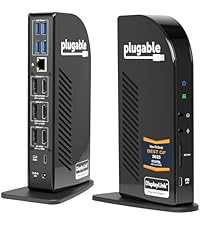
The Plugable USB-C Triple Monitor Docking Station is a 13-in-1 docking solution designed for professionals seeking a streamlined, multi-display workspace. It supports up to three HDMI monitors (4K on primary), delivers 100W laptop charging plus 20W device charging, and offers broad compatibility across Windows, macOS (with DisplayLink driver), and ChromeOS. With enterprise-ready features like Gigabit Ethernet, SD card reader, and multiple USB ports, it transforms any USB-C laptop into a powerhouse desktop setup, reducing clutter and boosting productivity.


| ASIN | B01FKTZLBS |
| Best Sellers Rank | #371 in Computers & Accessories ( See Top 100 in Computers & Accessories ) #39 in Laptop Docking Stations |
| Brand | Plugable |
| Built-In Media | USBC Triple HDMI Dock 100W PD |
| Color | Space Grey |
| Compatible Devices | Windows 10 / 11, macOS 10. |
| Customer Reviews | 4.4 out of 5 stars 1,596 Reviews |
| Global Trade Identification Number | 00819927010852 |
| Hardware Interface | USB Type C |
| Input Voltage | 20 volts |
| Item Dimensions L x W x H | 12"L x 6.7"W x 17.5"H |
| Item Weight | 400 g |
| Manufacturer | Plugable |
| Mfr Part Number | UD-ULTCDL |
| Minimum Required Operating System Version | Windows 10 |
| Model Number | UD-ULTCDL |
| Number of Items | 1 |
| Number of Ports | 13 |
| Product Dimensions | 12"L x 6.7"W x 17.5"H |
| Total Number of HDMI Ports | 3 |
| Total USB Ports | 5 |
| Total Usb Ports | 5 |
| UPC | 819927010852 |
| Unit Count | 1 Count |
| Warranty Description | 2 Year Limited Parts and Labor |
| Wattage | 100 |
M**.
Finally my Macbook is no longer in dongle hell!
I am running a Macbook Pro 2016 with Touchbar. I've been looking for a dock that would ultimately end the "dongle hell" as I've been running off of those dongles for over a year and between them sliding out, poor performance or simply having to disconnect and connect other dongles to accomplish other items, it was a frustrating experience. Enter in when I decided to purchase this item last week, DisplayLink technology which is leveraged in the docking station has had issues with Mac OS 10.13+, however, the latest beta of Mac OS Mojave has re-added support in for DisplayLink allowing these to work properly and I went ahead with the purchase. I have been quite pleased, there is certainly performance differences such that DisplayLink causes some delays and that can be an aggravation factor at times but having the ability to be back to a "normal" setup, I can honestly say, I am more than pleased with the experience thus far. Read below for the full review. Pros: * Multiple Displays * Plethora of Ports * Built-in Ethernet * Headphone and Microphone Jack Cons: * DisplayLink Software Performance * Secondary USB-C port limited to 1.5A * No Memory Card Reader * Third Monitor Port not HDMI/DP Initial Setup: I initially unboxed everything and downloaded the DisplayLink installer, I ended up having to manually configure the DisplayLink agent for the mac as it did not auto-install itself. The installation will require a reboot. After doing this, I then hooked up all of my monitor cables and a couple USB devices. I connected my Mac power adapters USB-C / Thunderbolt cable from the docking station to my Macbook. I could only get a single monitor to display (The 2K one not the 4K which is a direct pass-through). After going through all other options, I used the provided cord instead of the one from my mac power adapter and the 2nd display turned on and ready to use! Therefore, DO NOT use your mac power adapters cord but rather use the provided cord with the unit, otherwise the 4K HDMI/DP WILL NOT WORK. Up and Running: The unit is nice and compact, leaving me with being able to hide it behind my monitor and attach it to the laptop. I can easily switch between more of a "desktop" environment and go mobile quickly without worrying about the 5 dongles that used to be thrown about and worrying about connecting each one (or as it happens, searching for said dongle after it falls off of the desk). I am now using 2 HDMI ports, the Ethernet port, all 3 USB ports. The only port I am not using is the headphone port as there is not a need to do so since I work from my home office and noise is not of a concern. The performance has overall been "good" not "great". This is mainly due to the DisplayLink drivers sometimes causing a bit of a visual lag or causing a lag with the Macbook itself. This is not a consistent problem but does happen from time to time. That's not necessarily a hardware issue but rather a software issue with DisplayLink which will slowly be ironed out (they are not known for their quickness in resolving problems). Future Considerations? * Having a memory card reader. * Having a secondary usb-c / thunderbolt port that is not limited to 1.5A. * Removal of DisplayLink technology * Change the 3rd display port to be the same as the HDMI/DP
M**L
Works better than expected
I read alot of reviews and bought this used. I have used it with my Galaxy book which only has a USB C video out. This works great. It charges my little laptop and will run my TV and projector. Sound can be played out thru the USB or out thru the 3.5mm. Surround sound works well also. I had some driver issues at first but those have been resolved. No issues anymore. It can also just be used as a charger if I need it for only that. It's very versatile. Worth the money if you need it for that. I have not been able to get it to work with my note 8 though. It does not seem to support phones. Or at least the one I have. I have no others in which to try it. *Update 07/2019 I have moved twice now with my job. I still have my galaxy book and it's in my living room as I no longer use it for work. It's hooked up to the TV with a USB to hdmi dongle and doing fine. I didn't think I would use this dock anymore tbh. But I had bought a laptop to do a bit of gaming and light music mixing and editing with and like many older laptops I'd had over the past several years they would have had an hdmi out along with a vga. This laptop did not. But it did have usb 3.0 so I plugged the Plugable back in and ran a USB 3.0 to USB C which I had been using to charge my phone but was rated to transfer data and do video. And it took actually nothing but getting the connections correct and I had 3 monitors. 1 hdmi, one usb C running thru the dock and one running one the laptop itself. All were separate and extended. None mirrors. I can play Netflix or YouTube on any of the 3 and can see no lag. I have not tried gaming but I doubt it will hold up as well but who knows. I'm not the expert. I'm just surprised it works at all. I can plug in all my keyboards and my mouse into the plugable as well. No issues. I even have a Logitech wireless keyboard plugged into it. My sound is routed elsewhere thru a soundboard and such but I'm still impressed it works. This hub is impressive and keeps delivering no matter what I throw at it in so many different configurations. This is a long review for me. I don't review tech. I usually don't care enough to review it but when something impresses me I will give it the many accolades. After how this started out so expensive and with poor reviews. Well it was just ahead of its time. Like my 1997 Onkyo home theater system that them costs thousands and still holds up. I like older tech that really was way ahead of its time. Or can stand the test of time. But usually in tech it's the one who can improve on the innovation that makes the biggest impact. Not the inventor. The innovator.
A**R
Sleek, functional and reliable
The docking station was very easy to set up with clear instructions provided. The unit looks sleek and works perfectly. I needed some information from the manufacturer and their service was impeccable. Customer service was very clear and immediate. Great to know for those who may need clarification at some stage: e.g. input/output voltage. The USB ports, the extra charging option are great features to have available as well. Overall I am very satisfied with the product and the customer service department of Plugable. I highly recommend Plugable's docking station for those who need reliability.
J**R
Versatile dock!
EDIT: Reviewed too soon? 01/7/2025 I have been having issues lately with USB peripherals losing connectivity. Today while working and participating in a Teams meeting i lost control of my keyboard, mouse, video, audio, and network. After a few minutes it came back on then I lost all video. I had to completely power down the device for a minute and it came back online. This has me greatly concerned as I really enjoy this device but I do not think I should have to reboot reguarly or power off the dock when not in use. Docks are designed to be always on and used when ready. Does the vendor check these reviews? I would like to talk to them to give them more detail on my current issue. Since upgrading from Intel to M-Series MacBooks, I've had to use a Dell WD22TB4 Dock for my Dell 32-inch monitor and a UGREEN DisplayLink USB 3.0 dock for additional monitors. This was to work around the Apple M-series limitation of supporting only one external monitor. I've been searching for a single dock that could provide the same capabilities and support my MacBook, Microsoft Surface I use for work, Legion Go gaming handheld, and Steam Deck gaming handheld. The Plugable 13-in-1 USB-C Triple Monitor Docking Station is exactly what I needed. The primary HDMI port uses "alt" mode, allowing direct connection to the monitor like a traditional dock. It supports 4K @ 60Hz but can also do 120Hz on 1080p and lower resolutions, which is not advertised! The other two ports use DisplayLink technology, which requires a dedicated driver and enables ChromeOS, macOS, and Windows to connect the additional two monitors. Note: SteamOS does not support DisplayLink. However, if you have a Steam Deck, Bazzite is a SteamOS-like operating system that comes with DisplayLink support. I chose this dock over others with similar capabilities (even cheaper ones) due to the overwhelming positive reviews and its 100W passthrough charging capability without needing an additional power adapter. All my devices charged to capacity surprisingly quickly. Overall, I'm very pleased with the performance of this dock. It has reduced the number of devices I need and eliminated intermittent issues caused by daisy-chaining docks. My only complaint is that it does not have an audio out port on the back, requiring me to bring my audio cable to the front. While it has four USB 3.0 Type-A ports, an additional USB-C port on the rear would have been nice as well.
C**7
Reliable and Sturdy. Handles 2 HDMI, 3 USB-A and ethernet connections flawlessly on my setup
This is a high quality, stable docking station that handles two HDMI screens, camera accessory, mouse and keyboard, along with ethernet connectivity. My prior (cheaper) docking station would flicker and occasionally disconnect. Not this one. Also has a front USB-C port to charge my phone which handles it well. A tad pricey but I don't foresee needing a new one any time soon.
G**C
Single-Cable USB Docking - Better Than Before
This December 2022 edit replaces a detailed review I did in 2017 for the original version of the UD-ULTCD “Triple Display Docking Station”. That was 5-stars for high performance and great support from Plugable at a time when MS Windows support for USB-C Power Delivery and DisplayPort Alt Mode were still in relative infancy. Those technologies combined to bring USB docking into the current era, and the original unit is still working 6 years later. My new 12th Gen Intel laptop with Thunderbolt 4 requires more power than the original version of this dock was designed to deliver. The updated 2022 model of the UD-ULTCD solves this and has several other improvements, including its own downstream 20W USB-C Power Delivery on the front panel, SD Card Slot, and a streamlined port layout on the back. All 3 video ports are HDMI. The body of the new docs is a bitt taller and thinner than the original. The base plate is slightly larger on the new dock, and it's very stable sitting on the desk. At time of this writing, the original dock is still shown in Amazon's product photos, but 've included pictures of both docks next to each other in this review. The overall performance of the new dock/laptop system is excellent. Windows 11 brings its own improvements to this environment, including the consistently reliable ability to remember window locations across various monitor setups, and “snap assist layouts”. And the latest DisplayLink drivers support Night Light, which I can finally appreciate since it works across all monitors. Although I usually try to avoid, hot un-docking and re-docking have been flawless including with downstream USB hubs, devices, and the 1G Ethernet port. Microsoft Windows includes DisplayLink drivers, but they aren’t the latest version. It’s best to follow Plugable’s procedures for a clean DisplayLink installation. The USB 3.2 Gen2 (10 Gbps) 3’ passive PD/Alt-Mode cable that Plugable ships with the dock is high quality, which of course is critical in a system like this. I would like to see Plugable offer an optional cable with a right-angle connector on one end, effectively adding 6” to the length while taking less desk space. Still 5-stars.
D**N
Display outs stopped working
Edit: less than two years later and the display output ports all died; they either have noise and artifacts or they don't sync properly despite trying other cables and monitors in each of the ports. My new dock uses the same cable, same monitor without issue. On top of that this always played weird with my computer and would never want to output to the external displays after a reboot unless I opened up the laptop, waited for it to go to the external display and then closed my laptop again. It was annoying. On top of that forget it if it was ever disconnected at all. My mouse and keyboard would drop every few seconds over and over until a reboot. Kind of sours the whole convenience aspect of having a TB3 dock if I can't just up and go then come back and plug in with it working fine. My new dock doesn't have that issue, so I am blaming this one. Edit over. Original review was as follows, probably should have updated it earlier with my frustrations. At the time of this writing it didn't seem like there were many docks that met my specifications: -Dual monitor output -Thunderbolt 3 with host charging Well that's pretty much it other than expected features (USB for mouse and keyboard and 3.5mm for audio). Most offerings seemed very expensive and/or they had uninspiring reviews and/or they just didn't have all the features I wanted. So that's it. Does what it's expected to do. Not much to know here, it has the ports you see in the pics and they all work. I run two 1920x1080 monitors off of it (HDMI & DVI) and the host computer display works simultaneously, but I disable it so I can close it and throw it on a vertical stand. I've only had it a few days now but it works as expected so far and will charge the host computer while doing it all (I will update this review if any issues crop up as long as I am using it). Doesn't seem to even get warm to the touch, either for what that's worth. My specs: HP Spectre x360 13t (model: 13-ac023dx) Windows 10 x64 Home and I didn't have to download any drivers for it but to be fair I was completely up to date on Windows updates (including the Creator's Update). So why four stars instead of five? I don't particularly care for the way it looks, that's why. It works though, so I can't be too hard on it, just doesn't tick that last, vain requirement of "look pretty". I'll take an ugly, working dock any day over a pretty, non-functional one though.
J**E
Great solution for a MacBook
I wanted to give a review of my experience with my new MacBook - and this unit has provided everything I wanted with a minimum of fuss. It was more than I wanted to spend - but nothing else seems to check all the boxes of 1) Power Delivery/Charging 2) Multiple Monitor support 3) Additional USB ports with charging. This id for the Triple Display Docking Station with USB-C. My setup is a new MacBook running OS X Sierra along with two external HP Monitors that lack HDMI ports (EliteDisplay E231). This provided a bit of a challenge initially, since the pluggable unit recommends HDMI to support DisplayLink and only has a single DVI connection. I dug in drawers and pulled out a few cables and adaptors that allowed me to make connections - but only one external monitor came up. I gave up on the adaptors and ordered two DVI-HDMI cables ( about $6 ea wit same-day delivery from Amazon Basics!) and everything came up first try. If you are considering a new MacBook - this unit is almost essential for setting up a full featured workstation, otherwise you will end up with a collection of dongles and kludges to get things connected since the MacBook only has a single USB-C port. Using the 3 backside USB ports allowed me to connect my HP Wireless keyboard transponder, a Garmin receiver so I can easily download my workouts & publish to Strava and still have a few ports left over. On the front of the Plugable unit is a powered USB connection so I can charge and sync devices like my phone, iPod etc... Everything has been stable and shows up effortlessly on my Mac so the USB-C 'multi-function" capabilities are stable and true. I've watched YouTube and Netflix videos in HD on the primary screen and the video is stable and well sync'd that is very well engineered also. ( I'm not a graphics pro - so if you need this for video or photo editing that would need independent verification - but at least it all connects great!)
C**N
Not an Australian Plug!!!
Comes with a US plug instead of AU!!!! Why!!!!? I didn’t read the reviews and probably should have. This is super frustrating because I’ve been waiting over a week for this to land so I can finish my office set up.
O**Z
Works Perfect with Macbook Pro M3 Pro
Been using it 2 weeks and so far had no issues. Worked off the bat with my Macbook Pro M3 Pro. Was able to connect to 3 external monitors directly from this docking station, so only 1 cable connected from my Macbook to the docking station as well.
Z**O
Funcional
Cumple las funciones por la cual hice la compra. Sin embargo, el video DVI NO es muy fluido por lo que esa conexión no es apta para trabajos de precisión. Sería un excelente dispositivo si se pudiera limitar la carga de batería desde el mismo Dock, ya que en ocasiones quisiera trabajar usando el Dock SIN cargar la batería. Otro punto en contra, es que NO se puede apagar el aparato, se debe descontar de la alimentación eléctrica.
N**O
Excelente solução para conectar HD externos
Gostei muito minhas expectativas. Precisava de uma solução para o uso de 2 HD externos com o meu Macbook M1, e o Plugable foi uma excelente solução, além do fato de poder ligar meu monitor Dell externo, que parece até que melhorou a imagem.
J**Y
Perfect for Macbook with single charging port!! Multi display is the best part
I have a 2016 Macbook with a single USB charging port. After downloading the drivers to enable all 3 of the extra monitoring ports to my Mac...it worked like a charm....I have 3 monitors plus my main screen and a keyboard, cordless mouse, printer attached so far. AWESOME docking station especially for the Macbook without any ports whatsoever. AND as a bonus once connected to my Macbook...it even charges my computer....so no need to have my charger out anymore. It can be wrapped up and stored in my bag and not forgotten.
Trustpilot
1 month ago
2 weeks ago