Buy anything from 5,000+ international stores. One checkout price. No surprise fees. Join 2M+ shoppers on Desertcart.
Desertcart purchases this item on your behalf and handles shipping, customs, and support to Senegal.
🎨 Elevate your digital art game with precision and speed — don’t just create, inspire!
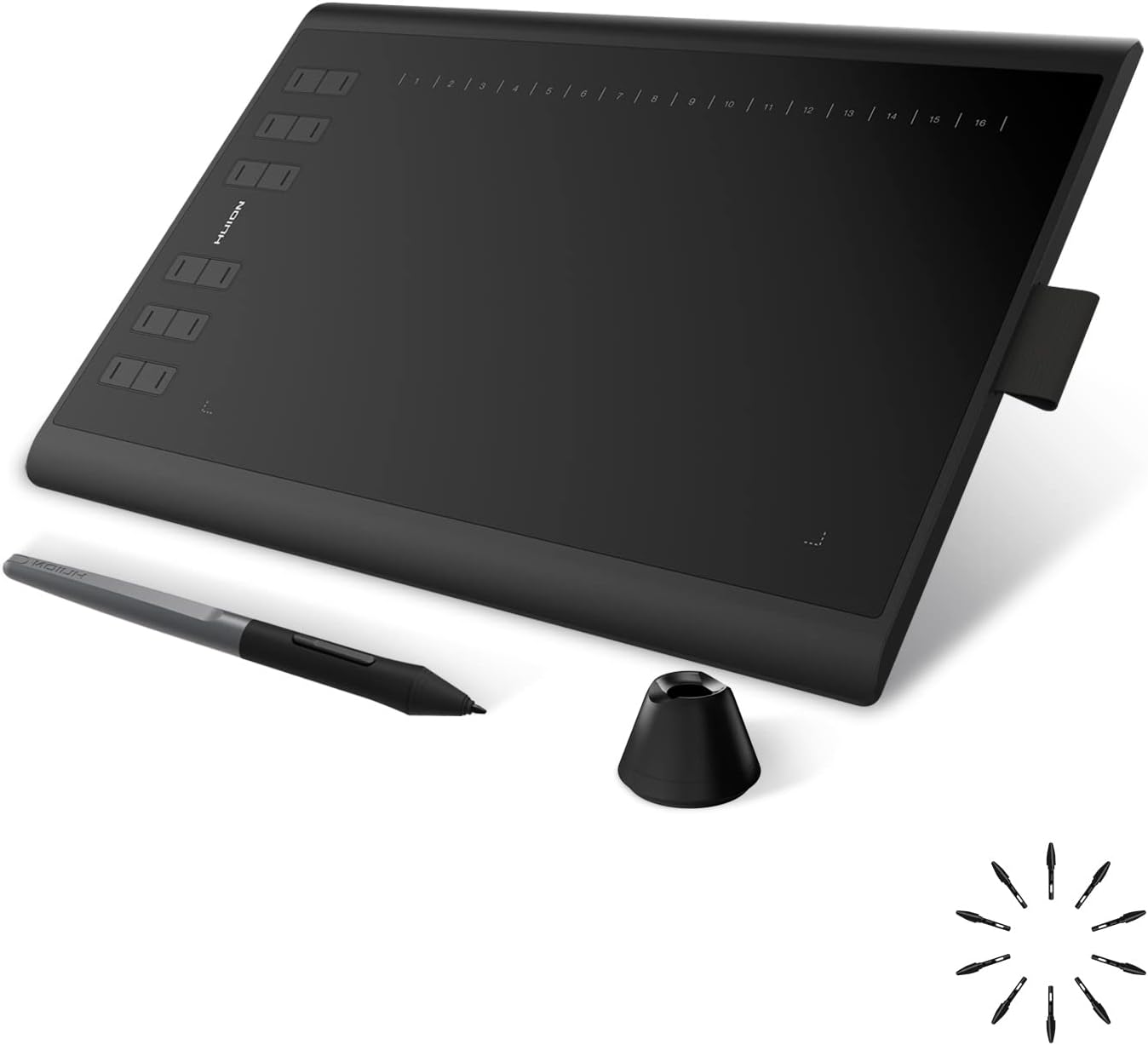
The HUION Inspiroy H1060P is a sleek, ultra-slim digital drawing tablet featuring a spacious 10 x 6.25 inch active area, 8192 levels of pressure sensitivity with tilt support, and a battery-free stylus for uninterrupted creativity. Equipped with 12 customizable physical hotkeys and 16 soft keys, it offers a highly personalized workflow. Compatible with major operating systems including Windows, macOS, Android, and Linux, this tablet is designed for professional artists and hobbyists seeking precision, comfort, and versatility in one affordable package.


| ASIN | B01FTE9HS2 |
| Active Surface Area | 10x6 |
| Additional Features | 10mm ultra-slim tablet with larger workspace, 60° Tilt Support, Programmable Press Key |
| Best Sellers Rank | #3 in Computer Graphics Tablets |
| Brand | HUION |
| Built-In Media | Pen Tablet, Battery-free Pen,Micro USB Cable, USB-C Adapter, Pen Holder, Pen Nibs x 8, Quick Start Guide |
| Color | Black |
| Compatible Devices | Android Mobiles and Tablets, Laptop, Mac, PC |
| Connectivity Technology | USB |
| Customer Reviews | 4.4 out of 5 stars 7,806 Reviews |
| Display Type | LCD |
| External Testing Certification | Não aplicável |
| Item Dimensions L x W | 10"L x 6.25"W |
| Item Type Name | Drawing Tablet |
| Item Weight | 0.77 Kilograms |
| Manufacturer | ShenZhen Huion Animation Technology Co., LTD |
| Mfr Part Number | 2 |
| Model Name | Inspiroy H1060P |
| Model Number | H1060P |
| Native Resolution | 1920x1080 |
| Operating System | Android 6.0 or later, Linux(Ubuntu), Mac OS 10.12 or later, Window 7 or later |
| Pressure Sensitivity | 8192 Levels |
| Screen Size | 10 Inches |
| Special Feature | 10mm ultra-slim tablet with larger workspace, 60° Tilt Support, Programmable Press Key |
| Specific Uses For Product | Drawing, Painting, Writing |
| Target Audience | artists, Creators, illustrator |
| Unit Count | 1.0 Count |
| Warranty Description | 1 year manufacturer |
M**.
Very responsive and awesome value
Awesome tablet! only thing i believed it would come with a glove like other reviews mentioned and it did not. Works great with my 2014 macbook pro. Installing was quick with no issues. Using Photopea to draw and the responsiveness is phenomenal. Absolutely recommend!
P**R
Very reliable and good quality tablet that has served me well for years
So I've had this tablet for ~8 years now, considering I bought it in 2017, and this has been an amazing drawing pad! I bought it when it still had a non-tilt pen with a battery, but I love the number of buttons on the side and wish flagship and other high-end tablets also included them. Because right now, although I'm tempted to buy a newer tablet with a better pen (a battery-free one), I can't help but hesitate and back out because there is nothing wrong the 1060, and buying a newer tablet would simply be an unnecessary luxury purchase. I also use linux and I have no real issues, though XP-Pen is more focused on linux support than either Wacom or Huion currently. So as an artist that draws a lot and is trying to earn money on commissions, I would highly recommend this tablet as something very affordable and worth every penny! Stay away from Wacom unless you want to throw away money, because XP-Pen and Huion have practically caught up with them in quality quite a long time ago, and Wacom is simply the Apple of the tablet world at this point. Way higher prices for the same quality.
B**E
Comparison between Huion H1060P and XP-Pen Deco01 v2
I'm writing this review because I wish there was one like it when I was agonizing over what my first drawing tablet would be. I've mostly used an XP-Pen deco 01 v1 for many years and it was fine, but when it broke (more on that below), I really wanted to try a Huion since they have such good reviews. I'm writing this review on both product pages. Huion vs Xp-Pen This is a comparison between the Xp-Pen Deco 01 (v2) and the Huion Inspiroy H1060P. They both have nearly identical price points and specs. I got both on discounts for around $50 on average. I am not a professional artist, but I do draw a lot (several hundred hours on my tablet) and have been paid for my work, but I'm not as skilled as professionals. I mostly do character sketches and inking comic-style. For my style and what I need, both tablets are great. They are very precise and allow me to execute and get the end result that I want. Pen pressure ability is the same between the two, I can make clean, tapered strokes with each just fine. The Huion is set to a "harder" pressure than the Xp-Pen, and while both tablet drivers allow changing pressure curves, the Huion minimal is "harder" than the XP-Pen. All-in-all I'd say aside from the pressure, they perform identical and I've heard they they both use the same underlying hardware (unconfirmed by me), this makes sense if true. Personally I like to use a lighter touch when drawing so I prefer the XP-Pen, which also has a much lower 'activation pressure' that the tablet recognizes before drawing pixels. With the XP-Pen, if you are touching the tablet, it's making a stroke. The Huion on the other hand requires a little pressure before it starts making a stroke. So you can lightly stroke the tablet and nothing will happen until you put enough pressure down for it to activate. Drivers: Unfortunately the Huion driver does not offer the option of changing the activation pressure of the tablet, just adjustment of the pressure curve (how the tablet interprets pressure after activation pressure has been reached). I don't believe it can be fixed or adjusted via drawing software either, though I think some drawing software (Photoshop, Krita, Corel, etc) might allow you to adjust your tablet to have a higher activation pressure if you want it (just not lower). Aside from that, the Huion drivers work better with my drawing software (Krita) - by this I mean they are bug free and even work properly if I disconnect and reconnect the tablet while Krita is open. The XP-Pen drivers are a little more buggy - they often don't reconnect properly when I disconnect/reconnect the tablet - the cursor position is fine, but the pressure will not be recognized by my computer until I exit Krita or sometimes I have to reboot the machine. There are other odd bugs like the cursor being trapped in a section of my monitor screen. This happens infrequently, but it does happen and its quite annoying. Pens: Both pens are nice and the new pen that comes with the v2 Deco is much better than the v1 one. The Huion pen is slightly better than both, a little heavier and it just feels a bit nicer/grippier in the hand Physical tablet: The XP-Pen is smaller and lighter than the Huion, but with the same drawing surface size. This is nice for travel and also allows you to place your computer about an inch closer when drawing. The Huion has 12 buttons to XP-Pen's 8. The buttons feel fine on both, I never had a button fail on my v1 Deco01. I did have a problem with the USB port however. My Deco01 v1 broke because when plugged into the included L-Shaped cable connector, it's easy to put up/down pressure on it which can cause damage. Looking at it now, it's possible that pressure is being placed on the USB port unless maybe your table is perfectly flat, but even then it might have slight pressure. I'm going to just use a regular USB-C connector for my new one. I should note that the tablet did not break during normal use, I had the cable plugged in while I had it stuffed in my backpack and it must have been knocked or subjected to sideways pressure which caused damage to the port. Make sure to disconnect it before putting it anywhere! Summary points: Huion + Better drivers (though it doesn't allow you to set a minimum pressure). More stable, interacts with Krita better + Better pen + More buttons - Larger, slightly more heavy XPPen + Smaller, but same active drawing space, better if table space is a premium, better for travel + Like that it has much lower activation threshold + Includes drawing glove, nice touch - USB port prone to breaking with included cable (unplug it when not in use!) Hope this helps!
V**K
A very good buy
The pen is rather comfortable and the pad is good, it is a bit weird downgrading from a kamvas 22 but it does the job beautifully. Pen pressure is really good and strokes are smooth. All in all I do recommend it for those who are starting off or can't afford the other types. I plan on upgrading to the kamvas 16 gen 3 rather soon though because I need to get back to sketching on a screen.
J**A
Great for starting out in digital art!
I've always wanted to get a drawing tablet and try digital art but I didn't know where to look. A friend of mine recommended I give the Huion tablets a try and I can say the huion tablets are great! I got the tablet a week ago and I've been having a blast with it. Very easy to use and it works with majority of drawing software out there. Everything came in the case in great condition. What I love about it is with the pen they give you eight extra pen tips in case you need to replace it. The price is also very nice as most other brands are good but also very expensive at times. So if you want to give digital art a try and not spend a fortune on a drawing tablet. I would say give Huion drawing tablets a try. They are easy to use and affordable.
E**4
Love it! No regrets, I recommend 100%
I bought a small Wacom Intuos on a whim a couple of months ago, just to see if I would be interested in creating digital art. Getting used to using a drawing tablet took me a couple of hours but after that I was hooked. I quickly realized that the small Intuos did not have enough surface area and my wrist and forearm were getting sore because the small surface area was causing me to bend my wrist unnaturally. After doing some research I decided a bigger tablet was what I needed- but the price tag on an Intuos Medium size tablet was more than I was willing to pay as an amateur/beginner artist. If you are a professional or very experienced artist or designer, I'm guessing you know exactly what you need and probably aren't reading this anyway, so my advice is intended for those who are just getting started. My advice is- buy this tablet! I wish I had not spent the money on the Wacom and purchased the Huion NEW1060 to start with. For basically the same price you get WAY more surface area, and besides the minor inconvenience of having to charge the pen, I like everything about the Huion pen better than the Intuos one. It feels better in hand, the tip feels better on the surface of the tablet, and the pressure sensitivity is just as good. If you are thinking about investing in a tablet to get started with digital art- you are getting more bang for your buck with this Huion than you are with the comparably priced Intuos pen and touch small. Sure the different Intuos versions come with included software to get you started (FYI Corel Painter and their customer service is garbage, Artrage is awesome especially for a beginner, but that's a different review) but still the Huion is a better deal. Once you learn the basics you will find that there are better programs available depending on your needs, some are very inexpensive or even free. If you are just getting started or want to upgrade to a larger tablet without breaking the bank, buy this with no hesitation Pros - 12 programmable express keys and 16 hot keys, once you figure out what shortcuts you want to map, you don't even need to use the keyboard. No issues at all getting the command I want mapped to the key I want. (Make sure you are getting the NEW1060 I have heard of issues with the previous 1060 model) - SURFACE AREA!! if you are currently using the baby sized Intuos or are debating between the two, I promise the extra working area makes a huge difference - Price- what you get for the price is a steal compared to any Wacom product in the same class. I can't say if that is true for the higher end professional level products, but for less than 100 bucks this tablet is not intended for pros -no touch feature. I've seen this positioned as a con, but for me I don't want the tablet to register anything besides the tip of the pen. I was constantly irritated when I would accidentally swipe the Intuos surface with my hand and have to go back and correct whatever moved as a result Cons - one thing I did like about the Intuos driver was the ability to set the shortcut buttons for different programs (example the same button could be programmed to be CTRL + X if I'm using Artrage, but SHIFT + = if I'm using GIMP) if there is a way to do this on the Huion I haven't figured out how. But with 24 more programmable buttons on the Huion to work with it's not that big of a deal - minor inconvenience to have to remember to charge the pen. In conclusion- the main complaint I've seen with the Huion tablets has been the drivers not working or not working correctly. The manual that came with was not specific to the 1060 model and was pretty much worthless. I did have an issue at first but that was my own fault not Huion's. Once I realized my error I completely deleted all driver files, started from scratch with the included driver and everything works perfectly. I know I sound like an a-hole when I say this... but if you can't figure out some basic install or download issues for the driver then you probably aren't capable of understanding how to use art and image editing programs, and should find a different hobby to spend money on. I'm sure a professional could find some things to complain about, but for someone getting started or needing an inexpensive upgrade to a bigger tablet, I say just buy it! I'm loving mine.
C**M
Overall a reliable and well-priced tablet for the features that you get
YET ANOTHER UPDATE as of Aug. 16th, 2017 I've used this tablet off and on for about 5 or 6 months now, and while my experience has been positive for the most part, I feel like I have to mark this tablet with a 3 out of 5 because of something very particular: Much like the more recent line of Intuos tablets by Wacom, this device seems to have an issue with soldering that will leave it susceptible to losing connection repeatedly. It works fine when it works, but even after such sporadic use it seems the Micro-USB port has been bent out of shape somehow. I recommend against this unit slightly unless you are the type to lay your tablet flat on the desk, and are willing to be diligent in taking care of it (tucking the cords away when not in use, being extra careful not to snag etc). It's definitely a con, but not unlike one you'd find with more recent Wacom hardware, so I still recommend this item over the Intuos 5 or newer. The functionality is still top notch, it's just that the connector could be better supported. Perhaps if the USB connection recessed into the tablet instead of laying on the outside of it. ---- NEW REVIEW as of Mar 10, 2017 I did write a pretty lengthy review on this previously, but after rereading it I felt like it focused too much on nitpicking small things about the tablet without actually touching on how it felt to use beyond making rudimentary marks. This doesn't do the tablet or the prospective buyer any justice, I feel, so I'd like to rewrite it in a way that will hopefully be more useful to someone considering this model. NECESSARY LIST OF PROS: The tablet functions reliably and lasts even very long sessions working with no real huge issues. The pen feels comfortable (even if I wish it had a bit more grip to it at times) and has a nice bit of spring when using it. The drivers install really fast and, minus having to comb your computer for previous Wacom preference files if you've had one installed on your system before, takes no time and doesn't even require a restart in my experience. I do remember having mixed experience with Wacom's drivers taking literal hours to install the drivers in the past, so it was a welcome change. --- As a bit of history: I've owned a Huion 580 (White) for about a year now, since February 2016. (Note that this model is listed as having been given an upgrade in the form of the K58 model here on Amazon). I purchased that unit after my Wacom Bamboo Capture (CTH-470) shorted out. I, with only 45$ to my name at the time, needed a replacement ASAP that would do the very basic job of allowing me to finish the client work I had already accumulated. Even though I purchased the 580 with the intention of upgrading back to Wacom at some point when I could better justify the purchase (particularly to an Intuos Pro), I ultimately found a lot of happiness with this brand and have since stopped considering purchasing another Wacom in the foreseeable future. For those that want a quick summary of this review/are scared of big blocks of text: The bottom line for these tablets vs. the Intuos Pro from Wacom that I was considering, and even all Wacoms in general, is that Huion seems to offer the best price for the features and functionality you will reasonably need from a non-display graphics tablet. I cannot comment on their display models because I have never owned one from any brand - Wacom, Huion or otherwise. I do know, however, that all of my practice and learning in digital art has always been with a budget option of tablets, as they offer exactly what I need in practice as a committed hobbyist. === As for the 1060 Plus in particular: The build is very professional and pleasant looking, although I do find it kind of wants for a wipe every other session as it can be a bit grabby on fingerprints. The glove is helpful for this, but I kinda feel weird using it and usually do not use it lol. The smooth, matte active area is really pleasant to draw on - not to mention it is very kind to the overabundance of Huion nibs I currently posses (more on why later on). It's a nice, comfortable upgrade from the 580, which I feel really only left me wanting for function keys and a slightly bigger working area. I do still greatly prefer a third model from Huion I owned, the WH1409 (Giano), but because that unit dwarfed my desk I forced myself to return it and will probably only repurchase it once I have a space to better accommodate it. --- The reason why I am so happy with Huion and the way it prices its units, is because I feel like I'm actually paying a price that's in line with what I'm utilizing on the day to day. Even when I had a Bamboo Capture (Which retailed at roughly 75$ USD when it was current), I felt that between the pressure levels, the 4 function keys, and its touch input capability, that I wasn't really getting much for what I spent, and that things like the touch and gesture input it featured by and large saw zero use in my actual daily drawing life. Even when you consider the recent Intuos Pro models, the Medium and Large of which boast "8000+ pressure levels", it comes with the caveat that the program you're using actually needs to be able to recognize that many pressure levels in order to be relevant - never mind that I doubt I'd ever reliably notice or even use that many levels with the incredibly light touch I use in graphics tablets. This is an issue I feel like I'll always have with Wacom as long as they remain the sort of industry standard in drawing equipment - the fact that they spend a lot of time engineering newer and better models with a lot of features that many people will probably overlook or take for granted, if they are like me and need only a comfortable drawing surface with a reliable set of features. Huion offers what I need at a price that is reasonable and seems able to last just as well as Wacom's options when shown proper care. Plus, the fact that there are so many models with similar specs to choose from makes it easy for someone to find something from them in the price range they can afford, while also receiving just the amount of features they'll need for practical execution. When you compare that fact to Wacom, which has only one or two budget options and immediately jumps you up to their "professional" line of tablets that offer a lot of bells and whistles, it can be kind of hard to justify defaulting to that brand anymore after putting the time forward to research the practicality for yourself. --- I feel like a lot of people kind of go by their initial impressions of a tablet and how it feels, making a lot of noncommittal marks that are not necessarily true to how they draw normally, which can be a really really poor way of judging whether or not a model ACTUALLY performs well for you. It can be easy to play around with a Wacom's tilt functions, eraser-enabled pen, and high pressure variance and say "wow, why would I go with anything else!" - but then when you actually use it daily, a lot of its features will probably go underutilized because they are inessential to the experience. This is what I think about when I see the price tag of an Intuos Pro being 299$ and up, or even when I see their sort of dinky budget Intuos (which let's be real, they're just Bamboos) with very few options compared to Huion's line of tablets that only ever seems to be expanded upon. === WITH ALL THAT BEING SAID, the reason why I rate this as four stars is because there are some little things that I feel Huion falls short on. I rewrote this review after I came to these criticisms over time, and after regular use that allowed me to form an opinion on the unit based on how it performs on a day-to-day basis. Before anything further: there have yet to be any issues with the tablet largely bugging out, or causing problems big enough that are disruptive to my work. I can work on this unit for hours and it will stay with me the whole way without a problem. This fact is true for every other model from them I have owned - if you find that you have issues with it, I would say pretty confidently that it's because your model is somehow defective. 1) When the left-handed functionality is enabled and one flips the tablet to match, none of the function keys actually flip their positions to reflect the change. They all still function as if the tablet is in the default right-handed mode, which means the user will have to map each of the keys in reverse order on their driver menu. Obviously this would be very confusing and even take as much as 30 or 40 minutes to finish, and yet longer to internalize and learn in actual practice. This is almost certainly a driver-specific issue, though, and one that should be able to be fixed in a future update. If you're willing to take a chance on them fixing it/the function keys being perfect are not a big deal to you as a lefty, it should be fine. 2) Recently when drawing, my lines will occasionally be interrupted by a skip or jump in tracking - at first I attributed this to the fact that I've dropped both of the pens I had been using for it, but the issue persisted when I bought a replacement. I recommend drawing in such a way that doesn't see you rotating the pen too much, as I have noticed that the skips are sometimes preceded by my turning the pen in my fingers. Huion does not have tilt functionality anyway (which coincidentally is another feature I feel like Wacom upsells on, and very unimportant in actual practice), so it may be a good idea to practice control with this unit to mitigate this issue should it happen for you, too. 3) The last little issue i have with this unit is that the pens are, sadly, quite fragile and prone to breaking. I purchased a spare for my tablet just because I could and wanted to have a bit of a safety net while I was actively taking new client work, and sure enough one of the pens I used fell a short distance (presumably on the nib end) and ceased working properly. The worst offender for pen fragility are the P68s (the models which require a triple-A battery), so if you ultimately go with a different model Huion tablet that comes with such a stylus, I'd recommend putting a little extra money toward a P80 model pen in advance. You may remember my mentioning that I have a lot of nibs - this is actually the reason why. Although the nibs do indeed last a long time because of the tablet's smooth surface, the pens themselves require a lot of care to match their longevity. You will probably need a new pen, before you need new nibs. It bears repeating that these issues came about from MY error in dropping the pen, though - Heck, I was hesitant to even list this as a real con at first because Wacom's pens will do the same when dropped enough, particularly on the nib side. At worst, Huion's pens may break a little faster if you were to compare each pen in a drop test, in my experience. --- PHEW. All of that being said, my experience with all of the Huion tablets I've owned have been positive. Furthermore, none of the tablets I've owned from them have been replaced via a need for a new tablet, or because of a malfunction of a previous model -The new purchases were spurred on purely by my curiosity and interest in trying the different features that they had, and it's important to note that I was even able to do so because of the price! I could never do such a thing with any Wacom. I do kind of regret not being able to consolidate this review further, but I do feel like it's important for lots of insight and information on a new or growing brand to be given for those looking to research it so that they can come to an educated conclusion on ti for themselves. I really do mean to help you and not just preach at you ceaselessly, I promise. :P Despite it's flaws and little oversights, the brand is overall very solid. Furthermore, when I was doing extensive research on the brand, I read a lot of reports that their customer service was also very good when it did come to smoothing out more serious issues. I can see this company being a really serious contender for Wacom in the market of artists like me who, even though they could potentially afford the bigger pricetag, would prefer to know their money is actually going toward netting them features and functionality they will actually use. The only thing I cannot comment on for Huion's benefit is the longevity of their units, as I have yet to own and use a model longer than I've ever used a Wacom. The 580's year-long use being very consistent is the most I can say on that front. For the money, this brand is more than worth giving an honest try if you prepare yourself accordingly and have done your necessary research on what you need vs. what they can offer you. As long as you don't wrongly come to a conclusion after buying one of their very small signature pads in the interest of digital art, you will probably have an experience as good as mine with them.
R**.
This is a Game Changer. Absolutely Amazing.
It was extremely easy to get set up, which was one of my worries (drivers, compatible apps, etc.). It works with all the major apps as far as I can tell, and was an absolute game changer for my Daughter. I usually spend an equivalent price on materials and supplies every few months, so I figured I would give this a try, plus $60 for a lifetime copy of Clip Studio Paint, and I couldn't have made a better choice. It works on Android and Windows flawlessly, and is a very compact, easy to use app, with just the essentials (button binding, sensitivity/pressure, etc). Definitely recommend. I can't say enough good about it.
L**S
Tablet de desenho gráfico
O produto é ótimo, atendeu minhas espectativas, recomendo. Achei a embalagem de envio muito frágil, se houvesse uma queda poderia quebrar.
A**R
ادفع وأنت مطمن
عظمة على عظمة
M**E
İyi degil
Hiç memnun değilim sakin almayın
A**R
Five Stars
Best decision was this Huion 1060 plus
C**X
Económica tableta digital de buena calidad
Me hubiera gustado que viniera con guante como antes. Pero aún así es muy buena compra.
Trustpilot
4 days ago
3 weeks ago