


Desertcart purchases this item on your behalf and handles shipping, customs, and support to Senegal.
🚀 Triple your screen, triple your impact!
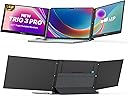
The Mobile Pixels Trio 3 Pro is a cutting-edge portable triple-monitor setup featuring two 14.1-inch QHD IPS displays with 2560x1440 resolution. Designed for 15"-17.3" laptops, it offers versatile USB-A and USB-C connectivity, a built-in kickstand for flexible mounting, and a 300% productivity boost by expanding your digital workspace on the go.



| ASIN | B0CCY4S5K2 |
| Adaptive Sync | FreeSync |
| Additional Features | Portable, Tri-Screen |
| Aspect Ratio | 16:9 |
| Aspect ratio | 16:9 |
| Best Sellers Rank | #24,050 in Computers ( See Top 100 in Computers ) #748 in Computer Monitors |
| Brand | TRIO |
| Brightness | 250 cd/m2 |
| Color | Trio Max 14.1" Triple Monitor Set (2025) with Built-in Kickstand |
| Compatible Devices | Laptop, Desktop, Smartphone, Nintendo Switch |
| Connectivity Technology | USB Type A, USB Type C |
| Contrast Ratio | 1500:1 |
| Customer Reviews | 3.8 out of 5 stars 18 Reviews |
| Display Resolution Maximum | 1920 x 1080 |
| Display Technology | LCD |
| Display Type | LCD |
| EU Spare Part Availability Duration | 2 Years |
| Hardware Connectivity | USB 2.0 Type A, USB 3.0 Type C |
| Has Color Screen | Yes |
| Image contrast ratio | 1500:1 |
| Included Components | Trio Max Mobile Pixels Triple Portable Monitor * 1, USB-C cable with USB- A adapter(Full function) * 2 , Type-C cable * 1, Metal adhesive plate * 4 (for laptops), Adhesive * 12 (for replace), Instruction manual*1 |
| Is Electric | No |
| Item Dimensions D x W x H | 35.8D x 24.1W x 2.5H centimeters |
| Item Weight | 3.97 Pounds |
| Manufacturer | Mobile Pixels |
| Model Name | 850001446082 |
| Model Number | 850001446082 |
| Mounting Type | Attached to laptop |
| Native Resolution | 2560x1440 |
| Picture Quality Enhancement Technology | IPS |
| Power Consumption | 5 Watts |
| Processor Count | 1 |
| Refresh Rate | 60 Hz |
| Resolution | QHD Wide 1440p |
| Response Time | 2 Milliseconds |
| Screen Finish | Flat |
| Screen Size | 14.1 Inches |
| Screen size | 14.1 Inches |
| Screen surface description | Flat |
| Shape | Rectangular |
| Specific Uses For Product | Gaming, Communication, Multimedia, Personal, Business |
| Total USB 3.0 Ports | 2 |
| Total Usb Ports | 2 |
| UPC | 810130760138 |
| Viewing Angle | 180 Degrees |
| Voltage | 5 Volts |
A**”
Love it. Get it. You won’t regret it.
This pull-out screen setup is a game changer for working on a laptop. It instantly turns a single screen into a full workstation and is perfect for editing, multitasking, and travel. Setup is quick, it’s lightweight, and it folds away easily. Bonus tip: If you’re editing video, use your side screens for timeline and project panels, and keep your main laptop screen for the program monitor so you see your footage at the largest size. Also adjust your color settings in your editing software (Lumetri Color in Premiere Pro, or the color panel in CapCut) on the main screen for the most accurate view. Highly recommend if you need more screen space without carrying a full monitor.
S**T
Good way to add extra desktop space to a laptop.
I got this to use with my work laptop as I travel a lot and once you get used to multiple screens it is hard to use just one. This does a nice job of adding 2 screens to a laptop in a way that is not hard to setup. I have it hooked to my Surface laptop and have my desktop extended to each side with the screens. It does have some weight to it that is greater then just having two of the external monitors that are USB C but this is due to how you can store the screens by sliding them in. I have had an issue with pulling the screens in and putting them back. This is due the fact that they have to be very straight for them to slide easy. Once I figured this out it was not as bad to get them in or out. One thing to note is that each monitor has to be plugged in separately to the laptop. I had hoped for one connection but it is two. The good news is the cables they provide have adaptors that convert the USB C Connection to USB A if needed. Attachment to the back of the laptop is easy with the supplied template. The kickstand takes some time to get used to. It is not attached except by a magnet so if you move the laptop it may pull lose and not support the monitors any more. I just note to grab the kickstand when I move the laptop around which is not often. It performs as expected so I give it 4 stars.
R**L
The Trio Max 14” 2nd Generation CRASHED my work computer - TWICE - NEGATIVE STARS FOR ANXIETY
I had high hopes for this nifty, phenomenally reviewed monitor display. My hopes were crushed and I suffered an hour of anxiety when the “plug and play” USB-cable crashed my work-allocated Thinkpad P15. On my first attempt in setting up the monitors, I had my laptop powered on to the Windows 11 desktop. I used the USB-C cable to connect the left Trio Max monitor to my laptop’s USB-C port. For about 30 seconds, the connection was a normal success. My laptop’s desktop duplicated on the Trio Max. Then, my laptop’s screen and keyboard cut out. The Trio Max stayed powered on, showing my desktop. Going into the display settings, the Trio Max was the only monitor that my OS detected. I could not type in the search bar. To resolve, I spent about 25 minutes restarting, shutting down, and hard rebooting my laptop, disconnecting and reconnecting the USB-C connection in different ways. Each time, my OS would only show on the Trio Max and my keyboard would not work. One instance finally let my OS boot up normally, with the log-in screen on my Lenovo and the Trio Max duplicating the laptop display. My dumb bum thought this was a fluke, so I kept the Trio Max connected. After another 30 seconds, this same crash happened again. I had to spend another 25 minutes troubleshooting because this time, across the rebooting attempts, The Trio Max wouldn’t power on to show the OS login screen and restart/shut down options. At this point, I could only hard reboot by pressing the power button for 10 seconds. Guess when it shut down completely. Press the power button to power on, then wait for the “duh-duh-ding” chime indicating that the OS booted up and that I should be seeing the login screen. Upon one random attempt, my laptop finally booted normally. I don’t recommend.
K**R
Easy to install, use, and remove.
So far so good. Extremely easy to attach to the laptop and both screens came on instantly when I plugged them in. Entire “packet” is attached to the lid of your laptop. Open your laptop, set the stand, then pull each screen out - easy peasy. I bought a different version that was nothing but trouble. I couldn’t get both screens to work without using the main power outlet so the battery would die and need to be recharged. Each screen was also independent with its own stand - which snapped shut on my finger once. Luckily I was able to return it.
C**T
Great product
For the cables in the back, I prefer that's you add hooks to hold the wires in the back of the screens will slide more smoothly what I dislike is that the there is no logo or light in the back of the screens like it had in the video, and it does make your laptop more heavy other than that I love it hope to see a newer one of this product!
Trustpilot
2 days ago
1 month ago