


⚡ Power your smart home with real-time energy mastery!
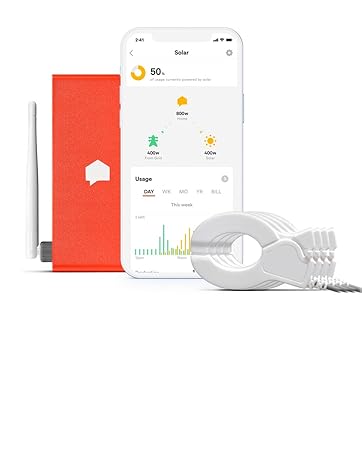
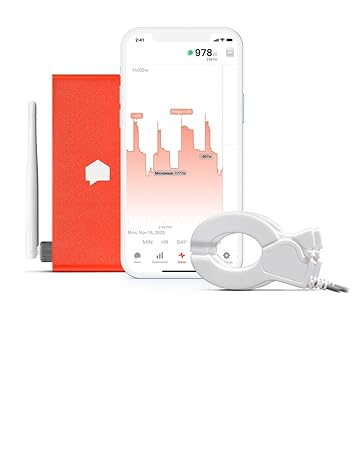
The Sense Energy Monitor is a cutting-edge home energy tracking system that provides real-time insights into your electricity usage via iOS, Android, and web apps. It supports time-of-use rate plans and sends custom alerts for critical devices, helping you save money and avoid disasters. Designed for safe installation inside your electrical panel, it meets rigorous ETL/Intertek safety standards, making it a trusted choice for energy-conscious homeowners.






| ASIN | B075K6PHJ9 |
| ASIN | B075K6PHJ9 |
| Batteries Included? | No |
| Batteries Required? | No |
| Color | Orange |
| Customer Reviews | 4.0 4.0 out of 5 stars (2,448) |
| Customer reviews | 4.0 4.0 out of 5 stars (2,448) |
| Date First Available | 20 November 2017 |
| Date First Available | 20 November 2017 |
| Included components | 1 Set of Current Sensors (2 pcs), Antenna, Mounting Bracket, Power Cable, Sense monitor |
| Is Discontinued By Manufacturer | No |
| Item Package Quantity | 1 |
| Item Weight | 771 g |
| Item model number | 12000 |
| Item model number | 12000 |
| Manufacturer | Sense |
| Manufacturer | Sense |
| Part number | 12000 |
| Pattern | Monitor |
| Product Dimensions | 20.07 x 19.3 x 18.8 cm; 771 g |
| Product Dimensions | 20.07 x 19.3 x 18.8 cm; 771 g |
| Style | Sense |
| Voltage | 110120 Volts |
A**R
I'm Thailand customer who want to try this cool gadget. Of course, the warranty will automatically voided. And i'm fully awared my risk and acknowledged. I hope my review could provided valuable information for other international customer. And you may use it at your own risk. My electrical system. (In Thailand, which is common in EU-standard.) Is 1 Phase (Non-split like US), 220 Volt, 50 Hertz Which means... i have 2 wire goes to my house. One is LINE, another one is NEUTRAL. And voltage across Line-Neutral is 220 Volt. I'm am Mechanical Engineer and have some basic knowledge about electrical system. So, i'm doing this on my own (With my Dad's help) without certified electrician. We use extremely caution, and use probe to double check which wire is Live (Always have electricity) and which line is Neutral. Installation step : (Find the picture) I detach the main-panel and on the left side. You will see main circuit-breaker with two big black-wire (That coming from power-line) connected to it. Black wire on the LEFT pass thought breaker and connected to upper uninsulated Bus-bar. (This is Neutral zero Volt) Black wire on the RIGHT pass through breaker and distribute electricity through all of Circuit-breaker on the right. (This is Line 220 Volt) For electrical wiring, i have two breaker empty (the 6th and the 7th) So, the Black-wire (Power supply & voltage sensing to SENSE) goes to 6th breaker. And White-wire obviously goes to upper busbar (Neutral) For the Current sensing (The clamp), just attached only one to the Line. Setup : When i switch on the power. The app show that something wrong with the installation :) I just continue and go to the main screen. And yes, its showing Power consumption for only one phase. Testing : I do initial testing, like turn on the light. Use the Induction hobs, oven. The app show the power consumption very accurate. Problem : Yes, i use this in Thailand. So, after 3 hour of data-sampling. The main menu indicate warning say about "Sense detected an installation problem and unable to fix automatically. Support team will take a look." Because i use only one phase with abnormal 220 Volt. And SENSE probably cannot analyse my current and voltage data to map electronic devices in my house. I'll try to contact SENSE team... if they could make my account as an exception. And analyst my data... Another problem is, when SENSE was running for a while. The real time data of Power (Watt) indicate the app seem to be shift. and its getting larger by the time passed. For example, on the 10:45 its showing live feed of data on 10:40. I thought this might be internet connection or bug. So, i reset my router and SENSE. Its still happening and three hour passed. The gap was larger. Like.. on 13:50, SENSE live-feed time showing data from 13.35 ! Conclusion : Regardless to problems (exclude i cause by using it in Thailand). I'm satisfy with the futuristic concept of tracking power consumption in household. The setup was quite simple, If you have electrical knowledge. If you don't, just call professional guy to take care that for ya. I can't try this AI-feature yet. But still love it ! Update : 2/2/2020 Day 0 After SENSE detected installation problem and cannot analyse electrical signal to map my house appliance. I've sent an email to support team to unlock or by-pass. And at the end of day, App show that installation diagnosis is OK and start listening now. Day 1 My Pressure booster water pump was detected. (Brand : Grundfos) App saying that most user voted this might be 97% match to the "Pump" I do some verification, on the pump on.. see if SENSE detect this pump. And yep, this is definitely the pump. Day 2 Sense notify that two new device detected. Heater & Motor... Identify the "heater" was a little bit difficult. Because i have... Water heater, Rice cooker, Induction stove ? But after i click at the usage data. I can see that this Heater was active around 6 p.m. At that time, i was't shower or use the stove ! So, 100% this is rice-cooker. (Electrolux-brand) App suggest Coffee maker 50% & Rice cooker with 40% confidence, Good guess ! For motor, i just click and see the activity. This one was active on 11:00 p.m. until 8:00 in the morning. Also, it keep cycling ON-OFF for 50-70 times during night App suggest this one was A/C with 97% confidence !
M**Y
Excelente producto, si se lleva casi un mes en empezar a detectar los equipos, pero en general es muy bueno
K**G
Easily installed by electrician. It's been about a week now & it's slowly finding devices in our home, but they don't always match up. Still many devices not located. MIGHT be related to my having a power conditioner (CleanVolt) installed on our panel that conditions power to remove spikes & protect from outside surges. HAS helped me by showing that my well pump isn't running long enough (about 30 seconds on average) & may reduce its life (supposed to have pump run 1-2 minutes), so will investigate getting larger pressure tank to allow pump to run longer.
B**.
I have had a Sense for over 4 years now and I still enjoy it very much. I have used it to reduce overall energy consumption in my home by helping raise awareness of "Always On". More on Always On in a moment. My one warning - its not a "Buyer Beware", but more "Buyer be aware". Sense's ability to live up to its marketing hype with device detection is affected by many variables. Some homes have good results. Others don't. I've had reliable detections that work great for a while, and then stop working when the seasons change. Another thing to keep in mind. We tend to think of appliances in their whole. "The Fridge". "The Washer". Sense uses Machine learning algorithms to detect devices. Notice I said devices, not appliances. Your Fridge is actually a whole bunch of different parts that do different things at different times. Sense may detect your "Fridge" but it has actually only detected the compressor. It may not detect the defroster, or the ice maker. Or it may detect those things, but not necessarily as "Fridge". There are tools to allow you to merge detected devices. So if it finds "Fridge" and then it finds "Light" and you know that "Light" is actually the Fridge Light, you can merge them together so it all gets tracked together. This leads me to the next item. Sense doesn't always know what its detected. It knows it found something, and it can generally put a category to it (Motor, Heating Device, Light etc..) but the leg work on finding out which motor, or which light may be on you. Sometimes this is really easy. You turn on your bathroom vanity lights and see "Light" turn on in Sense, and you know and can then rename "Light" to "Bathroom Vanity". Other times, its harder to track down, especially when the device detected is a part of an appliance. This is where the active community forums comes in. Sense's Machine Learning is good, but at times, a human is better. Frequently people will post the graphic of the device that was detected, and other community members can chime in with suggestions. "I have a Garbage Disposal that has a waveform like that. Do you have a Garbage Disposal?" While I say a human eye is sometimes better, this is another item to mention. Training Sense is NOT something you can do. People always ask "can I train it". The short answer is no. Sense's ML system will do its work and find devices on its own. There is no training mode. Turning something on and off a bunch of times to try to "help" Sense see it is not always useful. Now, back to Always On. While my device detection has been so so, the Always On feature is what has really saved me the most money. After running Sense for about 48 hours, it will come up with an Always On number. This is basically the "low water" mark for electric usage in your home. At any given point in time, you are always using around xxx Watts. If you have an always on of 100w, using the average US rate of electric of 13.28c/kWh, that is $9.70/month or $116/year on your electric bill. While Sense cannot help you identify the Always On devices, just the awareness of the always on is enough to help you start making changes (if you want) to your home. Seeing my always on power of 600w (~$700/year) made me start looking for things that didn't turn off. I had a fan in my basement that ran 24/7 that I had never thought about. Now that fan is on a timer and only runs 12 hours a day. My TV stereo system which was always on is now on a power switch. Savings of 15w of Always On power. And the list can go on. Without too much effort, and more importantly, without impacting the comfort of the home, I have cut that always on number down to 300w. A last benefit of Always On. Once you learn your homes baseline, if that always on changes significantly in one direction or another, it can help to notify you that something is amiss. Always on goes down? Maybe a failed pool recirculating pump. Always On goes up a lot? Someone left the fan in the guest bedroom on. And so on. So all in all, I highly recommend a Sense. Whether it detects many of your home devices, or you just use it as a live instant power meter, it can bring savings and knowledge to your electric consumption in your home.
M**E
I've been thinking about getting the Sense Monitor for some time. I have seen it advertised online and was curious how it worked and what it could do for me. My setup at home is I have solar and bought an electric car (Leaf) a few months ago. I was interested in seeing how much electricity my Leaf was pulling from a 110v plug. I figured in was in the 1kw to 1.5kw range. I always felt my I had my home running as efficient as I could with newer appliances, LED lights, and power settings set on different devices. My goal with the Sense was not to save money, but more to see how it worked, what my different appliances were using, especially an old refrigerator in the garage. With Solar meeting my current energy needs, I'm not looking for any particular ROI on this investment. My thoughts so far on the Sense are: 1. Installation- ok, the constant you must use an electrician had me a little nervous about trying to install myself. While I have a basic understanding of electricity and how my house is set up, I had never worked in the breaker panel before, other than flipping a breaker. I watched as many videos on installation as I could and understood that the Sense needs to hook up to a 240v. I didn't have a free 240v breaker and have no room to add a new one, outside of adding a subpanel. I decided to add the Sense to an existing 240v breaker that is labeled for master bedroom lights etc. While this may not be up to code in my area, not really sure honestly, the Sense uses such little electricity, 4w, and .05amp, I crossed my fingers that this would not be a disaster. I'm sure an electrician would lecture me about not doing this but hopefully, all will be ok. I put the Sense on the lowest rated 240v breaker, per Sense recommendation. To install I had to turn off the main breaker, solar, and solar inverter. After getting the sense hooked up I turned everything back on but didn't hear the beep you are supposed to hear when Sense is hooked up correctly. I turned the main breaker off/on again and thankfully I heard the success beep from the Sense. The only problem I have is finding space in the breaker box for the sense. My breaker box is a bit crowded so I need to spend some time putting it in a better place, right now I have it kind of just laying on the bottom. ***If you have no clue about electrical setups and what is in your breaker panel, get an electrician.*** 2. Application/web page- after successfully installing the Sense I set up the app on my iPhone and checked out the Sense webpage to view my data. The Sense will first run through a check before it starts listening for your devices. Sense page said that it can take up to 24 hours to complete the test. I think mine was finished within 6 hours. Two days in my Sense is still listening for devices. At the 48 hour time frame Sense did identify my "always on" power usage and created a category for those. Now it will take time to start identifying individual devices and appliances. It is interesting to see how much total wattage/kw I am using at any time. You can see spiked when different appliances turn on/off. A few surprises based on this information, my new Sony OLED 55 inch tv does not use as much electricity as I would expect. I think it is in the 80-100 watt range. My furnace that is 3 years old and 2 stage runs about 500 watts, really not bad all considering. My Leaf, when plugged into 110v standard outlet pulls about 1500 watts. As I am writing this review, Sense just emailed me that it found its first device, my fridge. Since I have two I was curious how I would tell which one it is. Based on watts used per day it looks to be my newer, more efficient kitchen fridge. The fridge in the garage is old and would pull more watts than what Sense is saying this fridge is pulling. I'm on my way with device/appliance detection, will be interesting to see how Sense does. I did give Sense the ability to monitor my home network to help identify electronic devices in my home, and I have a lot as I'm an IT professional and geek. On another note, I have some Wemo and Phillips Hue lights and Sense integrates with those to easily identify them and monitor their usage. You can also turn your lights on/off through the Sense app. 3. Value- Sense is not cheap, but I'm sure some of the price is to help pay for continued monitoring, data storage, and data management. As a technology geek, I don't mind spending a few $'s to try something out, it is just a hobby for me. If I was not a geek, it would be hard to justify the price. Sense says they are focusing on helping owners get more value from the device, and I think that is a good thing for them to do as to get higher adoption beyond early adopters, they need to show value for the price. With Solar, I'm not going to save anything as I can cover my electrical needs with my installation. The new variable which may change that is my Leaf. The Sense will let me monitor and become more knowledgeable on my home efficiency to help make sure I'm keeping all my electricity needs covered by solar. If you are interested in Sense and needs someone to install the device, consider the full cost of the device and installation. The price may not be worth the potential return on investment, at this point in time. If you like technology and want to check it out etc, I find Sense a very cool device and I'm satisfied with how it is working and what it is providing to me.
Trustpilot
2 weeks ago
3 weeks ago