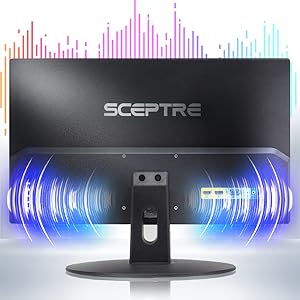
🚀 Elevate your workspace with sleek visuals and seamless connectivity!
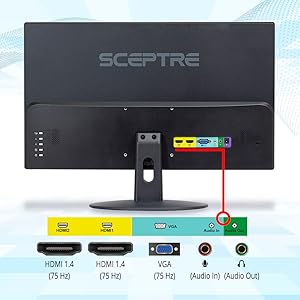
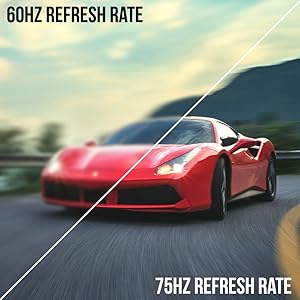
The Sceptre 20" Ultra Thin LED Monitor delivers sharp 1600x900 HD+ resolution with a fast 75Hz refresh rate and 5ms response time, perfect for both professional multitasking and casual gaming. Featuring dual HDMI ports, VGA input, built-in speakers, and a headphone jack, it offers versatile connectivity and audio options. Its slim profile and VESA mount compatibility make it an ideal, space-conscious addition to any modern workspace.





| ASIN | B07743412C |
| Adaptive Sync | FreeSync |
| Additional Features | Built-In Speakers, Flicker-Free, Wall Mountable |
| Aspect Ratio | 16:9 |
| Aspect ratio | 16:9 |
| Best Sellers Rank | #176,331 in Computers ( See Top 100 in Computers ) #3,867 in Computer Monitors |
| Brand | Sceptre |
| Brightness | 250 |
| Color | Metallic Black |
| Color Gamut | 99 |
| Compatible Devices | Laptops, Desktops, Gaming Consoles |
| Connectivity Technology | HDMI, VGA |
| Contrast Ratio | 3000:1 |
| Customer Reviews | 4.6 out of 5 stars 27,342 Reviews |
| Display Resolution Maximum | 1600 x 900 |
| Display Technology | LED |
| Display Type | LED |
| Global Trade Identification Number | 00792343320036 |
| Hardware Connectivity | HDMI, VGA |
| Has Color Screen | Yes |
| Image contrast ratio | 3000:1 |
| Included Components | Monitor Display x 1, Base x 1, User Manual x 1, Power Cord x 1, Cables |
| Item Dimensions D x W x H | 18.2D x 46.6W x 34.5H centimeters |
| Item Type Name | Sceptre E205W-16003R 20" 1600x900 up to 75Hz Ultra Thin LED Monitor 2x HDMI VGA Built-in Speakers, Machine Black |
| Item Weight | 2.01 kg |
| Manufacturer | Sceptre |
| Model Name | E205W-16003R |
| Model Number | E205W-16003R |
| Mounting Type | Wall Mount |
| Native Resolution | 1600x900 |
| Number of Component Outputs | 2 |
| Picture Quality Enhancement Technology | Multiple |
| Pixel Pitch | 3.69 |
| Power Consumption | 2 Watts |
| Refresh Rate | 75 Hz |
| Resolution | HD+ |
| Response Time | 5 Milliseconds |
| Screen Finish | Matte |
| Screen Size | 20 Inches |
| Screen size | 20 Inches |
| Screen surface description | Matte |
| Shape | Round |
| Specific Uses For Product | Business, Multimedia, Personal |
| Total Number of HDMI Ports | 2 |
| UPC | 792343320036 |
| Unit Count | 1 Count |
| Viewing Angle | 170 Degrees |
| Voltage | 110 Volts (AC) |
J**S
Wide!
Great monitor with excellent value! The Sceptre 24-inch Prime Monitor delivers a clear, sharp picture with great colors and a sleek design. The built-in speakers are a pleasant surprise—they are much louder and better than expected. Easy setup, reliable performance, and a great choice for work, entertainment, or everyday use.
M**D
Bang for your buck!
Great product, the visuals are amazing. I use this monitor for gaming and it runs smoother than my tv. What sets this monitor aside from most monitors is that it has an input audio and output audio source which is pretty awesome because I can just plug my headphones into the monitor and hear everything clearly. The audio on its own is not the greatest without headphones as I’m used to the surround sound system on my tv, however if you put headphones into the monitor, the sound is perfect. In terms of the audio without headphones, I had difficulty trying to distinguish where enemies were during games based on their footsteps, however when I put headphones in, I was able to properly distinguish where people were. So I’m conclusion, it’s an amazing product and definitely worth your money, but if you’re gonna use it for gaming, make sure you have headphones or another audio input !!
J**S
Satisfeito com a compra.
Sem problemas.
F**D
الشاشة رهيبه من الاخر
صراحه كنت متردد فيها لاني حاب استخدمها لسوني ٥ بس الحمدلله رهيبه بالالعاب كول اوف وسبيدر وفونايت كلها سلسه وجميله جدا يعني باختصار اذ على جودة كنك حاط 1080 جدا مناسبه للأفلام والألعاب مشكلتها فقط الصوت واذ عندك سماعه ما تفرق معاك غير كذا افضل تاخذ هذي الشاشه منها تلعب ومنها تتفرج فيها يوتيوب ونت فلكس وجميع البرامج
J**N
I am extremelly impressed with this monitor! Great buy specially for gaming!
I have a GTX 1060 laptop, set up is easy and there was no need for me to calibrate anything, I even dare say this monitor looks better than my own laptop screen at 1080p. At first i thought it didn not support 75Hz and the colors were washed out and it was too bright, also on the nvidia panel it said 1080p at 60Hz however this is what you gotta do to fix it. "CALIBRATION" 1. Connect via HDMI 2. Open Display settings and make sure that they are set so that only the 2nd display is turned on, do not put duplicate or extend. 3. Open Nvidia control panel and go to "Change Resolution" 4. You will see two lists, one will say HD, UHD etc, the other one at the bottom will say "PC", (changing the first list will project your laptop screen to the second screen however your laptop is 60Hz and the monitor is 75Hz that is why its limited to 60Hz and colors are washed out, changing the second list will basically use your laptop to power up the monitor at full 75Hz 1080p with the right color calibration.) 5. On list two "PC" change the resolution to 1080p and 75Hz And there you go, now you can use your 75Hz monitor for gaming, make sure to change the settings indvidually in games to 75Hz or they will still run at 60Hz and the colors will be washed out. Now onto the review *** REVIEW *** The screen resolution is full 1920x1080p at 75Hz, the colors are very accurate, it looks no where near like a TN panel, I would say its in between a TN panel and an IPS panel but closer to IPS. It comes with speakers which are ok for the price but I recommend headphones or your own speakers which are probably better if you got this for gaming. This is what comes in the package - Monitor - 4 screws for mounting - Two screws for setting up the monitor (non adjustable height( - HDMI to VGA cable - VGA to VGA cable I really recommend this monitor even if not for gaming, its a great price for what you get and it even comes with two cables. However one thing to note is that the difference between 60Hz and 75Hz is hard to notice in games. Playing Witcher 3 and Rise of Tomb Raider at locked in 75FPS wasn't anything much more amazing than 60FPS. However it is still an improvement. One last thing to confider if you’re debating on a 75Hz vs 144Hz monitor - If you have a graphics card such as the GTX 770,970,1060 Most games (witcher, call of duty, battlefield wont go back 80 fps on ultra / high graphics) so you wont be able to take advantage of a 144Hz monitor, so I suggest this one. UNLESS you play on medium/low settings. - If you have a graphics card such as a GTX 770,780,980,1070 and above, I suggest the 144Hz monitor since these can run most tiles at well above 100FPS so you can take advantage of the monitor. *** UPDATE *** Earlier on the review I said the difference between 60Hz and 75Hz was negligible, I take it back. I played on my laptop which is limited to 60Hz and it feels bad and slugish compared to 75Hz, once you go higher refresh rate you can never go back Its one of those things you dont realise until its taken away, great improvement.
Trustpilot
1 week ago
4 days ago