Desertcart purchases this item on your behalf and handles shipping, customs, and support to Senegal.
๐ Elevate your network game with unstoppable speed and ironclad security!
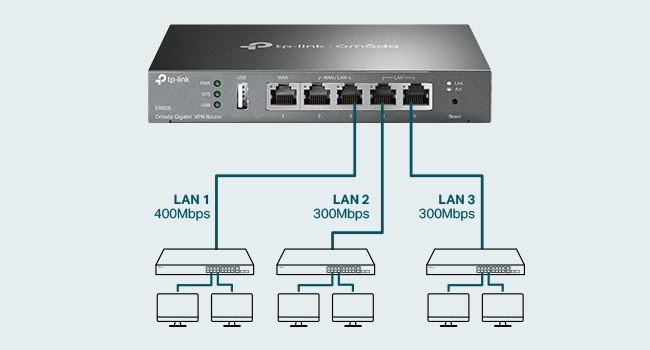
The TP-Link ER605 V2 is a wired Gigabit VPN router featuring 5 high-speed ports including 3 WAN options plus a USB WAN for 4G/3G backup. It integrates advanced firewall protections and supports multiple VPN protocols, making it ideal for SMBs and home offices seeking reliable, secure, and flexible network management with Omada SDN compatibility.


| ASIN | B08QTXNWZ1 |
| Antenna Location | Home |
| Best Sellers Rank | #219 in Computers & Accessories ( See Top 100 in Computers & Accessories ) #22 in Computer Routers |
| Brand | TP-Link |
| Built-In Media | Gigabti VPN Router ER605, Power Adapter, Quick Installation Guide, RJ45 Ethernet Cable |
| Color | silver |
| Compatible Devices | Personal Computer |
| Connectivity Protocol | Ethernet |
| Connectivity Technology | Ethernet |
| Control Method | Remote |
| Controller Type | Switch |
| Coverage | Multi-WAN and VPN supported connectivity |
| Customer Reviews | 4.4 out of 5 stars 4,899 Reviews |
| Data Transfer Rate | 1 gigabits_per_second |
| Frequency | 5 GHz |
| Frequency Band Class | Tri-Band |
| Global Trade Identification Number | 00845973089597 |
| Item Dimensions L x W x H | 6.22"L x 3.98"W x 0.98"H |
| Item Weight | 12.64 ounces |
| LAN Port Bandwidth | 10/100/1000 Mbps |
| Manufacturer | TP-Link |
| Maximum Upstream Data Transfer Rate | 4000 megabits_per_second |
| Mfr Part Number | TL-R605 |
| Model Name | ER605 |
| Model Number | ER605 |
| Number of Ports | 1 |
| Operating System | Windows |
| Other Special Features of the Product | WPS |
| Router Firewall Security Level | Advanced |
| Router Network Type | wired |
| Special Feature | WPS |
| UPC | 840460604635 845973089597 |
| Unit Count | 1 Count |
| Voltage | 240 volts |
| Warranty Description | 5 Year Manufacturer |
| Wi-Fi Generation | Wi-Fi 6 |
| Wireless Communication Standard | 802.11ax |
| Wireless Compability | 802.11ax |
S**S
Great home network firewall/router
I bought this for my home network. I don't use a controller of any kind, don't use any Omada devices, and don't use the VPN, but I *DO* use this for as a standalone home Internet firewall/router. I actually buy these for any friends and family that I need to support also. It's cost effective and just works, and I don't have to trust (or pay monthly fees for) the ISP's devices.
K**S
Solid little router with useful features
This TP-Link ER605 V2 has been a solid router for my network setup. I like that it gives me more control than a basic home router without being overly complicated to get running. The wired gigabit ports have been reliable, setup was straightforward, and the interface is easy enough to work through once you know where the main options are. The VPN and network management features are useful, especially if you want something more flexible for a home office or small business style setup. It is compact, looks clean on the shelf, and has handled regular traffic without any issues. For the value, ports, speed, and ease of use, it has been a dependable little router.
A**N
Router Installation
I made purchase of this item because my mikrotic got damage in a lightning storm. I could not get any LAN from however i had store this item in cart for a long time and have been watching itso finally it was baught. I had no doubt about if or not it would work having experience with TP-Link i felt 100% confident in their products. I have been using one of their access point in organization for a couple years now it works perfectly fine. This router is solid from the company going with their switch i baught last year. I was amaze with their soft ware even my cousin was taken back becaus he loves another brand but he loved the set up inside. It can take in up to two ISP it wasn't hard to set up quick and easy to log in create new password and in the quick set up to get internet set up. I didn't have to read the manual for that. Once your all set you will experience a new smooth service right off the bat, there few things to keep in mind it is a home and business router so it has high end set up inside so it is capable of handling DHCP, VPN, 2WAN and other smart set up. In some cases may need someone experience to set it up properly depending your desire. NOTE it is not a POE router meaning it cannot send that extra power for cameras that may need POE I would recommend it at anytime for small set up like mind because i have multiple tv, cable box, access points, routers and printer so its a for a home set up which handles alot of load at time. So i have a dedicated switch for that too which is a TP-LINK. Because of that this router can handle that load and also has lighting protection. You can also down load the app and control it from cloud so you don't really need to be physically around to login and make adjustment. There are videos on you tube that can help with that set up. Make sure the device is on a good ups for protection read through notes before buying make sure the setup you are doing is the correct set up for this router and then if it is an know your going to enjoy your purchase.
S**K
Works. For Limited Projects Only!
It required effort to set up my task (MAC filtering), but I managed to make it work. Although I am not a professional network engineer and possess only basic knowledge, I'd rather consider myself an amateur in networking. Upon receiving the product, I found that it did not come with the latest firmware, and the essential function I purchased it for was missing. I resolved this issue through a two-step firmware upgrade, but it demanded careful attention, patience, and persistence on my part. To be honest, I contemplated returning it three times due to inconvenient flaws in the product design. These included the administrator panel going offline after a period of inactivity, apparent issues with MAC filtering in the LAN-to-LAN mode (or again, I might be wrong, I just couldn't make it work), a considerably lengthy reboot time, and the very delayed reappearance of the web panel. There was another confusing point. The purchase's original purpose was to isolate a small network of security PoE cameras through the MAC address filtering feature to increase home network security. So after I reconnected my PoE switch through this router to perform that filtering, all my cameras had to be restarted as their network did not change automatically. Probably, this is a downside of my SECURITY CAMERAS with their limitations, not of the router, as my laptop reconnects easily every time I physically switch connections from one network to another. So be aware of this issue. I was lucky that I could reboot my cameras easily as their PoE switch is on my work table. If I did not have access to that, the cameras might have gone offline for some time. Despite these challenges, I decided to give it a final chance and eventually succeeded. Taking into account the product's price and the TP-Link Live Support's willingness to assist me, I exercised patience and thoughtfulness in finding a suitable solution before considering giving up. Over time, I began to experience routing issues with this router. Automatic DNS resolution periodically fails with dns_probe_finished_nxdomain error. After receiving the dns_probe_finished_nxdomain error, it takes around 1-3 minutes, then it eventually resolves, and the connection works. This issue ultimately led me to rate it 3 stars instead of 4, as it's becoming too problematic. Fortunately, for cameras, where the connection to a few constant IPs remains active, all routing tables, etc., are kept up to date. However, if you want to connect your laptop orโG-d forbid!โyour entire company network, you might encounter unexpected and painful problems. It's very sad that the router does not do a normal routing job - there is no local DNS solution provided. I have the latest firmware installed - ER605(UN)_V2.6_2.2.6 Build 20240718. If you are connected to a VPN, it does address resolution work for you, so with VPNs it works fine. My cameras, again, have no problems as they all connect to the same IPs to operate properly. Update: the dns_probe_finished_nxdomain issue is gone now. I am not sure now if it was a glitch on the side of my ISP, or it was the router. Back to 4 stars.
D**Y
Stick with built in web UI - If you can.
This review is for the TP-Link ER605 V2 Wired Gigabit VPN Router B08QTXNWZ1 I bought this router with only one thing in mind. Setting up VLANS. I have transitioned to a "Work from Home" position. I did not like seeing work equipment on my network or vice versa. My home router would separate WiFi with a guest option but some equipment was not wireless. Setting up VLANS wasn't too difficult but I had to do a to of research first so I knew what to expect going in. You will also need a managed switch capable of handling VLANS. I found a Netgear GS305E here on Amazon to work with the router. I may use the VPN at some point to just connect remotely when I'm away. I used the built in interface. I did not want to have it paired with software running on a PC. My router from work has a similar option and if the PC goes down, you can't connect. Read the bottom to find out what firmware is required and update it first. When you set it up initially, you type a web page address in your browser. Once everything was set up, my browser kept trying to connect to that website as if it was on the WAN and not the LAN. I kept getting redirected to adds to buy that domain. After the initial setup, just used it's IP address to connect. There was an odd quirk. I saved the login information in my browser. It wouldn't let me log in that way. When I looked at my browser the password was a extremely long random string. Maybe it's an added security layer. You may need to edit it in your browser manually and when prompted to update it, click not now. It has just enough ports to connect everything not going through the VLAN but you could add an un managed switch to one of the ports on the your managed switch. I could not find anything that does what this does for this price. So far it's been a good value. Some reviews were bad but it's working well for what I need. Most issues I saw reported were related to the VPN functionality. I'm not sure if this is a result of rebooting my spectrum modem but after adding the router and rebooting, a speakeasy speed test had my up speed at 20 MBS where it was only 10 before.
J**O
The TP-Link ER605 V2 is not your average home router
TP-Link ER605 V2 Review: An Unbeatable Prosumer and Small Business Workhorse** The TP-Link ER605 V2 is not your average home router; it's a dedicated wired VPN router that occupies a unique and valuable niche. For its remarkably low price, it delivers a feature set and reliability that far surpasses any consumer-grade all-in-one unit, making it an absolute essential for tech-savvy users, prosumers, and small businesses. **Designed for Performance and Reliability** Right out of the box, the ER605 V2 feels like a serious piece of hardware. Its all-metal casing aids in heat dissipation, ensuring stable performance during continuous operation. With five Gigabit Ethernet ports, its core functionality is incredibly flexible: you can configure up to three WAN (Internet) ports for load balancing or failover, and use the remaining LAN ports for your internal network. The inclusion of a USB port that can function as an additional WAN for a 4G/5G modem is a brilliant touch, providing a crucial backup internet connection for critical operations. **The VPN Powerhouse** This is where the ER605 truly shines. It supports a wide array of VPN protocols, including OpenVPN, L2TP/IPsec, PPTP, and notably, WireGuardยฎโa modern protocol renowned for its high speed and security. Setting up a secure remote access VPN for your home network is straightforward through the Omada controller software. You can securely access your network files, security cameras, or NAS from anywhere in the world as if you were locally connected. For a small business, it can easily handle dozens of simultaneous VPN tunnels for remote employees. The hardware-accelerated VPN performance ensures that you don't suffer a massive speed penalty, a common issue with cheaper routers trying to handle encryption. **The Omada Ecosystem: A Key Consideration** It's crucial to understand that the ER605 is designed to be managed. While it has a basic standalone web interface, its full potential is unlocked when adopted by a TP-Link Omada Software Controller (a free application you install on a PC or server) or a dedicated Omada Hardware Controller. This centralized management is a game-changer, allowing for seamless control of multiple Omada access points, switches, and routers from a single pane of glass. This makes network-wide settings like VLANs, firewall rules, and guest policies incredibly easy to manage. **Who Is This For?** * **The Advanced Home User:** Someone with a home lab, a NAS, IP cameras, or a desire for robust network segmentation and a reliable site-to-site or remote access VPN. * **The Small Business/Startup:** Needs a cost-effective, rock-solid gateway with multi-WAN failover to ensure uptime and VPN capabilities for a remote workforce. * **The Tech Enthusiast:** Anyone looking to step up from consumer "gamer" or "mesh" routers to a more professional, stable, and feature-rich networking setup. **Final Verdict** The TP-Link ER605 V2 is a no-frills, high-value champion. It forgoes the flashing lights and simplified apps of consumer gear to deliver what truly matters: unwavering stability, powerful VPN functionality, and flexible internet redundancy. The requirement for a separate controller might be a small hurdle for some, but it's a small price to pay for the enterprise-grade features and control you gain. If you need a reliable, secure, and scalable network foundation, the ER605 V2 is, without a doubt, one of the smartest and most rewarding networking purchases you can make.
C**S
Avoid. Missing key features and has poor performance
I spent a TON of money on this ER605 and an OC300, along with several switches (24pt and several 8pt units), a lot of WAPs and more based on the positive reviews here. Well the reviews must be padded or fabricated by the company (who apparently doesn't read and certainly doesn't respond to any of the reviews here) because this unit pretty much SUCKS. Latency is terrible, turning 14ms pings into 44-540ms on average. It regularly freezes, hiccups and otherwise requires reboots in the middle of the day, even though the logs show little to nothing in the way of problems and the ISPs attached remain in an unchanged, running state. This is truly frustration in a boxโฆ The fail-over feature is a joke; spotty at best with large lag times IF it works at all (very rare that it works at all and when it does, it takes several minutes to do so no matter the settings.) Aggregation doesn't work in any way, shape or form. And the real icing on the cake is there is NO local DNS solution provided AT ALL. This is a basic feature that even the cheapest, worst equipment brands supply, yet TP-Link seems to think isn't necessary to include. It IS NECESSARY - by very definition!!! Unless you like going back about 30 years in network capability... AND, the entire Omada promise is reduced to almost nothing without it, unless you like remembering or documenting every single deviceโs IP addressโฆ HUGE DISAPPOINTMENT. For the load balancing feature, if you want the unit to test all ISPs/WAN connections to suggest and implement a load balancing formula, the speed testing algorithm often gets hung and will 'spin' for hours or days if you let it. You can just enter the balancing ratio yourself (which most likely you will be forced to do because the auto-ratio speed test routine will probably just loop forever as mentioned) because even when the auto-ratio test does actually complete, the ratio it suggests is grossly inaccurate relative to known statistics. I purchased all this TP-Link equipment to replace an older Ubiquiti infrastructure because Ubiquiti's newer UniFi products have become garbage themselves, and Ubiquiti doesn't seem to care. Perhaps both companies are secretly one and the same because TP-Link's products are just as bad or even worse (i.e. no local DNS - at least UniFi gear DOES have that, as it should!) and their support is about equal - non-existent. Calls (well messages left), emails, posts on their support forums, etc. that are requests for support go unanswered. The few answers that do come offer little to no help, and a โjust wait, weโve put in a requestโ is the best Iโve seen in about a yearโs time. So the supposed TP-Link "lifetime warranty" is basically useless. A lifetime warranty with no one to honor it is no warranty at all. As the headline says - AVOID! Unless you LIKE continuous frustration, outages and below lackluster performance... If you do, this gear is definitely for you; go for it and good luck with that! I am beyond disappointed and feel I wasted thousands of dollars in a system that I cannot trust. As much as I hate to say it (and I do), I guess Iโm going back to Ubiquiti and scrapping all this TP-Link junk. Update Sept 2023: I didnโt go back to Ubiquiti, but instead purchased a Peplink Balance Two (WAY more expensive than the ER605 mind you) to replace the TP-Link ER605, and it actually WORKS. And it has expected basic functionality, like local DNS resolution, etc. Iโll be converting all my TP-Link equipment as time and budget allows since removing the ER605 dilutes the Omada management platform value proposition close to entirely. My advice: unless you just want unmanaged network equipment, stay away from TP-Link.
C**C
TP-Link Makes Quality Products
I absolutely could not believe this could be had for anything like sixty bucks! If it didn't have all the Omada stuff (which I don't use because I don't know enough about it yet and because a lot of my network stuff is pretty old) this thing would still be an absolute steal! I have two (total) of the ports configured as WAN ports. On the one that's a fixed WAN port, I've got an LM1200 LTE modem. That's T-Mobile. On the second port, which can be configured as WAN or LAN, I've got a TP-link ADSL/VDSL modem that I already had. This router, of course does all the actual connecting once the modems are done syncing. The T-Mobile (4G LTE) on the WAN port connected immediately, in under 15 seconds and all I had to do was click <Save> on the settings it came up with. It has a NanoSIM, of course, and it doesn't even need user | pass. The DSL on the WAN/LAN port, was another story. It came up with everything (Except username and password, of course), but it just wouldn't connect. It even had me thinking the password must not be what I thought it was. Well, at >major east coast telecom provider< (starts with a "V"), there are at least 3 levels of techs between you and the guy who can actually do something with the DSLAM at the other end. Put me through the wringer all day. I finally got one of them to create a repair ticket. According to this thing's log, they tried pinging it at 12:33 while we were grocery shopping and the router called it a "ping of death" and just tossed it. Then there were a few lines above my pay grade. Then at 12:58 another "ping of death" and seconds later, it connected!! The point is, it was the other end's fault. One of the techs had told me they don't even use Username and Password on the DSL lines anymore, but I consider that a rumor. My best guess is that the DSLAM encountered a brand new router on the other end with a different MAC address and all, considered it "suspicious" or something, and refused to connect. The point is, it connected immediately when it could, without me doing anything except talking to tech support "monkeys" for hours, but that's absolutely not this router's fault! And it keeps a great log! The ports are all gigabit! My whole wired network, now, is gigabit thanks to this thing. It has MANY, MANY settings. Pretty much anything you could want. It doesn't have wireless, but that's actually kind of a plus; it makes it so you can choose your wireless AP's carefully and get good stuff. You can have up to 4 internet sources with this thing!! It has (In a pulldown menu) PPPoE, Static IP, Dynamic IP, L2TP, and PPTP. The LTE is Dynamic IP, BTW. I also have a 24 port gigabit switch (also TP-Link), so I could actually even more without running out of ports. I consider this device to be an awful lot of bang for the buck! Very intelligently engineered! As for me, specifically, I'm watching YouTube videos at either 720P or 1080P, as the wife is watching Korean "dramas" on a Roku and an Android pad all at the same time. It's just smooth. And, finally our phone line got so bad a few days ago, that one could not hear a phone call over all the snapping and crackling. The DSL tried to hang in, but eventually, the modems gave up, at least for awhile, and disconnected. You wouldn't even know unless you looked it up in the router!!! We still had good internet!! So, I can also vouch for the load balancing and the failover! I'd buy it again in an instant! In fact, if I remember right, it also gives you several choices for how to determine if a connection is up. Again, if I remember right, default is a ping. But it knew the DSL modem had disconnected and it knew when it reconnected. What's not to like?
J**N
Excellent routeur fiable avec failover efficace
Trรจs bon routeur pour le prix. Le TP-Link ER605 est facile ร configurer et lโinterface est claire. Je lโai achetรฉ principalement pour le failover WAN, et cette fonctionnalitรฉ fonctionne trรจs bien. Avec un lรฉger ajustement via le policy routing, on peut obtenir exactement le comportement souhaitรฉ. Stable, fiable et efficace โ excellent choix.
A**R
Good product for the price
I have been using this for more than a week, overall good product. Must but if you want to use with multiple internet connections in one network Pros: extremely easy user interface 5x gigabit ports WAN fail and load balancing Small form factor No need for omada contoller Setup and forget configurations Cons: don't use with omada contoller. Horrible placement of options. WAN connection polling time cannot be set in standalone mode Some settings require hard reboot to apply, auto soft reboot not reflecting the settings The order of WAN port number is reversed for working order, last WAN is default not the first one
S**T
Easy to setup and use
Great product
A**H
I've put this unit to the maximum test
I bought this unit because I only have vdsl. I bought a second line to gain more bandwidth. I I run alot of services in my homelab. Even when I'm downloading or uploadeding large files it only sits at 60 percent. Great for people who need a backup line or load balance between 4 connections. I it has good fetures like port forwarding and all standerd networking. I works with cloudflare tunnels
D**H
Good product
Good product
Trustpilot
5 days ago
1 day ago