Desertcart purchases this item on your behalf and handles shipping, customs, and support to Senegal.
โก Power up your home network โ lightning-fast internet, everywhere you plug in!
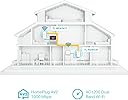
The TP-Link TL-WPA7617 KIT is a cutting-edge AV1000 Powerline adapter and AC1200 dual-band WiFi extender that leverages your homeโs electrical wiring to deliver up to 1000 Mbps wired speeds and robust wireless coverage. Featuring one-touch WiFi cloning, gigabit Ethernet, and easy app management, it ensures seamless, high-speed internet in every room without new cables or drilling. Perfect for professionals craving reliable, lag-free streaming, gaming, and smart home connectivity.


| ASIN | B08QSK84JL |
| Best Sellers Rank | 1,365 in Computers & Accessories ( See Top 100 in Computers & Accessories ) 7 in Powerline Network Adapters |
| Box Contents | 2ร Ethernet Cables, AV1000 Powerline Wi-Fi Kit: TL-WPA7617 & TL-PA7017P, Quick Installation Guide |
| Brand | TP-Link |
| Brand Name | TP-Link |
| Color | White |
| Colour | White |
| Compatible Devices | HomePlug AV & AV2 standard powerline adapter compatible devices |
| Compatible Operating System Family | Windows |
| Compatible devices | HomePlug AV & AV2 standard powerline adapter compatible devices |
| Country of Origin | China |
| Customer Reviews | 4.3 out of 5 stars 1,895 Reviews |
| Data Link Protocol | Gigabit Ethernet |
| Data link protocol | Gigabit Ethernet |
| Hardware Interface | Ethernet |
| Hardware interface | Ethernet |
| Item Dimensions L x W x H | 7L x 5.2W x 12.4H centimetres |
| Item Weight | 660 Grams |
| Manufacturer | TP-Link |
| Manufacturer Part Number | TL-WPA7617 KIT |
| Minimum Required Operating System Version | Windows 7 |
| Model Number | TL-WPA7617 KIT |
| Product Warranty | 3 year Manufacturer |
| Product dimensions | 7L x 5.2W x 12.4H centimetres |
K**E
Wonderful piece of kit - 3 year review
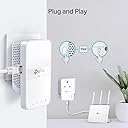
EDIT after 3 years of usage: I can confirm it works ultra reliably. I get a stable 600-700Mbps over the wireline connection. One key factor is where you connect the devices, ideally they should be on a single ring with no spurs. Additional spurs of extension cables used in between deteriorate the signal, if you keep it in mind and plan accordingly then it works wonders. Not a single reboot needed in 3 years of constant use. I had honestly been sceptical about it working over the power cables, but it does work perfectly. Make sure you plug it directly into sockets and not via extension leads, especially if they are loaded with other devices as the speed may drop significantly (or not be able to connect at all), so rather run a longer Ethernet cable to the nearest socket than an extension lead from it. Note that you need the main unit connected to your router, and the secondary unit (or several units) where you want it in your house. I can achieve close to the nominal 1Gbps when they are on the same ring, and slightly less when on different circuits. It works for me accross circuits but I suspect that it may to some extent depend on your fuse box, the manual recommends of course connecting both to the same circuit which indeed works best. One additional good thing is that, unlike typical wireless extenders, the primary and secondary units do not communitate wirelessly so do not cause extra interference of use up the bandwidth. Having said that, you have 1 Gb Eth port to use, but can also use built in 2.5 and 5GHz Wifi as either an extension of your home network, or as a separate network. Setup is easy, you can just plug them in and they work. You can additionally pair them (which you might want to do to avoid others trying to connect) by just pressing a button on each device, and clone your main wifi settings by pressing another button and the WPS button on your router - which you can use to extend your Wifi network. No need to connect to it to configure anything - but if you want to, you can do so via an app, web interface (via its wifi), or desktop tool. You can configure quite a lot of things actually such as MAC filtering etc. if you wish. Highly recommended.
M**P
Jobs a good-un!
I have had this TL-WPA7617 adaptor for 5 years with no problems what so ever I recently got a TP link router so today I cloned the Powerline again with no problem now everything uses the same ssd & pass word I also purchased a TP link Ethernet switch which again was no problem setting up.Now in my cinema room which is at the back of my property a Epson projector , Blu-ray player & PS5 pro are all connected using Ethernet cables through this very inexpensive piece of equipment which is then connected to the TP-link TL-WPA7617 Powerline adaptor kit for trouble free performance. Jobs a good-un!
B**N
Good but not 100% as advertised
This review is for TL-WPA7617 KIT I bought this needing to get better coverage in one of the upstairs rooms that is far from the router. The installation was seamless and very easy and linking the device to my current WiFi ssid and password could not be any easier (just follow the instructions). It is really plug and play as described, with a tiny bit of extra work if you want to set it up in a different way or link other devices to it. Having no cables is a nice thing as you only need to plug in one cable from your router to the main device. The overall quality and finish feels really good and premium. The cons however are that the speed is not as high as described over WiFi. Near the router I am getting speed of 500mbps while being upstairs near the extender the max I get is 150mbps. This is still a big improvement as without the extender I get around 50 so definitely a big upgrade. I have tried the wired connection and unfortunately that is not really as expected either and seems to be worse than the WiFi. I normally get 900+ mbps with a direct wired connection while through the extender I get a max of 100mbps. I am not sure if anything can be done to improve this but I would be willing to try if the seller has any suggestions. The stability seems to be ok so far, however latency is definitely slightly higher than going through the router. Overall good product but slightly disappointed that is not really working at its full potential as described
S**M
Best for gaming performance
The powerline functionality is the best to reduce latency and other issues faced during gaming. I experience no lag or disconnection issue generally seen with WiFi. The app is easy to use with instruction and easy setup. Extender functionality is an added bonus and stronger than most WiFi routers
C**E
Amazing for Wi Fi in my Garden Bar
I transformed my Garage at Bottom of my garden into a Garden Bar & needed decent wi fi, there was already power & lighting in the garage so was hopeful it would work, and Work It Did! I did some WI Fi Speeds tests with fast.com and In the house I am getting 450Mbps speed and in the Garden Bar with The TP Link I am getting 260Mbps which is nothing short of Amazing! This is more than enough to stream 4K video and have several devices working at the same time! Brilliant product!
B**U
Replacement but happy with these
I purchased these 7 months ago as I moved to a house with a home office at the end of a garden some 30metres away from the house where the standard Sky wifi would not reach. I know very little about these but after a lot of research I decided to go for these powerline adapters. For 7 months, they worked great - enabled me to work from home, videocalling, downloading big files etc in my outdoor office. The wifi extender also means my entire garden has a good wifi coverage so anyone out and about still has a good signal. I also have a cctv in my office and Alexa - all works great. The adapters needed resetting few times, but only about 3-4 times max in the past 7 months. IN the last week, they however stopped working altogether. No idea why, contacted the manufacturer, they werent very helpful in finding the issue but they told me to speak with Amazon. Luckily Amazon sent out a replacement without any issues, even after the time. Just set up the replacement - all seems good so hoping these will last a lot longer than 7 months.
A**R
Does NOT work as advertised.
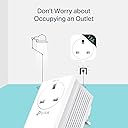
Firstly, the TP link is very neat and looks smart. However, it does not work as stated in the description. I followed the instructions, which were very clear, and set up my TP Link. The WiFi booster, DID boost the signal but the speed was 1/3 of the speed of my distant router connection. I also used an ethernet from the Adaptor to my Laptop and the speed was still nowhere near what was advertised. My Router runs at approx 900-1000 Mbps. My standard connection through WiFi to my router is around 150-200. I was hitting top speeds of 90mbps with a direct powerlink and 60Mbps through the WiFi Booster Adaptor. It seems for my circumstance, I'm better off with a distant WiFi connection to my router. On a plus note, the plug-through capability is a great feature so you don't lose a socket and the size is about what you'd expect. If you're looking to connect to WiFi far away, this will work, but the speeds will not be as advertised and there are probably cheaper options which work the same.
P**S
Simple - but the over the mains wiring less good than I expected
The setup is quite simple, and it acquired the password and network name simply. My snag was that the success of the setup didn't work that well as expected. I have had fibre fitted, but this is into the most distant part of my house and the wife from the router didn't;t get as far as the part of the house we're in most often. The idea was to put this unit with the router and the receiver (and source of the new wifi connection) where we mostly are. The electric distribution in our house has the usual ring circuits in the house, and we have a spur running to one extension where the router is, and another to a conservatory. Plugging the receiver into the conservatory, with the transmitter near the router failed to make a connection. There is a network connection in the conservatory, so I put the transmitter in there, and fed it with the network signal. Then the receiver was put in the lounge area. The two units made a connection and it works. Disadvantage is that the speed is not good over the main connection - it's OK, but not remotely near the 580mbps the router gives via cables. I expected a bit better than the 80 or so I get with the wifi connection, with the mains connection doing a short run, and then the network connection to the router. It's a nice designed piece of kit but my layout is too spread out for it to give it's best.
K**N
Great
Thanks ! Straight forward and suited me just well.
Trustpilot
2 weeks ago
1 week ago