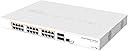
CRS328-24P-4S+RM 24 Port Gigabit Ethernet Router
Details
- BrandMikrotik
- Colourvarious
- Compatible devicesRouter
- Included componentsPower cable no
- Number of ports24
Desertcart purchases this item on your behalf and handles shipping, customs, and support to Senegal.
Details
- BrandMikrotik
- Colourvarious
- Compatible devicesRouter
Description
🚀 Elevate your network game with Mikrotik’s powerhouse switch—where speed meets smart efficiency!
- COMPACT YET MIGHTY - Space-saving rackmount design fits perfectly in any modern office or data center.
- BLAZING FAST UPLINKS - Four 10 Gbps SFP+ ports ensure ultra-low latency and future-proof bandwidth.
- ROCK SOLID RELIABILITY - Trusted by pros worldwide with a 4.7-star rating and silent operation for 24/7 uptime.
- ENERGY EFFICIENT DESIGN - Consumes minimal power while outperforming legacy switches—your green IT win.
- POWER PACKED CONNECTIVITY - 24 PoE-enabled Gigabit ports deliver seamless power and data in one sleek unit.
The Mikrotik CRS328-24P-4S+RM is a managed 24-port Gigabit Ethernet switch featuring PoE support and four 10 Gbps SFP+ uplinks. Designed for professional environments, it combines compact rackmount form factor with energy-efficient performance, operating reliably up to 60°C. Highly rated for its silent operation and cost-effectiveness, it’s ideal for managers seeking robust, scalable networking solutions.
Specifications
| Asin | B07C657P7Q |
| Best Sellers Rank | #59,952 in Computers (See Top 100 in Computers) #855 in Routers |
| Brand | Mikrotik |
| Built In Media | Power cable (model/part number not specified), no additional accessories mentioned |
| Color | various |
| Compatible Devices | Router |
| Customer Reviews | 4.7 4.7 out of 5 stars (125) 4.7 out of 5 stars |
| Data Transfer Rate | 10 Gigabits Per Second |
| Global Trade Identification Number | 04752224002228 |
| Interface | SFP+, RJ45, PoE |
| Item Weight | 10.01 Pounds |
| Manufacturer | Mikrotik |
| Maximum Power | 500 Watts |
| Mfr Part Number | MT-RBCRS328-24P-4S+R |
| Model Number | MT-RBCRS328-24P-4S+R |
| Number Of Items | 1 |
| Number Of Ports | 24 |
| Platform | Linux |
| Switch Type | managed |
| Unit Count | 24 Count |
| Upc | 708747435030 |
| Upper Temperature Rating | 60 Degrees Celsius |
| Voltage | 240 Volts |
Reviews
User
Recomiendo ampliamente, el equipo llego en perfectas condiciones.
User
Great value L2 switch
I'm not going to say much about the features, or os, or anything like that because there's plenty of full-length reviews elsewhere on the internet. Suffice to say, while they're loaded with L3 functions you don't want to use them as such without destroying forwarding performance.For me, I have a number of Mikrotik devices and while the CLI is "interesting", they do the job reliably, cheaply, silently, and while sipping the power. Replaced an equivalent Juniper switch with one of these and the difference in power consumption is amazing. This thing's going to pay for itself in under a year!
User
Best bang for my home network bucks
I bought this for several reasons.I had been using a large HP 2900-48G switch and a PFSense i7-7700K PC based router for my home network.They worked great, but......The HP switch was large, LOUD, put out a LOT of heat and sucks down 200-300watts of power. It is a server 19" rack enterprise switch. The PFSense i7 CPU PC mini tower router is powerful, flexible but takes up lots of space and consumes another 100 Watts.I wanted something with four 10GBit links like the HP. I no longer needed more than 24 ports like I did last year.The Mikrotik also has a comprehensive GUI (WinBox). I don't manage routers and switches for a living so a GUI was a must for me. I have no desire to learn another command line interface. I have a couple of proper Win 2012R2 media servers and a Threadripper workstation I do most of my home based business and personal things on. I wanted to be able to move large multi gigabyte media files to the servers at HD speeds and not be limited to the roughly 115MB/sec of gigabit ethernet. I will also run the 4th fiber link to the media room to access content from the servers.In all honesty I do not need most of the features this device has (which are numerous). It was appealing that this device's router OS has a following and is often used in business environments. A plus. I'm sure that I can grow with this setup to do all those things I want to do. My next step is to eventually install proper access points and power those with the need for a wall wart in whatever house we move to soon. Currently I use an R7000 and a WRT1900AC running DD-WRT setup as access points only(no routing).I only took me a couple of hours to find some tutorials online for things like setting Static IP address, changing DNS servers, upgrading the firmware and setting up the DHCP stuff. This is all pretty basic stuff. Later I will find more information concerning best security practices and hardening of this box so I am not a target for hackers.I am very happy. My network speed is great. My power draw is 8x less and I no longer have 5 screaming fans from the HP to talk over. The Mikrotik only has 2 quiet fans and barely puts out any heat. I love it!!!!UPDATE: Important!!!! You MUST add some firewall rules and go through the Mikrotik Wiki to secure this router or it will be hacked!!! I installed mine, updated the router OS to the latest version and changed the ADMIN password. NOT ENOUGH!! After a week I was getting failed login attempts every second form multiple sources all over the world. Google "microtik essential firewall rules" and watch the youtube tutorial #29. This guy also has a web page with a script to add rules. Also google "securing mikrotik router". The first hit is the Mikrotik wiki. Follow this!!!! Turn off services from the Winbox CMD line that are not needed so this router doesn't become some hacker's plaything. Keep your router firmware up to date!!!!! VERY IMPORTANT!!!
User
Erfüllt seine Aufgabe hervorragend!
Steile Lernkurve, wenn man Trunks benötigt, aber sehr schönes OS und die Möglichkeiten sind vielfältig!
User
Top
Super switch fourni de poe + sur tout ces portsComme d’habitude mikrotik ne me déçois pas !Point négatif :Livré abîmé.
Common Questions
Trustpilot