⚡ Power your rig with speed and style — don’t get left behind!
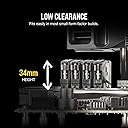
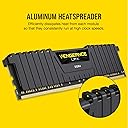
The Corsair Vengeance LPX 16GB (2x8GB) DDR4 3000MHz C15 kit delivers high-performance desktop memory optimized for Intel and AMD platforms. Featuring hand-sorted chips, a low-profile 34mm design, and a durable aluminum heatspreader, it ensures reliable overclocking and efficient cooling. With Intel XMP 2.0 support, installation is simple, making it a perfect upgrade for professionals and gamers seeking speed and sleek aesthetics.


| ASIN | B01EI5Z2T6 |
| Additional Features | Lightweight |
| Best Sellers Rank | #38,019 in Computers ( See Top 100 in Computers ) #243 in Computer Memory |
| Brand | Corsair |
| Built-In Media | DRAM(2) |
| Column Address Strobe Latency | 15 |
| Compatible Devices | Desktop, Laptop |
| Compatible devices | Desktop, Laptop |
| Computer memory size | 16 GB |
| Customer Reviews | 4.7 out of 5 stars 1,419 Reviews |
| Data Transfer Rate | 3000 MHz |
| Form Factor | DIMM |
| Global Trade Identification Number | 00843591088374 |
| Item Weight | 68 g |
| Manufacturer | Corsair Memory Only |
| Memory Form Factor | DIMM |
| Memory Speed | 3000 MHz |
| Memory speed | 3000 MHz |
| Mfr Part Number | CMK16GX4M2B3000C15W |
| Model Name | Vengeance LPX |
| Model Number | CMK16GX4M2B3000C15W |
| Number of Items | 1 |
| RAM Memory Technology | DDR4 |
| RAM Size | 16 GB |
| Ram memory technology | DDR4 |
| Special features | Lightweight |
| UPC | 843591088374 |
| Voltage | 1.35 Volts |
| Warranty Description | NO |
H**E
Cheap, was around 305 AED when I bought it.
Bought is here since it was cheaper than buying in Computer Plaza. Both RAM are working, no noticeable defects. Used it with ryzen 2600 and on asus prime b450 plus motherboard. Had to enable XMP to make it work in 3000mhz, as usual with ryzen cpus.
S**N
Excellent item
Excellent
ح**د
رائع مقابل السعر
رائع
A**H
good
good
B**A
Corsair
Does the job
J**N
You WANT Corsair RAM!
Corsair always delivers on their products, and their RAM is no exception. I have now bought 7/8 sets of my RAM from Corsair and have yet to have a single issue with any of their sticks. I only once bought RAM from G.Skill, but for the most part I buy Corsair RAM exclusively. I own their Value Select, Vengeance LPX, Vengeance LED, and Dominator Platinum RAM. If you want RAM that will perform as advertised and last forever this is the kit of RAM you want. I got this set at a great price a few months back in anticipation for this latest build. This particular set is for an ITX system. For this build I went with a white theme so naturally I wanted white RAM, and I didn’t want tall RAM either. This Vengeance LPX kit was the perfect fit for my needs and it looks great in my system. It is paired with an Intel i5-7500 and an EVGA GTX 960 FTW ACX 2.0 4GB, and I get great system performance. This kit is also easy to set to its rated speed of 3000MHz; you simply go into your bios on start-up (hit F2 and Delete) then enable XMP and it should automatically set to 3000MHz depending on your motherboard. If not head to advanced settings, and then to AI Tweaker (Asus motherboards), and set your RAM to its rated speed, so 3000HMz for this set, then save your settings and exit. It’s an easy process and allows you to use the full potential of your RAM, I have yet to have a problem setting any of my Corsair RAM to its rated speed. So for those of you looking for a great kit of RAM look no further. Corsair has many ‘flavours’ of RAM, and all sorts of colors so there’s something for everyone. I swear by Corsair’s ram and highly recommend this product to anyone interested! (Pictures attached)
M**E
Great looking and reliable Memory.
I just built a computer for a customer strictly using either black or white components and these memory sticks fitted the bill perfectly. Low profile and no RGB, just 16GB of DDR4 memory, capable of 3000Mhz with a lovely white head spreader! Due to being low profile they won't interfere with any CPU cooler. One bonus of being all white is if you shine any coloured light onto the components then being white it will adopt that colour. Simply install the memory and enable XMP Memory in the Bios and it should work at the 3000Mhz speed straight away. Highly Recommended!
R**Z
Atende para jogatina
Produto de qualidade. Atendendo expectativas em desempenho e ação contínua. Temperatura normal e esforço mínimo.
D**E
whats most important to know is dont do a rma unless you try these configurations or all configs. Mem may need jump start :)
I was a bit worried at first because i read alot of reviews with asus and corsair and i believe in their products from the performance i have always got out of them . My motherboard is a asus tuf x99 sabertooth with corsair 16 gb x8 works flawlessly. I wanted to upgrade my ram so i bought two more sticks of the 8gb, gives me a total of what was suppose to be 32gb. For some reason with many configurations later i still ended up with only 32gb with the latest bios 3801. Ok these second pair would not boot by themselves unless my original sticks was in there and booted and still showed 24gb. I did some more searching and saw alot of people with same problems not just with asus boards asrock,msi, etc. etc. i put the new pair in by them selves no posts not even if i pressed the mem ok to look for bad mem config and automatically suppose to take care of bad configuration in memory timings etc make them compatible with board . That didnt work no post no beep just flashing mem led. Now i want to mention in the bios and in windows using cpu-z or other utils says 32 gb installed . So i ran the system memory tester in windows 10, all ram showed fine with all four sticks in . I was very puzzled. O k saw some things about setting xmp to enabled for overclock a settings in main bios and i also went into memory config set the ram for 2400 instead of 3000 i clicked to save bios and it rebooted and got post beep. showed 32 gb for bios post as normal went into bios again after it said failed to overclock i wasnt trying to overclock anything except enable xmp to set settings if i wanted to manually put in settings. Well this time set it to 3000mhz for the ram frequency and saved bios and it rebooted . I took all four sticks out put the new ones back in and these are version 5.39 same as my other white corsair stick with rev being 5.20 save voltage timing. So i put one stick at a time of these new sticks and i was getting post beeps and info to go into bios and save my config . I was happy stick posted by itself so i put second new stick in of the corsair veng ver 5.39 and rebooted and the machine posted i was Extremely happy . Seems these sticks needed a jumpstart of some sort to get them to bulge . I went in bios as normal saved config, rebooted let windows boot and i went into my pc properties all 32gb all sticks showed finally 32GB of system ram . That was something then i ran some of Nvidias demos also others the valley, elemental, capcoms resident evil benchmark too. Totally stable. Let machine stay on for as normal . I dont turn off my machine unless bad storms. For all that are wondering i do have the asus gtx geforce 1080. Played a few games yesterday no crashes at all so this mem is very stable ram. I can say others might not have to do all this troubleshooting with new motherboards boards like the x299 or others but i though i share with you my experience because i have never had this happen before but it was fun trying to troubleshoot it and to finally figure out how i got it to work. Hope this might help others . Thanks,
Trustpilot
2 weeks ago
1 day ago