Desertcart purchases this item on your behalf and handles shipping, customs, and support to Senegal.
๐จ Elevate your art and game with precision that keeps up with you!
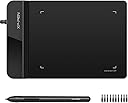
The XP-Pen G430S is a sleek, ultra-thin 4x3 inch graphic tablet designed for OSU! gameplay, digital drawing, and professional annotation. Featuring 8192 levels of pen pressure sensitivity and a rapid 266 RPS report rate, it offers precise, fluid control with a battery-free stylus. Compatible with Windows and Mac, it requires no driver installation for OSU!, making it the perfect portable tool for creatives and gamers alike.


| ASIN | B01BA6XQI0 |
| Active Surface Area | 4 x 3 inch |
| Additional Features | Stylus |
| Best Sellers Rank | #2,767 in Computers ( See Top 100 in Computers ) #13 in Graphic Tablets |
| Brand | XPPen |
| Built-In Media | 1 XP-Pen Star G430 Graphic Tablet, 1 x Passive Pen, 1 x Quick Guide, 10 x Replacement Nibs, 1 x Pen-Clipper |
| Color | Black |
| Compatible Devices | computers |
| Connectivity Technology | USB |
| Connectivity technology | USB |
| Customer Reviews | 4.2 out of 5 stars 9,227 Reviews |
| Display Type | LED |
| External Testing Certification | Nรฃo aplicรกvel |
| Item Weight | 0.25 Pounds |
| Manufacturer | XP-Pen |
| Mfr Part Number | StarG430 |
| Model Name | G430 |
| Model Number | StarG430 |
| Model name | G430 |
| Native Resolution | 1920x1080 |
| Operating System | Windows |
| Operating system | Windows |
| Pressure Sensitivity | 8192 Levels |
| Pressure sensitivity | 8192 Levels |
| Screen Size | 4 Inches |
| Special features | Stylus |
| Specific Uses For Product | OSU Game, Online Teaching, remote working |
| Target Audience | Teacher |
| UPC | 602258815575 |
Z**E
Bought it for the second time
Very good product
A**R
Nice gift for my daughter
Bought it as a gift for my daughter and she is so happy with it.
L**L
It's up there with Huion. It's that good.
You'd expect this thing to fall apart or the pen to break its tip pretty easily. However, this thing is decent, but the tensegrity and durability of the material are astonishing! I consider myself a pretty reckless fellow, and I have the occasional "whoops" here and there. However, despite all the brunt damage, this has taken from falling, my heavy hand scribbling despite frustrations, it stands up valiantly! The drivers automatically detect once you plug and play, and the only thing I might need to complain about is the small form factor; however, voided when you realize this means more portability. Brilliant job, XP-PEN.
H**I
Not recommended
I found Box opened finger prints everywhere product looks used and returned out of the seal im not happy with this order .
N**.
Total Waste!
It was a complete waste of money! I wanted it to mark and write on my pdf documents. But you cannot write with much accuracy using it. In fact, its difficult to write and is nothing like many other reviews have written about it.
K**N
Works well
It is a good product but very small in size
A**I
Really small
Not satisfied
M**A
ุงุญุจุจุชู
ุฌู ูู
I**M
small
very small
L**G
Excellent for text input
Work with Microsoft Word flawlessly. I use this for Chinese text input. Way faster and accurate than using mouse.
A**.
Great find!
This definitely came as a surprise. The affordability factor was the main reason for the purchase. It is used as a signature pad in a healthcare office. Most of the pads that we order for this purpose are close to $200. The fact that this is literally 10 times cheaper and IT WORKS for what it is intended, makes it a worthy $20 investment. This connects to a regular USB, and works alongside your mouse. The one downside of using it in a public environment is the fact that the stylus is not connected to the pad. If you are using it at a home setting than this is a perfect affordable tool. I am teaching a 5 year old and a 7-year old to use a stylus for basic computer animation and it is a great stepping stone to moving onto more advance (and expensive) design tablets.
M**D
ehh doesnt really work good
dislike
V**V
It's small but it's good
Giving 5 stars because it is exactly as advertised and hasn't given me any issues. Compatibility is good. Software (in my case, running the macos app) is surprisingly good, I have come to expect the worst with companion apps that come with hardware but it's actually good. You can configure pressure curves, the two buttons on the pen (built-in functions like Eraser, which a paint program should recognize, or custom actions like simulating keyboard presses, like Ctrl+Z for example), how the tablet's work area fits onto the screen (or multiple screens, part of a screen, etc). It's REALLY small though. It's the length of my hand (including the sidebar). Just be very aware of that. Drawing on such a small area is a very different thing than drawing on something the size of an A4 sheet of paper. You use your hand very differently. It's pretty hard to draw a straight line on this thing, even harder to draw a clean circle, which ideally you'd use more of your arm and shoulder forโthis thing is good for drawing with just your hand and wrist. You can get used to it over time, though. I have always drawn and doodled in small spaces, but even so it's still a bit hard for me to draw with because tablets don't have the friction that pen-and-paper do. I'm getting a bit better at it though. I'm happy with it especially for the price and the smallness of it is probably exactly what some people will want. It's certainly probably ideal for OSU though I don't play it.
Trustpilot
5 days ago
2 weeks ago