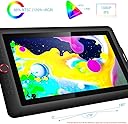
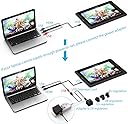
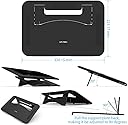
I got the Tablet sooner than the expected delivery date, which was a big plus. It came in a big carton box well packaged. Inside the box it came the Artist 15.6 tablet, the Pen, a Pen holder with 8 pen nibs, the 3 in 1 cable, HDMI, and Black usb for PC, and Red usb connector for AC Power or PC, and the USB C type for the Artist 15.6. There is also an AC adapter for the usb red cable with different types of adapters depending on your wall socket. You can find also the HDMI to Mini Display adapter, there is also the Manual, the CD driver, and a fouling glove. The tablet is really big and slim, It already has the Mate Screen Protector, the downside of the protector is that you’re gonna get some scratches because of the Pen Pressure Sensitivity, it’s 8192 levels, so you have to press hard and that's when your screen protector will scratch, but this won't bother you when you're using it. The Pen has the 8192 levels mentioned before, it’s slim, it feels good in my hand, and it’s Battery free, so that's great for me. The downside is that your pen nibs are gonna be torn out soon, well, it also depends on how hard you put your hand on the screen. For that, my solution was to Remove the Screen Protector, the pen is not gonna scratch the screen and the pen nibs are not gonna suffer anymore. The driver works good on my Windows 10 PC and with my Surface 3, once you install it, you can map your 6 shortkeys and your pen. On your PC/Mac, in the Monitor Configuration, it’s better you set it as 100%. So far, I’ve been using Sketchbook Pro, Sculptris, ArtRage and Moho 12, in all of them, the tablet performs really well, the only inconvenience is with the Pen Toggle for the eraser using Sketchbook Pro, but other than that, it’s been great, I just mapped the pen buttons to other functions. Pros: -Portable: USB Powered, I hook the tablet to my Surface 3, and I use a Battery Power Bank, 2.1A and 7000 mAh and it works away from the socket wall, it's also really light and slim and easy to carry. -Shortkeys and Battery free Pen. -Large working area. Cons: -No stand (not a problem for me) I bought one from Maxell really cheap. -Mate Screen Protector will scratch a lot and pen nibs will suffer (solution is to remove the screen protector) -Pen toggle Eraser/Brush don't work in Sketchbook Pro. I think the Pros are more important than the Cons for me with this tablet, I needed a portable tablet and this is awesome for that, I haven't had any problems with the driver and the programs I use: Sketchbook Pro, Sculptris and ZBrush. This is a great alternative if your budget is a little tight like mine.