Desertcart purchases this item on your behalf and handles shipping, customs, and support to Senegal.
🚀 Boost Your WiFi, Boost Your Productivity!
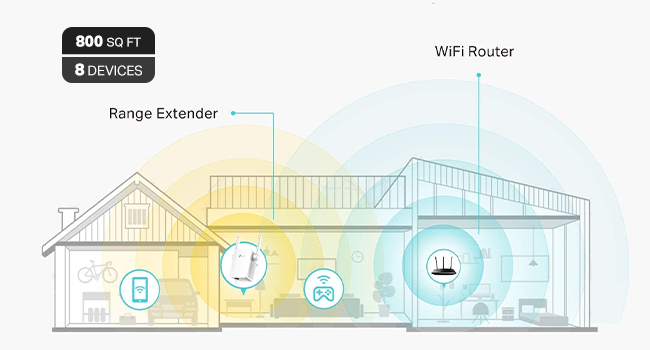
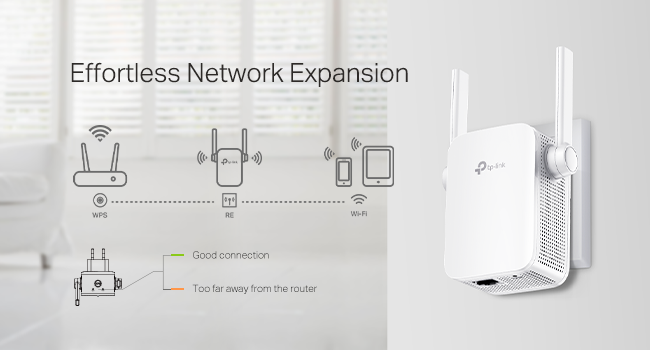
The TP-Link N300 WiFi Extender (RE105) is a compact, single-band 2.4GHz device designed to amplify your existing WiFi coverage up to 300Mbps. Featuring two external MIMO antennas and a fast Ethernet port, it ensures stable wireless and wired connections throughout your home. With easy setup via WPS or the TP-Link Tether app and an intelligent LED signal indicator, it’s the perfect affordable solution to eliminate WiFi dead zones and keep your smart devices running smoothly.


| ASIN | B08DHLCLCY |
| Best Sellers Rank | #24 in Repeaters |
| Brand | TP-Link |
| Built-In Media | 1 x RE105/300Mbps Wi-Fi Range Extender1 x Quick Installation Guide |
| Color | White,Grey |
| Compatible Devices | Router |
| Connector Type | RJ45 |
| Customer Reviews | 4.1 out of 5 stars 16,721 Reviews |
| Data Transfer Rate | 300 megabits_per_second |
| Frequency | 2.4 GHz |
| Frequency Band Class | Single-Band |
| Frequency Bands Supported | 2.4 GHz |
| Item Dimensions D x W x H | 1.6"D x 3.1"W x 3.1"H |
| Item Type Name | Wifi Extender |
| Item Weight | 120 g |
| Manufacturer | TP-Link |
| Mfr Part Number | ELCM |
| Model Number | ELCM |
| Number of Items | 1 |
| Special Feature | LED Indicator |
| Special Features | LED Indicator |
| UPC | 840030700446 |
| Unit Count | 1 Count |
| Warranty Description | 2 year manufacturer |
| Wireless Communication Standard | 802.11a, 802.11b, 802.11g, 802.11n |
| Wireless Compability | 802.11a, 802.11b, 802.11g, 802.11n |
K**R
Works great for my use
So everyone: I just read an online article about WiFi. It was from a very popular gadget blog. It listed several things that people with WiFi problems should NOT do. High up on the list of things not to do is try to solve a WiFi problem with a WiFi extender. A WiFi extender is a device that accepts a weak WiFi signal and amplifies it, thus extending the signal further than the router originating the WiFi signal does. The article instead recommended that you replace your old router with a shiny, brand-new one. Maybe one of those new mesh systems, or one with WiFi 6! I've been noticing a lot of articles like this recently and sometimes that advice is good. It depends a lot on your situation… which is different for everyone. What I am here to tell you about is, when it is time to call bullshit on this. Practically all of these blogs have an interest in you buying equipment through a link they provide. In exchange, they get a small cut of whatever you buy. It's not a big deal— it usually doesn't affect the objective information they provide— but sometimes it is obvious that it increases the pressure to sell devices or equipment that you really don't need. In my 1000-square-foot condo, I am using Apple's Airport Extreme router. It's 5th generation, introduced in 2011. I bought it used from a UW student in Seattle. It was fine until we moved into this condo and got a bunch of voice-activated, "smart" devices like lightbulbs and cameras, all connected to the router's WiFi signal. Many of the devices were installed through multiple walls or otherwise distant so they got weak WiFi signals from the Airport Extreme router. I wound up running an Ethernet cable under baseboards and over doors from the router at the back of the condo to the front. At the farthest end, I installed a switch and a very cheap hardwired access point (AP). At the time it cost about $60 total and about 1 afternoon. It was fine until I installed WiFi cameras in and outside the garage. The garage cameras and Google speaker were at the edge of the Airport Extreme's WiFi range, even with the access point at the front of the building. I decided to get another WiFi extender to daisy-chain the AP's WiFi signal to the garage. Then, last weekend, I came across the article I mentioned. Right at the top of the list it said, Don't Use WiFi Extenders. Instead, it urged buying (admittedly good) new routers or mesh systems to replace your old router. That sent me soul-searching about whether to replace my old, used Airport Extreme with a Google Nest mesh 3-component system (on sale for $140) or to go with my original idea: an $18 WiFi extender from Amazon, plugged into an outlet in the garage and using my existing AP's signal. I finally went with the $18 approach. I installed it in the garage yesterday, then did a status check afterward with a WiFi app on my phone. The results knocked me out. The WiFi signal-to-noise ratio on my network was suddenly the best I could receive in the garage. The network congestion is terrible in my neighborhood. Previously, my next-door neighbor's WiFi came through clearer in my garage than my own network. But installing that extender meant that my network's signal sliced through nearby foreign networks loud and clear. The link speed on the farthest device (mounted just outside the garage door) is 130 MB/s. That is a lot less throughput than a new router would provide, but it is more than fast enough for my streaming cameras and that Google speaker. The signal analysis picture I uploaded shows the extender using the AP's wireless signal through two interior walls, but only about 3-4 yards (2.4-3.7 meters) apart. Now, I admit: I would like to buy a new router with all the bells and whistles. But man. It's hard to turn my nose up at such an inexpensive solution that works so well. The garage camera video streams now pop up instantly on my network feed, and all's right with the WiFi world.
R**M
Exactly what I needed
I needed a barebones 2.4 ghz extender just for my bird camera and this works perfectly. The price is fair and setup was easy. Haven't had to mess with it since!
A**S
Maybe a couple of problems but a great product to buy
Only giving four stars because for the first few nights I had it it worked great no signal dropouts or anything but then it randomly dropped out signal and I tried putting my Wi-Fi back on it and it didn't work so I moved it and it worked again and then the same thing happened in the same amount of time I removed it and put it somewhere else so maybe it was just the place I put it and it was not particularly the product itself but it does claim to be able to provide quite a wide range of space for signal the looks rather are obviously minimalistic it comes out of your outlet socket so obviously looks aren't going to be crazy but they're also not going to be good the ease of setup was also amazing the app is great to use
G**.
If you have Smart plugs,smart lights, smart power strips that only run on 2.4 g to get this
I'm very happy with this purchase I have been trying to get my smart power strip to work since spectrum cable changed their wireless router to no longer have separate 2.4g and 5g connections. Because the power strips only run on 2.4 gig it's impossible to keep it connected to a spectrum wireless router even doing the bypass long enough to connect to the 2.4 because your phone has to connect it and as soon as you get it set up and your phone goes back into 5G spectrum internet immediately tries to force this smart plug or smart power strip back into the 5G and then it loses connection so this little Wi-Fi extender only runs on 2.4 gig and it works great I've not had a problem with my smart plugs working correctly now Alexa can shut my lights off like she used to do before spectrum changed their routers. I would purchase again if I ever need another one.
M**Y
Probably won't meet your expectations
I purchased this product in an attempt to "cheaply" improve my wifi signal from the house to my storage building/workout area. It was very easy to configure and when doing the wifi search it clearly shows up as an option, but even being 30' closer to my location than the router I didn't see any improvement. My assessment is this product does not work well sending a wifi signal from inside to outside. It works fine inside the same building such as going to another floor or back room but not inside to outside. If you are hoping to get wifi to a location on your property I would recommend a point to point bridge or some other product rated for outdoor use. You will pay more and they are not as simple to install, but they do work. I won't go as far as to say that I wasted my money on this product, but rather I misapplied it. It does have its uses. Understand the limitations before buying.
L**S
Poor and Unreliable Performance
This is a review of my second TP-Link N300. The first one not only behaved erratically, but had an interfering effect on my home network, causing low transfer speeds and signal dropouts. It was returned the next day. Setup of the second device seemed to work OK using the WPS feature. Initially, at any of the various distances from my wireless router that I tried from 10' to 18' (and through an interior wall), the download speed on the extended network ranged from about 0.1 Mbps to about 6 Mbps, with a typical reported speed of less than 3 Mbps. Upload speed was on the same order, and tended to be slightly higher. (This matches the first device's completely unsatisfactory performance.) After about an hour, the signal strength from the device suddenly jumped about 15 dB, and download speeds also jumped about an order of magnitude. The attachment shows an iMac speed test result after this happened. The download speed is reported as 12.6 Mbps, but it reached as high as 25-30 Mbps. (For my purposes, this is entirely adequate, except for the other demonstrated problems.) Three hours later, this result could not be duplicated due to failure to make a server connection for the upload test. Even at this higher signal level, the device is still unreliable, as the attached WiFi Analyzer plot shows. The time span of that plot is roughly 20-30 seconds. A different WiFi analyzer on my phone shows download speeds ranging from 0.1 Mbps to an unsustainable maximum of 16 Mbps or more, but fails to complete the speed test because a connection to the server cannot be maintained. The extender was intended to provide a network connection to a home automation device at some distance from my router. It does not reliably serve that purpose. The second device, too, will be returned as defective out of the box.
R**T
TP-Link N300 WiFi Extender -The Unsung Hero of My Robot Vac's Debut
I was thrilled to unbox my new ILIFE A30 Pro robot vacuum-mop—LiDAR mapping, self-emptying station, the works! It felt like stepping into a sci-fi movie, especially after hearing about this tech just weeks ago and thinking it'd be a decade away from my budget. But here's the plot twist: my son's ironclad Xfinity router setup (bless his security-savvy heart) runs only 5GHz, and my vac needed 2.4GHz for the app connection. No way was I messing with his fortress of solitude!Enter the TP-Link WiFi extender—a $16.24 game-changer that plugged straight into a wall outlet, no router tweaks required. Setup took about 5 minutes via the Tether app. It wirelessly latched onto my main network and beamed out a dedicated 2.4GHz SSID (I named mine "DustBunnySlayer2.4" for laughs). Boom—vac connected, scanned my QR code, and mapped my obstacle-course apartment (exercise gear, bed, shelves, and all) in its quirky, gerrymandered glory. First run? It tackled the bedroom and closet like a pro, returned to dock, charged up, and dumped the dust into the big bag. Mind. Blown.What sold me on this extender? Zero security drama. It mirrors your existing WPA3 encryption and password—no new vulnerabilities, just a tidy IoT bubble. Post-setup, I could even unplug it if paranoid, but it's staying for future tweaks. If you're in a shared-home WiFi standoff, this sidesteps the whole debate without a single cable or compromise.And a massive hat-tip to Grok (xAI's witty AI sidekick)—their step-by-step guidance turned my glitchy hours into a victory lap. From remote-only basics to extender hacks and permission paranoia-busting, it was like having a tech-whisperer on speed dial. Reviewed Grok by R.H.: 10/10, would future-proof again!If your vac dreams hit a band-width bump, grab this TP-Link. Spotless floors and zero regrets await. (Signed, R.H. – Proud Floor Overlord)
D**.
A GEM!!
This thing its tiny but mighty! My building exchanged my personal Wi-fi for a corporate one and the signal took it hard! I was suddenly not able to get signals in my bedrooms. Called the company, they came and "fix it" but down to the drain again with the signal that was now up to 2 bars. Nothing they could do but then the tech said " perhaps you should get an extender". I really want to tell him " Well I didn't need one before wit the personal wi-fi" but I didn't. Instead I face the music and got this one that I know most ppl will overlook because of the price being so cheap. Trust me on this...BUY IT! I am back to 5 bars in all bedrooms! So good! Thank you whoever made this!
T**.
Good quality..works okay
As above
R**G
Good product
It’s meet the expectations
R**O
Excelente producto!
Lo puse en el piso de abajo para ampliar la señal de modem que esta arriba. Va excelente, sin ningún problema. Se configura super fácil y ya no tienes que hacer nada. Excelente para tener mejor señal en la television.
Z**I
Very Good Product. i like it
easy setting.
S**E
Terrible
Don't buy that, this a scam item. At same area I check without 50MPS, with item 25MPS.
Trustpilot
2 weeks ago
4 days ago