Desertcart purchases this item on your behalf and handles shipping, customs, and support to Senegal.
🖥️ Elevate your workspace, elevate your game.
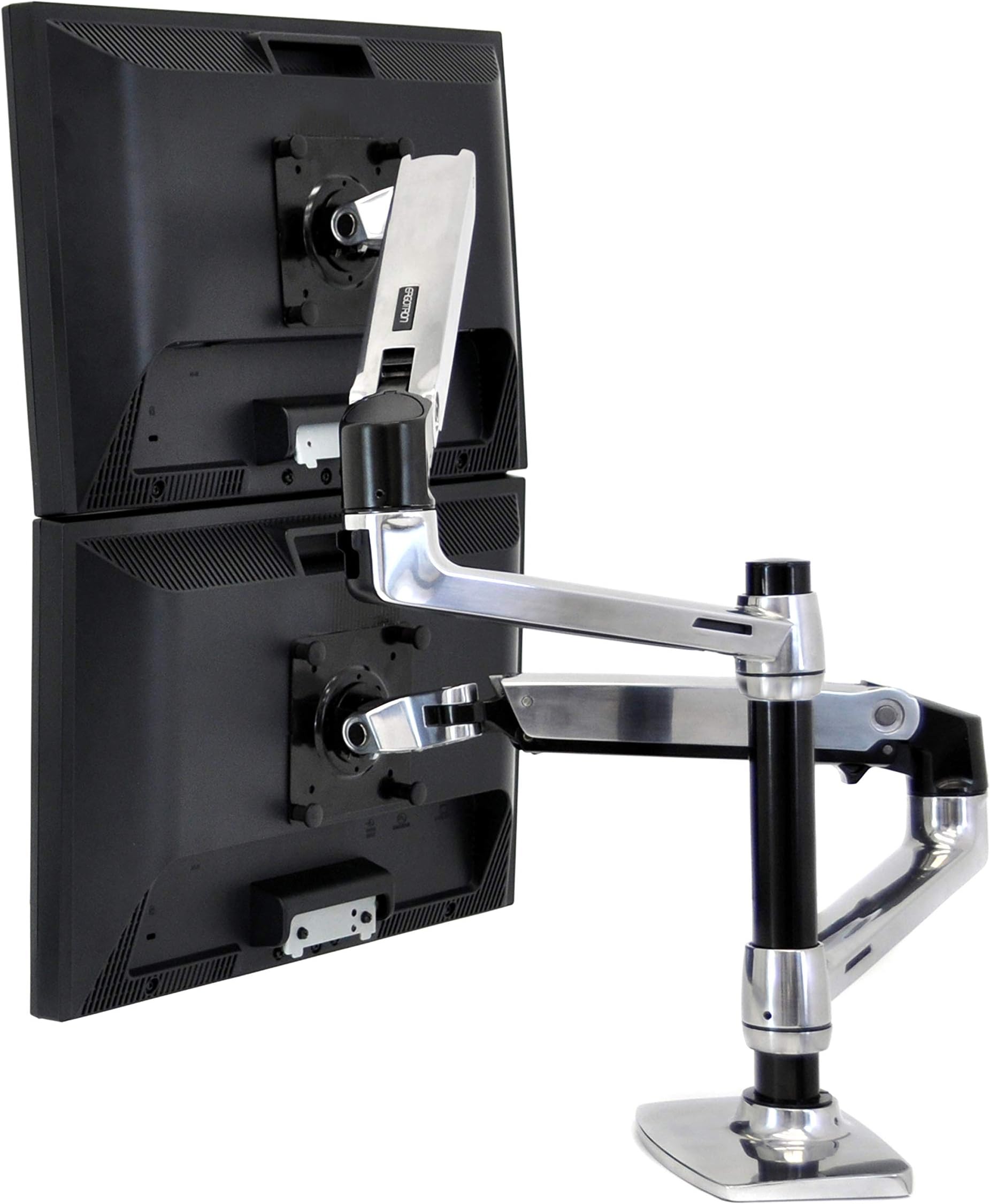
The Ergotron LX Vertical Stacking Dual Monitor Arm is a premium polished aluminum desk mount designed for two monitors up to 24 inches and 7-20 lbs each. It offers extensive ergonomic adjustments including 13" lift, 25.6" extension, 360° rotation, and 75° tilt. With versatile mounting options and a secure laptop tray, it transforms cluttered desks into sleek, efficient workstations backed by a 10-year warranty.


| ASIN | B0036RDOT8 |
| Best Sellers Rank | #208 in Computer Monitor Arms |
| Brand | Ergotron |
| Built-In Media | mount |
| Color | Polished Aluminum |
| Compatible Devices | Monitor |
| Customer Reviews | 4.6 out of 5 stars 1,550 Reviews |
| EU Spare Part Availability Duration | 10 years |
| Enclosure Material | Metal |
| Global Trade Identification Number | 00698833012545 |
| Item Part Number | 45248026 |
| Item Type Name | Ergotron 45-248-026 LX 2-way monitor desk mount 38.1 cm (15 ) - 61.0 cm (24) height adjustable, N |
| Item Weight | 15.8 pounds |
| Manufacturer | Ergotron |
| Material | Metal |
| Maximum Tilt Angle | 75 degrees |
| Maximum-Supported Screen Size | 24 inches |
| Mfr Part Number | 45-248-026 |
| Minimum-Supported Screen Size | 24 inches |
| Model Number | 45-248-026 |
| Mounting Type | Tabletop Mount |
| Movement Type | Articulating |
| UPC | 012302364223 012302466781 621015599725 033584638000 698833012545 854587105968 012304740520 778889282847 031112304588 791836469498 065030837248 611101328940 663647974167 777787377822 014484769841 |
| Unit Count | 1 Count |
| Warranty Description | Manufacture |
B**D
You get what you pay for, but shop before you buy
I research most anything that is a specialty item and/or over $100, I believe in getting my money's worth but also hate getting sold on a cheap product. I searched all over the internet for a monitor stand that would offer some flexibility in what it could offer and this is the one I settled on. To each their own. My thoughts so far; The pros: strong arms rated for heavier monitors, a laptop option, adjustable height arms as well as the support base gives multiple ways to move the arms independently from each other and even swap side to side if I so choose (some stands the arms will conflict with one another), I liked the polished look contrast against the black, kinda classy. The base is solid with a "through" mount option, and the routing method for cables was about as good as any other stand. The laptop stand partially holds a computer by velcro which was very secure even with smaller pieces; also some rubber padding strips provided (both are 3M and good quality). The cons: the price is somewhat expensive, and the joints are incredibly stiff, at least to start. So, basically I have been very impressed with the item. It seems very well made, I like the look of it, and it is solid, the laptop stand is much more secure than I ever would have guessed and have been tearing my laptop off but better than there being a chance of it falling. Also, it is natural to grab the monitor, or in this case the laptop case, to use as leverage while adjusting the arms. I have a 29" monitor to go on one arm and it will likely be able to handle a bigger model in the future. But from the factory the joints are LOCKED tight. This shows the quality of the build, but frustrating at same time. The item came very well packaged, all the pieces set in their place in the box. The smaller individual pieces came in sealed, consecutively attached bags (for the most part, some stand alone items) overall very organized. This is a really nice item, and although it takes some getting used to maneuvering the "limbs", it really makes the desk seem more spacious once the clutter of moving is cleaned up. The joints are pretty tight at first and may get easier with more use, but as-is and considering the weight they need to handle it is not a real issue. Completely recommend this item.
J**S
Extremely sturdy and fulfills a fairly uncommon niche
Short version : _____________ Pros: - easy to assemble - very robust and sturdy, will hold up very well within guidelines - fairly decent free range of motion Cons: - dat price tag $$$$ - certain features like cable routing and swivel leave some very minor grievances LONG version : ______________ You don't have to read it all, but if you're already looking into buying this, there's a decent chance you are in a similar situation. If I was being nitpicky this would be a 4/5, but seeing as how there's really no other manufacturer that readily provides a solution to my problem it really is just the best I can get, from what I've seen. I upgraded from an LG 34UC89G-B 34" 21:9 to an Alienware AW3423DW 34" 21:9 and wanted to keep both monitors, with the new one on bottom and old on mounted on top. My old 2 arm mount was not going to be able to support this much weight as my other monitor was just a 27" 16:9 and it barely held those together. I didn't want to have to screw anything into my wall and I wasn't 100% sure on my desk space so I wanted free moving arms for orienting the monitors before finalizing where I want them to stay. Once I got this I was able to set my monitors up stacked on top of each other. While the bottom one isn't quite sitting as low as it can go, it's not far off. But the top monitor is just about using the mount's maximum capabilities in terms of being able to space these monitors apart while still leaving a tiny bit of room for adjustment. I have been able to pull my top monitor forward and rotate it portrait for documents and such though I have not done the same with the bottom monitor. ______________________________________________________ Overall actual use after setup: 9/10 The monitors themselves are not on the extreme end of heavy but they're not light. They both fall within the specifications of the mount. But where Ergotron excels with the LX is that it will actually support curved monitors up to that weight as well, as the curvature changes the center of balance of the overall monitor and puts more stress when extended out than your typical flat monitor. This is usually where you can see other people having issues with sag when approaching the upper limits of other mounting systems. These have not sagged at all since tightening down the screws and move with a fair bit of range, staying in place afterwards. However I do not extensively move my monitors around often and don't know how well it would hold up if you just kept moving them around constantly, though with the construction quality I'd wager it would be fine. One thing I was told from a friend who has the same mount: if your monitor is really bottom heavy for whatever reason and you decide to use it portrait style, the minor taps and thumps from your desk will cause it to try to rotate back to a horizontal position, skewed about 5-10 degrees. It's very minor and just takes a quick second to readjust but keep in mind that it may happen as 1 side is now far heavier than the other. ______________________________________________________ Setup process: 9/10 The setup itself was very easy. I saw other reviews having issues with it and maybe getting some help but if you follow the instructions provided, it is extremely easy, especially compared to setting up other mounts where you have to screw in the whole assembly to the monitor and take the entire piece and clamp it on your desk. You need to clamp down the base and bottom arm portions of the mount, then screw in the upper portions to the monitors BEFORE putting the rest of the mount together. The top arm portion falls right into the bottom and you just tighten the screw afterwards. If you can physically lift your monitor + 8 ounces or so, you will have no issues putting it together. One thing I will note: tightening the actual swivel head on the monitor so that the tension matches the weight of the monitor may be difficult if you are short since it adjusts from the top. WARNING: If your desk is particle board or something, I highly recommend buying reinforcement plates for the clamp. The clamp that the LX comes with is fairly sizeable but if you're going to be putting 50 lbs of pressure on 1 spot on your desk, it's best to not worry about the weight snapping your desk in half. If your desk isn't sturdy material: the arm mount will hold up, your desk will not. You're already splurging on this mount, don't cheap out and break your desk and potentially your monitors by skimping out on a $10 metal plate. If you don't want to go that route and don't care much about aesthetics, you can just use some wood. ______________________________________________________ Cable management: 5/10 Cable management looked like a mere afterthought. It's serviceable and hides the cables well enough but it's nothing to write home about. This feature has been better executed in cheaper models. ______________________________________________________ Range of motion: 8/10 Range of motion is better than most for sure. While it will still hold them in place, some positions and setups can be limited if you have enormous monitors. If you're using 2 24" monitors you will have zero issues, but the more you approach 40", even on 1 monitor, the options get more and more limited. ______________________________________________________ Final notes: I wish the pole was longer. That would solve a lot of issues people have had with mobility using large monitors. The arm mounts themselves hold up well, the fitting of large monitors just leaves something to be desired, especially out of something as expensive as this.
J**H
hard to believe how beefy it is for the price
can't imagine any other arm being as beefy, and not for this cheap. the stacking works great, with 22" monitors. The pole is completely solid, though through all the joints in the arms there is a bit of play. Basically if you bump into the monitors they will wiggle back and forth until they settle, however the movement is small and if you aren't bumping into them they don't move at all. The mount works well. Downsides: arms are beefy and take up some space, ESPECIALLY factoring in the joint at the monitor. Basically make sure you have some space because the parts are soo damn big! I'm not sure but I get the impression that you could put a couple 27s on here or something heavy because this thing is a beast. i was shipped the version WITH the laptop stand, so you can use it with 2 monitors or a monitor and a laptop. the laptop stand is probably part of the reason the arms are so beefy. i will say that the human scale single monitor arm that I have is at least ten times more svelt and sleek, but it's clearly not as strong / beefy. If you need something that looks really nice this ergotron isn't it...though it still looks pretty good. just the wires don't disspear as much, and the black and silver look just isn't awesome. also, the friction adjustments on the human scale seem cheap compared to the adjustments here on the ergotron. they both do the same thing, but for the most part i like the ergotron better. that said, if I didn't need stacking and didn't care about cost, and had a desk where the arms were visible (no wall) i'd buy a couple human scales. those conditions not withstanding (i.e. most situations) the ergotron is the one! All in all, this has got to be the best value in monitor arms out there. you don't have to stack with it, and you dont' have to use the laptop mount, but you WILL be happy with the strength and obvious quality, and you'll be thinking "how could this be so cheap?"
A**R
Best monitor arm I’ve personally used
Extremely sturdy, wealth of adjustments, and simple set up. By far the best monitor arm I’ve used. My monitors don’t wobble or move unless I want them to. Went with the small pole and had no issue mounting 32 and 27 inch side by side. Might even buy another for my laptop. One thing to note, if your desk is against a wall and you want full range of motion, I would recommend grommet mounting instead of using the c clamp. About 6-9 inches from the wall should give you full range of motion clearance.
J**S
Overpriced but worth it
Very impressed with the quality of this item. Very sturdy. Assembly instructions could be a little more clear, but wasn’t too difficult. Went with grommet mounted and just really impressed overall with the construction and materials. Need to bring the price down though. No way it should cost near $500! 5 stars for quality, -1 star for cost/value.
T**R
Versatile, Sturdy; Sit/Stand Desk is Doable
Revised 25 June 2014, 2 years ownership: First impressions: It's big. I would say every part of the mount is about 20% larger than expected. Everything about this unit is solid and substantial. This dual version comes with lots of extra or optional hardware, including the notebook tray and some small attachments for it (flexible clips, loops for cable management, non-slip pads). Movement: Using the monitor(s) from both sides of the desk and in a variety of positions, easy movement is important: 8.5/10 on that score. Adjusting the tension, there are trade offs between ease of movement and stability, but overall it's quite good. Compatibility: Consider the strength of your desk before buying; a bit of ingenuity can make this stand work with just about any desk, but it may require modifications such as counterweights, wood spacers to brace the bottom clamp, or in my current case, re-tasking your OEM monitor stand to brace one elbow, spreading out the stress on the desk surface. Any Ikea desktop more than half an inch thick is likely thin laminate sandwiching layers of cardboard honeycomb and will not stand up to the weight of even a single monitor on this mount. Standing Desk: Using this arm to turn your sitting desk into a standing desk is doable, but a kludge. You would probably need to be shorter than about 5'3" to face the monitor head-on, but tilting it upward from its highest point works fine. Some people say looking slightly downward is the most ergonomic way to use a monitor. When I was doing the sit/stand thing, I used the notebook tray on the second arm to hold a shelf for my keyboard and mouse. It required some reinforcement to cut vibration, and a separate riser would be better if you have the desk space. I've also "pinned" tablets to the notebook tray a couple different ways so I could face them from a reclining position to read. It's kind of overkill for a device that's already pretty easy to handle, but at least I won't drop the tablet on my face if I fall asleep :) Overall I'd rate arms like these as vital as a good chair for anyone who spends some time with their PC. Two years in, wear and tear looks similar to the one year mark: some corrosion spotting on the base, some paint coming off the post, the plastic sleeves that space the arms out from the posts have cracked, but remain usable. Overall it's still attractive and functional, and should remain so for years to come.
K**Y
Sturdy, well made, versatile
I bought this back in 2013 and it worked great with a 27" monitor on one arm and the laptop tray and my Macbook Pro on the other arm - inserted into a hole on my treadmill desk. I upgraded my monitor to a Dell curved 32" monitor, which is under 17lbs. The arm couldn't hold the monitor at first, so I went back to the directions and learned there is a screw to create more tension on the spring. After making the adjustment on the arm the my new monitor held in place just fine. The new monitor was on a different desk; instead of going through a hole in the desk top, I had to clamp onto the edge. The only caveat is that if you are up against a wall, you may not be able to maneuver the monitor back far enough without hitting the wall with the arm. To remedy this, I put the pole on the left side and had the arm fairly straight so that I could push the monitor back without the arm elbow getting in the way or hitting the wall.
C**C
Worth Every Penny
Purchased this along with the single arm for a three monitor setup. I originally wanted to spend much more money on Humanscale M2 monitor arms, but -- as my wife pointed out -- these things are just sitting behind the monitors anyways. Of course, while not as sexy as the M2, the Ergotron Lx arms are no ugly ducklings either and you'll save about $300. Functionally, both the dual stacking and single arm have been great. They are holding three 24" Dell monitors without issue (and freeing up a lot of deskspace!) and the vertical range is much better than I thought it would be based off of the reviews I've seen. I'm able to get the bottom edge of my 24" monitors 7" off of the desk surface with the arms on the lowest position on the pole. Installation was a snap. I did take the extra step of adding some plywood under my Ikea Galant desk just to be safe as the desk itself is made from particle board secured to a steel frame. So far, no issues with the desk and weight of the arms and monitors. As a note: I didn't realize that this package also included the laptop holder so that was a nice little surprise. If I had to do it over again, I'd probably get TWO of these and put my laptop on the extra arm :D If you are deciding between this one or the side-by-side Lx, I would recommend getting this one since it allows you to configure it side-by-side OR stacked top and bottom. Highly recommended and worth every penny as it will free up sooo much desk space.
M**R
I would find it hard to believe that there is any stand better than this one
Bought this for work. Main reason was to get my screens higher so I could sit correctly. These are extremely well made, very solid and strong. most parts are metal. Very very versatile. My colleague was jealous so he bought one as well. I would find it hard to believe that there is any stand better than this one. Easy to put together. Gives many options on how to attach to desk which is handy. super easy to move screens. Love this product. This is how products should be made and how they should work. Perfect!
R**T
Escritorios útiles
Gracias a este soporte, mi escritorio vuelve a ser útil para realizar otras actividades tan normales como escribir sobre él.
A**R
Du solide
Très solide comme prévu, très bonne mobilité.
A**S
Excellent produit.
Livré en temps et en heure. De fabrication professionnelle. Un design superb une finition irréprochable. Montage aisé qui n'abime pas le bureau sur lequel vous le fixez. Une fois la position désirée obtenue on peut la bloquée par des vis 6 pans. Des caoutchoucs évitent de rayer le tube vertical. Si je devais mentionner un point négatif ce serait qu'il aurait été parfait si on avait pu faire glisser les cables à l'intérieur des bras et du tube central. Sinon, c'est un produit parfait et deux fois moins chère que la concurrence.
S**0
Praktisch, gesund, stabil - genial!
Ich habe mir diesen Bildschirmhalter gekauft, weil ich eine sehr große Person bin und extreme Schmerzen bekomme, wenn ich länger am Rechner arbeiten muss. Ich kann gar nicht so viele Gegenstände unter dem Bildschirm stapeln, so dass er ideal stünde. Ich habe einen 27" Samsung P2770HD in Gebrauch und er hält! Es ist extrem angenehm diesen Halter zu verwenden. Wenn es zu hell wird, kann ich ganz schnell den Bildschirm so weg drehen, dass ich normal weiter arbeiten kann. Ich kann jetzt besser und länger arbeiten, ohne dass ich schnell verspanne. Das Produkt selbst ist gut verarbeitet und stabil! Die Montage ist sehr einfach. Praktisch ist auch, dass in diesem Paket die lange Stange und die Notebook-Halter vorhanden sind. Wenn der Arm für jemanden zu kurz ist, würde man sogar noch einen Erweiterungsarm bekommen. Die Kabelführung ist gut gelöst. Mit diesem Produkt kann man ergonomischer und angenehmer arbeiten. Ich habe mir sogar noch einen iPad Halter gekauft, welcher aber nicht unbedingt für diesen Arm ausgelegt ist, da das iPad sehr leicht ist - daher kommt jetzt noch ein dritter LX Halter speziell für das iPad. Ich will ohne diese Halter gar nicht mehr arbeiten. Klare Kaufempfehlung!
Trustpilot
3 days ago
3 weeks ago