We remain fully operational. Our teams are working around the clock to ensure your deliveries continue safely.

DOWNLOAD THE APP


Copyright © 2025 Desertcart Holdings Limited
DOWNLOAD THE APP
Buy anything from 5,000+ international stores. One checkout price. No surprise fees. Join 2M+ shoppers on Desertcart.
Desertcart purchases this item on your behalf and handles shipping, customs, and support to Senegal.
🌀 Master your airflow, dominate your build.
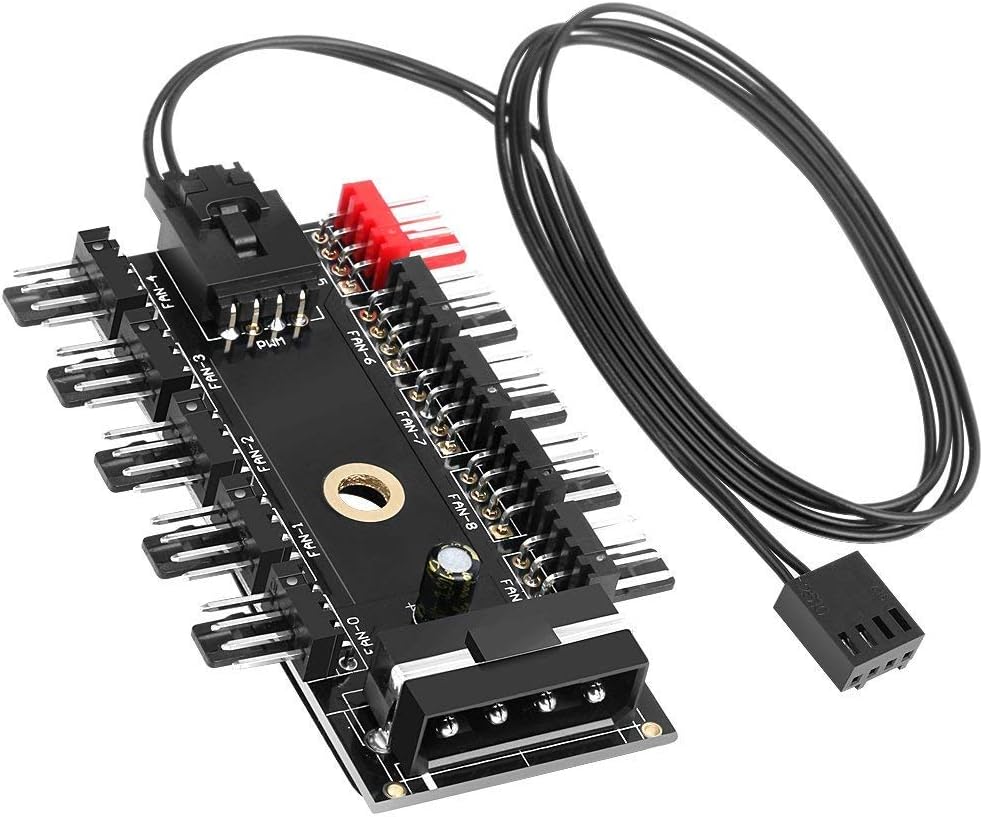
The 4Pin IDE Molex 1 to 10 way cooling fan splitter hub expands a single 4-pin motherboard fan header into 10 outputs, supporting both 3-pin and 4-pin 12V fans. It enables synchronized PWM speed control for 4-pin fans, allowing all connected fans to run at the same speed dictated by your system’s BIOS fan curve. Designed for easy installation with EVA adhesive and a screw mount, this compact hub ensures efficient, quiet cooling for high-performance PC builds.


| ASIN | B08DJ7VWHH |
| Batteries Required? | No |
| Batteries included? | No |
| Best Sellers Rank | 28,634 in Computers & Accessories ( See Top 100 in Computers & Accessories ) 512 in USB Hubs |
| Colour | Black |
| Customer Reviews | 4.3 4.3 out of 5 stars (192) |
| Date First Available | 23 July 2020 |
| Item Weight | 20 g |
| Item model number | Fan Hub 10 Port |
| Manufacturer | Kuesn |
| Material | Metal, Plastic |
| Noise Level | 20 Decibels |
| Part number | Fan Hub 10 Port |
| Product Dimensions | 7.5 x 4.8 x 7.49 cm; 20 g |
| Voltage | 12 Volts |
| Wattage | 2.16 watts |
S**R
Perfect Fan Hub for Clean and Easy Builds
I used this fan hub to connect six ARCTIC P12 Slim PWM fans in my build, and it worked flawlessly right out of the box. Installation was straightforward: I connected the PWM signal cable to my motherboard and powered the hub via Molex. All six fans respond perfectly to my BIOS fan curves, syncing their speeds based on system temperatures just as intended. What I really appreciate is the simplicity—no unnecessary software or RGB complications. Great value and highly recommended for anyone running multiple case fans and wanting unified control.
P**L
Works a treat
Works well no issues, other reviews of this unit are not correct, if you use 3pin fans they will run at 100% as there is no PWM control on 3pin fans. Use 4pin Fans everything is good.
P**O
Easy
Did the job
S**R
Works well, No instruction
This hub works well however it took a while for me to realise that in order to control the fan speed using armoury crate, one of your fans needs to be plugged into the red pin slot, otherwise it will not detect the fans and be able to control the speed
M**R
Perfect for PWM Case Fans
I used this hub to control 4 case fans on my new Ryzen ITX build and it works perfectly. I didn't want to use splitters that reduce the speed of all my fans (or overload the board) and with this hub I'm able to control the fan speeds in the bios.
S**E
Kuesn 10 Port PC Chassis Fan Hub
Received the Kuesn 10 fan hub today, If you are short on motherboard headers then this maybe ok for you, but what I disliked about it there were ZERO instructions although it's not hard to see what goes where. I am not a fan of connecting my CPU fan to third party controllers so I connected the Kuesn Hub wire to the CPU2(pwm) fan header on my motherboard, but although the case fans are working you wont get a RPM of the fans which is a big minus for me personally. Will probably buy a better Hub. 3 Stars from me... Edit: If you connect a 4 pin fan to the red cpu port on the hub you will see the speed of the fans.....
P**N
Very Simple, Very Effective.
Wanted to control 9 radiator fans from a single header, based on liquid temps. This plugged into the CPU_OPT header (as that was the first header that could use the mobo temp input header), and works perfectly with the fan curve set in the bios.
G**M
PWM doesn't work at all
Doesn't work with Corsair Commander Pro at all. Useless.
S**T
Funktioniert einwandfrei!!
Trustpilot
3 weeks ago
2 months ago