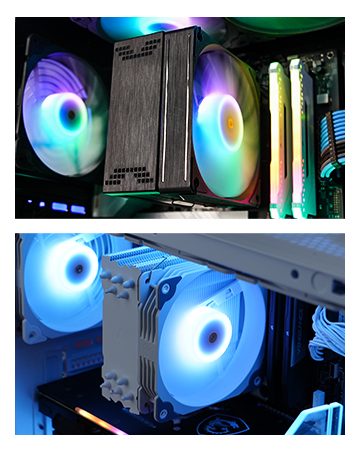
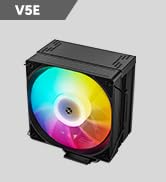
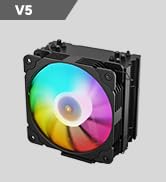
❄️ Cool your core, light your lore — Vetroo V5 keeps your build chill and lit!
The Vetroo V5 CPU Air Cooler combines five direct-contact heat pipes and a 120mm PWM fan to deliver efficient, whisper-quiet cooling compatible with the latest Intel and AMD sockets. Featuring addressable RGB lighting that syncs with your motherboard, it offers both performance and style for professional-grade PC builds. With dynamic fan speed control and vibration-dampening design, it ensures optimal thermal management without noise distractions, making it a top-tier choice for millennial managers who demand reliability and flair.


| ASIN | B08F2FS7SR |
| Air Flow Capacity | 52 Cubic Feet Per Minute |
| Best Sellers Rank | #40 in Computer CPU Cooling Fans |
| Brand | Vetroo |
| Compatible Devices | Gaming Console |
| Cooling Method | Air |
| Date First Available | July 31, 2020 |
| Item Weight | 1.68 pounds |
| Item model number | V5-WT |
| Manufacturer | Vetroo |
| Material | Aluminum |
| Maximum Rotational Speed | 1700 RPM |
| Noise Level | 30.8 Decibels |
| Number of Items | 1 |
| Power Connector Type | 4-Pin / 3-Pin |
| Product Dimensions | 5.83"L x 5.04"W x 2.95"H |
| UPC | 609015786611 |
| Voltage | 12 |
| Wattage | 150 watts |
J**R
Review of - Vetroo V5 CPU Air Cooler w/ 5 Heat Pipes & 120mm PWM Fan
Review of - Vetroo V5 CPU Air Cooler w/ 5 Heat Pipes & 120mm PWM Fan - EXECUTIVE SUMMARY (2021-May Update) - still working superbly The Vetroo V5 CPU Air cooler is an amazing cooler sold at a competitive price! - As the product description and product photos illustrate the Vetroo V5 CPU Air cooler comes with a great fin stack around five (5) heat pipes, which is more heat pipes than similar products available on amazon. - COOLING PERFORMANCE HAS BEEN EXCELLENT As noted by several well known and reputable youtube computer product reviewers, the Vetroo V5 CPU cooler provides superb CPU cooling. When cooling a little AMD Ryzen 5 3400G, with tuning to run at 4,000mhz, the Vetroo V5 has been providing 31-35C idle temps and 43-50C CPU temps under load, as reported by both the Windows 10 "core temp" software utility, and the Windows 10 HWINFO64 software utility. - GREAT VALUE Since I was looking for cooling for a $99.00 (direct amazon price) AMD Ryzen 3 3200G CPU, or AMD Ryzen 5 3400G the availability of the Vetroo V5, on sale with a coupon, paired well economically with the CPU it is now cooling. - INSTALLATION WAS EASY It was valuable to do a tabletop "dry run" assembly before installing this cooler. The most important thing to get right is that the AMD AM4 brackets MUST be installed with the bracket angles ANGLED INWARD in order for the screws on the bracket to line up with the AMD motherboard backplate. It seems as though reviewers who complained that the Vetroo V5 did not fit their AM4 motherboards probably didn't have the mounting brackets attached in the right direction. Notably, the seller has included an illustration of this, with the brackets angled INWARD, within the product photos right on the amazon product page. The documentation doesn't clarify this however. Note also that it is NOT possible to install the cooler and tighten the brackets onto the AMD motherboard backplate with the fans attached, so attach the fans after installing the fin system. Having a "long neck" screwdriver is also helpful, to extend past the height of the fin stack while tightening the screws in succession. - Since I was doing a build already with NON rgb Arctic brand fans, I was able to set up this cooler with two Arctic P12 PWN non-rgb fans in "push/pull" configuration. However, according to the various youtube testing gurus, using two fans apparently does not significantly increase cooling efficiency even though push/pull fans produce a small efficiency increase. - SUGGESTIONS TO MANUFACTURER EVEN WITH THIS FIVE STAR REVIEW Vetroo should make a second version of the Vetroo V5 cooler that comes with two (2) fans. The Vetroo V5 does come with two (2) fan attachment brackets however. As a result, it is possible to install the Vetroo V5 cooler with "push" and "pull" air flow from two fans. Having an alternate version, even at a slightly higher price, would also be helpful because Vetroo does not currently have fans available for sale separately on amazon (or the Vetroo website) that match the fan provided with Vetroo V5. - CONCLUSION The Vetroo V5 CPU Air cooler provides performance which rivals fans that cost 2, 3, and 4, times as much as the Vetroo V5.
V**I
Functional and a Nice Option for Pink-PC, Non-Liquid Cooler Lovers.
Installed this for a recent cosmetic face-lift we did for my pre-built PC and so far it functions nicely. It’s honestly not the best quality and that made installing it a bit annoying, but it came with everything needed including a thermal paste (didn’t use it though) and it’s working properly, so for the price I think its overall a good value. It’s not the best design-wise, but it is pink, which is solely the reason I went with this. As a pink-lover and someone going for a pink-PC look this was virtually the only option I could find for someone who does NOT prefer liquid cooling for their PC builds. In fact, this is one of the only few pink options for non-liquid-cooling users, which is kind of sad. Regardless, I appreciate this company for offering this product in this color, and I fully recommend it.
D**O
Quite Possibly the Best Budget CPU Cooler
And that's not hyperbole. I honestly thought all the tech YouTube content creators bragging about this CPU cooler were just being over-the-top (until JayzTwoCents reviewed it, anyway) so when I got a new PC with an i7 9700F I knew I needed to get an aftermarket cooler, fast. The noise level of the stock Intel cooler, under any load at all, honestly sounds like my neighbor's cat in heat. It's horrible. This thing is damn near silent. The fan is incredibly easy to install, using a hook system that's quite literally just a piece of wire that latches onto the tower. As a bonus, they actually give you two sets of hooks (4 in total) so you can use your own fans in a Push Pull configuration and maximize the heat dissipation. I have some EZ-DIY fans that I'm going to mount to the tower since I already have another one acting as an auxiliary exhaust fan, and because my motherboard doesn't have an RGB header. Because of that, I can't really speak to the RGB qualities of the included fan. I can say that it, like the cooler tower, feels pretty solidly built. I'm legally blind, but I had no trouble installing it with my motherboard in the case. That being said my case has a cutout section allowing me to easily get access to it. You MAY have to remove your motherboard to attach the backplate, which is true for basically any cooler, unfortunately. You need a backplate, and although some coolers use the Ryzen stock backplate, many don't. The mounting system is great. Because of the size of the tower, it's fairly easy to get it mounted onto the motherboard provided you read the instructions (or look it up on YouTube - there are tons of videos on this thing). Just DO NOT FORGET to remove the little tab on the bottom before you install it! The brackets are labeled based on Intel or AMD, and the Intel specific backplate has settings for the different socket sizes (ex 1150/1151/1200 would be the middle one) and has very tacky tape to hold it in place while you mount the tower. I've also been told you can use screws to mount it, but because of my vision, when it comes to fiddly things like tiny scew holes, I prefer to just use the path of least resistance (i.e. the tape) and call it done. I'm using my own thermal paste (happened to have a tube of Arctic Silver lying around), so I can't speak to the quality of the included paste, but the reviews I've read put it at least on par with the thermal compound used by OEMs so that's a positive for it. Honestly if you're looking to cool a CPU that isn't an 11850K or Ryzen 9, and thus doesn't really need a Noctua cooler the size of a cinder block, I can recommend this one, especially over the massive pain in the butt that some coolers can be. It could *probably* handle a 5900X, especially with two fans in push pull, but honestly, if you're spending that much money on a CPU, you might as well get a proper liquid cooler with a 240 rad at least, at that point. :)
Q**H
Can't be beaten by price vs performance. Rgb is nice too... was easy to install all good. On am4
B**R
This is a very cheap but surprisingly well-performing cooler. I ended up installing 2 of these for some friends who had similar pre-built systems both from Asus, one was AMD and one was Intel. The Intel system had chronic throttling issues and idled at 60c and the AMD one's fan was ramped to max permanently and they complained about hearing it even with headphones on. The Vetroo V5 is fairly easy to install but does come with custom mounting brackets so depending on the case and motherboard you have to work with it can be quite difficult to get this installed but that's not really a problem unique to this cooler. Instructions were good, all the included parts were there and the thermal compound was easy to apply and seems to be good quality. It dramatically dropped temps on both systems, is nearly silent and most importantly for their scenarios it is quite a short tower-- this will (just barely!) fit in some very narrow pre-built mid-towers. The tip of the heatpipes actually touch the side panel of one of the systems but that's fine. No other decent air cooler I could find would fit and they didn't have the space for an AIO. Worked fine as a replacement cooler for a 65W TDP CPU (AMD) and a 105W TDP CPU (Intel). Not sure I'd want to throw this on a really power hungry processor but if you want to upgrade a stock cooler this will totally fit the bill and is so cheap it won't break your budget.
F**A
Tengo una Dell Inspiron 5680 y lamentablemente no puedo agregar un water cooler para el cpu ya que el tamaño de los ventiladores solo es de 92mm, los cuales ya no existen. Vi que una persona recomendó este modelo en fotos del Dell ya que el case es muy limitado en espacio y este disipador era perfecto por el tamaño para que pudiera cerrar la tapa. ¡Fue una genial compra! Es super sencillo de instalar, su ventilador permite espacio para no chocar con la ram. Tiene 5 tubos de cobre que permiten que el calor de mi actualizada CPU, un Core i7 8700k no se caliente tanto como con el disipador anterior, con el que llegaba a 95° y hacia que mi pc se apagara. Ahora mantengo temperaturas de 75° a máximo 80° en juegos muy exigentes, lo cual es muy bueno para darle vida extra a mi PC.
A**ー
ヒートパイプが5本もありよく冷えます。最低価格狙いの省電力PCを作るには良いと思います。
L**F
Thank you, Jayztwocents for recommending this.
Trustpilot
2 days ago
1 week ago