Buy anything from 5,000+ international stores. One checkout price. No surprise fees. Join 2M+ shoppers on Desertcart.
Desertcart purchases this item on your behalf and handles shipping, customs, and support to Senegal.
🎮 Relive Retro Glory with Modern Precision!
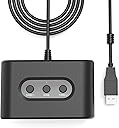
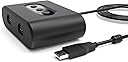
The MAYFLASH N64 Controller Adapter MF103 lets you connect up to two original N64 controllers to your Nintendo Switch, Switch 2, or Windows PC. Featuring easy mode switching with LED indicators, customizable button mapping, and turbo functions, this USB 2.0 adapter delivers authentic retro gameplay with modern convenience. Perfect for nostalgic multiplayer sessions or solo speedruns, it’s a must-have for any serious gamer’s setup.


| Asin | B089LKCBLG |
| Best Sellers Rank | #4,533 in Video Games (See Top 100 in Video Games) #30 in Nintendo 64 Accessories |
| Brand | MAYFLASH |
| Color | BLACK |
| Compatible Devices | Desktop, Gaming Console |
| Connector Type | USB 2.0 |
| Current Rating | 500 Milliamps |
| Customer Reviews | 4.1 4.1 out of 5 stars (705) 4.1 out of 5 stars |
| Finish | Oled |
| Input Voltage | 5 Volts |
| Item Dimensions | 4.41 x 1.5 x 5.63 inches |
| Item Weight | 0.17 Kilograms |
| Manufacturer | MAYFLASH |
| Mfr Part Number | uni-010100 |
| Model Number | may-uni-010100 |
| Number Of Items | 1 |
| Number Of Ports | 2 |
| Package Quantity | 1 |
| Power Plug Type | No Plug |
| Smart Home Compatibility | Not Smart Home Compatible |
| Unit Count | 1 Count |
| Warranty Description | 30 days |
| Warranty Type | Lifetime |
User
Steam Deck Retroarch Support!
I bought this not knowing whether it would work with my original N64 controller and new Steam Deck, particularly the RetroArch N64 emulator run through EmuDeck. After first plugging it into my Steam Deck dock's USB, with the red light on, only the back button (the A button on the N64 controller) and a couple other random controls worked. I couldn't figure it out until I realized that the red light is intended for Switch per the manual.To get it set for the Steam Deck, hold the “HOME” button on the adapter until the color changes to green, which is the Xinput setting intended for PC use. This does everything you need it to for the main Steam Deck interface: Select (A), back (B), and navigation (Joystick). The tricky part was getting it configured in RetroArch.Because Steam Deck recognizes the 2 inputs both as "Generic X-Box Pad", the N64 controller B button doesn't work right away (on Xbox, the B button is to the right, but on N64, it’s on the left). To get it working, I first made sure the N64 controller was listed first. You can do this by pressing Steam -> Settings -> Controller -> press the select/view button (top left on the steam deck) to "Reorder Controllers." Make sure Generic X-Box Pad is first. (If it still doesn't work in the next step, try switching the controller to the 2nd port on this adapter)Then I fired up the standalone RetroArch emulator and navigated to: Settings -> Input -> Port 1 Controls using a USB mouse also plugged in (although it may also working using the N64 controller). With the “Device Index” set as "Generic X-Box pad," you can select each of the following and press the matching button on the N64 to the reconfigure the buttons. For some reason, I found it necessary to set all of these (even if they are listed correctly), shown as “Auto,” or else they lose their settings when we save them later.D-Pad Up = push the up D-pad button = 11D-Pad Down = push the down D-pad button = 12D-Pad Left = push the left D-pad button = 13D-Pad Right = push the right D-pad button = 14A Button (C3) = press A button = 0B Button (C2) = press B button = 1Start = press Start button = 6L Shoulder = press L button = 9R Shoulder = press R button = 10Z Trigger = press Z button = +4Control Stick Y (up) = push joystick up = -1Control Stick Y (down) = push joystick down = +1Control Stick X (left) = push joystick left = -0Control Stick X (right) = push joystick right = +0C Buttons Y (up) = press up yellow C button = -3C Buttons Y (down) = press down yellow C button = +3C Buttons X (left) = press left yellow C button = -2C Buttons X (right) = press right yellow C button = +2Once complete, select "Save Controller Profile" and you should be good to go. If you use 2 controllers, you'll have to repeat these steps for the other port. It’s been working every time I reconnect the adapter for the last few days.If it ever gives you an issue in RetroArch where you can’t navigate or press any buttons, you can always exit by hitting the Steam button -> Exit Game.Overall, zero complaints so far. This product is working exactly as I need it to!
User
Excellent adapter!
This is a great adapter with one caveat. I plugged this into my switch 2, worked right away. For some reason by default the B and A buttons are switched, but in the instruction manual it tells you how to swap this easily.Works seamlessly. Easily do 2 player on n64 games.THE ONE THING TO NOTE - there is no + and - buttons (obviously) so getting back to the main menu will require a native switch remove.HIGHLY recommended. I hope this company has a gamecube version. Recommended!
User
A decent product - once you update the firmware
I purchased this controller to be able to play N64 games on my Switch with a N64 Controller. It's decent, but it really only shines once you've updated the firmware. Out of the box, A and B buttons are bafflingly flipped, and the C-Buttons are inverted.Switching between N64 games and using save states is mildly inconvenient as you'll need a second, regular Switch controller on hand, but otherwise the adapter is functional and does what it needs to when you are in a N64 game with an N64 controller.The price fits the little bit of time needed to make this work.
User
Update the Firmware
After updating the firmware, it's great.
User
Disappointment for Mayflash product (Dropped Inputs, inaccurate analog inputs)
I have the previous Mayflash N64 usb-adapter as well as their Gamecube adapter. Both are great, so I was very disappointed when trying out this product. At first I thought maybe I received a faulty unit, but I see other reviews with similar reports. I have tried all 3 modes on PC and tried calibrating them, each with different results.1)The switch mode dropped analog inputs, sometimes I would press a direction and it would either lag in recognizing that input, miss the input completely, or not recognize how far the stick was being pressed (may result in walk instead of run in games).2)The two PC modes didn't seem to drop inputs as often, but the analog stick was constantly being recognized as fully pressed in a direction. Calibration would not fix the issue, the stick would not recognize as being in neutral. Some buttons were similarly recognized as being fully pressed.I have tried updating the drivers, but that didn't fix the issues. I've also verified it isn't the controller as the controller works perfectly on my old mayflash adapter (model PC048). I use this for speedrunning SM64 so any dropped inputs, lag, or inaccurate directional inputs is a deal breaker.
User
Works with 20+ year old controllers
Worked fairly well. There's options for xinput/dinput. Getting this to work with specific PC emulators may be a task in itself, but the hardware is solid.
User
I love this thing
This is one of my favorite Amazon finds of the year! I'll admit my secret shame...I never played any Zelda games growing up. So this year I took a poll of my friends and was told that Ocarina of Time on the N64 was a good place to start. So I downloaded the expansion for the Switch where I can play retro games and I started Ocarina of time. It was extremely hard to play as the joycons don't have as many buttons as an N64 controller. Enter this gizmo! I have plenty old N64 controllers so this was a perfect fix. It takes a bit of tweaking to make it work the way I have it, but you can find tutorials on YouTube to walk you through easily. This is so worth the money for the nostalgia alone!
User
You get to swap the Control Stick with the DPAD, but no button mapping?
I picked this up to be able to use N64 controllers with the idea that this would allow me to button map the buttons anyway I wanted to through the means of the Nintendo Switch options regarding button mapping, since this is being read as a pro controller rather than being read as a GameCube Controller which is how the Hyperkin Adapter works.What's aggravating about this is that it doesn't allow to change the button mapping through the Switch, even though it is read as a pro controller, and on top of that the buttons being read are slightly incorrect: an A button press is being read as a B input and a B button press is being read as an A input. Meanwhile the CSTICK inputs is inverted naturally through this. Meaning if I were to press down in Super Mario 64 then the camera would zoom in like its suppose to for if you press up on the c stick.I simply bought this to use with various titles on the Switch, such as Super Mario 64, Super Smash Brothers Ultimate, and a few various games that I thought would be fun to challenge myself with a few buttons missing. However, because I can't button map in any regard besides the capability of changing my Control stick to my DPAD I can't play SM64 with it unfortunately and having the genuine layout of Smash 64 in Smash Ultimate is a no go.Perhaps an update will fix these issues, but currently I don't think it's worth $25.99 USD when you can get a Hyperkin Adapter for $12.99 USD that doesn't have the two face buttons inverted and the c stick input inverted. The only thing this has over that is the secondary controller spot and ZL is in the correct spot rather than being flipped with the Left bumper.
User
This N64 adapter actually works.
I have purchased a few of these different versions in theses adapters in the past none of them worked properly until i found this N64 adapter.I used a OEM nintendo controller and it works flawlessly. All buttons and keys work even the joystick (which had problems with others). Work great on windows PC. Costs more but works unlike the others that are more affordable.
User
反応はしたけどボタン配置が…
64マリオでやろうと思い購入。Switchに反応したまではよかったがボタン配置の設定も出来ず、これではゲームにならなかった。
User
Funciona perfectamente bien
Excelente para usar tu control n64 original, solo lo actualizas en la compu, en el switch dejas oprimido start+izq y queda remapeado el A y B. No me parece que tenga lag la verdad. Si lo recomiendo
User
It works
This works great! I’m able to use it to use a n64 controller with the project64 emulator on my computer. It works just fine!
User
Veel inputlag
Extreem veel inputlag waardoor dit product eigenlijk onbruikbaar is.
Trustpilot
3 weeks ago
2 weeks ago