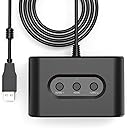
🎉 Relive the Retro Revolution — Plug In, Power Up, Play Together!
The MAYFLASH SEGA Genesis Mega Drive Controller Adapter MF104 lets you connect classic SEGA Genesis controllers to Nintendo Switch, Switch 2, and Windows PCs. Supporting up to two controllers per adapter with Xinput and Dinput compatibility, plus Turbo and Auto Fire functions, it’s the perfect bridge between vintage gaming nostalgia and modern multiplayer fun.


| ASIN | B089LSHW4T |
| Best Sellers Rank | #17,562 in Video Games ( See Top 100 in Video Games ) #52 in Sega Genesis Accessories #2,023 in Nintendo Switch Accessories #2,517 in Nintendo Legacy Systems |
| Customer Reviews | 4.0 4.0 out of 5 stars (97) |
| Date First Available | June 4, 2020 |
| Item Weight | 4.8 ounces |
| Item model number | may-uni-010101 |
| Manufacturer | MAYFLASH |
| Product Dimensions | 4.49 x 1.97 x 5.59 inches |
P**C
Old school
Works great!!! and a great blast of the past..... perfect fit easy to use and apply love it
A**G
Works great with Genesis and 2600 controllers
Worked perfectly out of the box for connecting a Sega Genesis controller to Nintendo Switch. After updating the firmware through manufacturer’s website, Atari 2600 controller worked on the Switch as well. Great item for playing retro games on the Switch!
E**C
Sort of Works
I have it in the correct mode, latest firmware, and using a selection of joysticks. The joysticks work to navigate the Switch main screens, but they don't actually work inside of any games. Most notably, Atari 50th anniversary doesn't work, which is the main game that you would want to work.
U**S
Works great now - EXCELLENT customer service from Mayflash
I had originally bought this to use with the Hyperkin Ranger. I have since found out from Mayflash that the MF104 does NOT support the Ranger. The Ranger works flawlessly with a vintage Atari 800XL though, so not a total deal breaker. I had issues updating the MF104 to the new firmware to support Atari 2600 controllers. Totally expecting to completely be ignored or if any response to just get a "copy/paste" from the online manual. To my surprise, Mayflash support responded over night. They had sent a link to update the MF104 with the MF103 firmware. I thought this was an error, but it did lead me back to their site to see there was a link for a MF104, V1.00.22.08. I downloaded that and it just failed over and over. I wrote back, and again they responded right away. They said the firmware for the MF103 & MF104 are the SAME. So I downloaded the firmware from their site for the MF103 and it flashed the MF104. It worked perfectly as expected. I do not have a switch, I am using this on a PC to use my vintage Atari controllers with an Atari 800 Emulator. It is now working as expected so I am very happy. I am also VERY impressed with the support provided by Mayflash. Also, it may seem confusing... Mayflash lists the Atari 2600 firmware update for the MF104 as v1.08.13 dated 12-29-2020. When you flash the MF104 with that firmware, it will actually appear as firmware V1.00.08.13. It appears they left the "00" after the "1" off on the website listing. As of today, 6/17/2023... there is a firmware for the MF103, V1.00.22.08. That is the firmware that worked for me. For some reason the firmware download of the same version, V1.00.22.08, for the MF104 did NOT complete for me. It was the MF103 linked version that worked and the vintage Atari 2600 controllers now work using Xinput in the emulator. I setup custom mapping for them in the Atari 800 emulators. I was hoping the Ranger would work, the vintage Atari controllers work but anyone who has used them knows they feel horrible! Since this unit supports the Sega controllers, might see if I can find any that don't feel horrible.
J**Y
Good Adapter (Mostly)
Excellent condition. I use it for my Nintendo switch to play Sega games. But for some reason on Nintendo switch, the C button is mapped to L on a regular controller. Would prefer the Y,B,A Button trio, but overall a good adapter if you’re into retro gaming on newer consoles.
T**B
Need an update, but perfect once done.
At first I was disappointed that it did not work with Capcom fighting stick's XYZ buttons. Went to Mayflash's site, and updated the firmware. That allows the mode button to work on the stick. Everything on the controller works like it supposed to.
M**E
Worked
Worked right out of box
C**G
Good prodcut
Very good product. I like it.
E**Z
buena calidad, extremadamente caro para lo poco que hace, por eso solo le doy dos estrellas, por ese precio al menos deberia ser bluetooth.
S**S
Funciona perfectamente con casi cualquier mando de 9 pines. El modo Autofire es un poco lento.
R**T
Aucun problème pour les pads usuels 3 boutons, mais ceux à 6 ne sont pas reconnus - pour être plus précis, les boutons supplémentaires ne le sont pas et le pad est vu comme un 3 boutons classique. Donc 3 étoiles maximum : j'en aurais mis 5 si ça avait fait le boulot attendu à 100%.
M**.
Meine Erwartungen von MAYFLASH SEGA Genesis Mega Drive Controller Adapter wurde weit übertroffen als angenommen. Man kann nicht nur SEGA Genesis Mega Drive Controller benutzen, sondern viele andere zum Beispiel alle Flightstick, Joysticks, Arcade Controller von C64, Atari ST, Amiga, Sega Mastersystem und mehr im MAYFLASH SEGA Genesis Mega Drive Controller Adapter einsetzen. Bis jetzt gibt es keine Verbindungaussetzer oder andere Technische Problemen mit der MAYFLASH Controller Adapter, von mir bekommt es die Volle 10 Sterne wen ich könnte, getestet wurde die MAYFLASH Controller Adapter unter WinUAE v6.0.0, Denise_win64 v2.6 und einige native Windows Run n Gun und Plattformer Games und noch vieles mehr, einfach ein Tolles Produkt, bitte mehr davon, Danke.
G**E
Has two ports allowing two controllers in one adapter. Decent build and construction. A must have to use with Sega Genesis / Mega Drive controllers on PC or Nintendo Switch.
Trustpilot
2 weeks ago
1 month ago