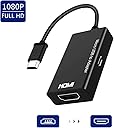
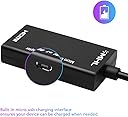
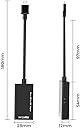
MHL Micro USB to HDMI Cable, Micro USB to HDMI 1080P Video Graphic Converter for Samsung Galaxy S5, S4, etc Phones with MHL Function (Black)
Product ID: 215573853
Desertcart purchases this item on your behalf and handles shipping, customs, and support to Senegal.
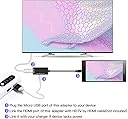
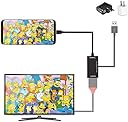
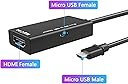
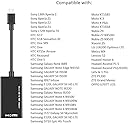
Package Includes: 1 x Micro USB MHL to HDMI Adapter Method of Application: 1. Plug the MHL cable to your devices directly 2. Plug the HDMI cable to your TV and switch the TV to HDMI channel 3. Plug the USB cable to power adapter (at lease 5V 1A) 4. Restart your devices after whole connection finished Features: 1.Enjoy High definition video of 1080P on a bigger screen. 2.Portable and use it at anytime and anywhere. 3.Charging your phone while using the adapter. 4.Plug and Play. Do not need to install any drivers. Compatible with: Samsung: Galaxy S5 (SM-G900A SM-G900D SM-G900FQ SM-G900K SM-G900L SM-G900M SM-G900P SM-G900R4 SM-G900R6 SM-G900S SM-G900T SM-G900T1 SM- G900V SM-G900W8 Galaxy S4 (GT-i9500 GT-i9505) Galaxy S3 (i9300 SCH-R530X) Galaxy S2 (i777 i9100 GT-I9100) Huawei: P6 S-L01 / P6 S-U06 / S10-231L / S10-231W / S7-951wd / S7-961w Please note: the MHL to HDMI cable can support YouTube / Office / Safari / Chrome / FaceTime, While NOT support NETFLIX / Video / DIRECTV / hulu. Service: If you want more details, Please kindly click the link http://www.mhltech.org/devices.aspx. We promise a 30-days Money Back Service and a 180-Day Limited Product Service.
B**N
Check compatibility, not sure if mine is defective.
I would say check compatibility before you buy in any way you can. I own a Sony Xperia Z tablet and a Sony Xperia Z3 Plus, this did not work for either, but should work for both by all my research. They both support MHL to HDMI and I recently bought a different one from another vendor and they both work perfectly with that. So either this purchase is defective or it doesn't support devices that it should based on specs provided from this device and specs from the phone/tablet.
B**.
Junk
Never got it to work.
N**
Does not work
Does not work
E**Y
Five Stars
No bizzare apps to download, no need for instructions, simply plug it into your phone charger and an HDMI cable to your TV
Trustpilot
3 weeks ago
1 day ago