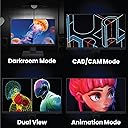
🎯 Elevate Your Creative Game with Color-Perfect Precision
The BenQ PD2705Q is a 27-inch QHD (2560x1440) IPS monitor designed for creative professionals seeking impeccable color accuracy. Factory-calibrated with Delta E ≤3 and covering 100% sRGB and Rec.709 gamuts, it supports HDR10 and Pantone validation for true-to-life visuals. Featuring USB-C with 65W power delivery, daisy chain connectivity, and a built-in KVM switch, it streamlines multi-device workflows and maximizes desk space. Ideal for graphic designers and video editors who demand precision and efficiency.


| ASIN | B086Z39HSP |
| Additional Features | Anti Glare Screen |
| Aspect Ratio | 16:9 |
| Best Sellers Rank | #7,725 in Electronics ( See Top 100 in Electronics ) #420 in Computer Monitors |
| Brand | BenQ |
| Brightness | 250 nits |
| Color | Grey |
| Color Gamut | 100 |
| Compatible Devices | Laptops, Desktops |
| Connectivity Technology | DisplayPort, HDMI, USB Type C 65W |
| Contrast Ratio | 1000:1 |
| Customer Reviews | 4.5 out of 5 stars 193 Reviews |
| Display Resolution Maximum | 2560 x 1440 pixels |
| Display Technology | LCD |
| Display Type | LCD |
| Global Trade Identification Number | 00840046042479 |
| Hardware Connectivity | USB Type C |
| Image Contrast Ratio | 1000:1 |
| Included Components | USB 3.3 Port,USB-C Port,USB-B Port,DP 1.4,DP Out,HDMI 2.0 |
| Item Dimensions D x W x H | 19"D x 26.5"W x 9"H |
| Item Weight | 18.7 pounds |
| Manufacturer | BenQ |
| Model Name | PD2705Q |
| Model Number | PD2705Q |
| Mounting Type | 100x100 mm |
| Native Resolution | 2560x1440 |
| Number of Component Outputs | 1 |
| Picture Quality Enhancement Technology | AQCOLOR Technology, Brightness Intelligence (B.I.) |
| Power Consumption | 65 watts |
| Refresh Rate | 60 hertz |
| Resolution | QHD Wide 1440p |
| Response Time | 5 milliseconds |
| Screen Finish | Matte |
| Screen Size | 27 inches |
| Screen Surface Description | Matte |
| Shape | Rectangular |
| Specific Uses For Product | Photo Video Editing |
| Total Number of HDMI Ports | 1 |
| Total USB 2.0 Ports | 1 |
| Total USB 3.0 Ports | 1 |
| Total Usb Ports | 3 |
| UPC | 840046042479 |
| Unit Count | 1 Count |
| Viewing Angle | 178 degrees |
| Voltage | 240 volts |
| Warranty Description | 3 year |
| Warranty Type | 3 Years Limited Warranty |
M**M
One Fantastic Monitor
What can I say, this monitor is a beauty. I tried a 4K screen because many people rave about it and because 4K is better if you have the monitor fairly close to you, but after one entire year, I simply could NOT get used to the 4K screen because the font is just too darn small and fine. Even after increasing the font manually in windows, something was just not right. I got rid of my 4K screen and did a lot of research and decided to buy this 2K screen. It is much much better than a 4K for my professional photography requirements. Fantastic rich colors and everything is so crisp that you can’t tell that is not a 4K screen.
J**R
The best MacBook desktop monitor
Great monitor for the price. Colors are accurate and it works perfectly with my MacBook Pro right out of the box. The 27-inch size is perfect, and it feels professional without being overpriced. Highly recommend.
R**N
Benq rocks
Excellent color, sharpness and brightness. A must-have for a video editor or graphic designer who requires excellent color accuracy. Reliable
A**R
Very good quality and super easy to set up.
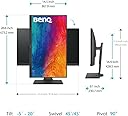
ChatGPT actually recommended this monitor to me. I have an iMac and I just wanted a second monitor that would work well with it and wouldn’t require a lot of set up. It is of incredible quality, very sturdy. It adjust up and down and left to right. I’m glad I made the purchase highly recommend.
J**N
Great, with one flaw
I've used my BenQ PD2700Q for around four years and have loved it from everything from gaming to graphic work. I was in the market to add another monitor to create a dual-screen setup so naturally went back to BenQ to see what they offered. I could have purchased another of the same monitor for 100 dollars less than this one but was interested in some of the newer features and thinner bezel. So far this monitor has been great. Crisp detail, with great color accuracy. The ONLY downside is the vignette on the left and right, which slightly dims the edges. @BenQ if you're reading this and it's not normal, please let me know. I'm ASSUMING this is not a defect since another purchaser had mentioned it, similar to light bleed on IPS as being inherently part of the tech. Either way, since 99 percent of my work doesn't touch the edges. That's usually set aside for UI, etc, so it hasn't been a huge issue for me. This monitor would be a 5/5 if it had as uniform a picture as my PD2700Q.
J**N
Excellent Monitor for Editing
I use this as a second monitor for my 2019 iMac 5K. The colors are near perfect for photo and video editing and the image is clean. The factory calibration was perfect and my media looks amazing on the screen. Watching HDR YouTube and AppleTV+ content looks phenomenal. The only downside to this monitor is it's half the brightness of the iMac on full blast. I edit in a darkened room so it's less of an issue for me, but it might be a turn off if you plan to use it in a bright environment. Bonus: It came with plenty of cables that should connect to just about anything.
M**�
Muy bueno
Muy bueno el monitor excelente compra
A**R
Not for Mac Mini
BenQ likes to claim that this monitor is perfect for a Mac Mini. I will tell you that it is not. I was hooked up directly via USB-C to my Mac Mini M2 Pro, ready for a beautiful picture, but was instead greeted by something that looked like my G5 Mac and Acer combo from 2007. This is not hyperbole...it looked dim, fuzzy, and dull...the opposite of alive. I am somebody who never has the brightness of a screen all the way up, but with the brightness of this BenQ screen max'd out, it was still really dark. Here's the kicker...I contacted BenQ support and uploaded a screenshot, expecting them to affirm what I was saying to them. The person told me that's how it was supposed to look. So I guess the lesson here is that saying your monitor works perfectly with a Mac Mini doesn't actually mean that it does...unless you'd like a dim, dull picture for your brand new Mac computer.
S**A
Monitor for professionals
The monitor offers accurate colors with enhanced visibility of blacks when watching content, and I’m impressed with its adjustable design and variety of connectivity options. However, it can be a bit wobbly on the desk, especially if you’re using a pen display on the same surface, as I am.
A**R
فيه ملاحظات لكن بمشيها بسبب سعرها وجودتها
الملاحظات الديزي تشين مايشتغل حاولت اكثر من مره باكثر من سلك عندي macbook pro m1max الالوان قريبه مره للماك بس فيه فرق بالذات لو انت مايل شوي عن الشاشه يكون الفرق والاضاءة كبير لدرجة ياثر على التلوين Light bleed قوي مره وياثر على التفرج على الافلام السماعات سيئة ولايمكن الاعتماد عليها لكن حلو انه فيه سماعه الايجابيات السعر خورافي مقارنه بالجودة الستاند ممتاز جداً ومريح ورفيع وتخليه طول وعرض بسهوله جودة الصورة من ناحية دقة ومن ناحية الوان عدد المنافذ يخدم بشكل وتقدر تشبك كثير USB A
N**E
Muy buen monitor para edición
Muy buen monitor para edición (Final Cut X). El problema es que con equipos Mac, el brillo del monitor no se puede graduar, las teclas de brillo no funcionan. De ahí en fuera, muy recomendable. Buena relación valor-precio.
S**M
THE BEST MONITOR FOR GRAPHIC DESIGN, VIDEO and EVERYTHING IN BETWEEN.
My design firm has been using Dell monitors for over 15 years and my personal station is Dual 43 inch Dell 4k monitors with the resolution of 2560x1440 resolution and sit about 3 feet away. I have searched and tested several monitors including Benq 4k 32" in hopes to match the sharpness and colour rendition to the Dells... We design and produce all types of media content. Web development, Branding, Video Production and all the other things in between. Moving forward, Dell's are great, but the colour rendition of Benq is even better "in my experience/opinion". If you are looking for colour accuracy monitors for professional work, look no further. I was a bit hesitant on ordering this model PD2705Q as I thought going from 43" to 27" with the same resolution will take some time to adjust... Well, I have adjusted right away. It's a perfect transition from 43 to 27 "2560x1440" I have used Benq's 32 inch PD3200U "no USB-C" and found the letters and OS interface was too small, causing eye strain. I have tried to use 2560 x 1440 on the 4k but the results were not satisfactory as the 4k monitor seems to be optimized for 4k resolution for Benq's. If you want a 32" monitor and need 4k resolution and do not need USB-C then the PD3200U is a great choice. I was searching for a USB-C 32inch 2k but could not find it on Amazon. Only 4k 32" USB-C is available... The price for a 4k 32inch with USB-C is ... $2,599.99. So I decided to try out the 2k USB-C PD2705Q for $469.98 The PD2705Q is PERFECT. Price, Size, Weight and Excellent colour rendition. It took me 2mins to match this screen with my Mac Air M1 screen, both in colour and brightness. Setting: Benq = M-book + Brightness at 65 Mac Air M1 = 1 step down from full brightness "near-perfect match in brightness and colour" I hope this info makes sense to you and will help you in choosing a monitor for your work and MAC AIR M1 monitor search. I LOVE THIS MONITOR, and I am certain you will too. Don't buy the higher-priced items, get this one. Just buy it! Oh, by the way, The USB-C cable that comes with Mac Air M1 does not work with this monitor for some odd reason? No worries, the monitor comes equipped with a USB-C cable that is black and works perfectly!
C**N
Buen producto
Excelente producto aunque batallo un poco con la luminosidad ya que en ambientes con mucha luz tiende a perderse. Pero si lo vas a usar en interior unicamente es un excelente monitor.
Trustpilot
1 month ago
5 days ago