🔗 Bridge Your Tech Gap in Full HD Brilliance
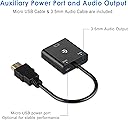
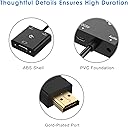
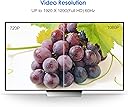
The Rankie 1080P Active HDTV HDMI to VGA Adapter is a sleek, portable converter designed to connect HDMI devices to VGA monitors or projectors. Supporting up to 1920x1080 resolution, it features an active IC chip for enhanced compatibility and gold-plated connectors for superior signal quality. Powered via included Micro-USB cable, it ensures stable performance even with low-power devices like MacBook Pro Retina displays, making it an essential tool for professionals seeking seamless connectivity across diverse tech setups.
| ASIN | B00ZMV7RL2 |
| Best Sellers Rank | #192 in HDMI-to-VGA Adapters |
| Brand | Rankie |
| Color | Black |
| Compatible Devices | Monitor, PC, Projector |
| Connector Type | HDMI, VGA |
| Customer Reviews | 4.5 out of 5 stars 35,356 Reviews |
| Finish | Hdmi,Projector |
| Global Trade Identification Number | 00810298028927 |
| Input Voltage | 5 Volts |
| Item Dimensions | 8.66 x 1.77 x 0.59 inches |
| Item Weight | 0.1 Pounds |
| Item dimensions L x W x H | 8.66 x 1.77 x 0.59 inches |
| Manufacturer | Rankie |
| Mfr Part Number | H001 |
| Model Number | R-1150- |
| Number of Items | 1 |
| Number of Ports | 2 |
| Package Quantity | 1 |
| Power Plug Type | No Plug |
| Specific Uses For Product | Monitor,Projector,Tv |
| UPC | 810298028927 |
| Unit Count | 1.0 Count |
S**J
This EXCELLENT unit has worked flawlessly every time and is a real bargain too!
If you give PowerPoint or other presentations and your laptop does not have a VGA output, you cannot be too careful in being prepared. You know what I am saying - your speedy new laptop doesn't have VGA (like most now, it has only HDMI). You arrive at the room, and there is that older style VGA hookup and no HDMI! Your heart sinks as you begin to think through how to give your talk with NO slides. This unit has been FANTASTIC in every such situation for me! I frequently speak and teach, usually with PowerPoint slides. My new laptop has HDMI video only - no VGA - but I find many places still use VGA for their ceiling-mounted projectors. I have used this adapter several times (maybe a dozen) and every time, the video output appears perfectly on screen. I feel completely confident with it! I was even more impressed recently when I tried a friend's Belkin branded unit and the VGA showed only the right half of every slide! I figured it was the projector, but the minute I changed his adapter out for this one, the picture was perfect and as intended. Boy, was I impressed that my no-name adapter worked where the Belkin adapter had the picture all screwed up! After I finished my talk, I ordered him the same unit as a gift. He reported it works perfectly for him as well. I have NO hesitation recommending this unit. It works perfectly as described and takes very little room in my laptop bag. In short, this product simply provides added security to any presenter who wants to avoid a last-minute PowerPoint or other presentation hookup problem! P.S. Mine has held up just fine through many uses. Other reviewers said theirs "fell apart" but looking at the way this is made, I can't even figure out how that would be possible. If mine comes apart also, I will come back and update this review.
G**W
Works Great!
Awesome device! This worked perfectly for what I needed it for. I wanted to use one of my older ROKU devices to stream online videos to an older projector in our Sunday School Class. I simply plugged the HDMI cable into the ROKU which transports both the video and the audio from the ROKU. The VGA output connects easily to one of the two male ends of a VGA computer video/monitor cable. Then, there is a 3.5 mm female jack on the adapter that I plugged my analog computer speakers into and I'm done! This allowed me to use a great working older ROKU on a great working projector that did not have an HDMI input! It saved me a ton of money, and now I don't have to lug my laptop in every week or leave it there subject to someone "borrowing" it. Now the setup can stay intact and anyone there in my absence can activate the device and play back our streaming videos the same as if they were at home. Top quality, works great!
C**0
Good thing in a small package at a great price!
Pros: Small size Powered by HDMI cable Audio output Cons: Does not automatically resize (only passthrough) I'm planning to buy an inexpensive projector for my music room but since I already have an old Sharp projector, I decided to use it until the lamp quits. Being an old projector, it doesn't have an HDMI (or DVI) input so I bought this port adapter so it would work. At first, the Sharp showed me a (horizontally) split screen and then I remembered that the projector can't take a 1080p input. Since this adapter will pass through whatever resolution the source has, I had to change the output from my Android TV box to 720p and then it worked! Yay!! Although the adapter has a micro usb power connection (it comes with a short hdmi to micro hdmi cord), it will take power from the HDMI cable. It also has a 3.5mm mini audio output which also comes with the jack. While there is no manual, it's pretty much self-explanatory how to use it (no two plugs are the same so they can only go in one way). All in all, in my opinion, it comes with everything you should need to get up and running in less than 5 minutes and most importantly, it works flawlessly!
D**K
Just Works and Fits the Need...
It is what it is -- and so far solid. Will update the post if any issues. The short cable and separate connectors are a plus in terms of flexibility with installations. I have it connected to laptop with VGA cable and tied to 27" monitor via HDMI. From my experience switching multiple devices connected to a single monitor via the monitor's input control is not only troublesome based on the monitor's auto-sensing features but also screwed up one of my previous monitor's signal sensor (makes sense since monitor manufacturers don't expect users to switch sources 10x times per day. I am using a Fosmon HD8024 2x1 HDMI switch and have used many of the same unit for client installations. UPDATE: Too bad as ended up that this product does not maintain the HDMI signal 100% of the time -- meaning that if you are using a switch box as I was, when switching to the device (in my case a ThinkPad) attached to this interface cable, the switch/monitor don't recognize or "see" - signal. I thought I could trick it by using the audio connection cables (two options -- analog -- mini), but no dice. Nothing. So changed the rating to 4 stars because if you set it up as a real-time, always-on, connection it appears to work well. Important to know depending on your specific situation.
R**R
Works well for PS4(@720p) to old monitor
I just had an old led 19inch SyncMaster Samsung monitor and wanted to hook it up with both my laptop and PS4. What i did was had only one VGA port. So i had also bought another VGA 2 port switch that had held BOTH my laptop (Macbook air 2015) and my PS4. I recently just bumped up screen size to an old 20inch Dell monitor (Got cheap from NExtdoor app: Dell E207WFP) which has a DVI and VGA outlet. I had tried the moved both 2port use to this Dell which worked still both with the ports. I then had let my brother use the old monitor and the HDMI port adapter. Tried to get a DVI-d to hdmi cable to work with another purchase for this new monitor, tested and it had failed me. AM NOW BUYING ME A SECOND Hdmi Rankie VGa adapter. Sorry for long review, just had to give my input in these reviews because I think it valuable to other PS4 and old monitor users. In all honesty for this review, will have to say this adapter is very valuable/useful and will encourage others if in doubt or need help in what to buy. Note!!! : most VGA or DVI cables will NOT support audio transmission. :) headphones do trick if you are in such predicament.
A**N
Worked Well for My Requirements
I had an old VGA monitor I wanted to use as an extra display for a home security system The camera system had only HDMI outputs, and I figured I would try this product out as a way to avoid buying a new display. === The Good Stuff === * It worked. * The converter has an input for external power, and ships with a USB cable, although not a power supply. I didn't need this, as the converter took its power from the HDMI source. * The video is more than acceptable for my needs. Not sure if I got true 1080p or not, but for a security cam monitor, I really didn't care. All of the auto-sizing built into HDMI worked just fine with the converter-I never had to touch any video settings. === The Not-So-Good Stuff === * If you are the kind of person that likes to read the instructions before plugging something in, forget it. There are none. Not a big deal- the setup if obvious, but may scare off some technophobes. === Summary === I don't think I would rely on it for high-quality video, but then again, if you are really worried about video quality, you are probably not trying to jerry-rig a VGA monitor into the HDMI system in the first place. It has worked for a month or so now with no issues.
M**E
Wonderful solution to my problem, but ...
I recently bought a Raspberry Pi computer and needed a method to share video between it and my Samsung laptop (which has both VGA and HDMI output) to my Dell monitor, which has only VGA input. I also wanted to combine this Rankie adapter with a keyboard, mouse, and VGA video (KVM) switch to make it easy to move from one computer to another. This converter works great plugged into the Raspberry Pi and cabled to the KVM without need for the USB power (it's currently unplugged) and it provides high (1920 x 1080) resolution display to the VGA monitor. Out of curiosity, however, I then tried it with the Samsung HDMI output. Working directly from the Samsung to the monitor, it functions fine and again provides 1920 x 1080 resolution. Curiously however, it will not function from the laptop through with the KVM switch even when the USB power is applied. I also tried it combined with a 3 input to 1 output HDMI switch that bypassed the KVM also without success (the laptop functioned but the Raspberry Pi did not). By the way, I also bought the VicTseng VS1-VC38BVT-VD video adapter, and it works well with the laptop but won't work with any cabling or switch combination on the Raspberry Pi. All-in-all the Rankie works perfectly for what I originally intended and deserves 5 stars, but YMMV depending on your setup.
H**U
Good and useful product
The product is ok but the packaging was not.
V**M
Worth It
Good cable
M**O
SOLUCIONADO PROBLEMA CON WINDOWS 10 👍
📝 DESCRIPCIÓN Adaptador para salidas de video HDMI a entrada de vídeo VGA 🧾ESPECIFICACIONES - Medidas: 22,1 x 4,57 x 1,52 cm - Entrada Vídeo: HDMI - Salida Vídeo: VGA - Entrada de Audio: Sí - Entrada alimentación: Micro-USB - Memoria RAM 1 GB - Soporte Resolución: Hasta 1920x1080 📦 CONTENIDO - 1 Adaptador HDMI a VGA - 1 Cable Jack audio 3.5mm - 1 Cable USB-A a micro USB 💶 PRECIO - 23 de Octubre de 2020: 8,97€ ✳️ USOS * De portátil a proyector VGA * De salida de PS4/XBOX a monitor VGA * De Pc con salida HMDI a monitor VGA 🟢 PROS * Económico * Ligero * Buen funcionamiento * Viene con los cables de audio y alimentación * Fácil y rápido de conectar * Buena resolución * Entrada de audio 🔴CONTRAS * No es reversible. Sólo funciona HDMI a VGA. NO FUNCIONA VGA a HDMI * Viene sin manual de instrucciones o de usuario. Nada de nada * Cable alimentación micro-USB un poco corto ⚠️ RECOMENDACIÓN Hay mucha gente que sufre los mismos problemas, para ordenador/portátil con Windows 10, que no consigue duplicar la pantalla. Yo también tuve estos problemas y al final conseguí que me funcionase de una manera repetida y fiable. Para sacar el vídeo desde un sistema operativo Windows 10 sigo el siguiente procedimiento: 1 - Activo el duplicado de la pantalla. En mi portátil HP es la tecla F4 sin pulsar la tecla FN. En cada portátil puede variar. La tecla de salida de vídeo suele estar en las F1...F12 con un símbolo cuadrado, con una raya a cada lado. 2 - Una vez activado el duplicado de pantalla, CONECTAMOS el adaptador HDMI a la salida de vídeo. NUNCA lo conecto antes de hacer el duplicado, ya que de esa manera no me lo reconoce. 8️⃣ VALORACIÓN Adaptador de HDMI a VGA con buen funcionamiento y buena resolución. En mi caso, no he necesitado usar el cable de alimentación micro USB, sólo conectar el cable HDMI y el VGA y ya me queda funcionando. Este dispositivo viene con una entrada de audio, para conectarlo a la salida jack de tu portátil y poder enviar por HDMI el sonido. En mi caso, no conseguí que me funcionase el audio. Sólo lo probé en un monitor y no sé si es cosa de ese monitor. Si es tu caso, el audio se puede sacar por jack de audio a un altavoz o también puedo dejar el audio puesto en el portátil En mi caso, no necesité conectar el cable de alimentación micro USB, pero es posible que en algún dispositivo, como una consola, sea necesario el usar la alimentación auxiliar. El cable es un poco corto y cuando lo quise usar en el portátil, se me quedaba un poco corto, ya que la salida HDMI estaba del lado contrario a los USB. Este dispositivo no es reversible, sólo puedes conseguir pasar vídeo de una salida HDMI a una entrada VGA, NO al revés, para eso existen otros adaptadores. ✅ CONCLUSIÓN Un dispositivo con una relación calidad/precio de lo mejor que hay por Amazon, que funciona a la perfección, con una calidad aceptable y ligero, por si lo necesitas llevar en una bolsa de portátil. 👍 RECOMENDABLE. ✳️ Espero que mi comentario ✍️ te haya podido servir de ayuda 😃
G**L
Nadaje się do PS4
Mam stary projektor ze złączem VGA. Z powodzeniem podłączyłem konsolę przy użyciu adaptera.
V**2
It does the job.
Only 2 weeks on my hands but im happy with the adapter.
N**S
Adaptador completo y funcional a buen precio.
Es un producto muy bueno y completo para el precio que tiene. Te incluye el cable auxiliar como salida de audio, así como un cable micro USB; ideales para cada situación en la que tengas que hacer uso de este periférico. De buenas a primeras se nota que es un adaptador resistente y con materiales de calidad muy duraderos. Los cables y las uniones están bien construidas y no parece haber riesgo de cables trozados. Los plásticos también son duros y las conexiones en el adaptador también están adecuadamente implementadas, la localización de cada entrada no se me hizo incomoda y todo funciono sin obstrucciones, ademas el cable VGA se fija muy bien en las muescas para los tornillos y una vez fijo ya no se mueve. Ademas es importante mencionar que al momento de usar el cable no hay ningún tipo de retraso o perdida de información (al menos yo no percibí fallas o retrasos evidentes), transmite la calidad de imagen sin problemas a la par que el ordenador desde donde sale la imagen, todo se mueve de manera fluida y correcta. En cuanto a su función se desempeña sin problemas. Sin duda es un adaptador competente para darle una segunda oportunidad a tus cables VGA y que estos puedan transmitir información con mas potencia y resolución a tu monitor u proyector. Es un buen precio y ya te incluye todo para que puedas usarlo justo después de sacarlo del empaque. Recomendado.
Trustpilot
2 weeks ago
1 month ago