Desertcart purchases this item on your behalf and handles shipping, customs, and support to Senegal.
🚀 Upgrade your storage game with speed and style!
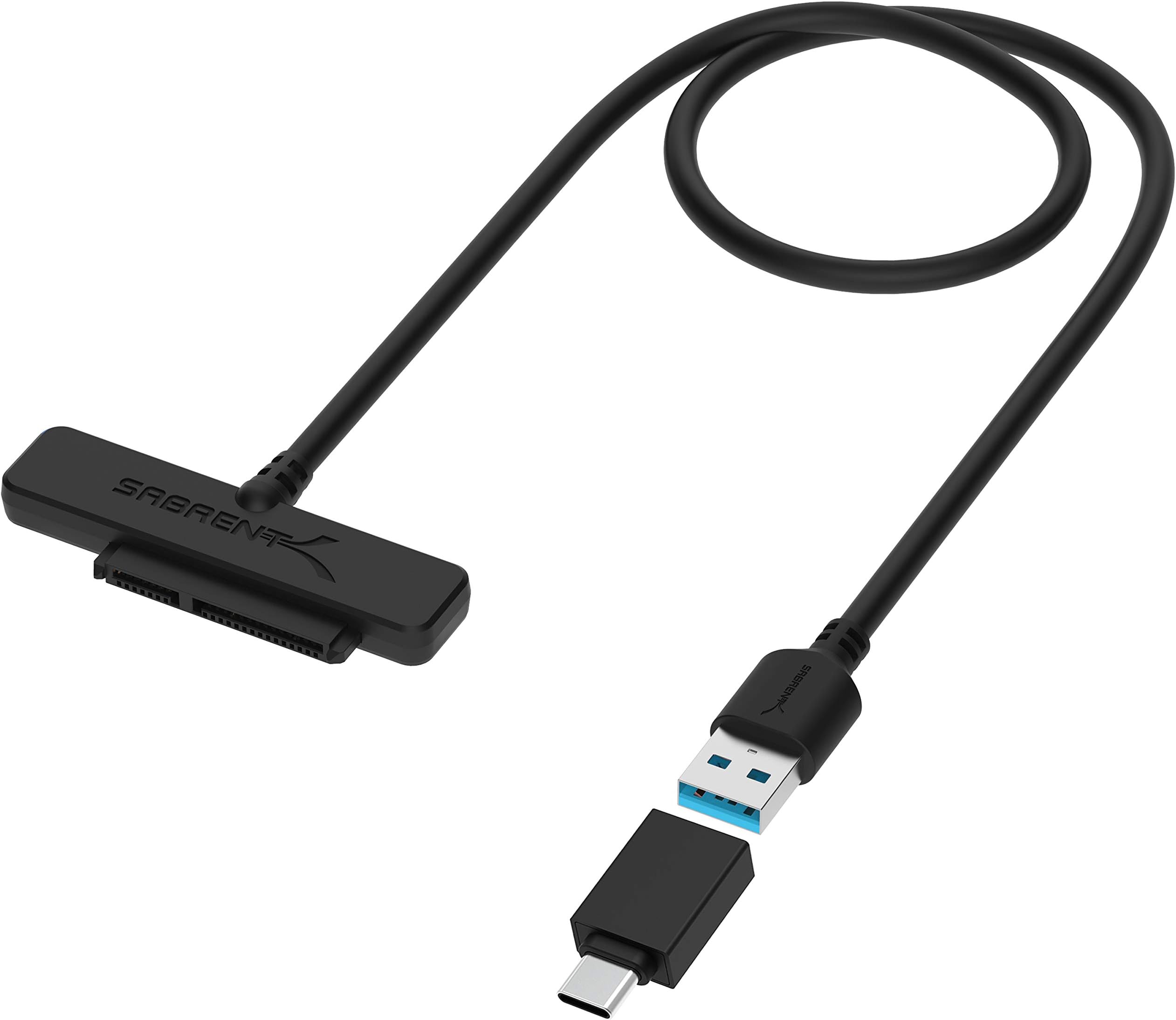
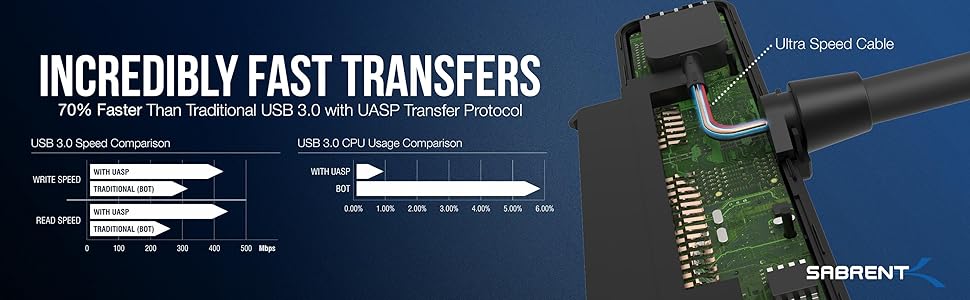
The SABRENT USB 3.1 to 2.5in SATA SSD/Hard Drive Adapter Cable (EC-SS31) delivers full SATA III 6Gbps speeds over USB 3.1 Type-A, includes a USB-C adapter for broad compatibility, and features a tool-free, hot-swappable design with LED indicators—perfect for professionals seeking fast, reliable, and portable data access.


| ASIN | B017NIDXF0 |
| Best Sellers Rank | #43 in SATA Cables #157 in Computer Hard Drive Accessories |
| Brand | SABRENT |
| Built-In Media | User Manual |
| Color | Black |
| Compatible Devices | Laptops, Tablets, Desktops, External Hard Drives, Docking Stations |
| Connector Type | USB Type A |
| Current Rating | 3.1 A |
| Customer Reviews | 4.6 out of 5 stars 4,913 Reviews |
| Finish | Chrome |
| Global Trade Identification Number | 00819921012784 |
| Item Dimensions | 2.76 x 0.24 x 0.71 inches |
| Item Weight | 1 ounces |
| Item dimensions L x W x H | 2.76 x 0.24 x 0.71 inches |
| Manufacturer | SABRENT |
| Mfr Part Number | EC-SS31 |
| Model Number | EC-SS31 |
| Nominal Power | 4.5 watts |
| Number of Items | 1 |
| Number of Ports | 1 |
| Package Quantity | 1 |
| Power Plug Type | No Plug |
| Specific Uses For Product | no |
| UPC | 819921012784 |
| Unit Count | 1 Count |
| Warranty Description | 1 year limited. 2 years with manufacturer registration. |
| Warranty Type | Limited |
G**C
Like the perfect toaster, it just works — flawlessly
I bought the Sabrent EC-SS31 1.5" SATA hard drive/SSD to USB 3.1 adapter to clone the internal 128GB SATA SSDs on three Dell 9020M Optiplexes to new Samsung 860 EVO 1TB SSDs at work. The cable came with a USB-C adapter, which I did not use. The end of the year is always busy for our company. We find out if we can buy new toys, how much we get to spend, and push to get it all in before year-end for taxes. This year forced us from Windows 7 to Windows 10, but did not scream, "new computers". Instead the orders were "make what we have better and longer-lived". Wow. We put these boxes in service in December 2012. I had expected to replace them in 2017 but they've performed flawlessly. We maxed out the onboard RAM at the end of 2018. Now increasing storage was key to make this all work — unfortunately I had zero experience cloning drives. Oh, goody. After extensive research I decided to go with the Samsung 860 EVO 1-TB drives to replace the strained 128GB SSDs in the boxes. Reviews, spec tests, etc., all showed the 860 EVO to be superior in all respects regardless of size and 1-TB should give us ample head room for the next 5-7 years as actual data storage is served by a NAS. The userbenchmark.com site was invaluable for this. Having nailed that down the next step was how to connect the drive. The reviews I read here and elsewhere (including the site above) all indicated there were many makers of cabling, but Sabrent kept popping up over-and-over again as successful, no issues, well made, solid, dependable, etc. Shopping sowed pries all over the map, but the only maker that consistently performed well was Sabrent, regardless of price. That's why I elected Sabrent even though it was definitely not the cheapest. The last piece of the puzzle was the software. This was a real challenge, it seems everyone has their own favorite but they all had horror stories and "fixes" that mostly work — usually by hobbyists and gamers. Accronis was well thought of and available from Sabrent. Samsung also makes software specifically for this purpose that is free for use on their drives. That limits the reviews about Samsung's software, but what reviews existed were rock solid. Once I was done I had budgeted for the drives, the cable, the software as a purchase and three days of project time. I figured each machine would be down for anywhere from 3-8 hours. I was so wrong! The Dell's had 128GB Samsung SATA SSDs in them. The Sabrent cable hooked up perfectly. The free Samsung software was sophisticated, polished, easy, flawless, smooth, and fast. I mean really fast. The first box, which I expected to take 4-5 hours including unattended down time just doing the transfer, took 30-minutes including physically swapping the drives after the transfer was done. The transfer itself took under 10-minutes. The only reason that worked was because the Sabrent cable performed flawlessly.
A**R
Quality product, recommended without reservation
Everything about this seems a quality product. Carefully packaged in a thin box with foam cutout so the adapter and the cable are securely tucked into it. Instructions pamphlet. One of the few USB 3.1 adapters I saw listed (10 Gpbs), most are USB 3.0 (5-6 Gbps). Works with both 2.5" SATA SSD and spinning hard drives. Both USB-A and USB-C connections supported. Worked perfectly on my Windows 11 and Linux (Debian) systems.
J**A
Does support SMART data, and USB-C adapter works fine
One reviewer of this adapter said that it did not allow SMART data to be viewed. This worried me, so now that I have one, I want to report for everyone else that this was not the case for me. I was able to view SMART data using CrystalDiskInfo, GSmartControl, and Speccy (Sabrent's USB 3.0 version, EC-SSHD, also supports SMART data, incidentally). If your preferred utility does not report SMART data for a particular drive, try a different one. GSmartControl is sometimes unable to report SMART data for a drive connected through an adapter while CrystalDiskInfo and Speccy have always been able to in my experience. I like GSmartControl because it also reports the SMART Error Log, which the other two don't as far as I can tell, and it can run self tests on the connected drive. Another reviewer, DScott, said that data transfer rates over the included USB-C adapter were extremely low. This, too, was not the case for me. I tested the transfer rates for a low-end SSD using CrystalDiskMark, and the 1GB sequential transfer rates for both connections were roughly the same - between 463MB/s and 563MB/s Read and 409MB/s and 416MB/s Write. Running the tests a second time often produced better results for some reason. Strangely, two of my three USB-C tests reported much lower Write speeds of 169MB/s and 183MB/s, but these are still much faster than the 35MB/s reported by DScott. I assume these lower Write speeds had something to do with the SSD not being TRIMed, which would mean the data blocks CrystalDiskMark wrote to had to be cleared first. One of my USB-C tests produced a write speed of 409MB/s, and all three produced fast Read speeds (in fact, slightly faster than my USB 3 tests), so I know the adapter can transfer data that fast. The RND4K Q1T1 Write tests were the only ones that were always slower over USB-C than USB 3, being about 7.5MB/s vs about 40MB/s. Only for Writes, though. I don't know enough to conjecture whether or not this is the adapter's fault, or the fault of a driver or something. This adapter does not seem to support TRIM commands according to TRIMcheck. From what I have read, very few SATA to USB adapters do. The StarTech USB312SAT3CB reportedly does support TRIM (I do not have one and so I cannot confirm this), but I like the design of the Sabrent adapter better, and I rarely use these adapters with SSDs, so TRIM support is not high on my priorities. I have been very satisfied with both this adapter and Sabrent's USB 3.0 version (EC-SSHD). I like the low profile design, the elegant, easily visible activity light, and the long 23" cable. I used my old Sabrent EC-SSHD adapter to make a custom external drive by making a faux leather case that holds the drive and adapter and has a cutout in the corner for the activity light. I have never had a problem with either adapter (though I have had this USB 3.1 EC-SS31 model for only a few days, and so I have not used it much yet). By the way, the activity light is not positioned on the corner shown in the product photo. That must be an old design or something. With the top of the adapter (the side with the Sabrent logo) facing you and the cord pointing away from you, the light is on the right corner, not the left as shown in the photo. This was important to me because I wanted my case design's activity light cutout to be compatible with both adapter models. It is.
P**K
Works till it doesn't
I have owned a few of these now, great till it just stops.
S**H
Does the job and does it well
The cord works as intended and I do believe it's transferring at USB 3.0 speeds. Not manufacturer stated speeds but closer to real world test speeds. I connected a Samsung EVO 850 Pro to an Early 2011 Macbook Pro to clone as a new HD and it just worked. It took about 3.5hrs to clone a 250+ GB HD. Not bad, slightly lower than many other times I've seen but nothing overly amazing to write home about. Given the architecture of a macbook pro I'm not going to knock any stars off and blame the cord and manufacturer. No power was needed nor did I have any connection issues. Once the drive swap was completed, which was the main reason for buying this cord, it had no issues reading the 2.5" HDD that the SSD had replaced. Tried a few others I had laying around and all worked. Guess who's getting rid of all his thumb drives? This guy. I was also moving the device around to test the cords connection and could find no issue. Connections - I will note that I personally plan to put any SSD's that will connect to this in an enclosure. While there were no connection issues in moving the drive around a few times on my desk as stated above I did notice that because the full length of the adapter isn't resting against something high enough(a drive enclosure) to give it more support the drive can be wiggled around. The adapter is long enough for the length of most if not all standard 2.5" SSD's or HDD's but for long term use of this cord you might want to consider an enclosure. Cord Quality and Feel - As others have stated the build quality feels sturdy enough for what it is but for less than $20, free shipping I wasn't expecting a solid, unibody like all aluminum design that is the darling of current product design, awaiting it's place in some tech history museum. I was expecting a solidly built item and I believe that's what I've received. Zero complaints. I do wish the cord came in a 6' FT variation. Price - The price point feels very right for the quality of the cord.
D**E
Good product , great price !!
Works great and I love the led on it and its not big and bulky like the others .
C**E
Perfect for sata drives
Perfect for sata drives and love the usb c adapter
M**E
Saved $$$$ !
Worked perfectly! Saved my 55 year old marriage. Every day for over a year I heard my dear husband curse his aging computer for being so slow. We couldn't afford a new one and nothing he tried worked. I was ready to trade him in for a lap dog. I called my grandson... My personal computer consultant who lives 3 states away. He suggested changing from disc drive to solid state. BINGO! Problem solved. We used it once to copy our hard drive to a new solid state device on our 7 year old laptop. This saved us from buying a new computer. Well worth the money and if we ever need USB ssd connector we have it.
H**L
Excellent adapter! Will buy more of these and try other Sabrent products
This is a great little kit, especially because it comes with the USB-A to USB-C adapter, perfect for my laptop and other newer devices that don't have the larger USB-A ports. The cable and adapter worked perfectly with a full 10gbit link established for fast data transfer to my MacBook Pro.
T**Z
Great product
Does exactly what it is supposed to do. Nothing more to it. Worked straight away and has an indicator light when connected and flashes when transferring. Good value for more
U**E
Item received in good packaging.....thank you.
Good product and workable....thank you.
T**M
Utile, Rapide et Efficace !
Très heureux du produit, tout fonctionne parfaitement, le contact avec le fournisseur est rapide (pour demander une facture). les + : - transfert très rapide - Câble assez long - compatible mac/pc/linux - Très bonne qualité les - : Il n'y en a pas :) Conclusion : La construction du câble est vraiment de très belle facture avec un plastique moulé épais, les connecteurs sont solides. La partie SATA s'enfiche parfaitement sur un disque 2,5, le connecteur USB s'enfiche aussi sans jeu, ni dureté excessive.. Vous pourrez avec ce câble, connecter n'importe quel disque SATA 2,5 (SSD ou HDD), sur n'importe quel PC. Il sera reconnu (s'il est partitionné bien sûr) instantanément comme un disque supplémentaire. Pas besoin de soft ou d'outil supplémentaire. Je conseille vivement ! :)
M**K
Good option för connecting with USB to AtomX 500 gb SSD mini
Works just like expected
Trustpilot
1 month ago
1 month ago