

Desertcart purchases this item on your behalf and handles shipping, customs, and support to Senegal.
🎯 Elevate your creative edge with precision and comfort that professionals swear by!
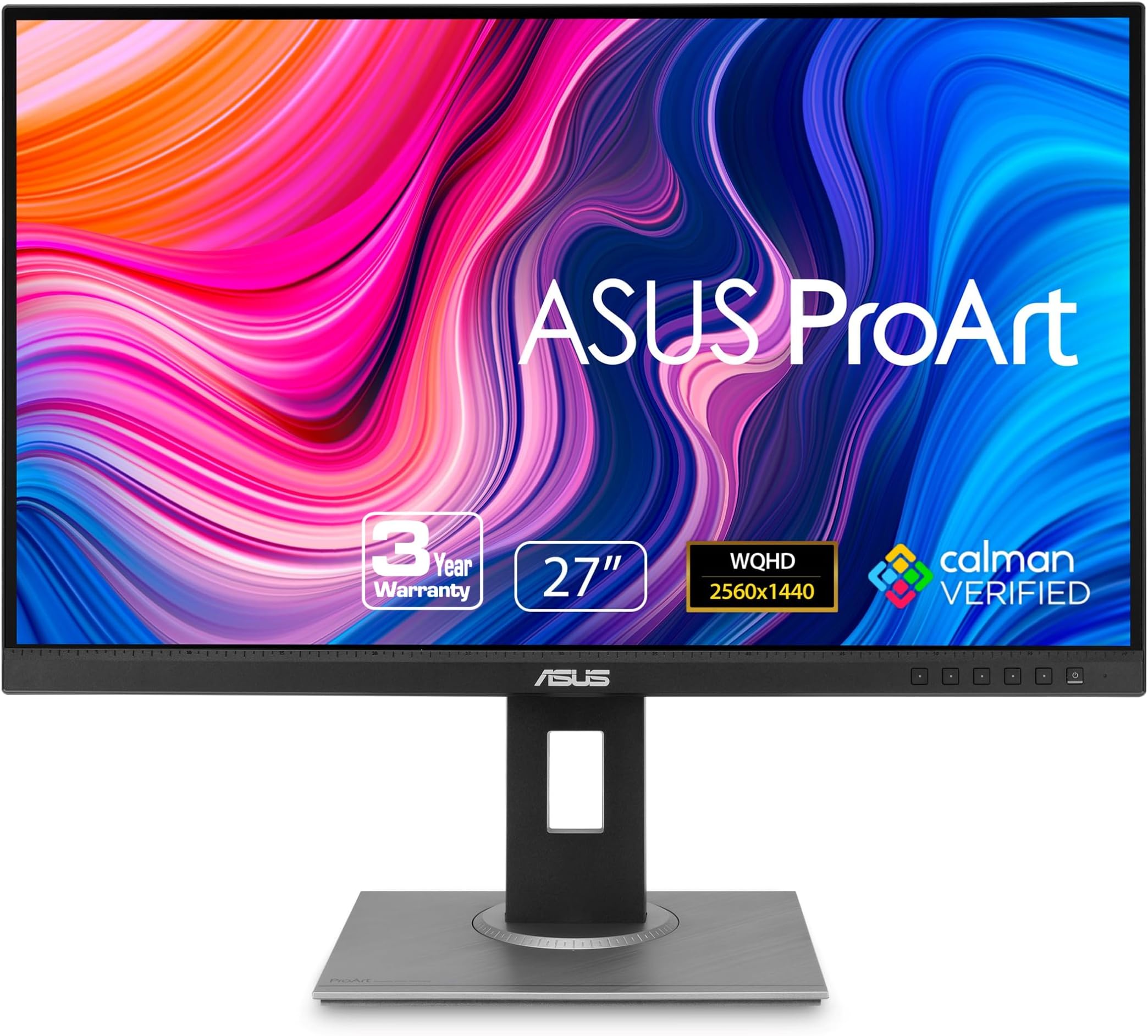
The ASUS ProArt PA278QV is a 27-inch professional-grade QHD monitor featuring Calman Verified color accuracy (Delta E < 2), 100% sRGB and Rec. 709 color gamut, and an IPS panel for consistent, vibrant visuals. It offers extensive connectivity including 4 USB 3.2 ports, HDMI, and DisplayPort, plus ergonomic adjustments and ASUS Eye Care technology to reduce eye fatigue. Perfect for photographers, video editors, and designers seeking true-to-life color and comfort during long workflows.


| ASIN | B088BC5HMM |
| Adaptive Sync | FreeSync |
| Additional Features | Blue Light Filter, Built-In Speakers, Flicker-Free, Height Adjustment, Pivot Adjustment |
| Aspect Ratio | 16:9 |
| Best Sellers Rank | #2,140 in Electronics ( See Top 100 in Electronics ) #80 in Computer Monitors |
| Brand | ASUS |
| Brightness | 350 candela_per_square_meter |
| Color | BLACK |
| Color Gamut | 100 |
| Compatible Devices | Laptop |
| Connectivity Technology | HDMI, 4x USB 3.2 Gen 1 Type-A, display port |
| Contrast Ratio | 100,000,000:1 |
| Customer Reviews | 4.6 out of 5 stars 3,073 Reviews |
| Display Resolution Maximum | 2560 x 1440 pixels |
| Display Technology | LCD, LED |
| Display Type | LCD |
| Hardware Connectivity | DisplayPort, HDMI, Mini-DisplayPort, USB 3.0 |
| Image Contrast Ratio | 100,000,000:1 |
| Included Components | Audio cable, Color pre-calibration report, DisplayPort cable, DisplayPort-to-miniDP cable, HDMI cable |
| Item Dimensions D x W x H | 15.04"D x 24.21"W x 8.9"H |
| Item Type Name | ASUS ProArt Display PA278QV 27” WQHD (2560 x 1440) Monitor, 100% sRGB/Rec. 709 ΔE < 2, IPS, DisplayPort HDMI DVI-D Mini DP, Calman Verified, Eye Care, Anti-glare, Tilt Pivot Swivel Height Adjustable |
| Item Weight | 17 pounds |
| Manufacturer | ASUS |
| Model Name | PA278QV |
| Model Number | PA278QV |
| Mounting Type | Wall Mount |
| Native Resolution | 2560x1440 |
| Number of Height Positions | 3 |
| Picture Quality Enhancement Technology | Yes |
| Pixel Pitch | 0.27 |
| Power Consumption | 12.5 watts |
| Refresh Rate | 75 hertz |
| Resolution | QHD Wide 1440p |
| Response Time | 5 milliseconds |
| Screen Finish | Matte |
| Screen Size | 27 inches |
| Screen Surface Description | Matte |
| Shape | Rectangular |
| Specific Uses For Product | Business, Gaming, Personal |
| Total Number of HDMI Ports | 1 |
| Total USB 3.0 Ports | 4 |
| Total Usb Ports | 4 |
| UPC | 192876575260 |
| Viewing Angle | 178 degrees |
| Voltage | 240 volts |
| Warranty Description | 5-year warranty (3 years + 2 years extension with online registration) |
| Warranty Type | 3 Years Fixed Warranty |
C**E
Vivid, high quality display
A review from over a year of owning this: I got this to do art and occasionally play games. Refresh rate is great, especially when gaming or editing 60fps videos. Screen is the perfect size for my desk and I love that I can extend it and use it when I’m standing. Color is excellent and I appreciate the ability to check real life dimensions from within the screen. I have no dead pixels and I’ve been using it for over a year with no issue. While the brightness is adjustable and can go pretty high, there’s a bit of screen burn-in (that fades given time) which is to be expected. I generally keep to the default sRGB and lower brightness to avoid this because it can mess with color appearances which isn’t ideal for art. The only major downside of this is that the speakers are really poor quality. I got some cheap, 20+ year old external speakers to plug in because it really was that bad and the cheap external speakers are significantly better. If you are editing videos with audio or like to listen to music while you work, you’ll need headphones or speakers. I’d almost rather this monitor didn’t come with built in speakers as it feels like such a waste for something so poor quality. But I suppose if you just need something to hear alerts or notification sounds, it could be just what you need. Overall, I’m a very happy digital artist with this monitor!
L**D
This monitor is for creatives
Overall, it's a super beautiful monitor, very impressive. It took me awhile to get it set up as I had initially plugged the HDMI cable into a DisplayPort adapter and couldn't access the 2560x1440p resolution because of that, but when I figured it out it looked amazing. I had mostly been looking for an accurate sRGB IPS monitor so I didn't look at the stand or other features that this monitor has. I was pleasantly surprised about how gear towards creatives this monitor was. On the back of the monitor and bottom of the stan there are degree measurements, so you know exactly what degree you are setting the monitor's tilt or horizontal viewing angle. The stand is tall enough for you to rotate it without reaching behind to do any adjustments, so your workflow is easy to adjust even while working. The monitor has on screen grids for rule of thirds, a ruler, and a scale for A4 and B5 paper. I was just ridiculously excited to learn these things, they're extremely helpful for someone in design/illustration. The ruler on the bezel of the monitor isn't as helpful, considering it isn't very visible with the screen backlighting it, but it was cute and I'm sure I'll use it eventually, so no marks against it for that. I ordered a used monitor, it was supposed to have visible blemishes but I can't see anything anywhere. Perfect condition, no scratches, just a beautiful monitor. It was missing a manual, the DisplayPort cable, the DisplayPort-to-miniDP cable, and the USB type B-to-A cable. Not a big deal considering the discount, but when Amazon says the used product may have some damage, it could also just have extra items missing. The display itself is beautiful, 1440p is a great midway for my 3070. The colors are very good and I like how easy it is to switch color modes or other settings. I have only two complaints for this monitor. The first is that the DCI-P3 color space setting is extremely green, though that might just be how that color space is because I've never seen it before. The second is that it is *bright*. I put my brightness down to 20 out of 100 just to save my eyes. Since this monitor is for people who will definitely be looking at the screen for a long time, I'd like to see it get even darker or be less bright in general. Overall, I am extremely happy with this monitor and I'm so glad I got it.
C**H
Great monitor, superb colors and brightness, decent gaming too!
In my (not-so-extensive) days of using monitors, it's hard to say I have come across a screen that is capable of not only such high levels of contrast, color accuracy and detail, but is also high brightness to boot (using my phone's lux meter, it says the monitor is 70% brighter than my 300-nit laptop screen, definitely need to verify this). Most monitors at this price range compromise at least one of these items. And best part is, even for casual gaming, it pretty great too! Input lag and ghosting aren't nearly as bad as you would expect on a non-gaming monitor, and it even compares very favourably with my laptop's 1ms 120Hz display. And then there's the stand; perfectly solid-feeling and fully adjustable with minimal effort. Rubber feet are sturdy and hold the display firmly in place, and single-handed adjustment is certainly an option as well. One thing to note is, out of the box the display will run in sRGB mode, meaning you won't have control of most of the aspects of the display immediately. You will need to switch to Rec.709 mode to gain access to the full features. The strongest suit where I foresee myself gaining the most from this monitor is productivity. It's an absolute productivity beast, the canvas is large and beautiful, and designers and developers alike will definitely appreciate the added real estate. Granted, it could certainly have done even better with 4K, but then again, it would be nowhere near this price point, now would it? Overall, I give this monitor my highest recommendation. At this price it is definitely gathering more competition, however this combination of quality of material and display output that one would come to expect from the ASUS ProART brand, I'd say this is the most solid value point in their entire lineup, and you should definitely consider picking one up for yourself!
M**Y
Great PC Monitor
I've been very happy with this Asus ProArt monitor. It's color production is downright beautiful and it has lots of options for adjustment. I really like how heavy the stand base is, so the screen is secure on a busy desktop. The USB hub feature may be my favorite...it added at least three USB ports to my work station, with no hassles or confusing setup required. Very easy.
R**L
Reliable and honest - just what I need from my monitor
This is my second Asus PA278QV with the 6-axis OSD controls. And I love it. If you properly calibrate these things, you can't see pixels close up. They may just be 109PPI but they punch above their weight class. Yes, I also have one Asus PA278QGV and while that does not have the 6-axis control in the OSD, as this one, I think the QV can create better contrast. I can get up to 1467:1 on the second generation QGV, but this QV has a depth that the new models lack. I also tried the Asus PA278CGRV and it was okay, but had a red tint that no Gains/Offset adjustments would take out and my paper white was not white. Tinted. So I sent that one back and ordered this one. I have a Mac Studio M1 and heavily use DxO as my main app, along with Pixelmator and other apps. The other QV is on my Mac Tower, and don't judge me. I have full use of LR4.2 and PS7.1 and don't have to pay monthly nor by the year. Mine Adobe apps are paid for. I wanted to get this on sale and have seen them around the $200 mark and for that price, a true WQHD is amazing. I would recommend this as a second monitor to anyone on a Mac system.
A**D
Great display for every day use.
I'm a book and magazine designer, and I needed a monitor for the Mac mini I just got to replace my iMac. I have a secondary display that I've been using, but its highest resolution is 1920x1080, so it doesn't give me much screen space when I work. I should say that I mostly work in InDesign, and don't do a lot of photo adjustment (typically any imagery has been touched up before it gets to me), and I do no video work, aside from watching videos online, and I'm not a gamer. The picture quality, color, brightness are great for me, and the price is right for a display with this level of resolution. Youtube, Hulu, Amazon, and Netflix, all look great. Love it. My only complaint is the speakers, oddly enough. I like to listen to podcasts and radio shows as I work, but don't always want to have headphones in (my wife tends to come up behind me and scare me half to death when I wear them). My old iMac had great speakers, the mini has one little speaker thats okay, but a bit tinny. The speakers on the display are almost painful to listen to. It's like a 1950's AM transistor radio. Plus, once you move over to the speakers, you lose all ability to control the volume with your keyboard. This is typical, but getting to the point where you can adjust the volume on the display takes working through the menu - 8 button clicks, that aren't very intuitive, before you can even turn the thing down or up. Otherwise a great display. If you're using it with a Mac mini, do yourself a favor and find a good quality USB-C to HDMI cable. I tried it first with Apple products (Thunderbolt 3 (USB-C) to Thunderbolt 2 adapter, then a Thunderbolt 2 cord to the mini-DVI on the back of the display). Didn't work - could have been a defective adapter, but the cord I ended up with was $11.99, as compared to about $70 for the Apple stuff, and works fine. Aside from the speakers - 5 stars.
G**N
Easy to set up and looks great.
This is my first 2K monitor, and I really like it. I cannot think of a bad thing to say. Right now I have the brightness set to 10%, and it looks great. I usually work in a dimly lit room. The blue light blocking is great. When I first tried it, I couldn't see anything happening. Then I looked over at my TV for a few minutes, and when I looked back at my Proart monitor, it looked yellowish. Perfect. I connected the Proart monitor to a fresh PC build with an ASUS motherboard and case, and it fired right up. I connected the monitor with a DisplayPort cable. The monitor is running at 60Hz. No flickering, dead pixels, or any flaws that I can see. I'm reviewing the PA278QV. Update 1: See picture which shows the lower-right corner of the monitor. A maximized window shows the extent of the drawing area. The monitor has a small physical bezel on the sides and top of about 1/16 of an inch. But, the LED panel also has a bezel of 1/4 inches on each side and about 1/16 inches on the top and bottom. This is unused space on the LED panel. My measurements show that the distance from corner to corner of the drawing area is exactly 27 inches. Update 2: This ASUS monitor came with 1 HDMI cable, and 1 USB cable. ASUS spec sheet shows that you might receive other cables, or no cables. This monitor supports: DisplayPort 1.2 and HDMI v1.4 Update 3: The monitor stand is nice. You can rotate from landscape to portrait and then get much better access to the ports on the back of the monitor. Update 4: If you order this monitor, plan to use a DisplayPort cable or a USB-C cable for it. Do not use an HDMI cable. When connected with HDMI, on startup and shutdown, the monitor will display for about 5-seconds a bright pure blue screen. It's pure blue at full brightness. It's the most annoying thing I've ever seen. DisplayPort does not do this. I've not tried a USB-C connection, but I've read that it also bypasses the blue screen.
J**E
Stunningly clear image quality and very adjustable color settings (27" WQHD 2560x1440 monitor
I do a lot of fractal art and photo editing as a hobby and occasionally for sale. My old monitor was several years old and to the point to turning green and dark so I went on the quest for a replacement. I eventually narrowed it down to two different models and after debating with myself for a couple of weeks, I bought this model. I am extremely pleased with it so far. (I have had it for 3 days now) One of the things that attracted me to this one is that it came with color calibration on some of the settings from the factory, which was great for me since I do not really understand the fine points of adjusting CYMK color nor do I really understand what the Rec.790 preset is for, but I do understand the rest and how tweakable most of them are. I have set up user mode1 for my digital art and my user 2 specifically for my fractal art. I love the way the scenery mode really brings my outdoor photography to life and also the ease of being able to tone the blue light emission, and so on. Considering that I was spending a lot of time every day tweaking the color as best I could on the old monitor with the Nvidia controller, not having to worry about it is like a whole new lease on life. :) Another thing I LOVE is the ability to sync the settings with the app that is running without having to worry about it. The app Sync works perfectly. I have settings for Photoshop and Lightroom, Topaz Studio, and so on. I have another fro apps like Chrome, Office, and creating with apps like Inkscape. Then there is the stand. It is very well constructed and for once I can actually have my monitor at the perfect height for me. I am short and for most other monitors I have owned my eye level is near the bottom. This actually lowers down to the perfect height for me. Yaaa! Overall, for my use, this monitor more than fills the bill. Now I need to educate myself a bit on the rest of the adjustments, but that is for another time. For now, I am just enjoying seeing all the detail on photos of my two very black cats. That is not an easy task. Thankfully my camera can do a decent job with them but I had no idea of how much so until now. Just WOW!
K**N
Great monitor!
I just want to start of by saying that I owned 2 of these monitors. Bought 1 from the Amazon Warehouse and the other New from Amazon. I'm an amateur photographer and was looking for a monitor that could provide accurate colours and also be used for occasional gaming. I do occasionally game but I'm very casual at best so I didn't need a high refresh rate monitor, just needed a good in between monitor. Monitor 1 - Used from Amazon Warehouse: I decided to take a gamble and buy a used monitor from Amazon Warehouse. The monitor worked fine, however, I was a little worried about the packaging and the condition that the monitor came in. First off, many of the contents in the box came scrunched up or were not packaged properly (see photo). Does this mean that Amazon doesn't check the quality of the products before shipping it back out? Secondly, the monitor itself had water stains on it. This was a huge concern for me since there might have been water damage (see photo). Lastly, the previous owner of the monitor completely messed up the factory calibration. For some reason there was a strong blue hue. It was as if the previous owner took the blue slider and maxed it out. After spending hours on calibrating the monitor, I finally got the colours that I was happy with, however, the condition that this monitor came in was concerning and not worth the price I paid. Especially since the description mentioned it would be Calman Calibrated, which it doesn't get recalibrated before getting shipped out again. I decided to return it and since I received some giftcards for my birthday, I decided to buy the monitor again but this time in brand new condition. Monitor 2 - Brand new from Amazon: Colours look fantastic right out of the box and everything was packaged correctly. There was also no damage to the box. This is a great monitor for an amateur or professional photographer. There is also a ton of calibration settings that you could use to ensure that you're getting the colours that you want. Final thoughts: Would I have bought this monitor if I didn't have giftcards? Probably not. It's a bit too expensive for me since I'm not at the professional level yet, but since I basically got it for half off, I have to say, that this is a beautiful monitor. 27 inches is the perfect size for editing, gaming or even office work. I didn't think there would be a huge difference in quality between 1080p and 1440p but I was wrong! I don't think I'd go back to 1080p after experiencing 1440p. The 75Hz refresh rate is also a nice touch.
A**A
Excelente monitor, sonido aceptable:)
Este monitor me pareció una muy buena opción ya que me dedico a la fotografía y al diseño gráfico, por ende, necesitaba una pantalla lo suficientemente grande y con buenos colores al momento de trabajar. Puntos a favor: * Tiene una fácil instalación realmente, no tiene mucha complicación el acomodar el monitor ni se requieren herramientas especiales. *En cuanto al diseño es un tamaño que aún puede utilizarse siendo un monitor plano ya que un poco más grande quizá sería buena idea optar por un monitor más bien curvo. Tiene una regla en la parte de abajo del marco de la pantalla lo cual se me hizo excelente para comparar tamaños, es práctico. Los materiales usados para recubrir la base y el monitor son de plástico pero no se sienten de baja calidad, por dentro de la base tiene una estructura metálica lo cual le da más firmeza y estabilidad. Que el monitor se pueda girar en vertical está excelente, no había tenido un monitor así. *Por el lado de los colores son un poco opacos comparados con un monitor BenQ BL2420PT, el cual también tiene un porcentaje al 100% de sRGB, pero cabe recalcar que el precio del ProArt es más bajo con más pulgadas de diferencia entonces creo que se compensa. También puedes recalibrarlo, aunque no lo recomiendo, es mejor optar por alguna de las configuraciones de color que vienen por defecto. *No refleja mucho las luces, atrás de mi silla tengo una luz intensa que se percibe poco, solo en situaciones en las que las escenas son muy oscuras en la pantalla. Puntos negativos: *El sonido claramente no es excelente, es aceptable, pero si quieres tener buen contraste en sonido es mejor buscar unas bocinas, yo trabajo con audífonos, pero veo videos y juego con las bocinas integradas, a veces cuando se sube el volumen a tope suena como si estuviera algo saturado, si eso te incomoda mucho y de verdad quieres un monitor que sea más para gaming con altavoces y no para trabajo te sugiero buscar otra opción ya que también está el punto de que este monitor es de 75 Hz, prácticamente poco apto para juegos shooter, pero funcional si así lo requieres. *Venía con un detalle en la parte de la base, como si lo hubieran picado con algo, no es seguro que todos los monitores vengan con algún defecto de este estilo, pero al leer varias reseñas es algo común, aunque no afecta en su funcionalidad para nada. Detalles sobre multimedia: Video: Ese es el volumen máximo y se aprecia un poco de lo que mencioné anteriormente del audio saturado. Foto 1: Tamaño de monitor en relación con un teclado Razer Blackwidow Elite e iluminación con luz alta. Foto 2: Ilustrativo a la regla que posee. Foto 3: El detalle que tiene la base del monitor. Foto 4: Tomada directamente a la pantalla. Gracias por su atención!:)
M**I
The best LED monitor ever!
In short, if I didn't read the "LED" on the box, I would believe straight this is an OLED screen! Yeah it's that good as everyone said, the colors are rich and has a good range, feels natural at the same time (not that over saturated). Build quality is top (we're talking about ASUS) it's easy to setup and no need to tune its colors (but you can though). Worthy👌🏻
S**N
What a masterpiece for people in creative field and for occassional gaming.
I never thought I will be spending so much on a monitor. But I took the leap of faith and it has turned out to be one of the best decisions. My preference for this monitor was mainly due to the color accuracy because I am professionally a Digital Product Designer. Color accurate monitors are usually on the costlier side and this model is one of the cheapest and best in this requirement. 1) The monitor is huge with thin bezels. You get physical grid lines below as well as stand rotator grid lines too. Pretty unique. 2) It is extremely flexible physically. You can - adjust the height between 0 ~ 150 mm - swivel sideways between +90° ~ -90° - pivot into vertical or horizontal view between +90° ~ -90° - tilt front and back between +35° ~ -5° 3) Color accuracy is perfect, and so is brightness. 4) Getting a 75 Hz refresh rate in an IPS panel is a boon for occasional gaming. 5) Video clarity is phenomenal with 4K & 2K. Viewing angles are damn good too. 6) Only ignorable factor is the monitor's inbuilt sound which is decent but who depends on this for sound when the majority of the people have an external sound system. 7) They provide a variety of cables and power cords. I got 3 cables and 3 power cords whichever suits your purpose. Nut only installation manual was missing. Installation is pretty easy and self-explanatory so didn't need it but you can check youtube videos if yours is missing too. Having used it for the past 4 days and it is a top-class buy for creators also all-around it's pretty good. If you have the requirement and can splash some extra bucks, then it is a fantastic investment. Go for it.
M**Y
An amazing product, very functional, flexible and beautiful colors.
I like this screen very much, you can set it in almost any position and rotate it in every way, great colors and brightness.
Trustpilot
1 week ago
1 week ago