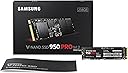
🚀 Upgrade to the Samsung 950 PRO — where speed meets sleek sophistication.
The Samsung 950 PRO 256GB SSD combines cutting-edge NVMe PCIe 3.0 x4 technology with a compact M.2 form factor, delivering sequential read speeds up to 2200MB/s and write speeds up to 900MB/s. Designed for professional-grade PCs and workstations, it offers energy-efficient performance at just 5.7W peak power consumption, ensuring rapid boot times and seamless multitasking for demanding workloads.


| ASIN | B015SOI392 |
| Best Sellers Rank | #4,287 in Internal Solid State Drives #98,168 in Computer Internal Components |
| Brand | Samsung |
| Color | Black |
| Customer Reviews | 4.2 4.2 out of 5 stars (637) |
| Date First Available | October 22, 2015 |
| Flash Memory Size | 256 GB |
| Hard Drive | 256 GB Solid State Drive with NVMe interface |
| Hard Drive Interface | NVMe |
| Hardware Platform | PC |
| Is Discontinued By Manufacturer | No |
| Item Dimensions LxWxH | 3.16 x 0.09 x 0.87 inches |
| Item Weight | 0.32 ounces |
| Item model number | MZ-V5P256BW |
| Manufacturer | Samsung Memory |
| Operating System | Windows 10, 8.1 (32, 64bit) |
| Product Dimensions | 3.16 x 0.09 x 0.87 inches |
| Series | 950 PRO |
B**D
Excellent product! I could not be more pleased!
I just built a computer for the first time! The items I purchased for the build: Phanteks EVOLV ATX Mid Tower in Antracite Gray / EVGA 700 B1, 80+ BRONZE 700W Power Supply / Intel Core I7 6700K CPU, Samsung 950 Pro 256GB M.2 Internal SSD / Gigabyte GA-Z170X-Gaming 7 Motherboard / Ballistix Sport LT 16GB Kit (8GBx2) DDR4 2400 RAM in White / Gigabyte AMD R7 360 GPU / Cooler Master Hyper 212 EVO CPU Cooler / TP-LINK N900 2.4GHz or 5GHz WI-FI Card. I am thrilled with my new build! Everything works well together and it was all plug and play. I did not have to make any kind of adjustments in the BIOS. I was so worried that I was going to have issues with the SSD not being recognized as a boot device (after reading various forums regarding NVMe - M.2 SSD's and this particular motherboard) and that major BIOS tweaks were going to be needed. That was simply not the case at all. As soon as I booted the computer for the first time and went to install Windows 10 Professional, the SSD was recognized and Windows installed perfectly. So the issues I was concerned with turned out to have nothing to do with my build. I think those issues have to do with using more than one M.2 SSD or other types of SSD's or hard drives in conjunction with each other. Then RAID becomes a factor. But in my case this was not an issue. My new computer is faster than any computer I have ever had! Boot time for a cold boot or restart is around 6 to 10-seconds. Things that took a half an hour or more to copy to the hard drive, like my music and video files from a backup drive, took less than 5-minutes on this SSD. All my programs open instantly. I know that SSD's are supposed to make things much faster than the old mechanical hard drives, but this was so much more than I expected.
M**L
Awesome fast
This drive is awesome FAST. Boot time 3 seconds. Now, that does need some clarification. When I first start my computer, from a cold start. The mother board comes online. Then it goes through the ‘boot order’ to see if there are any CD, or USB to boot from. Then the overclock cycle. I have an ASUS Maximus hero board, and it overclocks automatically. It will test your current configuration and overclock to the best STABLE frequency available. THEN windows, begins to load. A little circle, indicates load is in progress. That is where the 3 seconds start. The total time, for me, is more like 45 seconds. But IF, I turn off those features I mentioned. Then, I would have the 3 seconds. Or, maybe, you already have a, more, to the point, kind of setup. Those, extra seconds for those, boot up procedure, are important to me. But the point remains. From the windows load time, until me having my pointer. Is 3 seconds. Awesome fast. Now, the part you might not like, but you still need to know. Compatibility. When I, got this drive, which was, on release day. No backup software, could recognize the drive as being there. Now even the backup, that is part of windows, control panel>>file history>>system image. Then I went a browsing for a better image software. But, thank God, most people had a free sample to try and decide. But they all failed to, ‘see’, the new drive. And yes, I formatted it, and assigned it a logical letter. I even installed windows to it, a fresh. I did finally find ONE that worked. And it worked good, so I bought it. It’s called EaseUS backup. I got the 256 gig drive. But, as I put my libraries on a drive of their own. It is way bigger than I need. From the charts, performance gets better with a bigger drive. So even though I only use 50 of those 256 gigs. I am still glad I got the extra space. I can’t predict what I will need this drive for when it has served its current use. I do know I have thrown away a lot of little, useless, drives. And, I would like to be able to give this, as a gift, when I upgrade.
V**P
Great performer, but not worth the cost.
Pretty much not worth the price in my opinion. Yes it's blazingly fast on transfers, but in typical usage (office, browsing, media, gaming, photo editing) I have not noticed any improvement over my Samsung 850 EVO for more than twice the price. When the tech matures, support improves, and prices come down, this will be well worth the cost, I'm sure.
A**R
Great in my Lenovo 15 inch Y700; also benchmarks
3 drives were compared, all tested in the same Intel NUC: BOXNUC6i5SYK , this is the 6th Gen NUC running a 6th Gen i5. No other drives installed. Tested each drive with Crystal Mark 5.2.1 x64, and Samsung's Magician Benchmarking tool on Win10Pro. Same RAM and same everything. Only difference is that Samsung does have its own drivers where WD relies on windows default. Samsung drivers were loaded then after a restart, tested. Tested was a: 256 950 Pro (MZ-VKV256) 512 960 Pro (MZ-V6P512) 512 WD Black PCIe (WDS512G1X0C) 950 results: SeqR: 2055 SeqW: 941 RanR: 253234 RanW: 81080 960 Results: SeqR: 3221 SeqW: 2105 RanR: 272128 RanW: 232871 WD Black Reults: SeqR: 1800 SeqW: 820 RanR: 159038 RanW: 122913 Obviously the 960 Pro was the fastest with the 950 and the WD in somewhat the same ballpark. Although the 950 was faster than the WD. However it isn't a runaway and it is hard to tell how much of an impact the specialized drivers from Samsung helped performance. Either way, these are all very fast and are expensive compared to other non-PCIe NVMe drives. The tools that go with the WD are very nice and more expansive compared to the Samsung. However, the WD tools software has lots of WD ads running accross it .. kinda annoying. Otherwise, nice dashboard. Secondary info: Fast and easy to install. I installed this in my Lenovo y700 15 inch laptop. Before installing this, I did update bios first and then installed. It found the drive immediately. I downloaded win10 and installed right from usb stick to new drive.
C**T
Excelente producto mucho mas si anterior mente se contaba con un HDD (disco duro óptico) la velocidad es decenas de veces mayor, es recomendable instalar el SO en este SSD para gozar de todos los beneficios, es un poco tedioso el proceso de instalación de SO pero vale la pena 100%, lo recomiendo completamente.
A**E
La prima volta che ho caricato il sistema operativo e lanciato dei giochi molto pesanti sono rimasto sbalordito dalla velocità di questo SSD2. Se avete intenzione di usarlo per velocizzare al massimo i tempi di risposta dei vostri software vale ogni euro. (vi chiederete come avete fatto senza) Se invece volete salvarci le foto delle vacanze vi consiglio di orientarvi su prodotti più economici ma in grado di soddisfare a pieno le vostre esigenze. Sul mio PC ho solo questa unità di memoria da 250gb e mi trovo alla grande. Utilizzo un Hard Disk di rete ( Synology DS115J NAS 1-Slot, Bianco ) per archiviare film / musica / documenti e l'SSD la dedico esclusivamente all'esecuzione dei software. In alternativa all'hard disk di rete potete montare sul vostro pc un altro SSD (anche meno performante) o un vecchio e caro HD destinato a fare da archivio. Se volete installare WINDOWS 7 - 64bit su questo SSD c'è da litigare un po' con i driver. Nulla di drammatico ma se non sapete di cosa sto parlando o non siete molto pratici vi consiglio di far fare l'installazione di WIN 7 ad un esperto o passare direttamente a WIN 10.
R**I
Very Fast good for Database Server
R**Y
It didn't work in my new Dell Inspiron 7559 so I installed it in my new Gigabyte z170x gaming series MB and I am impressed with how fast it boots and loads programs. Most impressive is the Samsung migration software and Samsung Magician software. Very good value and the seller shipped it fast like lightning!
A**R
installed today and the ssd is screaming fast......windows boots in seconds and file transfers are insanely fast now with some time using this bad boy....it gets warm....may throttle if u dont have airflow and under heavy loads
Trustpilot
1 day ago
3 weeks ago