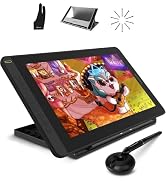
🎨 Elevate your digital artistry—where precision meets portability!
The HUION Kamvas 13 is a 13.3-inch full-laminated graphics drawing monitor featuring an anti-glare screen, 8192 levels of pen pressure sensitivity, and 8 customizable shortcut keys. It supports Windows, macOS, Linux, and select Android devices via USB-C, offering versatile connectivity for remote work and e-learning. Ultra-slim and lightweight, it delivers vibrant 120% sRGB color coverage and dual-mode operation for enhanced creative flexibility.


| ASIN | B0859D63ZG |
| Active Surface Area | 13.3 pulgadas |
| Best Sellers Rank | 4,221 in Computers & Accessories ( See Top 100 in Computers & Accessories ) 9 in Graphic Tablets |
| Box Contents | Pen Display, Digital Pen, 3-in-1 Cable, USB Extension Cable, Pen Holder PH05A, Pen Nib x 10, Pen Nib Clip, Glove, Cleaning Cloth, Quick Start Guide |
| Brand | HUION |
| Brand Name | HUION |
| Colour | Black |
| Compatible Devices | Desktop; Laptop; Smartphone;Tablet |
| Connectivity technology | USB |
| Country of Origin | China |
| Customer Reviews | 4.3 out of 5 stars 1,968 Reviews |
| Display Type | LCD |
| Item Dimensions L x W | 21.7L x 36.7W centimetres |
| Item Weight | 980 Grams |
| Manufacturer | HUION |
| Model Name | kamvas |
| Model Number | Huion Kamvas Pro |
| Model name | kamvas |
| Native Resolution | 1920x1080 |
| Network Connectivity Technology | USB |
| Operating System | Android(USB3.1 GEN1), Linux, Windows 7 or later, macOS 10.12 or later |
| Operating system | Android(USB3.1 GEN1), Linux, Windows 7 or later, macOS 10.12 or later |
| Pressure Sensitivity | 8192 Levels |
| Pressure sensitivity | 8192 Levels |
| Product Features | slim |
| Product Warranty | 2 Year Warranty |
| Screen Size | 13.3 Inches |
| Special feature | slim |
| Specific Uses For Product | Drawing |
| Target Audience | Teacher |
K**E
A fantastic tablet for a fantastic price
Setting this up was easy peasy! No issues whatsoever, and it powered up perfectly. The tablet is a great upgrade from my previous Huion Q11K. The screen is smooth and feels like paper; which makes drawing on it very comfortable, and it doesn’t feel like the pen slips around. The screen quality is also fantastic! It doesn’t distort in colour no matter what angle you view it from, which is really handy. The tablet isn’t overly large, but it’s also not too small and has plenty of space to draw on without taking up too much space on my desk. I’ve been using Huion for years, and they’ve never let me down prior. This was my first ever screened drawing tablet, and I can safely say Huion has once again surpassed my expectations. This is a great tablet for a great price <3
J**S
Nice piece of tech at a reasonable price
Some people say there's not much difference between a drawing tablet and a display tablet. I think they're wrong! I own a Wacom CTL-672 that won't track properly and destroys the pen nibs within days. I also own a XP-PEN Deco 01 V2 which is okay, but looking at the screen instead of where you're drawing takes a bit of getting used to and it always felt like I was spending longer to get the results I wanted. When you upgrade to a display tablet, you realise that those cheaper drawing tablets were somewhat holding you back. Being able to see your strokes directly under where you're applying the pen nib makes drawing easier. It's not the same as drawing on paper, but it's very close. The cursor on your computer is almost exactly where the nib touches on the screen and since you're looking directly at it while applying pressure, it feels more authentic. There was no stand included with this tablet, which was disappointing but I ended up buying the Huion stand made for their Kamvas 16, which is solid. You really do need a stand because tilting your head down will eventually make your neck and back ache. Buy a stand at the same time you buy the tablet rather than later! Actually looking at the tablet screen and drawing on it, I have no issues so far. The screen isn't as bright as you'd expect but it's by no means too dim to work on. I think the built in screen protector might be affecting the amount of brightness. Speaking of the screen protector, it makes the surface feel a bit like paper. There's resistance, but not too much, which feels nice. The screen colours seem decent and I don't feel like any part of the spectrum is unbalanced. The stylus pen is quite chunky and has a rubberised cover where your finger tips sit. There are 2 buttons in this area which work well as middle click and right click, though you can customise these in the driver software. The buttons themselves seem a little less solid than the buttons on the XP-PEN stylus, but they work fine. The stylus feels good to use for several hours without any fatigue. Using the included glove prevents sweat and oils making their way onto the stylus and tablet screen. Whenever you're not using the stylus, it can be placed in one of two ways in the stylus holder. The stylus holder also contains spare nibs. There's 2 ways to connect this tablet. The first way is the same way many tablets connect, with a 3 way cable that has 1 connection to the tablet with 1 USB data cable, 1 USB power cable, and 1 HDMI video cable back to the computer. The second way is with a USB-C cable, which not only needs to have a long enough connector to fit into the tablet (Huion's own vastly overpriced cable seems to be the only one that fits without any issues) but your computer also has to be capable of delivering a compatible signal over that USB-C cable. Some modern mobile devices are capable of delivering a signal, though I don't own any of those and couldn't test that feature. All in all, very pleased with this tablet and impressed at how cheap it is for what you get.
J**S
Great Tablet
Excellent. A good-sized screen, nice colours. Stylus is nice. Good value for the price. Works on Linux, but some functionality is missing. Quite frankly, I only wish I'd went ahead and forked out for the 16.
H**N
Amazing Value for Digital Artists – Smooth, Responsive, and Portable!
The HUION Kamvas 13 has completely upgraded my digital art workflow. From unboxing to drawing, everything about this tablet has impressed me. The screen is vibrant and sharp with great color accuracy, and the matte finish gives it a natural, paper-like feel that’s super satisfying to draw on. The pen is lightweight, comfortable, and highly responsive—no noticeable lag or jitter. Pressure sensitivity and tilt work beautifully, allowing for smooth, nuanced strokes. Setup was quick, and it connected to my laptop with no issues. I love that it supports USB-C to USB-C, so I can use it with my Android phone too when I’m on the go. The customizable shortcut keys on the side are a nice bonus and really help speed up my workflow in programs like Photoshop and Clip Studio Paint. It’s also surprisingly lightweight and easy to carry, making it a great choice for students, hobbyists, or even pros on a budget. Overall, the Kamvas 13 delivers performance that rivals much more expensive tablets. If you're looking for a reliable, high-quality drawing display without breaking the bank, this is it. Couldn’t be happier with my purchase!
V**E
Paper like drawing on a portable screen
Great drawing tablet! The matte screen is large enough to fit Clip Studio Paint on comfortably while still being portable. Using the pen feels like drawing on paper which makes the experience fantastic and allows getting great lines a cinch. Overall a fantastic companion for digital artists at a fantastic price point.
A**R
Excellent!
Brilliant drawing tablet. Really happy with purchase. Bit pricey but money well spent.
A**I
Not Great with Older Macbook Pros (Intel i7 - 2016)
I purchased this as a great deal during the Amazon Spring Sale. But have tried it solidly for 2 weeks, I am having to return for a refund. The screen itself arrived in a very nice almost premium feel package. There were no instructions, so I have to watch a quick Youtube video on how to set it up. Then had to download the driver app from the Manufactures website. This was all fairly easy. Setting up the various buttons on the tablet and the pen are very easy. The pen comes with a round holder which comes apart and contains extra nibs and a tool to remove the old nib. nice touch! the screen is bright and fairly well colourspace calibrated. have a lovely paper like feel, so very easy to draw and touch. Now for some niggling issues, its not like an iPad or any other tablet where you can pinch to zoom. you also can't move an image with your fingers either. the 13" model does need a fair amount space than a regular Wacom Tablet so you do need to be prepared for that. Also, a stand will be a must for most people otherwise you will end up with neck cramp and very bad posture. Now all of these will not have made me decide to return the item. Its the connectivity problems that I am having. Although the tablet comes with the standard USB-3 and HDMI cable, its far from the way it performs on a newer USB-C port. I am not changing my laptop anytime soon as it works seamlessly with Photoshop. It has an Intel i7 with 16GB RAM, so pretty quick machine still, but the old tech and new tech do not match Seamlessly. I have to disconnect the HDMI due to freezing issues. Sometimes, it takes 10 seconds to catch up with pen strokes. The Cable comes with 3 in one form and is fairly thick for a connectivity cable so there should be no issue. When I tried it on someones else Mackbook with a USB-C, it was worlds apart, a real joy to work with. So, its a good tablet, but has issues with older Gen Mackbooks. will have to replace for £50 Wacom once again!
J**W
Using the Kamvas for photo Editing, some thoughts after a while.
I bought this for photo editing not drawing I'm not an artist, and couldn't draw a circle unaided. I have owned conventional drawing tablet (no screen) in the past but never got on with the whole looking at the monitor and using the pen on the tablet bit, it put me off taking it further. The cost of Professions Drawing monitors from the well known brands is way out of my league and I could never justify it. Having seen these on Amazon and considered the price not outrageous I decided to take the risk and try again. I wanted one to allow me to have better control when making selections or creating custom masks for correction or retouching photographs as they always have dust, hair, creases or scratches. Using a mouse to try and follow a shape always leads to the mouse going off track and faffing about, using a pen seems so natural an so much more accurate, and to be able to see on the tablet and draw on the area I was looking at is brilliant. Using the tablet for retouching with old photographs or negatives is a revelation. It is so much quicker than using a mouse, plus the buttons on the tablet allow you to zoom in and out without stopping to navigate around the photograph. The other buttons on the side can be set in the software to perform other functions as you decide and can be set to act differently in individual programs. As the pen is pressure sensitive I find that I adjust brush size less often as the harder I press the larger the effect. Is it perfect ? The size at 13in can seem at first too small but as you zoom in and out to retouch it's actually no problem neither is that its not 4K for the same reason, and means its easier to hold and transport being smaller. It also requires less real estate in the terms of desk space imagine putting your existing monitor face up on the desk next to everything else there. Screen quality is very good with clear sharp images, the design means that there is very little difference between where you think the pen is and its actual location (think looking a a ruler from above or the side, parallax) meaning you are drawing where you think you are. You will need the stand to use it comfortably and at the right angle for prolonged use and this isn't included in the price. If you want to use it just via a usbc cable (rather than the 3 in 1) that is also an extra at about £25. The plug on the tablet is at the bottom of a moulding and so a standard cable wont reach unless you feel like trying to trim the plug down, maybe not the greatest design choice (form should follow function). The Kamvas is not a touch screen which at first seems counter intuitive after all the I pads/phones/tablets we are all used to, and you will find yourself trying to tap on it but you do get used to it. I use the tablet purely for the retouching and masking aspects of editing because I find that the pen is not very good at sliders when adjusting colour or exposure I preferer to use my mouse for that but maybe that's old habits. I haven't been able to find out how to set an accurate colour calibrated profile and make it stick when I reconnect it so I wouldn't rely on the tablet to assess the image in that way a larger monitor is always better for that anyway. I have no regrets in purchasing this kamvas tablet and would do so again with the new one looking even better. Would I like a larger one, yes but I couldn't justify the extra cost at the time. Having now used it I would certainly like to be able to have one of the larger ones. I've found it really useful particularly with a lot of old photographs my mother has dug out, that I'm trying archive, so they can seen well into the future but many require some work to be seen at their best.
Trustpilot
2 weeks ago
2 weeks ago