Buy anything from 5,000+ international stores. One checkout price. No surprise fees. Join 2M+ shoppers on Desertcart.
Desertcart purchases this item on your behalf and handles shipping, customs, and support to Senegal.
🎮 Level up your game with style and resilience!
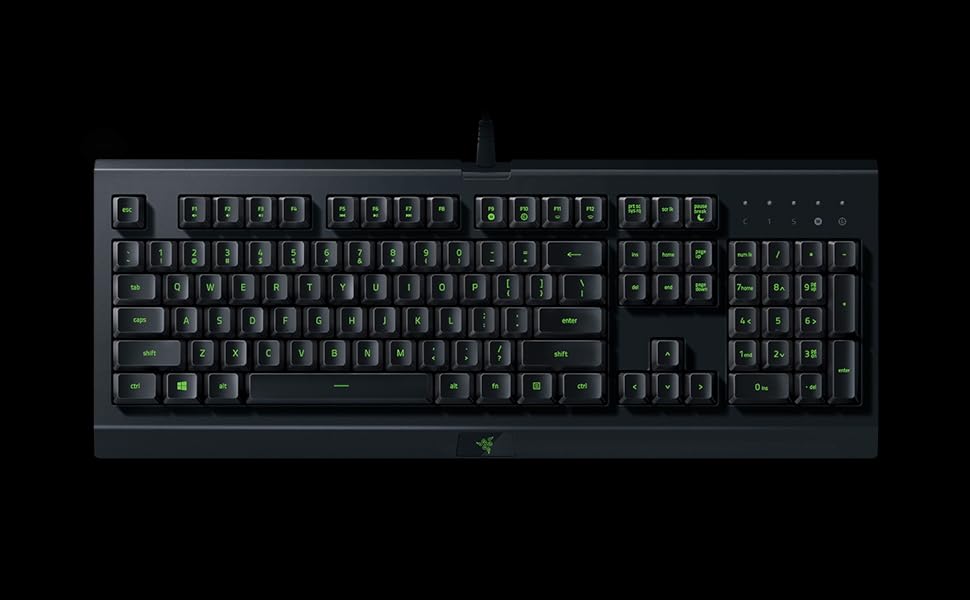
The Razer Cynosa Lite is a high-performance gaming keyboard featuring single-zone customizable RGB lighting, spill-resistant construction, and fully programmable macros. Designed for comfort and durability, it supports up to 80 million keystrokes and offers quiet, cushioned keys powered via USB. Ideal for gamers seeking reliable, stylish peripherals with professional-grade functionality.


| ASIN | B087C98QJJ |
| Additional Features | Lighting |
| Antenna Location | Gaming |
| Best Sellers Rank | #7,857 in Video Games ( See Top 100 in Video Games ) #548 in PC Gaming Keyboards |
| Brand | Razer |
| Built-In Media | Keyboard |
| Button Quantity | 87 |
| Color | No Color |
| Compatible Devices | PC |
| Compatible Operating System Family | Windows |
| Connectivity Technology | USB |
| Customer Reviews | 4.4 out of 5 stars 1,152 Reviews |
| Enclosure Material | Plastic |
| Hand Orientation | Ambidextrous |
| Item Dimensions L x W x H | 18"L x 6.85"W x 1.29"H |
| Item Type Name | Razer Cynosa Lite Gaming Keyboard: Customizable Single Zone Chroma RGB Lighting - Spill-Resistant Design - Programmable Macro Functionality - Quiet & Cushioned |
| Item Weight | 2 Pounds |
| Keyboard Backlighting Color Support | RGB |
| Keyboard Description | Gaming |
| Keyboard Layout | QWERTY |
| Manufacturer | Razer |
| Mfr Part Number | RZ03-02740700-R3U1 |
| Model Name | Cynosa |
| Model Number | RZ03-02740700-R3U1 |
| Number of Keys | 104 |
| Power Source | USB powered |
| Recommended Uses For Product | Gaming |
| Special Feature | Lighting |
| Style Name | Cynosa Lite |
| Switch Type | Linear |
| Theme | Gaming |
| UPC | 811659036001 |
| Unit Count | 1.0 Count |
| Warranty Description | 2 year manufacturer |
| Water Resistance Level | Water Resistant |
A**E
Great Keyboard for Light Gaming and Everything Else!
When purchasing this keyboard, my needs were something that allowed for more comfortability than my regular laptop keyboard, added aesthetic to my desk setup, and performed well. This Razer Cynosa Lite was EXACTLY what I was looking for and more. I was really happy with the price (first and foremost) and the added bonus of having the Razer brand. I love the feel and sound of the keyboard and the customizable backlighting as well. Even in full light exposure, the backlighting is still visible! So happy I went with the Cynosa Lite!
W**?
Excellent!
Exactly what I was looking for for the price it works awesome, and it has its own software. My only qualm is that some of the led lights are super dim for some reason like the keys are out of reach of the light. But I bought it for the keyboard not the lights, we're just a bonus so I would definitely suggest.
T**E
Good... could be Great with minor tweaks...
The Razer Cynosa Lite Gaming Keyboard is an exceptional value in the razer lineup. The heft and feel of the keyboard let's you know it is a substantial piece of gear. The keys are nice and tactile. Not too squishy and not to stiff. The layout is nice and standard, no surprises. the multimedia keys are well integrated into the F-key row. The height, top to bottom, feels a little narrow compared to previous keyboards I've used, but is adequate. The lighting is where the Razer Cynosa Lite falls short. the Synapse software you use to control the RGB is a little wonky. It's not very intuitive for people who aren't used to RGB software, or who have used other RGB software that wasn't made by Razer. Also, the lighting is really dim. I come from using a cheap as you can find RGB keyboard that had lighting that you could use as a nightlight to see your way around in the dark, and the Cynosa falls short by A LOT. The white lighting is adequate but as with the other colors I tried, it lights up about 80% of the lettering on the key and the top 20% seems unlit or under lit. I'm not a typist and don't have the keyboard layout memorized. I have to look at the keyboard and peck around while typing. Not being able to see the lettering well, hinders the pace at which I can type. The Synapse software is a bit difficult to figure out, and I can't figure out how to set specific keys to have a different color. ie; WASD in Red while the rest of the keys are Blue... I wish the software was easier to use and I wish the lighting was brighter by 50% with the entire letter on each key lit. The roundup: The keyboard works well and seems of exceptional quality. The lighting stinks and the software to control the lighting is less than user-friendly.
L**Z
Classic games
Perfecto para jugar ragnarok online
J**L
Really good
Key is really good for the price. I have had it for about 2-3 months hasn’t broken. The lights aren’t backlight the letters only light up.
P**P
Bought as spare
Good keyboard
A**R
This keyboard is the greatest for 40 dollars.
Greetings, I'm Riley Folsom. It may not say my name and that is because my mom let me use here account for prime shipping. I got this keyboard in the mail and it is great. The RGB lighting is very cool, the overall feel of the keyboard is amazing for gaming, the programmable switches are very useful, and even the packaging it came in was very nice. I highly recommend this keyboard.
T**L
You get what you pay for, this is very much a "budget keyboard".
------ PROS ------ 1*) It a working , wired keyboard. 2*) With the razer apps, you can customize almost every key to do something else. 3*) The keys have a good texture and feel to them, keyboard feels responsive when you type and isnt too loud/quiet. ------ CONS ------ 1*) The backlit is basically non-existent when there is any other light source in the same room(even with keyboard at 100% brightness). 2*) Around the 6 month mark, the "S" and "D" keys started to severely rub/scratch off, and at the 8month mark(as of writing this review) both keys are just huge open boxes, with zero traces of the actual letter. The "A" key has also started to rub away. (I am a male, I maintain short fingernails, and am the only one who has ever used this keyboard. It usually takes multiple YEARS before keys start to rub off/fade away, this keyboard started around the 6 month mark). 3*) There absolutely is ghosting. Literally the first day of owning the keyboard, I was playing fallout 76, and while holding down a few keys I attempted to press "F" (like I always did with my lame wireless keyboard) and was rather shocked when the key wouldn't register. I then let go of every key, worried something might be going horribly wrong, only to press "F" and have it work without issue. That was the first "awww man..." moment of the keyboard, followed by MANY more. 4*) Countless times the keyboard has acted as if the keys were stuck. This isnt that common, and on average I would say has only happened maybe once per month, but nothing is more frustrating than when your browsing the internet, go to scroll on a web page, and it starts resizing the page instead of scrolling(because the computer thinks I am holding down the "CTRL" key while I scroll the mouse wheel, its just doing its job lol). I then have to physically get up and go unplug, then re-plugin the keyboard to have it work properly again. It only takes 30-60 seconds to get up and unplug it and let it connect back, not trying to say its some hard task to do, its just another one of those "awwww man...." moments. 5*) If you want to change the backlit color AT ALL, razer forces you to download a resource hog of an application "Razer Synapse". With Synapse you are forced to also load/run other razer apps in the background that work with Synapse(otherwise Synapse wont load, and your forced to use the default color scheme for razer products). Let me tell ya, these apps are some HUGE resources hogs! If you add up all the resources these razer apps are using at any given time, its seriously about as much resources as an average game would need about 5 years ago. No hyperbole, no sarcasm. (I actually found a way to run synapse, force close certain resource hog apps, rename them to avoid them from auto-running again, and it seems to cut down the resources needed by almost half, while allowing me to keep my lights color scheme being used on keyboard/mouse. It just sucks having to do with with every restart of the computer.) (Just to clarify, there has never been a single drop of liquid make its way into the keyboard(I dont keep drinks around it on my desk), and I have already cleaned the keyboard multiple times in an attempt to stop the "sticky keys" problem, but it just seems to be something that happens regardless of how clean the keyboard is.) ------ Conclusion ------ This isnt a bad budget keyboard, however if your looking for a backlit keyboard bright enough to see the keys in the daytime, then this probably isn't a keyboard for you lol. I actually used amazon reward points to purchase the keyboard(my total was like $6 or something afterwords), but I imagine if I had spent $50+...I would be pretty upset right about now lol. If your like me and live in a very small town with no good keyboards available in any physical store, and need to replace a bad wireless keyboard ASAP, then this keyboard isnt that bad of a purchase. However, if your not in a huge rush, and want to get a product that will last for many, many years.... you may want to look for a different keyboard lol. Hope this helps inform some people on if this keyboard is right for them or not! :) (Will update review if any huge changes happen)
J**.
calidad precio
buen teclado
M**D
very smooth and nice
les touches sont super agréables , douce au touché et tres smooth :)
A**S
It's perfectly adequate
It does everything it needs to do as far as keyboards go. The back lit panel is actually somewhat dim, but not to the point of being a deal-breaker. You'd have thought they'd include additional USB ports or something, but no, it's just the standard keyboard as is.
M**N
Solid Gaming Keyboard for Everyday Use
Been using this keyboard for gaming and general use for a while now and it’s been great overall. Keys feel soft and quiet compared to louder mechanical keyboards, which I actually prefer for longer sessions and late-night gaming. The RGB lighting looks clean even though it’s single zone, and setup through Razer software was pretty simple. Keyboard also feels comfortable to type on and the spill-resistant design is a nice extra bit of peace of mind. For the price, it’s a really solid entry-level gaming keyboard if you want something reliable without spending a ton.
H**G
This keyboard is cheap for a reason!
The keys are very narrow. The lighting on the keyboard is VERY LOW even turned the lighting up to full brightness and it is still barely visible. The lettering on the keys is also very faint and without sufficient lighting it is difficult to see the keys values. This keyboard is cheap for a reason ...
Trustpilot
1 month ago
2 weeks ago