Desertcart purchases this item on your behalf and handles shipping, customs, and support to Senegal.
🖥️ Triple your view, triple your edge!
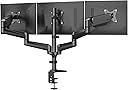
The HUANUO Triple Monitor Mount supports three 17 to 32-inch monitors with VESA 75x75mm or 100x100mm compatibility, weighing 4.4 to 17.6 lbs each. Featuring full swivel, tilt, and rotation adjustments, it offers ergonomic customization and desk space optimization. Installation is flexible with both C-clamp and grommet mounting options, fitting a variety of desk thicknesses for a secure, clutter-free multi-monitor setup.


| ASIN | B084RF63FK |
| Best Sellers Rank | #23 in Computer Monitor Arms |
| Brand | HUANUO |
| Color | Black |
| Compatible Devices | Monitor |
| Customer Reviews | 4.3 out of 5 stars 7,255 Reviews |
| Enclosure Material | Alloy Steel |
| Manufacturer | BESTQI INNOVATION (HONGKONG) TECHNOLOGY CO., LIMITED |
| Material | Alloy Steel |
| Maximum Tilt Angle | 90 degrees |
| Maximum-Supported Screen Size | 32 inches |
| Mfr Part Number | HNTS3B |
| Minimum-Supported Screen Size | 17 inches |
| Model Number | HNTS3B |
| Mounting Type | Tabletop Mount |
| Movement Type | Articulating , Tilt, Swivel , Rotate |
| Number of Items | 1 |
| Number of Packs | 1 |
| UPC | 810145633649 |
| Unit Count | 3 Count |
J**L
Best mount ever with in depth explanation as to why.
I originally posted a 2 star review and said the mount could not fit 3 32" monitors. That review was meant for another brand, which was the case. I replaced that brand with this Huanuo and it was a night/day difference. The initial setup may be daunting for those who, much like the entitled Veruca Salt, want everything NOW, and proceed to kick and scream when they don't get it. If you have a little patience, and the most basic understanding if mechanics and physics, this stand is amazing. I am housing 3 32" LG ULtragear curved 180hz monitors with this mount, with ease. For those complaining about sag, if you tale two minutes to read the 2 pages of instructions, you'd see there's a set screw on the top of the piston arm to increase and decrease the upward force of said arm. Mine sagged too, as the arms came a little loose from the manufacturer, but low and behold, 4 or 5 revolutions of the screw, and, as if by magic, problem solved. One of the great things about this mount is that there is a separate mounting system for the center monitor, separate if course from the arms that have their own shared mounting system. This is clutch when you're trying to get all 3 monitors to perfectly align with no gaps between the bezels. It's also clutch to keep the center monitor square with the back wall, as one can loosen just the center, square it, adjust height, and then adjust the swing arm heights to it and be good to go. I built the wntire setup first, with no monitors, which seems common sense. I then installed the center monitor and got it to precisely where I wanted it. The last step was the adjust the height of the arms, I did this before installing the two outer monitors, again this should be obvious. I simply used the monitor mounting plates on the center as a guide. I lined up the outer arm mounting plates to it, keeping the arms as straight out as possible to allow maximum movement in both up and down travel. Once I got all the mourning plates pretty even by eye, I installed one monitor at a time to the arms, and positioned the monitors accordingly. Doing it this way, you can semi tighten all the set screws that you never have to use again BEFORE the monitors are installed, again, common sense, I know, it's difficult, and the only screw left to adjust is the arm piston screw which is on top amd insanely easy to fet to after the monitors are installed. This mount is crafted like a brick poop house and it's easy enough for a child to put together successfully, quite honestly. In comparison to its competition, in which I have been very courteous as to not mention names, this Huanuo mount is easily a clear winner. Have a little patience and, more importantly, be smarter than the thing you're working on.
S**N
Great stand! & a few adjusting tips!
Ive used several dual monitor stands in the past and Ive been debating on getting one for my triple set up...after a lot of reading reviews I rolled the dice on this one. Super easy to put together with the instructions. Once you get it put together and mounted to your desk, either way clamp or through an access hole, you can adjust the monitor height. Super strong arms and joints...welds all look good and the white paint is clean. Holds 3 24" monitors with no issues! ADJUSTING TIPS Since the arms go up as they go out the only adjustment you need to do is the very top bolt for weight. As you turn the bolt, it takes several by the way, it will slowly adjust to a lighter monitor and slowly start to ease down. So basically a heavy monitor will take more tension than a light monitor. Just start turning and feeling the tension loosen as you push down on the monitor. Get it where you want it and slightly tighten it back up so it holds. If it springs back up then loosen it some more. It will go quite far down but they dont recommend putting the arm in a downward slated position. Just level. Get the left side adjusted and then set your middle monitor which can only be adjusted up and down. Then match the right monitor to the middle and left by repeating the steps to loosen the tension. Another tip if you have all of your monitors butted together edge to edge, if you find that your outside monitors moves up if you bump your desk, it has just a tad too much tension. Loosen it a little and then on the back of the monitors apply a small piece of tape from the outer to the middle monitor.....it will help hold the monitors since the middle one is non movable after you tighten down. The tension arms can be moved quit easily. If you have your PC backs open to the room and dont want to see tape try adding a small piece under the monitors edge at the bottom...it doesnt take much to hold them. Once you have the adjusting done you will love this stand. Ive been using for over a week no with issues. I didnt add the tape I mentioned above but I havent had that problem, only read about it in other reviews. Be patient the adjusting process can take some time to get it perfect. Took me about an hour but im pretty picky. Hope this helps. 5 stars from me! Id buy it again in a heartbeat.
S**L
Great Value, but it has it's issues.
To set the stage. I have a large built in desk and 3x 27" LG monitors. I love the monitors, but the bases take up a lot of room and do not swivel, so getting the screens positioned well means the bases take up a lot of desk space in price real estate areas. I mounted it using the "Grommet Mounting" method. I think I'd recommend this method even if the clamp was possible. The mount is pretty sturdy, I have no concerns there. Assembly wasn't too bad. The instructions could be better, mostly around the arm assembly as two arms are identical in the instructions, but are not clearly marked in the packaging. A little trial and error was required there, but thankfully it didn't require disassembly of half the unit to resolve. As for monitor setup. The middle monitor is fairly stationary, so ensure the mount is positioned where you want that middle monitor to sit. The arms are on gas springs, however, the cannot be locked in place once you get is positioned. While there is a tilt lock there is no swivel lock and there is a lot of play in the positional lock. I spent over an hour trying to get all 3 screens flat/level and never did achieve 95%. Once you get the gas spring tension dialed in the movement there is pretty smooth/easy. Again, there is some play in the joints, so you need to fiddle with it to get the right height, but unlike the tilt and swivel it's not too difficult to get it where you want it. The side screens are a bit "wobbly". I'm one of those guys who's always tapping his leg(s), and the side screens will jiggle a bit and there is nothing I can do about it b/c of the gas springs I can't tighten or lock them in place. Overall a minor issue, but an issue nontheless. The cord guide/cages that attach to the gas spring arms could be deeper (like the ones on the fixed arms). I have fairly thick cables and I had to pry up wedge the cable in place, and they aren't moving, so fine adjustment is very difficult. Overall, I am quite happy with the product and believe it is a great value.
G**Y
Fairly easy to assemble and holds position well. Worth the price!
The stand is fairly easy to assemble. Just understand that this isn't something you will be putting together in 5 minutes! Expect a good 30 minutes to an hour. You can do this as 1 person. If this is going on a wood desk or a glass desk, be cautious! This may crack or damage the desk! They sell a metal plate for the glass desk as well as for the wood! If like me, your desk is wood with uneven surface, you may want to take an old mousepad and cut it a little larger than the foot and use that as a 'matt' for under the foot of the top and then use a plate (purchasable) for the bottom to protect the desk from damage. I used a small piece of wood being my desk was up against a wall and it hides the piece of wood. Once the foot was secured and the central mast was solid, not going anywhere then the arms were able to be put in place for the monitors to be put on with no damage to the desk. The only 'complaint' I have is the central monitor's limited positioning. It is virtually fixed to the mast. There is no moving closer (away from you) or towards you (away from the mast) to adjust the view for comfort. On each point on the arm there are lock screws to fix their position. This helps with their sturdiness however it doesn't help with the monitors themself. If you want to 'fix' the monitors themself, there is no way to do that. Bump them, and they can move a little and you are now working on getting them just right again. Overall, I am very satisfied with the stand, all the accessories offered FOR the stand, and the price. They even offered a mount bracket for my monitor that had no VESA mount to convert the desk stand mount into a VESA mount!
M**E
what is the right number of monitors
originally I had 2 - 32” 4k monitors then 4 (double stacked) but I didn’t like reading the top 2, iso I tried 3 (this one) and I think it’s about right. A lot depends on the size but f your monitor, but when they get double stacked I almost think you are in to a new kind of mount (or at least different from the ones I have seen so the monitors tilt down (almost like you are creating a cockpit. i’ve also noticed that many monitor arms that say they accommodate 32” monitors don’t - it causes awkwardness where they meet and it doesn’t allow for a perfect lineup. This arm was perfect in that respect. I also like the way this is built because the center one is largely captured against the support. the outer monitors have an amazing amount of control over placement - but you really start to get the hemispheric positioning so your head can move and see everything. monitor arms have come a long way, my first arm in the 90’s was basically a shelf, then we transitioned to models that almost required you to have 3 hands, this is among the new style I have seen where you attach a vesa plate to the monitor and then that plate slides into the mount arm, and finally a screw is installed to complete the attachment. it couldn’t be any easier to set up. sometimes I think me needing this much screen real estate is stupid, but it’s when your monitor monitors are all on, the mount has them in perfect alignment that you understand, why I think this might be the best monitor support arm I have ever owned. I highly recommend it.
T**R
I love this for my 32" monitors but wish the back pole was taller
Overall I love this item and unlike my last purchase, which I had to return, I plan to keep this one. PROS: Has two extension arms, meaning you have the middle part that connects to each side, plus an arm AND an additional arm, most would only have the middle part and one extension arm. This means for guys like me with 3 32" monitors you have the option of having them sit horizontally without having to sacrifice, IE one monitor is partially blocked by the other. As I noted I had to return a different brand and that was because of this. Weight - My monitors are roughly 15 1/2 pounds each and I didn't have any issues moving the arms around with the monitors connected. Says a lot about the stability that I'm talking about this product being able to hold a 15 lb monitor on a second arm extension, as opposed to one. Install time - About 10-15 minutes, 20 if you factor that I'm a moron who didn't check placement before setting everything up, then forced to disassemble and reassemble in the proper area. Bad joke aside was straight-forward setup but use your own screwdriver, the one that comes with this is limited. Range - Similar to what I've used in the past. Easy to lift upwards, downwards, tilt the monitor, rotate to portrait. Standard stuff CONS: Only one. The middle pole is a decent size, but not tall enough for me. If you're like me you want your monitors higher to reduce strain on your eyes (I'm 6' so I prefer not having to look downwards so much). In my situation even when I had the middle area at it's highest my middle monitor was too low. I ended up using a stand for my middle monitor instead of connecting. Checked with the manufacturer and unfortunately there wasn't an option to buy a taller stand or add an extension, so while I give this 5 stars IMO it's really 4.5 and only because of this limitation. TLDR - Great product, no regrets purchasing it. Can hold 3 horizontal 32" monitors but middle might be lower than you prefer.
R**D
Not for the faint of heart
Yes I am giving this item one star to catch your attention of the monumental task your about to place onto yourself. Do not buy this type of triple monitor mount if you are faint of heart. This thing will test you to your very core and bring you to your knees, but it works great once you make it right for you if you can master it and show it whose boss. Yes I realize I may not be using it it in the perfect way, but this thing is an akward nightmare that is almost sentient. I have made it work and am using it to max capacity, but it has been quite the experiment to get it to a stable enough point where I can justify this is better than using the stands my monitors came with. It's been lots of trial and error, multiple busted monitors, lots of experimentation, lots of reinforcement, and lots of fine tuning. I work from home and have attached 3 32 inch monitors to this thing all horizontal. Whitch I do not recommend because while the description says it can support that, it really limits the range of motion of the 2 adjustable swing arms and you have to be careful not to bang the monitors into each other when adjusting or careful not to bust the screen of your middle monitor with the corner of the side monitor or just destroy the inner monitor corners all together. With 3 32 inch monitors this takes up the whole with and then some of 6 feet. And I can not pull the side monitors as far inward as I would like to get more of a half circle effect. Like other reviewers have pointed out, the C clamp really puts a lot of pressure into a very small area of your mounting surface. You can drill a hole in your desk but the hardware seems a bit thin to do this. Hindsight, I would have given more consideration to wall mount options. Because I like lots of surface space, no drawers, and simple solid wood tables are pricey and a dining table as the desk I would need would be ridiculous; l opted for a 6ft plastic folding table as my desk. I made sure to buy some metal C clamp reinforcement plates before setting this up for the first time. There was so much downward force from the C clamp, this contraption would have caved in the table and twisted it in half if I had let go completely. I did a little bit of wood working on a 2x6 scrap for the bottom of the clamp and used a thick plastic cutting board for the top of the clamp. And then added in the metal C clamp reinforcement plates for good measure. Trust me, it actually looks decent and not ugly like it sounds. I also mounted a clamp to the wall to grab the middle pole to keep this from ever falling forward (later on, I made it months ago but never mounted it to the wall until after the events below like an idiot). After using this set up for a few months, I noticed the C clamp was slipping away from the table. Like a moron, I did not remove any of the monitors before readjusting. I had my wife keeping things stable while I was under the desk to readjust the C clamp but the whole assembly fell forward and while she caught it, 2 of my 3 LG 32 inch gaming monitors got busted. I had to purchase replacement monitors but made sure to take a metal handle and run it across the backside of the C clamp and secure it to the 2×6. This way the C clamp cannot back away from my desk without taking the whole 2×6 with it. Then I added my security clamp/mount to the wall as well. This thing comes with plenty of spare hardware and parts to fine tune it to suit your exact needs for what you mount to it. Assembling it is a nightmare and the the directions would do a better job as bird cage lining. Pay attention to each arm segment. While all 4 looked the same, they are not and the directions will have you a bit off kilter. I had to unassemble and reassemble several times to get this thing right. Carrying this thing is about as easy as carrying a lifeless metal robot with heavy metal arms swinging every where ready to destroy anything in your path. Trying to add or remove one of the side monitors is rough as the spring loaded arm will fight you and it about takes 2 people to add or remove a monitor. You mount a versa plate with a plastic block attached to it that slides into the mechanical arm, but the arm moves up and down when trying to get it to lock into place. It's especially fun to remove a monitor as the spring loaded arm will keep popping up and relocking the monitor in place. Hence why I said you need 4 hands. You can adjust the tension on so many diffrent places that it's great for fine tuning. To wrap this up, this thing works well if you have the determination of a warrior but at times it can be like arm wrestling an octopus. I have 2 other mounts made by this brand and they have been fairly easy to work with since I am not pushing them to the make like this hefty boy. It is nice being able to grab a monitor and hoist it up in to the air to demonstrate things on the screen to a bystander. This is also a good option for a standing desk as you would just need an elevated surface for your mouse and key board because the monitors can lift pretty high with a baby's touch. So think long and hard about purchasing this, but it's a good unit and made well. I'm only giving it one star because it's been one **** of a fight making this thing work the way I want it too and using it with 3 32 inch monitors and a plastic table is a fool's errand but I was determined to win this fight.
K**C
HUANUO Triple Monitor Mount
Work perfect but not for my game curved monitor
A**.
Überraschend gut in der Qualität und Stabilität-
Die Halterung kam inklusive einer recht guten Anleitung an. Die Halterung für 3 Monitore ist sehr groß. Der Standfuß ist stabil und Trägt die Monitore alle zusammen ohne irgendein Wackeln.. Die Verstellbaren Gasdruckfedern sind etwas fummelig einzustellen aber tun ihren Job auch gut. Ich habe 3x27" Monitore drauf. Was man dabei bedenken sollte ist die Anbringung der Halterung an einen Tisch der an einer Mauer liegt: Ja es ist möglich aber dadurch wird der Winkel indem die Monitore abstehen schon recht hoch. Besonders in meinem Fall (Tisch Maße:230x55x 04 cm Eigenbau). Tipp: Wenn du einen Tisch mit normalen Maßen hast montiere die Hauptstange etwas weiter in den Tisch hinein. Da Die Arme nach hinten abwinkeln braucht man da auch Platz. Das Problem wird geringer je größer der Monitor. Die maximal Montierbare Monitorgröße ist 32" Die Hauptstange ist entweder ohne Zerstörung klemmbar oder per Bohrung verschraubbar (Empfehlung). Der Preis scheint recht hoch aber dafür bekommt man auch Stabilität und Qualität. Die Halterung hat in den Profilen Kabelhalterungen integriert. Die Montage ist ruhig alleine Machbar. Einen zweiten zu haben kann jedoch hilfreich sein. In dem Fall konnte ich mich auf die Rezensionen zuvor verlassen. Die Qualität ist für ein Noname Produkt wirklich sehr gut. Zubehör kommt nummeriert und eingeschweißt (Kunststoff auf Karton). Alle nötigen Schrauben sind dabei. Die Verpackung kam ordentlich gesichert und somit unbeschädigt an.
R**T
You can trust this triple monitor stand!
After doing lots of research on monitor stands and solutions for three monitors, a lot of people recommended using three single monitor arms instead of a triple monitor mount due to stability issues found with a lot of triple monitor arms, especially as I was mounting three 27 inch monitors. I really did not want to go down this path as I wanted my setup to look as clean as possible without too many arms being mounted to my desk. I decided to risk it and order this triple monitor stand after reading some positive reviews. It arrived and it took me between 1-2 hours to set up which I thought was relatively reasonable given I had never set up monitor arms before. Installation went very smoothly, there was a worry that I may damage my Ikea worktop as it is veneer with particleboard (which the instructions for this mount said is not a suitable desk to mount on), but I decided to go ahead anyway. I did add a bit of hardwood between my desk and the clamp to give it a bit more strength and so far it has been perfectly fine. The mount itself is super adjustable and very stable. I've managed to get all three of my 27 inch monitors perfectly aligned, and there is enough space to angle them inwards. You could probably fit 32 inch monitors on here quite easily. I have had it all setup now for about a month and the monitors have not shifted even one bit. The outer monitors do wobble a little bit if my desk is wobbled or when I raise/lower my desk with the sit/stand feature, but its not a lot of wobble, and during normal usage (such as typing on my keyboard) they barely move. When they do wobble, they always return to their set place and do not shift at all. Having switched from using the stands that come with the monitor to this triple monitor arm, I have gained so much more desk space and my setup looks super clean and professional which is exactly the reason why I purchased this mount. If you are in a similar position as me, and are not sure whether this mount will suit you, I am sure you will be very happy with your purchase!
M**.
solid and as described
Llegó a tiempo, excelente conductor de entrega y el producto funciona bien, paciencia y un poco de tiempo, bastante simple, método de ojal para mí y muy bonito. arrived on time, great delivery driver and product works well, patience and a bit of time, simple enough, grommet method for me and very neat looking
H**S
Brilliant quality and infinite adjustment.
I was hesitant to purchase this as I don't like the design of the staggered/tiered arms which look terrible in the photos. I was after a sleeker, minimalist design, despite the good reviews. Fortunately, my monitors are against the wall, and the arms are hidden between the wall and monitors. The adjustment is infinite and it's more than capable of holding 3 x 27" monitors side by side with plenty of space to have them angled towards me, rather than flat against each other (like other arms). This is 10/10 from me.
R**J
Good quality product
Great price for a great quality product. Assembly is requires some attention to detail. Adjusting the sensitivity for the up/down pitch as a little challenging. The VESA bracket has a nice feature where you can just clip into the arms. you can maximize the distance of the screen to the edge of the table by rotating the center mount to the side and then mounting the monitor. The monitor center will be a little off center, but you gain a couple of inches in desk space.
Trustpilot
1 week ago
2 days ago