

๐ Own the game, command the room โ Alienware 17: where power meets prestige.
The Alienware AW17R3-1675SLV is a 17.3-inch Full HD gaming laptop powered by a 6th Gen Intel Core i7-6700HQ processor, 8GB DDR4 RAM, and a dedicated NVIDIA GeForce GTX 970M GPU with 3GB GDDR5 memory. Featuring a premium aluminum chassis in Epic Silver, it offers a vibrant matte display, advanced cooling with quiet fans, and a backlit keyboard designed for both work and play. With a 1TB 7200 RPM HDD (upgradeable to SSD) and Windows 10 Home, it balances high-end gaming performance with professional-grade productivity and extended battery life, making it a coveted choice for millennial managers who demand style and substance.
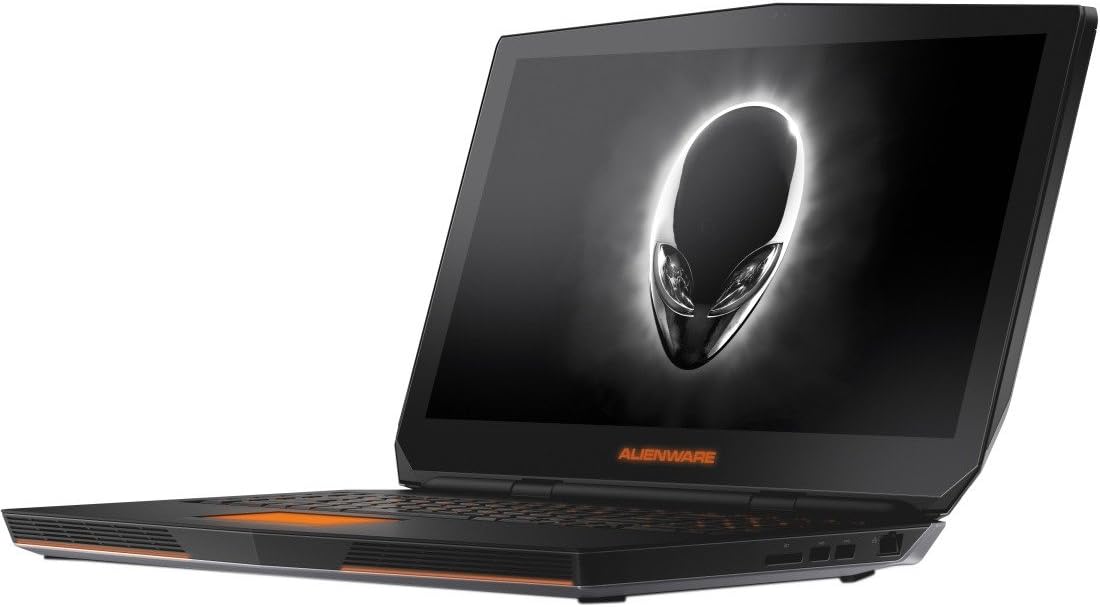


| ASIN | B015P3SSD2 |
| Audio Output Type | internal |
| Automatic Backup Software Included | Windows 10 Home |
| Battery Cell Type | Lithium Ion |
| Best Sellers Rank | #179,159 in Computers & Accessories ( See Top 100 in Computers & Accessories ) #34,292 in Traditional Laptop Computers |
| Brand | Dell |
| CPU Model | Core i7 6700HQ |
| CPU Model Generation | 6th Gen |
| CPU Model Number | Core i7-6700HQ |
| CPU Model Speed Maximum | 3.5 GHz |
| Color | Epic Silver |
| Compatible Devices | External displays, mice, keyboards, storage devices, printers, wireless accessories |
| Connectivity Technology | Wired |
| Customer Reviews | 3.9 out of 5 stars 64 Reviews |
| Display Resolution Maximum | 1920x1080 |
| Display Technology | LED |
| Display Type | LED |
| Form Factor | Laptop |
| Global Trade Identification Number | 00884116169277 |
| Graphics Card Ram | 3 GB |
| Graphics Coprocessor | NVIDIA GeForce GTX 970M with 3GB GDDR5 |
| Graphics Description | Dedicated |
| Graphics Ram Type | DDR5 SDRAM |
| Hard Disk Description | SATA |
| Hard Disk Interface | SATA 6 GB/s |
| Hard Disk Rotational Speed | 7200 rpm |
| Hard Disk Size | 1 TB |
| Hard-Drive Size | 1 TB |
| Hardware Interface | Bluetooth, Ethernet, HDMI, SDHC, SDXC, Secure Digital Card, Thunderbolt, USB, USB 3.0 |
| Human-Interface Input | Touch Pad |
| Item Weight | 8.3 pounds |
| Keyboard Description | Gaming |
| Keyboard Layout | QWERTY |
| Lithium-Battery Energy Content | 92 watt-hours |
| Manufacturer | Dell Marketing USA, LP |
| Memory Clock Speed | 2133 MHz |
| Memory Speed | 2133 MHz |
| Model Name | Alienware 17 R3 |
| Model Number | AW17R3-1675SLV |
| Model Year | 2015 |
| Native Resolution | 1920 x 1080 pixels |
| Number of Ports | 5 |
| Operating System | Windows 10 |
| Power Device | built-in rechargeable battery |
| Processor Brand | Intel |
| Processor Count | 4 |
| Processor Series | Core i7 6700HQ |
| Processor Speed | 2.6 GHz |
| RAM Memory Installed | 8 GB |
| RAM Memory Technology | DDR4 |
| RAM Type | DDR4 SDRAM |
| Ram Memory Maximum Size | 8 GB |
| Resolution | 1080p |
| Screen Finish | Glossy |
| Screen Size | 17.3 inches |
| Specific Uses For Product | personal, gaming |
| Total Usb Ports | 4 |
| Touchpad Feature | True |
| UPC | 884116169277 |
| Unit Count | 1 Count |
| Video Output | HDMI |
| Video Processor | NVIDIA |
| Voltage | 14.8 volts |
| Warranty Description | 1 year coverage for labor, 1 year coverage for parts |
| Warranty Type | 12 |
| Wireless Compability | 802.11ac |
| Wireless Technology | Wireless |
B**N
The Lamborghini of Laptops
I have read alot of reviews complaining about problems galore with their Alienware laptop. However after recieving mine I'm happy to report that there was absolutely nothing wrong with mine, maybe I'm lucky or maybe they other people citing problems were overclocking or doing other things that risk damaging their laptop. I inspected my laptop closely and found no dead or bright pixels, no scratches or blemishes anywhere. And when i turned it on there were no problems booting, or bugs or crashes or slowness (do note my order was fulfilled by amazon). The only funny thing i ran into is that Star citizen was not recognized by nvidia so Star citizen would use intel graphics resulting in really low frames. To fix this just go into the nvidia control panel and add the game in the right pane, then in the dropdown box select "High-Performance NVIDIA processor" after doing this star citizen runs awesome on this laptop. anyhoo for the actual review. The chassis: I was immediately impressed with how solid this laptop felt in my hand, it felt like a macbook. The outside is aluminum and the finish is superb, second to none. The hinge feels solid and I haven't experienced any flexing or creaking. The unit is hefty but not particularly heavy when in my backpack, after cleaning out a little junk in my backpack it feels great for carrying around. I wouldn't carry it long distances in a briefcase but a messenger bag would be fine. The interior is relatively tame with flat plastic on both sides of the interior. This isn't regular plastic but instead that soft almost rubbery feeling plastic (it's not grippy like rubber though). The keyboard feels excellent and has a little more actuation force than my mechanical keyboard with Cherry switches but it's not too hard to press that I think I will wear myself out typing alot. The trackpad is gorgeous and the best trackpad I've ever used (I haven't tried other high end computers trackpads but this is leagues better than other mid to low end laptops). The Backlighting on the keyboard is really cool and really useful at night. During the day you can turn off the keyboard backlighting because the keys are white print during the day so you can read them like any other keyboard. Performance: This pc's performance is amazing. I was able to run star citizen on the highest settings getting 35-50 fps @ 1080p and this game isn't even that optimized yet. All my other games run at the highest settings @ 1080p no problem. it does produce alot of heat but the fans aren't too loud and they have a good sound to them (not an annoying whine but a calm whooshing sound when they ramp up). Games like league of legends dont even get the fans going and not playing games this computer is silent as death, you literally can't hear it when your not playing games. The hard drive that came with this computer is unacceptable for such high end hardware and i recommend you get a Samsung 850 EVO when you buy this computer. I was able to replace this computers harddrive with a solid state and did a fresh install. The process i took that had no problems is as follows. 1) go to [...] and use that to make a bootable usb drive 2) swap out the old hard drive with a solid state (i used a 2.5" sata instead of m2) 3) power on the computer and follow the normal windows installation 4) go to [...]=drivers and download and install the drivers, the general principle is first install the chipset drivers, then install the networking drivers (Lan and wifi), then sound driver and video drivers (i got my video driver from nvidia.com instead). Then last but not least the alienware specific programs (command center, airplane switch, onscreen). Windows will automatically activate so you dont enter a product key (the product key is fetched from the motherboard automatically) after doing this I had this baby purring like a kitten, no crashes, no bsods, no problems. then i just installed some games and they ran fine. display: This display is pretty good, i got the 1080P one. The colors are clear and accurate and the matte finish is good to reduce glare. The viewing angle is reasonable, just so so. It gets quiet bright and should work excellent in an office setting, and better than average in daylight (due to matte screen). I personally recommend getting the 1080p version instead of the 4k because windows has poor scaling and 1080p is about the highest resolution that you can do no scaling and see everything fine. Instead buy an external 4k display so you can get a nice large one. However I have read good things about the model with the 4k screen. Sound: The speakers are by Klipsch and it has two speakers on the front and a subwoofer on the bottem so it's a 2.1 system. The sound is great for a laptop, the woofer adds base but isn't dubstep by any means, the front speakers are clear and can get reasonably loud but they aren't a bose stereo system. However the real gem in this machine is it's Creative X-FI sound card, THIS IS A BIG DEAL! I've used creative sound cards before and they are the best when it comes to a sound card, realtec is nothing compared to creative. The number one feature of creative is their "crystalizer" what this does is restore sound fidelity lost due to compression, I like to turn this thing up to 100% but you can tweak it to anything inbetween. The crystalizer feature makes music and sound go from sounding like it came through a telephone, to sounding like your really there at the stage, or by that person. To experience this get nice headphones or earbuds with the standard 3.5mm connector NOT USB, if you get usb then the sound will be through their driver and you'll miss out on the ear heaven that is creative X-FI. Also I recommend turning ON the 3d surround when using the laptop speakers but TURN IT OFF for headphones when your listening to music. also the creative sound card filters out background noise if you turn that feature on and I say turn it on. My room sounded like a warzone off my speakers, but all my friends hear out of the built in michrophone is my voice, nice and clear. The built in microphone is superb but if you want an external microphone make sure it is 3.5mm standard connector and not usb for the same reason as stated above. Battery life: This thing has crazy good battery life, which is unheard of with gaming laptops. Mind you if you play games on this you may get 2-3 hours depending on how demanding the game is. Where the battery life really shines is when your using the intel graphics instead. You can expect 6 hours (or maybe even a little more) doing things like web browsing, watching 1080p moves, programming, word documents email etc. conclusion: I'm a computer science major and I got this laptop because although i like small ultralight pc's I hate having a slow computer and moreso I hate having a tiny screen when most of my day is spent writing and reading code. This screen is excellent for this purpose because I can do a split view where my code editor is on one side and google chrome on the other (all coders are google addicts lol). I also have to run a linux virtual machine so i can test that my code compiles on it and this computer works great with vmware (I wouldn't recommend trying to boot linux as the host operating system because of not having drivers for this hardware). I also like playing games and this baby does that too. All in all i think this computer works great for my uses, the battery life is great, the hardware is top notch, and the quality and aesthetics make you smile when this is what you get to use for your day.
N**S
Awesome laptop that runs like a dream
I did a lot of research before buying this laptop and for the cost (right now a new one is about 1350$) your not going to find much better. I had an ASUS ROG before buying this that I had been using for 6 years (ROG's are great laptops as well by the way), but I decided to pull the trigger on the Alienware mainly because of the Gforce 970m it had under the hood. First off its a great looking laptop, with one of the best screens I have ever used on a laptop. The resolution is great and the keyboard layout is nice and works well for gaming. It does heat up a bit where the underside fans are so if its sitting on your lap its going to get a bit warm, but that's nothing you can't solve with a cooling pad, or just putting it on something harder. The video card is awesome and I am having no problems running things on ultra settings (battlefleet gothic, vermintide, just to name a few). I bought the entry level R17 with 8gig of ram and a 1tb 7200 hd, which was fine. However right out of the box I installed 16 gig of ram (the laptop has 2 expansion bays so you can put in 2x4gig or 2x8, 2x16 gig for a max of 32gig) and put in a samsug 850 evo 250 gb m.2 in one of the expansion slots for much cheaper than it is to order those things from Dell. I also did a fresh windows install over to that ssd and now this thing flies. The one frustrating thing is finding a screw to hold the ssd down (you need an m2xl3, or in other words a screw that has a 2mm thread that is 3mm long). I went over to best buy and asked the geek squad guys for one and they let me look through their loose laptop screws and just take a few for free. Do yourself a favor though and pull out one of the screws that holds the back panel on to use as a guide (they are also the right size to hold that ssd down). After those few upgrades this thing is a total monster and I am looking forward to using this laptop for years to come. I would recommend that you update the bios from dell though, and update the network card drivers to avoid some of the other problems people have had with this laptop. I did not have any problems with mine, but I updated them still just in case. Both of which can be found on dell's website for download. If you do a clean install of windows onto your new ssd make sure to update the video drivers as well for the Gforce970m (or 980m if you get the better model) from Nvidia. I will update this review in a few months to report back on how this baby is running, but I expect no problems. (Updated 5/27/16) I am still very very happy with this laptop almost 2 months later. I have had no problems with it and it makes me happy every time I hit the power button and within 4 seconds its up and running. One thing that I did not mention before is that the lights on it can be changed to any color you want, or you can have each area (there are about 9) different colors if you want. I don't game in the dark, or do big network parties like in my younger days, but my kids get a kick out of it as I change the colors around. I broke down and put another ssd in the extra port (500gig this time) and I am installing all my steam stuff there now. Everything loads up fast and runs great. One thing I did notice that I commented on a bit, is that the bottom of the computer gets a bit hot, but also the keyboard itself will get a bit warm. This had not ever been a problem for me and I use a cooling pad but thought I would mention it so no one is surprised.
E**K
Pros, Cons, and my Tips
I was not sure whether or not I should buy this laptop, but I got tired of comparing laptops for so many hours so I said, "Screw this, I am just buying this awesome looking laptop." I love it so far although I experienced some issues with Wireless Network driver and adapter. Pro: 1. Awesome design 2. Awesome performance (gaming) -> (Runs Witcher 3 Medium option in 50~60fps, Ultra option in around 30~34fps) 3. Fast booting & loading speed for the HDD Con: 1. Heavy compared to other laptops 2. Gets really hot when playing games 3. Software isn't the best (I suffered from Internet driver & Wireless network adapter issues) 4. Short battery life (But I guess this is the same as any other gaming laptops) I don't carry this laptop around that much so I have no issue with it being heavy. Also I lift, so it's no big deal for me. Here are my TIPS to improve this laptop (tips for the cons). 1) Get a cooling pad for the laptop, it's only $25~35 on Amazon. This cooled down my cpu temperature from 75~88C to 65~78C when playing games. It cooled down my cpu temp from 40~60C to 25~50C when not playing games. 2) Just in case your laptop's wireless adapter goes stupid, download and keep the most recent network driver from Dell Support. Restart your laptop if something goes wrong, and if it still doesn't fix it, try this: Uninstall the existing driver, reboot, then re-download, and reboot it again. That's how I solved it. To sum up, I strongly recommend you this product if you don't mind getting a cooling pad for gaming and know how to fix the internet issue.
D**A
Defective Laptop
Display - Amazing, and no dead pixels here Battery Life - Way longer than most other gaming laptop varieties Cooling - Abysmal and can get hot enough to cook your breakfast or anybody's lap that it happens to reside on Lighting - Different areas on the laptop can styled differently with the alienware fx Laptop usage while gaming - Yeah, this will cook anything you put this on. Including you, your house, your family, your animals, and your neighborhood. Seriously you would've thought the cooling system would port heat out the back and not directly down below it. What kind of moron decided that this would have been an optimal cooling solution in the design process. Look at asus laptops no overheating there what so ever. Have an older model that gets no where near the temps on this. I feel like Dell is pushing gamers to the external graphics amplifier because of the design choice on cooling. Dell is being lazy and not deciding to redesign, which would require money. Look at their tech support, it answers everything. Overall - Long battery life, nice display, overheating is terrible on this. It hasn't gotten so hot that it shuts down, but it is annoying that they don't mention this to you. Like hey, "The heat is all blowing directly below the laptop, and your lap will get cooked while gaming". There was an option in bios to turn up the fans, which don't consistently run. Well, compared to my asus rog laptop, which actually cools the laptop properly. This was a miserable experience with the alienware laptop. It completely died on me for no reason. PS - Avoid putting this on any kind of carpet, blankets, or anything that can possibly make the heating situation much worse. You might try a cooling pad or the external graphics amplifier to help with heating issues while gaming. UPDATE: I sent the Alienware laptop back. Kudos to amazon for helping me return this laptop back painlessly and was beyond the 30 days policy. I didn't feel like dealing with the rma process with Dell, which I have heard my fair share of horror stories in the forums that I just gave up and sent this back. The laptop would no longer turn on, and you have no way to get to the battery out to reset it, because it's locked in the bottom casing. You would also need to break warranty seals to get to the battery on this laptop. Not really sure what happened, it just didn't turn on at all. It would take a charge, but the laptop didn't respond to pressing the power button. It may have overheated as there was significant heat issues with this laptop model.
G**E
Great laptop other than some manufacturing isses
I love this laptop. I think it did have some manufacturing issues. My first one had a screen that looked like it was burnt in. The 2nd one had a bad hard drive, the 3rd one is good, but it has a piece of dust behind the glass that is driving me bonkers. I thought it was a dead pixel, but after looking at it through a magnifier, its definitely manufacturing dirt. Other than that, I love it. I should have sprung the extra 800 for the 980M and better screen. I guess for that price, I can get a used 980TI and amplifier. You wont be able to run the 980M on battery alone anyways. I installed a M2 SSD and this sucker is fast. Love it.
A**R
Mind Blowing
Just amazing service and the product is hands down the best purchase you'll make. Don't listen to all the BS about Alienware. They make an amazing product and you are getting your money's worth. Mine didn't come with an SSD which was actually great cause it has two m.2 slots that run through the PCi after installing a Samsung Pro 950 I was getting 2522 MB/s Read and 1521 MB/s Write times. Boot time Start-Finish 4 seconds. Not to mention this laptop has the Intel Skylake motherboard. Games, Rendering, Videos, everything is amazing. Only suggestion would be to purchase the higher resolution UHD screen. Also if you upgrade with 32GB of DDR4 RAM you'll be unstoppable. Mine crunches massive atomic force microscopy image matrices and blows through the data analysis, fitting, and rendering of the data. Computational programs like VMD run super smooth. Game wise, I ran COD black ops 3 on this for 5 hrs and the laptop wasn't hot at all slightly warm at best. So if you're debating about it... BUY IT
E**S
Great Laptop, you got what you bought!
First of all, just want to make sure that the review you are about to read is OBJECTIVE, is not going to be so long neither, I got this laptop 2 days ago and I must say that I do not have any complain AT ALL, the battery life is great (4.8 hrs) if you are doing basic usage, I have tested The Division and Dragon Age Inquisition for over 35 minutes and the performance/FPS is very smooth, (did not try any software to measure the FPS) laptop is very quiet I can barely hear the fans working when I was playing and when you are not using the GTX 970M (that is my configuration) you will be on the Intel Processor Integrated Graphic Card, I have read many reviews about the wifi card that gets disconnected from time to time but is just perfect for me, it have not disconnected one single time, overall performance is great, any questions that you may have about this laptop, please feel free to ask so we can answer it together, you will not regret in case you purchase this laptop.
L**.
Better than I expected
Best notebook I've ever had. It runs all my games in high and 60fps. The screen and the materials are excellent. The personalization blows my mind. If anyone buys this model I suggest to format and make a clean install of the OS. You can download a Windows 10 ISO from Microsoft's webpage, and the drivers from Dell's.
G**O
Awesome
I haven't had it for long, but it's a great laptop, I love how you I can play pretty much every game I have without difficulty.
Trustpilot
2 weeks ago
1 month ago