


Desertcart purchases this item on your behalf and handles shipping, customs, and support to Senegal.
🚀 Stay connected anywhere, anytime—your ultimate 4G Wi-Fi powerhouse!
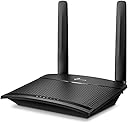
The TP-Link TL-MR100 is a sleek, black 4G LTE Wi-Fi router delivering up to 150 Mbps on the 2.4 GHz band. Featuring dual detachable LTE antennas and a micro SIM slot, it supports plug-and-play internet access across 100+ countries. With capacity for 32 devices, flexible Ethernet WAN support, and built-in parental and guest controls, it’s designed for seamless, reliable connectivity at home, office, or on the go.


| ASIN | B085PFRFKX |
| Antenna Location | Home |
| Antenna Type | Internal |
| Best Sellers Rank | #975 in Computers & Accessories ( See Top 100 in Computers & Accessories ) #11 in Routers (Computers & Accessories) |
| Box Contents | 300 Mbps Wireless N 4G LTE TL-MR100, Power Adapter, RJ45 Ethernet Cable,Quick Installation Guide |
| Brand | TP-Link |
| Brand Name | TP-Link |
| Colour | Black |
| Compatible Devices | Laptop, Personal Computer, Smart Television, Smartphone, Tablet |
| Connectivity Protocol | 4G LTE |
| Connectivity Technology | Wireless |
| Control Method | App |
| Country of Origin | India |
| Coverage | Wide coverage for up to 32 devices, both indoors and outdoors |
| Customer Reviews | 4.0 out of 5 stars 8,489 Reviews |
| Data Transfer Rate | 150 Megabits Per Second |
| Frequency | 2.4 GHz |
| Frequency Band Class | Single-Band |
| Global Trade Identification Number | 06935364088804 |
| Importer Contact Information | TP-Link India Private Limited Office No.1, Tower 2, Level 2, Raiaskaran Tech Park, Andheri Kurla Road, M.V Road, Andheri East-400072 Contact: Toll Free 1800-209-4168, [email protected] |
| Is Electric | Yes |
| Is Modem Compatible | Yes |
| Item Dimensions L x W x H | 15.4L x 11.4W x 3.6H Centimeters |
| Item Type Name | Router |
| Item Weight Unit of Measure | 150 Grams |
| Manufacturer | TP-LINK CORPORATION LIMITED, TP-Link Systems Inc. 10 Mauchly, Irvine, CA 92618, USA or TP-Link India Private Limited Office No.1, Tower 2, Level 2, Raiaskaran Tech Park, Andheri Kurla Road, M.V Road, Andheri East-400072 |
| Manufacturer Contact Information | TP-Link Systems Inc. 10 Mauchly, Irvine, CA 92618, USA or TP-Link India Private Limited Office No.1, Tower 2, Level 2, Raiaskaran Tech Park, Andheri Kurla Road, M.V Road, Andheri East-400072 |
| Manufacturer Part Number | TL-MR100 |
| Maximum Upstream Data Transfer Rate | 150 Megabits Per Second |
| Model Name | Archer |
| Model Number | TL-MR100 |
| Number of Ports | 2 |
| Operating System | RouterOS |
| Other Special Features of the Product | Guest Mode, LED Indicator, Parental Control, Remote Access |
| Packer Contact Information | Pacific Technology Private Limited Survey No, 57/3/55, 57/2/56, 57/1/57, Silver Industrial Estate, village Bhimpore, Nani Daman, daman Dadra and Nagar Haveli and Damn and Diu, India 396210 |
| Security Protocol | 64/128-bit WEP, WPA/WPA2, WPA-PSK/WPA2-PSK encryptions |
| Special Feature | Guest Mode , LED Indicator, Parental Control, Remote Access |
| UPC | 753459226339 |
| Unit Count | 1 Count |
| Voltage | 9 Volts |
| Warranty Description | 3 Years Warranty |
| Wireless Communication Standard | 802.11b, 802.11g, 802.11n |
| Wireless Compability | 802.11b, 802.11g, 802.11n |
H**Y
A Reliable 4G Router with Room for Tweaking
I recently purchased the TP-Link MR-100 4G router, and it has been a great addition to travel internet setup. If you’re looking for a no-frills option to get reliable internet without broadband, this router is a solid pick. What I Like About It: Quick and Easy Setup: Just insert your 4G SIM, plug it in, and you’re ready to go—no technical expertise required. Reliable for Streaming and Browsing: Delivers steady speeds that are great for Netflix, YouTube, and even light gaming. Decent Range: 2.4Ghz - Covers my villa well, even with multiple walls in between. Wired Connectivity: Ethernet ports are a big plus for devices that work better with a stable wired connection. You can choose between 4G & Wireless mode (WAN port is also available) Portable and Lightweight: Perfect for travel or as a backup internet solution. Indian 4G Bands – Key to Better Speeds: The MR-100 supports major Indian LTE bands used by providers like BSNL, Jio, Airtel, and Vi. Here’s a quick breakdown: Example : (Varies by network operator) Band 40 (2300 MHz): Best for high-speed 4G in cities and urban areas. Band 3 (1800 MHz): A versatile band offering a balance of speed and coverage, suitable for semi-urban and rural areas. Band 5 (850 MHz): Perfect for rural areas or places with weak signals due to its excellent range and wall penetration. Pro Tip: For the best speeds, you might need to manually test and lock the router to specific bands. The router automatically switches between bands, but manually tweaking can make a big difference depending on your location and carrier. A Note About Speed Complaints: While researching, I noticed many people in the comments complained about slow speeds, likely because they didn’t understand how to manually tweak the bands. If you’re unfamiliar, look up guides or tutorials to help you configure the bands. It’s not difficult, and it’s definitely worth the effort to get optimal speeds. Final Thoughts: The TP-Link MR-100 is a great 4G router, especially for users who don’t want the hassle of broadband. It’s reliable, portable, and works well once you set it up correctly. Spend some time adjusting the bands for your area, and you’ll see the performance improve significantly. Highly recommended for both primary and backup internet needs! PS : I'm an expert in tweaking routers & setting good configurations. Please do understand how the bands work and network congestions before you start complaining something. Be realistic of urban vs rural internet speeds. Buying a MR-200 or upper models won't resolve the speed issues in your area. If you are having low speeds even after tweaking, it's only due to congestion/unavailability of superior bands in your area.
N**E
Awesome Product. But needs some improvements
Awesome Product quality. Working seemlesly. But charger quality is not good. It burnt out in a week.
R**R
Router is excellent but Not for Jio 5G sim
I have tested the router with Airtel 5G sim, Jio 5G sim and VI 5G sim. I observed that there is no problem when you use Airtel or VI 5G sim. The router automatically detect setting and gives you 4G speed as per signal strength in that area. In my case speed of Airtel and VI is excellent in Mumbai. But it is not true with Jio 5G sim.The router gives you wifi signal but without network. Whatever you do you can't use Jio 5G Sim in it. I have never tested Pure Jio 4G sim so I can't say about it. It is not fault of router but problem is with Jio 5G sim. Installation is super easy and coverage is also good. Manufacturing quality is also nice. It is really a value for money product if you are want to use Airtel and VI sim and if there is good signal strength in your area.
P**R
Product is defective
Bought this product on 30th April 2026 and it stopped working within a month. Device trips within a minute of switch on. I have change the adopter but no improvement.
S**A
Sim base router best option
Working fine I'm using last 2 month with BSNL sim card
A**.
Comparable upload speed, below average download speed. No Carrier Aggregation
Comparison: The upload speed of the router is comparable to the speed I get in Redmi Note 5 Pro mobile. But this old phone supports 2 CA (Carrier Aggregation). The phone connects to Band 40 twice, so the download speed in my area is 61 Mbps max on Jio. Without 2 CA, download speed is around 20 Mbps. The upload speed is just 6-7Mbps from the phone. Speed: This router doesn't support CA. So the download speed I get is 20 Mbps using Jio. Upload is 6-8 Mbps which seems to be okay. So use this only if you prefer steady connectivity over speed. And don't expect high speed connectivity from this router if you see higher speeds in your One Plus or premium Galaxy devices which supports 4CA. You can safely compare speed of the router by comparing JioFi or similar devices. In Bangalore whitefield area, I got 38 Mbps download and 19 Mbps upload in Jio using this router. So the speeds greatly vary by location, proximity and tower capacity. Using Vi in my hometown also reached 42 Mbps download and 38 Mbps upload using this router. Airtel is also pretty stable. Configuration: There is no configuration required for Airtel or Vi. But Jio needs configuration. After that this will work without any issues. This can also be connected to Wired LAN internet. It doesn't seem to support WiFi Repeater mode. Signal Strength: There are 2 antennas for catching 4G signals and an internal antenna for WiFi. I've tried connecting cheap external antenna to capture signal in a remote area. It actually worsened the upload speed, and download speed was way more fluctuating. Also tried an extension cable so that the inbuilt antenna can be placed outside home. The speed didn't improve for Band 40, but it worked for Band 5. So cheap antennas may not work always. I haven't tried antennas that are worth 2000 yet.
A**2
Good but not great for Jio (TL-MR100/ '300 Mbps 4G LTE')
Overall good experience, first product delivered had one antenna socket missing but replacement delivered in 2 days was fine. India 4G LTE bands are LTE 850 (5), LTE 900 (8) LTE 1800 (3), LTE 2100 (1), LTE 2300 (40), LTE 2500 (41) - of which Jio uses bands 3, 5 and 40 in Maharashtra. Only the latest 2 products from Tp-link support all these bands, this product (TL-MR 100, labelled as style '300 Mbps 4G LTE') and the more powerful TP-Link Archer MR600 (labelled style ' AC1200 Mbps Dual Band | Cat6'). Did not get the Archer MR600 as it costs double the TL-MR100 and its key feature, carrier aggregation (4G+) doesn't work well as per reviews on Amazon. Setup was a bit tricky, had to create a new profile for Jio (see picture) which wasn't intuitive in the UI. I think it is better to set the band and network manually as the device will be placed in a fixed location. You can choose the best band by selecting each in turn and running speed tests - band 3 worked best for me in two locations - city and rural. Note the product accepts the nano SIM (same as that in Jio dongle) and not micro SIM (as per description). Placing the device near a window, preferably with line of sight to tower works best - speed reduced a bit if raining. The speed is better than that received from the Jio dongle and more stable as well - although no battery is a problem if you don't have an inverter. One feature not working with Jio is SMS - don't need to send SMS but need to receive OTP over SMS to login to Jio website. Folks have raised this in Tp-link forums but not fixed as yet. This is particularly needed to check daily usage is not over limit. On the wifi side, note that the external antenna is for the 4g lte signal - wifi antennas I think are internal to the device which explains the limited range (at most one wall) and reduced speed at distance. Testing speed next to device vs across one wall/ floor results in speed dropping by half. Could be improved by using a wifi extender or access point connected over LAN (not tried). LAN cable included is flimsy and short though. Could use 3 mobile phones to simultaneously watch Youtube at good quality (at least before the daily limit ran out!). One or two children can do online classes over MS Teams if well setup (near window, limited indoor wifi range)
B**N
Use any SIM card and Setup Your Home Wifi
Reliable 4G LTE Wi-Fi Router – Fast Setup & Stable Connection! Use any SIM card and Start Home Wifi. The TP-Link TL-MR100 is an excellent 4G LTE Wi-Fi N300 router that delivers fast, stable internet without the hassle of cables. Setup was super easy — just insert a 4G SIM card and power on: true plug-and-play convenience. Within minutes I had a strong 300 Mbps 2.4 GHz Wi-Fi network up and running. The signal coverage in my home is consistent, and multiple devices stay connected without frequent drops — perfect for browsing, streaming, and working from home. The device is compact, well-built, and TP-Link’s interface makes configuration intuitive even for non-tech users. If you’re looking for a 4G LTE Wi-Fi router with easy installation, strong performance, and excellent value, this TP-Link model is a solid choice. Highly recommended for homes, offices, or areas with limited wired broadband! 📶💻📱
A**R
Seamless with circles life
I got this setup with a supplementary data sim using circles life. It worked out of the box without any configuration. Deafult SSID and password were mentioned at the bottom of the router. Plug and play. Would recommend.
O**E
Waste of money, no returns accepted
Avoid this garbage, barely two months old and router has stopped working. Amazon won't accept a return and when directed by them to contact the manufacturers you're given the run around by AI to make it as difficult as possible to get a replacement. Not only is it a terrible router, you will get no support from Amazon or the manufacturer.
A**N
Good quality
Good quality working is good
F**I
تدعم جميع الشرائح زين، موبايلي و اس تي سي الحراميه (شخصنه🌝).
الجهاز ممتاز ويغطي البيت كامل بقوه اتصال عاليه، تاكد انك تحطه بوسط البيت بالصاله مثلا. العيب انه مايدعم تردد 5Ghz بس 2.5Ghz وبحكم اني ماجربته بدور ثاني. انصح باستخدامه للشقق والبيوت الصغيره. أبداً ماينفع للبيوت الكبيره حكم ان التردد 2.4Hz يتأثر بالجدران والعوائق الاخرى. الخلاصه: 1- سعر مناسب جداً مقارنةً بدعمه لجميع الشرائح السعوديه. 2- جهاز صغير ماياخذ مساحه وغير ملاحظ. 3- يتوفر تطبيق خاص بالهاتف الجوال (Tether) للتحكم وحظر المتصلين بالجهاز (ماتبلش مع النشبه)😉. 4- اهم ميزه: نمط الضيوف بحيث يستخدمونه ضيوفك برمز واسم مختلفين ماتضطر تغير الرمز كل مره.
A**A
Ottimo prodotto marca top
Un buon prodotto efficente e sempre funzionante,scalda pochissimo..ci sono altri modem che diventano roventi..semplice utilizzo e istallazione rapida...mai avuto problemi dopo anni di utilizzo..lo ricomprerei perché a meno così buono non lo trovi
Trustpilot
3 weeks ago
2 months ago