Buy anything from 5,000+ international stores. One checkout price. No surprise fees. Join 2M+ shoppers on Desertcart.
Desertcart purchases this item on your behalf and handles shipping, customs, and support to Senegal.
🛡️ Elevate your security game with ultra-HD clarity and smart detection — don’t just watch, know.
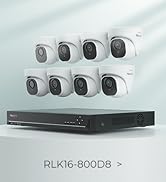
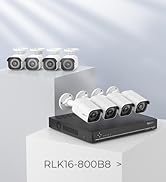
The REOLINK RLK16-800B8 is a professional-grade 8-camera 4K Ultra HD PoE security system featuring 8MP resolution, AI-powered person and vehicle detection, and a 16-channel NVR with a pre-installed 4TB HDD for continuous 24/7 recording. Designed for easy plug-and-play installation via Power over Ethernet, it offers remote access through a dedicated app compatible with all major platforms, ensuring comprehensive, reliable surveillance for homes or businesses.


| ASIN | B082KGF6FX |
| Best Sellers Rank | #3 in Surveillance DVR Kits |
| Brand | REOLINK |
| Built-In Media | RLN16-410*1, B800*8, NVR Power Adapter*1, HDMI Cable*1, USB Mouse*1, 1m Network Cable*1, 18m Network Cable*8 |
| Camera Description | Front, Rear |
| Color | White |
| Compatible Devices | Cameras, Laptops, Personal Computers, Smartphones, Tablets |
| Connectivity Technology | Wired |
| Customer Reviews | 4.4 out of 5 stars 1,561 Reviews |
| Frame Rate | Mainstream: 2fps - 20fps, Substream: 4fps - 15fps |
| Hardware Interface | Ethernet, HDMI, USB, VGA, eSATA |
| Item Weight | 0.01 Ounces |
| Lens Type | Fixed |
| Manufacturer | Reolink Digital |
| Memory Storage Capacity | 4 TB |
| Mfr Part Number | RLK16-800B8 |
| Model Number | RLK16-800B8 |
| Night Vision | Night Vision |
| Night Vision Range | 100 Feet |
| Number of Channels | 16 |
| Operating System | iOS, Android, Windows, Mac OS |
| Optical Sensor Technology | CMOS |
| Other Special Features of the Product | Adjustable, App Control, Easy to install, Human Detection, Weatherproof |
| Power Source | DC |
| Recording Mode | Motion Recording; schedule recording; 24/7 recording |
| Set Name | REOLINK 4K Security Camera System, RLK16-800B8 |
| Signal Format | Digital |
| Total Usb Ports | 2 |
| UPC | 633696952843 |
| Unit Count | 1 Count |
| Video Capture Resolution | 4K 8MP (2560 × 1920) |
| Video Input | RJ45 |
| Viewing Angle | 87 Degrees |
R**R
Incredible Value, Impressed!
Absolutely fantastic! Easy setup, incredible resolution and visibility. User friendly. Very expensive, but if quality is important, this is the system to get. Added a couple of dual cameras, but less impressed with them. Phone app, mouse scrolling on the screen, zooming, sound, etc, all really excellent! Previously owned two different Samsung systems, this is miles above them.
S**E
Excellent System
Reolink 16 cameras nvr poe system is excellent. This system was chosen because it had good reviews, slightly better than the competition. The part number for the system was RLK16-810B8-A. It includes a 16 channel box, 3 Tbyte hard drive, 8 POE cameras, part number RLC-810A, some misc cables and hardware. I purchased three additional cameras, a single point and zoom Reolink camera, part # RLC-423-5MP for over two hundred dollars, and a twin pack of two dome cameras, part # RLC-520 2PACK for about ninety dollars. Overall I am very pleased with the results so far. I've installed an IPhone app called simply "Reolink" in the apple store. This app smoothly and flawlessly connected to my system and works well to see through the cameras both live and playing back previous recordings, remotely as well as on site. Presently I have 8 cameras hooked up including the ptz camera above. The ptz camera is easy to use aiming left right and up and down as well as zooming. It does not, however, aim up above the horizon. So if you have a house up a hill, it shouldn't be placed down the hill from it. This is exactly what I did and I can see most of my house but can't zoom in on details much. But I can spin this camera around and zoom in on much of the rest of my property. Very good camera. I also installed the Reolink app on my laptop and tested it outside my home network. It too worked great to access the camera system remotely. I should talk about "poe" or power over ethernet. Each camera gets only one cable connected to it. This cable, called a cat5e cable in my case, supplies the power down to the camera and returns the collected video. I made a decision to purchase 1,000 ft of this cable for a number of reasons. Part # 5ECMXBLK_1Krl, True Cable direct burial cable. First, if anything had gone wrong with the Reolink camera system, I wanted to be able to return it, so didn't wish to take down all the cabling as this is a major amount of work to install. I could simply leave the seperatly purchased cable in place, allowing a replacement of one poe system with another if something went wrong. I also purchased a couple of 100 pack packages of mounting clamps to install the cat5e cables. Part # CMP-SCRW-SGL-WHT-100P. These were excellent and could easily be removed after install if needed. Also, I didn't wish to drill big holes in the walls of my house. So I decided to learn how to install the connectors, called RJ45 connectors, on the cable ends. This way I could use a small hole in the walls for each cable needed and install the connectors after positioning the cable in place. This was a good decision and a great way to get it all done. I purchased a crimping kit, part number Ninhao01. This crimping kit included several items, the crimper, which worked flawlessly, and an electronic test module, which displayed a sequence of lights clearly indicating whether the connectors were correctly wired. Very important. Worth it even if you don't attach any connectors. The first cable I checked was incorrectly wired, even though it was purchased with connectors! It was obvious and easy to see using the little diagnostic checker. This was my first time ever doing ethernet wiring and it was fairly easy to do with this crimping kit. I did watch a video on how to do it. You'll have to search for this as Amazon won't let me post a link. I used 568B cable endings, which turns out to be recommended by Reolink as well. I'll talk about where I placed the console. I put it in our basement. This was less cluttering for me and eliminates the fan noise, which runs 24/7 by the way. There were a few added complexities because I placed the console in such a remote location. I wanted to be able to quickly see through the cameras and accomplished this by running a display cable from the basement to my 51 inch living room TV. How? By using VGA over ethernet. Part # B07F3RW1C1. Once again I could wire the connectors myself and drill small holes. I also purchased a wireless mouse that worked in my living room as well. Part # M8126AB01. This worked one floor up from where the console was located and allowed me to select cameras and operate the ptz camera just as if the console was in the same room with me. A little note about exterior connections to the cameras. Reolink supplies supposedly sealed connectors, but these did not work for me as the direct burial cat5e cable I was using had too large of a diameter. So instead I opted for heat shrink tubing and glue to seal off the ends. The heatshrink was 3/4 inch by 4 ft xhf brand. I used a map gas torch to do the shrinking. All in all the Reolink camera system is the best of three different camera systems that I have worked with. The other two were gw security and lorex, both older systems that were dvr coaxial cable plus seperated power wires. Those systems were pretty good as well, but the Reolink system has been smoother and easier to use.
T**Y
Security camera for your Home or work place
If you're looking for a reliable, high-quality home security camera without expensive monthly fees, the Reolink 4K lineup is one of the best options out there. I tested it for everyday home use, and overall—it delivers impressive performance for the price.
D**T
Quality and Simplicity
This replaced a 10 year old HIKvision camera system. This is so much easier to use and manage. Very clear high res images. So simple to capture images and videos to share or upload to YouTube. Was able to re-use old Ethernet cabling that was already in place. Had it to add running in an afternoon, replaced the NVR and eight cameras that were mounted under the eaves.
D**S
Latest software version is very MUCH improved
[Revised Review] Wanted to provided and update. Reolink support connected me via email to address the concerns with the overall quality of the unit. First, I want to say I am pleasantly surprised with their wiliness to work to quickly resolved the update issues with the second unit I received. Specifically; o) overall lock and feel of the software is greatly improved over the old version. Setup is improved, the snappiness of the software is noticeably better, and over all software is significantly better quality [bonus points] o) Upgrade issues: According to support, the tech I worked, the versioning information provide was "not clear". The new tech help sort it out and they were able to provide me with an update to fix the issue. o) The fix also provide HTML5 support (replacement of flash)! (bonus points) o) Black screen on web preview - seems to be a Flash compatibility - fixed as new version supports HTML5 o) No "clear mode" support for web access due to "browser cannot support H.265." All in all, while the process has not been smooth the fact that Reolink stepped up, and supported their product goes a LONG way. So be sure to update the firmware when new version is generally available!!!! [Original Review] I did my research and ended up with the RLN16-410 as it has the 8MP cameras. Reviews looked better than average, so I ordered one. 1) First unit constantly rebooted over and over and over and... Reached out to Amazon support, we tried all the steps but no luck. They suggested I contact the Reolink support. So I did, and after a days of no where, I just decided to just exchange it. No so fast... I ended up having to return it because, apparently, when you send email asking for tech support, they (Amazon) block you from and exchange. OK so I returned it (and STILL waiting for a refund) 2) Second unit arrived – good news is, it does not have the reboot issue, but will not take and upgrade PAK file. Reolink support said the latest software for the RLN16-410 was not compatible with my hardware version. This might not be such a big deal except: o) The device uses Flash Player which Adobe dropping Dec 31st and Windows has disabled by default o) While the screen on the monitor show the camera fine, using the network show a black screen. Its likely a flash issue, but as noted Adobe has dropped support o) Reolink support says a new update for the version of the RLN16-410 is planned, but they did not provide a date other than "this year" 3) The overall quality of the software poor ( Cancle" should be spelled Cancel), portal is clunky and feels like it was developed in 1990. Even simple things like Setup and upgrade as been an extremally painful experience. Which is a shame as the video quality is nice and clear. Honestly you seem to have a great looking product, and nice features, but the QC process is severely lacking based on my (limited) experience. So to sum it up - hoping the future software update improves the usability. If it does, I will update my review. [It does, review updated to reflect this]
G**W
Excellent for home use, some issues for business and multiple locations
I plan to buy a total of 8 Reolink systems. So far, I’ve purchased 2 of them but haven’t installed them yet. Seven of the systems will be installed in automatic/self-serve carwashes which are open 24/7, most of the time with no employees present. Every wash is recorded in case of damage claims or malfunctions, and we also use the cameras to check the general status of the washes. The eighth camera system will be for an ice cream place owned by the same company, which is open 7-8 months per year. I’ve given the systems 5 stars because they are excellent for home use, which appears to be Reolink’s main customer target. There are some issues, however, mostly in how the software is implemented, for business users, particularly those with multiple locations. Pros: Very easy to set up for novices. Cameras have good quality video at a low price. Windows client and smartphone apps are generally well thought out with one of the simplest playback user interfaces that I’ve seen. Cons: Although written in good English, the manuals are incomplete. Support for 3rd party cameras is poor and Reolink doesn’t have cameras for some special applications like hidden cameras. Although functional, the Windows client and the smartphone apps can be rather confusing with multiple NVRs. My goal is to keep recorded video for at least 3 weeks before being over written. I plan to record only on motion detection, and I set the frame rate to 15fps. I won’t know whether that is sufficient until the systems have been installed and running for a while. Our two largest sites will have close to the maximum 16 cameras and may require a second hard drive. The user manuals are clearly written but don’t cover many of the features. I was going to downgrade my rating until I found a couple of features that I needed in unexpected places in the menu. At least one manual can be downloaded from the Amazon site but isn’t listed on Reolink’s own website. I bought the first two systems with 8MP cameras. I’m not convinced that the extra resolution makes a significant difference in real-life use. The NVR software lets you select lower resolutions, but I found that it just records a portion of the picture in the middle of the 8MP frame and doesn’t cover as much area. I’ll probably order the other systems with 5MP cameras, saving both cost and recording space. One surprise that I had is that you can log into the NVR, Windows client, and smartphone apps, but you can’t log out of any of them. You can change users rather awkwardly on the NVR using a mouse, but you can’t even do that on the client or apps. As a result, I can’t set up a proper access control scheme. For a single NVR, the Windows client and apps are excellent. The Android app works well on an Amazon Fire tablet. It doesn’t work properly on a Chromebook. For multiple NVRs there is no way to limit your viewing to a single NVR and it can be confusing because you can inadvertently scroll to a different NVR. I recommend only choosing the 1, 4, 8, and 16 camera screen choices.
B**I
Good cameras but the system and app need work
UPADTE 2: it is not quite 5 years that we’ve had these cameras. Once again I needed to find an event and have discovered that 2 of our 9 cameras no longer have sound and one is just gone. It shows it’s there but no picture. Really very disappointed as they are high on my house and not easily accessible. At this point I am calling these a false sense of security. UPDATE: We have been using this system for 2 years now and have needed to find something on our recordings twice now. There is no way to fast forward or rewind while watching a clip. For example, there was an incident on the farm next to my subdivision. I was asked to check my cameras to see if I can find anyone running onto mine or my neighbors property. Without having a clear time, I had to advance the slider bar so it’s skips forward in time, but how do I know I didn’t miss anything? There is no way to know other than sitting and watching each clip, hour by hour. I have told my husband that we will not buy this system again when we are ready to move or need to replace it here. That is a big deal that should not be overlooked! The picture quality and night vision are good, the the program however, is not very user friendly. We are in the process of installing these cameras and every time we add one to the NVR it ends up in a random position on the grid. We figured out how to move the order around on the monitor we have connected to the NVR, but it doesn’t carry over to the app. What’s even more frustrating, is that from app to app, nothing is in the same order. On the iPad we have to show a grid of 9 just to see the 3 cameras we have installed thus far! And as far as we can tell, there is no way to reorder the cameras within the app. What good is surveilling your property, if you have to jump all around looking for a particular scene? Reolink, please fix this!
J**A
100% recommend
I ordered the RLK16-800B8 with 8 cameras and they are absolutely fantastic! Great camera quality easy to view and download videos from the mobile app, and solid audio as well. The camera hub is not loud (as other have stated) and installation was very straight forward. Would 100% recommend this to anyone considering a whole home security setup!
M**E
Quality and service from reolink
First of all want to say amazing product and service you get. Bought the product with 1 camera had issue shipping and reolink not only did they resend a new one but also upgraded it to a newest model for free, quality is great and sound I will be buying 100% another kit for my daughter house thanks reolink and keep up the great work
D**Y
Always in stock when needed and reliable
Easy to set up and use as an inclosed non-wifi camera NVR. Cheaper to buy 2 of these kits to get the 16 cameras then to buy 8 extra cameras for the one unit.
C**J
Good value for this kit.
8 cameras are the right # for a small to medium sized property, but having 16 ports is a must if you are uncertain if 8 will be enough. It’s easy to just add more as needed. The camera setup is plug and play, all you have left to do is name the cameras and set up the level of detection (person, vehicle or motion); you can even toggle sound recording on or off. Picture quality is excellent daytime, good for the infrared night vision, but motion detection at night is only moderately okay at the edge of the viewing area. If the object is moving fast, they appear ‘ghost like’. The one thing that caught me by surprise is the red ring of the infrared led’s that is visible at night. They are quite noticeable at 100 feet (30 m) or less, dropping off in visibility beyond that. The bullet cameras are much smaller than they appear in the picture, and so are much more discreet than I had originally thought they would be. Against white soffits, they blend in, with only the black face drawing your attention. And then, you only notice them if you “look”. Overall, at first blush, this system while not cheap per se, seems to be good value for protection of property. I would give the system an overall score of 8.5 out of 10.
C**S
Good product.
Very satisfied with the product and value. Easy to configure.
S**U
DO NOT BUY THIS PRODUCT (OR ANY OTHER REOLINK PRODUCTS)
Before I start this review I want to mention that my comments are objective and based on the facts I experienced with this product's installation. As a Lawyer and also Professional Engineer I must respect the ethical principles that govern these two professions and therefore I will refrain from making any unfounded notes. I decided to purchase a Reolink NVR 8-camera system based on balancing a number of factors (stated abilities and features, number of cameras that could be connected, weatherproofing, installation easiness, etc.). importantly, price was not a determining factor in my decision. Upon installation (which under our large residence's geometry took more than 2 days at a cost of almost $ 1,500) we attempted to turn on the NVR. The unit did not power up. This could be due to one of two possible causes: either the NVR unit is faulty or the adapter/transformer is faulty (or both for that matter). This further means that no meaningful control or verification exists at the manufacturer's end, a trait not at all uncommon with products made in China. For clarity, I have used, same as many others of course, various Chinese-made products. Some are of excellent quality while some are the opposite. Reolink appears to belong to the latter category. Notably, in our particular circumstances there is no time to purchade and replace the entire system with a different brand, given that we have to travel to Europe in 10 days (hence the reason to install a security camera system), at least not at this time. We need(ed) a functional system before we leave. "Customer and Technical Support": To add insult to the injury, Reolink has no support on weekends - as in no one to even respond to emails submitted with this department. Moreover, I have been unable to identify a phone number for customer service or technical support in Canada. The Reolink webpage that purports to be the "Canadian" one displays phone numbers in...Italy, Spain and the Netherlands (!!!) It is notorious now that many companies (no matter where they are based in) do not have telephone support in the countries where they sell their products. This is not because they could not afford a live customer service or technical support person but because they want to avoid ANY accountability. Instead such companies direct the customer to use often convoluted forms to "contact" the "support team" and often the submision of these forms does not even work (I had to submit 4 times before the form probably went through). These types of companies are the worst. It is a disgraceful, disrespectful unreasonable and frustrating manner of doing business based on deceiving customers in purcahsing a product that does not work even when used for the first time. To conclude, again, I have submitted a "form" with Reolink (so-called) technical support and I asked that a replacement NVR and the adapter be shipped to me overnight, given the short time frame I have left before leaving on an inter-continental trip. I will return with another posting detailing their response (if any). If their response and the conclusion to this issue is positive, I will state so in a future posting. For now, this present posting is intended to at least caution potential buyers of this company, if not warn them to not purchase Reolink products. I had to select one star because otherwise I could not have submitted this post. Otherwise, the rating would have been "zero" stars.
Trustpilot
1 month ago
2 months ago