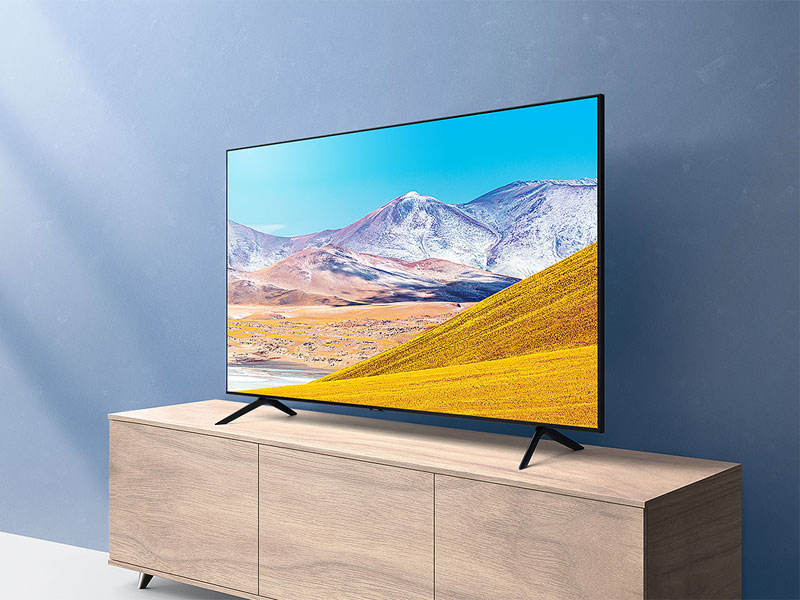
📺 Elevate your binge-watching game with crystal-clear 4K and hands-free control!
The Samsung 65-inch TU-8000 Series Crystal UHD Smart TV delivers vibrant 4K UHD resolution enhanced by a powerful Crystal Processor 4K for ultra-smooth upscaling. Featuring built-in Alexa and Bixby voice assistants, it offers intuitive hands-free control and seamless smart home integration. HDR technology reveals stunning color depth, while the Tizen OS provides easy access to popular streaming apps. With a sleek design and multiple connectivity options, this 2020 model is perfect for professionals seeking a premium, effortless entertainment upgrade.


| ASIN | B084JBTYHJ |
| Additional Features | UHD, Smart TV, HDR, Built-in Alexa, Crystal Display, Ultra Fast Processor |
| Analog Audio Output Count | 1 |
| Antenna Location | Home Viewing |
| Aspect Ratio | 16:9 |
| Audio Input | HDMI, USB, Optical, RCA, or Coaxial |
| Audio Output Mode | Digital |
| Base Depth | 11.1 Inches |
| Battery Type | AAA |
| Best Sellers Rank | #164,108 in Electronics ( See Top 100 in Electronics ) #501 in LED & LCD TVs |
| Brand | Samsung |
| Built-In Media | Power Cable, Remote Control, User Manual, Wall Bracket |
| Color | Black |
| Compatible Devices | Smart Home Device |
| Connectivity Technology | Bluetooth, Ethernet, HDMI, USB, Wireless |
| Connector Type | HDMI |
| Content Sharing Direction | Mobile to TV |
| Contrast Ratio | 16:9 |
| Control Method | Voice |
| Controller Type | amazon_alexa, vera |
| Customer Reviews | 4.4 out of 5 stars 24,415 Reviews |
| Display Backlight Configuration | Direct LED |
| Display Backlight Technology | LED |
| Display Language Options | English |
| Display Refresh Rate in Hertz | 60 |
| Display Size Class | 65 Inches |
| Display Technology | LCD |
| HDR Format Supported | HDR10 |
| Hardware Interface | USB |
| Integrated Surround Sound Format | Object Tracking Sound Lite (OTS Lite) |
| Internet Applications | Amazon Instant Video, Browser, Hulu, Netflix, YouTube, Apple TV |
| Is Electric | Yes |
| Item Dimensions D x W x H | 11.1"D x 57.1"W x 35.7"H |
| Item Type Name | Smart TV |
| Item Weight | 45.4 Pounds |
| Line Voltage | 110 VAC 60 Hz |
| Manufacturer | Samsung |
| Mfr Part Number | UN65TU8000FXZA |
| Model Name | TU8000 UHD 8 Series |
| Model Number | SAMUN65TU8000 |
| Model Series | 8 |
| Model Year | 2020 |
| Mounting Type | Wall Mount |
| Number of Audio Channels | 2 |
| Number of Batteries | 2 AAA batteries required. |
| Operating System | Tizen |
| Picture Quality Enhancement Technology | Crystal processor 4K, Crystal display |
| Power Consumption | 0.5 Watts |
| Refresh Rate | 60 Hz |
| Remote Control Technology | Bluetooth |
| Remote Required Battery Quantity | 2 |
| Remote Required Battery Size | AAA |
| Resolution | 4K |
| Screen Finish | Flat |
| Screen Mirroring Technology | Miracast |
| Screen Size | 65 Inches |
| Signal Format | digital |
| Size | 65-Inch |
| Speaker Description | Built-in speakers |
| Special Feature | UHD, Smart TV, HDR, Built-in Alexa, Crystal Display, Ultra Fast Processor |
| Total Audio Out Ports | 1 |
| Total Number of HDMI Ports | 2 |
| Total USB 2.0 Ports | 2 |
| Total Usb Ports | 2 |
| Tuner Type | ATSC |
| UPC | 887276397726 |
| VESA Mount Standard | 800 x 400 mm |
| Video Encoding | HDR10 |
| Warranty Description | 1 year manufacturer |
| Warranty Type | Limited |
| Water Resistance Level | Not Water Resistant |
| Wireless Technology | Bluetooth, Wi-Fi |
J**P
Excellent TV - no major complaints
I purchased the 65" version of the Samsung Crystal UHD TU-8000. Pros and Cons: * Mounting was relatively straightforward. Like other reviews, I did have to purchase specialized bolts to secure the tv to my existing flat screen mount. Fortunately I have a hardware store nearby, and it was easy to find what I needed. I agree with other reviews that the screws need to be a tad longer than what is specified in the owner's manual. I used four M8 1.25 pitch screws at 30 mm length. Depending on your mount, this may or may not be the proper length for you. * Once powered up, I found the remote control to be very simple, and surprisingly intuitive. I give the remote 4 stars for two reasons: the buttons are not back-lit or visible at all in the dark, and the remote is small and black which means I lost it three times in one night of viewing. * The quality of the graphics are very good. As noted in other reviews, the screen is very reflective which can be bothersome for daytime viewing. I would have included a picture, but the tv behaved like a mirror and I didn't want to post a selfie. ;) * The smart features were very intuitive, and highly functional. Within minutes I had set up access for YouTube, Netflix, Amazon Prime, Disney+ and HBO Max. This was the main reason for me to upgrade from my 55" Samsung screen, which was nearly 10 yrs old. * I plugged in my Chromecast, and the TV recognized it and began offering Google Assistant as a voice command option (in addition to the native Alexa and Bixby options). * I still haven't figured out how to get Ambient mode working. It isn't important for me anyway, so I gave up. I may try again in the future out of morbid curiosity. * I have a separate Sony stereo receiver with bookshelf speakers. I plugged in the optical cable and HDMI, and it worked immediately. The two devices "talk" to each other, so I only need to use the remote that came with the TV. Overall, I am very happy with this purchase. The interface is now much simpler than what I had before. I'm a tech person by trade, so the added complexity I used to deal with didn't bother me, but my wife was not able to operate the tv without my help. With this new setup, she feels much more comfortable operating it on her own.
B**N
Love this TV
Granted, this is a significant upgrade from what I had, but this is a great TV. I bought it with the Samsung sound bar to replace the main TV in the living room. Great quality UHD picture and great sound as well. Setup was easy, it has all the apps I want, it's very light, and it has plenty of inputs. Just a few caveats though. I have an older Panasonic VCR/DVD recorder combo. It has HDMI out, but when trying to connect this there were connection problems. Perhaps all that is needed is a newer HDMI cable, but I haven't bothered. I just hooked it up composite. Another thing is I thought the Samsung sound bar would be more easily controlled with the same remote as for the TV. Once connected it does simply take over as the TV sound, with +, -, and mute controlled by the TV remote with no problem. The trouble is the sound bar power stays on when you turn off the TV. In other words, I thought you'd be able to turn everything on and off at once. Not the case, or at least I haven't figured it out. I just leave the sound bar on all the time. When you turn on the TV you first hear sound from the TV speakers for about 15 seconds while everything boots up, and then the sound bar takes over. Another thing is there are some OEM apps you can't delete. This is a bummer, because it clutters up the home screen with things I won't ever use.
R**Z
Screen goes black.
I have had my television for 13 months and it is no longer works. I turned it on one day and the screen was black. I went through all the troubleshooting steps and still no good. After about 6 hours I could hear sound but still a black screen. The entire time the television turned itself on and off. This happened 3 times in less than 2 weeks before I got another one. Samsung was going to send a technician out but it was going to cost too much just come and look at it. The price quoted was more than a new television bigger in size. I thought that was absurd considering it has not been looked at yet. I was also told that this was a common thing with Samsung televisions. I questioned why sell them with this problem if you know there is a problem. Anyway, the only thing I would say is I would never buy this brand again. By the way, the 2nd time it happened I didn't turn the TV off for like 3 days for fear it would screw up again when I tried to turn it off. Sure enough I turned it off and the problem started all over again.
G**.
OK TV at this price
After looking at a lot of TV's and reading reviews I finally got this Samsung TV. (It replaces a Sharp TV that the sound kept cutting out on needing turning the TV off for a minute and turning it back on, a known issue with Sharp, but no update.) The Samsung is great bang for back, although performance was also important. It got better buyer reviews than most of the sets I was looking at, for a better price. Picture is good, sound is good. Set up with all the menus and smart functions to scroll through was a PITA, all I wanted was a TV to watch movies on. The remote control turns on complicated menus on TV that one needs to scroll through. It is not intuitive, one need to spend some time with a downloaded manual to learn how to use this TV I prefer quick buttons on remote. The instruction pamphlet included is very limited and one needs to download the full manual online. Once I did that and took the time to read up on the control functions things became clearer. I still prefer buttons than scrolling through functions. I have direct TV and wanted to set the DTV controller for this TV. Could not find a correct code at first. Direct TV gives the wrong code, and their code link is a blank page, seems to open their code list one needs to sign in first PITA looking for all the passwords, and whats the secret?. . Finally I found and old print out with several codes and the last one worked. 10812, YMMV.. Update: so after having this TV for a few weeks, its a second room TV. I looked at the Samsung TV a few times and found the picture a bit flat not deep hue and vivid, especially faces. I went into picture settings set dynamic and than advanced, and adjusted there a bit. Got better than Standard setting, but my old Sony 1080 still has more depth and vivid colors. With all the functions this TV has I would have preferred individual color control not a general color slider. I'll never use most of the other functions.
D**.
Great TV at a great price
I really like this TV overall and am happy with my purchase. I ran some 4K demo videos through the built-in YouTube app and the 4K picture is absolutely beautiful. The one minor gripe is that the blacks aren't truly black, as is the case with all LCD screens, but unless you're going to pony up the money for an OLED, that's just the way it's going to be. The sound quality is also quite good from the TV's built in speakers. I only have a couple of minor complaints overall about the TV. The first is that I'm not really a fan of the modern style "minimalist" remote. Call me old fashioned, but I would prefer to have a number pad, especially when using the built-in Spectrum TV app to watch my cable TV channels. But if it really bothers me that much I assume I could probably buy a universal remote to use with the TV My other minor complaint is that I don't really like the "stand" that came with the TV. My old Samsung TV had a really nice swivel stand that allowed me to turn the TV from side to side, depending on where in the room I was sitting. This TV only has 2 "feet" for a stand, so no swiveling of the TV is really possible. Here again, I can probably remedy this by buying an after-market universal TV stand that will swivel if I want to. Overall I am very satisfied with this TV and would definitely recommend it. At under $400 it's a very good value.
E**R
Every day I like it more!
I haven’t bought a “good” TV in about 20 years. My last two were inexpensive Insignia Roku TVs under 32”. And when I bought my first one, my Mom and I spent a few weeks marveling at the picture quality (a measly 720 dpi!). I’ve been experiencing some deja vu the last week or so every time I watch something that is UHD. On the whole I think the TV is great! Larger than I expected, but that’s largely because I didn’t go out TV shopping at stores in person beforehand—I relied on Amazon’s recommendations and research. I really like the Tizen Smart TV interface and am looking forward to not having to deal with delays in new streaming apps because of Roku’s business dealings. It was pretty easy to set things up as I like and their store had all of the apps that I use regularly. The remote has actually been a delight to me. I would not have expected something so small and … condensed (as in it has so few buttons in comparison to my other remotes) to be so useful. I only use the bulky universal remote that I got from Spectrum when I need to use the cable box. Switching over to the Spectrum app removes that need entirely—which I love. The only thing that I haven’t really tried is the voice control feature. I’m really pleased with this purchase. The TV is great. The picture quality is amazing. The sound quality is better than I expected. The interface is nice. I’m super pleased!
A**E
I was expecting better quality Apps dont always open already issues with screen . Overall - just OK
Update 4/2/2023 TV is dead - I had a feeling Samsung was garbage - will never buy Samsung again - every tv ever bought before has lasted 10+ years. This barely lasted 2 years. Total garbage - don’t buy. I bought this about 3 weeks ago. It has a "white" space around the top left corner (and along the left side). It is mostly noticeable when there is a black / dark scene ... it is not solid black in the upper left corner (or along the left side) when it is evenly dark everywhere else (about 2 inch circumference in top left corner is the worst). Annoying but the box to return tv is gone so dealing with it. The OS and included apps worked well the first few weeks. Then this week the Prime app started acting up. It would not open. I clicked the Prime button it would not open so navigated to and selected the Prime app and it keeps taking me to the Samsung free channels or one of the connected game systems. VERY Annoying but we had like 5 other apps to pick from so we just moved on... unfortunately, next day ... Opening the Prime app was still an issue (it would not open) and now Apple + does not open either. Oh wait now Hulu doesn't open either. I unplugged TV and waited 60 seconds, plugged it back in ... still none of the apps will open. Soooo I went to settings>support>update... TV up to date, no updates available. Then I go into the app settings. Tried to delete Apple+ so I could reinstall... ugh, nope I cant delete it because it was preinstalled. Once there however, I decided to click Open from the apps settings section. TOTALLY UNACCEPTABLE solution to this problem BUT that worked. Then I went back to the appropriate way of selecting app to open. For whatever reason I am now able to open all apps again. Sorry but when I go to use my TV, I want it to just work as it should. I should not have to troubleshoot every time I turn on the TV 3 weeks in to be able to watch something. So yeah if you have patience and can accept less than perfect functionality and picture quality (but pretty good in fairness) then this is an option. That said, too many unacceptable issues for the prices so I give it 2 stars. if it would have worked the way it should without requiring me to do a bunch of troubleshooting after 3 weeks of use, It probably would have received 3 stars. If the screen was not already messed up in the top left corner and the apps worked without struggle I would have probably given it 4 stars because when the issues outlined above are not present, it is a pretty good tv. All this said, I would recommend you pay the extra for added warranty If you do purchase this TV because it is too big to return without a reasonable amount of frustration. (Oh and dont buy it just because it is Alexa enabled if you already have echos in the house. totally useless feature to have on the tv if you already have an Echo (or many). I got it with alexa thinking I would be able to "easily" sync my echo plus with it... which you can do but there is nothing easy at all about the setup and once it is setup there is a major delay between the TV audio and Echo audio. (Echo is delayed by like 2 - 3 seconds. (I have GB internet service with an excellent router). I will say, the speakers in the tv are pretty good so I just use the tv speakers. Over all, I was disappointed with this purchase but its good enough not to return (At least not yet) Update Still not loving the tv. The App Store section is Horrible! Search UI tries to be smart but fails miserably. Half the time you click install on an app it looks like it’s going to install and it doesn’t. The Samsung free content is annoying because it goes right to that instead of letting me pick what I want when I first turn on the tv and it’s louder than the other apps. It’s good enough for the sales price I paid but will never pay full price for a Samsung anything after the experience I’ve had with this TV.
E**T
Awesome tv. Crystal clear picture, slightly difficult to setup.
I had considered this 65 inch tv and the Qled. I saw the picture at a Best Buy and thought it to be fantastic. The Qled was amazing too but I didn’t feel it was worth $400 more. This picture is so crystal clear I can see the grain of the grass when watching a golf tournament. I love to watch TCM movies , the old movies are so clear with this tv that it seems like the actors are actually in your room. Some dislikes , not crazy the way the app bar is shown across the bottom of the screen, they are small and hard to tell which one is highlighted. Also I just wish I could get rid of many apps I don’t want, but Samsung has some you just can’t delete. Instructions with the tv were only for installation, hardly any operating instructions on paper. I also thought it was difficult setting up as you have to go online and start a Samsung account . I couldn’t get the Bixby to work for voice so I used Alexa which works great. The remote is pretty basic but does a good job, I can use it for Xfinity/ Comcast, but found it easier just to use the Comcast remote, and use the Samsung remote for apps and controlling my Firestick. Only other thing is it would have been easier if the tv had a stand with a platform instead of legs. Legs are ok but I had to make a new tabletop to accommodate the width of the legs. Overall the tv is awesome.
Trustpilot
2 weeks ago
2 weeks ago