Desertcart purchases this item on your behalf and handles shipping, customs, and support to Senegal.
🔥 Own the game with precision and power at your fingertips!
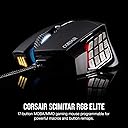
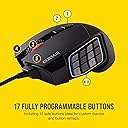
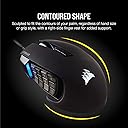
The Corsair SCIMITAR RGB ELITE is a high-performance wired gaming mouse designed for MMO and MOBA players, featuring 17 fully programmable buttons, a custom 18,000 DPI PixArt optical sensor with 1 DPI increments, and a patented key slider system for customizable button placement. Built with ultra-durable Omron switches rated for 50 million clicks and multi-zone RGB lighting, it offers both longevity and style in a comfortable, contoured design.
| ASIN | B083JL8CLF |
| Antenna Location | Gaming |
| Are Batteries Included? | No |
| Are Batteries Required | No |
| Best Sellers Rank | 605 in PC & Video Games ( See Top 100 in PC & Video Games ) 27 in Xbox One Accessories 34 in PC Gaming Mice 46 in Xbox Series X & S Accessories |
| Brand | Corsair |
| Brand Name | Corsair |
| Button Quantity | 17 |
| Colour | Black |
| Compatible Devices | Personal Computer, PC, Mac |
| Connectivity technology | USB |
| Customer Reviews | 4.1 out of 5 stars 3,489 Reviews |
| Embellishment Feature | Multi-Zone RGB Lighting |
| Enclosure Material | Metal |
| Global Trade Identification Number | 00840006616214 |
| Hand Orientation | Right |
| Hardware Platform | Laptop, Personal Computer |
| Item Dimensions L x W | 12L x 7.8W centimetres |
| Item Type Name | Mouse |
| Item Weight | 122 Grams |
| Manufacturer | Corsair |
| Manufacturer Part Number | CH-9304211-EU |
| Minimum Required Operating System Version | Windows 7 |
| Model Name | SCIMITAR ELITE |
| Model Number | CH-9304211-EU |
| Mouse Maximum Sensitivity | 18000 Dots per Inch |
| Movement Detection | Optical |
| Movement detection technology | Optical |
| Network Connectivity Technology | USB |
| Number of Batteries | Unknown batteries required. |
| Number of buttons | 17 |
| Operating System | Linux, Windows 7, Windows XP |
| Pattern | Scimitar Mouse |
| Product Features | Patented Key Slider control system, 17 Fully Programmable Buttons |
| Product Warranty | 2 year manufacturer |
| Range | 1.8 meters |
| Special feature | Patented Key Slider control system, 17 Fully Programmable Buttons |
| Style Name | Wired |
| Theme | Gaming |
| UPC | 840006616214 |
| Unit Count | 1 stuk |
J**B
I love this mouse, but it has issues with prolonged usage
I have had at least 5 of these over the years. I first got one 8 years ago and fell in love with the shape and fit of the mouse. The reason I have bought so many is that the coating for the mouse has a tendancy to peel off. I had to return the second one I bought for that reason. I also have had issues with the right click button where it stops working, and another mouse where the scroll wheel gets jerky. A small squirt of WD40 fixed the scroll. To be fair, I am a dev so I use the mouse day in, day out. The iCUE software is decent, it's highly configurable. The only annoyance I have is with the memory saved profiles. I can't ever seem to save what I want to either my keyboard or this mouse. Keep in mind that iCUE isn't supported on Linux.
Q**T
Really good MMO mouse
One of the best MMO mouse IMO. It's big, but pretty comfortable. The buttons area can slide so you can position it perfectly. I like that each row has a different texture so you know where your thumb is. The Corsair iCue software is a bit of a monster and a pain to use, but that's fine, you won't have to use for too long. The profiles can be saved directly on the mouse so you won't have to re-install iCue on other computers which is very very handy. There is a ton of buttons but I do end up missing the forward/backward buttons when browsing. I probably need to make a special browsing profile for that.
R**N
3.5 years later...
Lasted 3.5 years before signs of a dying scroll wheel, which is surprisingly longer than the G600 I had previously - may it rest in peace. In terms of comfort it is comfortable for palm grip, but some buttons even when slid all the way back are unreasonable to reach for small-medium hands in competitive scenarios. Over its lifetime I used about 6/12 buttons consistently. The software wasn't great either, had plenty of occasions where it just wouldn't load the profile and required reconnection or computer restart. Not too often, but enough to be wary of. That said, for it's price I can't complain after years of daily, heavy usage. It's done well!
S**U
Great once set.
A very niche mouse and it can feel a bit complicated or overwhelming at first, especially with all the buttons and setup options. Once you get everything configured the way you want, though, it works great. Based on my experience, definitely 5 stars.
A**X
iCUE
5 stars for the mouse -4 stars for the software. I have had Corsair products for over a decade and I don’t know why I do this to myself. Stockholm syndrome? I absolutely hate iCUE. it’s the biggest POS software I’ve had the displeasure of using over the last so many years I’ve also got the Corsair K70 mk2 keyboard, but for absolutely no reason, sometimes iCUE just won’t detect the keyboard at all in the software so it doesn’t work. “Error: The device was not found” Get used to seeing this error message. Now you might think it’s a keyboard hardware issue, but no, because if you force quit iCUE and restart the program the keyboard works again and the software detects it. Shocker! It’s supposed to start automatically, but it’s slow as hell. All your settings and config rely on the software running. My OS and iCUE are installed on a Samsung 980 pro NVME. It’s VERY fast. ICUE is not fast. Until iCUE decides to run, I’m dragging my mouse across the desk because the sensitivity reverts to default setting of what feels like 1 dpi until the software finally decides to start up. Then, you find out that the software is actually running some sort of update in the background without telling you, and now it’s decided it needs to restart your pc. You don’t really have a choice here since the mouse barely functions and none of your custom key binds or settings work, so I guess I’ll now wait another 5 mins for all the DDR5 Corsair memory to retrain itself before the PC POSTs. It’s ok I wasn’t in a rush or trying to do something! Thanks iCUE! The software is also clunky as hell, the UI is diabolical. “Let’s make it look cool and gamery for all our hardcore Corsair gamers”. How about make it work. How about make it simple and functional instead of the first page opening to adverts for your “AI voice” changer or a bunch of “mural” options. Like what the hell is even that. 95% of people just want to set the RGB to one simple colour and be done with it. I pray to God that the CEO of Corsair reads this little rant, finds the lead software developer for iCUE, and terminates him on the spot. Either with a P45 form or a sniper rifle.
J**Y
Better than a Naga!
Absolutely brilliant, so far. The ability to move the keypad with the included driver is useful even for the one time you will use it. The soft touch texture of the mouse feels amazing and not tacky, also seems like it will last a long time with little marks from oil appearing after a couple of months of heavy use. The mechanical buttons feel good and are easy to differentiate with the variety of texturing on them and they are angled making them feel easy to press but with a normal grip you won't likely accidentally press them (unless you are picking the mouse up a lot). The mouse wheel is tactile and feels as good as any other and the grip on the outer side of the mouse is amazing so far, texture stops any slipping in game and feels like it isn't going to peel off (like the naga does). RGB is really nice and everything is easily customisable with corsair ICUE, while it takes a littler to get the side buttons working it is simple to learn and is much more refined than other mice software. As a Mac user the mouse works perfectly and so does ICUE but switching from Mac to pc or visa versa may require separate profiles. After doing this once on PC and Mac it has worked perfectly every time. The 2 middle mouse buttons below the mouse wheel can be re programmed from profile switch and dpi toggle too, which is very useful as you can set this to what you like then change them to more useful key binds.
A**R
Expect to replace every 3-5 years
Great mouse for those wanting programmable buttons. The only downside is that you WILL need to replace every 3-5 years due to click issues or as others have mentioned mouse wheel issues. The main one for me is that the mouse starts to double click with a delay so if you're highlighting something, it will stop and start in the middle of it which is annoying. You may also be dragging a tab to a screen and then it loses the drag and clicks on the background instead, leaving the tab midway. This is the third time I have had to order this mouse in about 10~ years. I keep coming back because I enjoy the way it feels for me and its layout over something like the naga buttons. Is it planned obsolescence? I have no idea at this point. As feedback, I would perhaps like to see a newer version or something in line with the same principles of the original design but sturdier with more robust clicks.
T**K
Quality - pity about iCue software though.
Great mouse. iCue 3 & 4 software is arbitrarily difficult to set up - it needs to be redesigned for ease of use and basic features, such as rgb triggered by audio. The only corsair product that reacts to sound are the headphones - aka the ONLY bit of hardware you cant see when using it !!!! You cant see the RGB LED's flashing as its on your head!! But all the other corsair products (mouse mat, case lighting, cooler lighting, keyboard, mouse even the stand up lighting stick things - NONE of them react to audio due to it not being an option within the iCue software - how ridiculous ! If I hadn't already bought the K95 keyboard and found this out first I'd buy the Asus top end keyboard - slight side track there but kuf it - iCue needs "fixing". Musicbee audio player does have a free plugin that add's this to iCue - but it's a simple plugin with little customization and why should it have lots, it should be part of iCue. The mouse is good though.
N**S
Myszka do MMORPG.
Opłacalna myszka do MMORPD. Macra można zapisać w pamięci myszki dlatego icut iset potem niepotrzebny. Polecam do World of Warcraft i Final Fantasy XIV.
C**N
Su teclado lateral.
Este ratón me encanta, mientras funciona es increible. Pero al estar llegando sus dos años de garantía empieza a fallar. Y siempre es lo mismo, los elementos plasticos internos que accionan los pulsadores se desgastan, hundiendose y adquiriendo su forma. Y la rueda del ratón da un falso movimiento contrario y termina chirriando (en el vídeo lo tenéis). Por ello lo estoy devolviendo y Amazon muy amablemente me realizan el reembolso, ahora lo estoy comprando rebajado. A ver cuánto dura esta vez. Ya lo he adquirido 3 veces y he tenido hasta 2 reemplazos. Y no soy de maltratar mis preriféricos, quizás es por que trabajo y juego y les doy mucho uso, más de lo que el fabricante estipula. Aunque estos periféricos tan caros pasan pruebas de mucho estrés.
A**R
needs to be plugged and replugged every time i open pc, also side lights permanently stuck
title. good experience with corsair usually but this must be a defective unit
M**C
sağlam uzun yol arkadaşı
sağlam ve kaliteli bir ürün uzun yıllar sorunsuz çalışıyor renkl atması led bozulması olmadı çok sağlam bir ürün kablosuz olsa benim için daha iyi olabilirdi..
D**Y
Do not buy
Terrible mouse doesnt work with windows 11
Trustpilot
3 weeks ago
1 month ago