Desertcart purchases this item on your behalf and handles shipping, customs, and support to Senegal.
🔥 Own the game with precision and power at your fingertips!
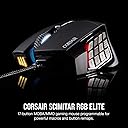
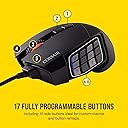
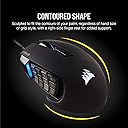
The Corsair SCIMITAR RGB ELITE is a high-performance wired gaming mouse designed for MMO and MOBA players, featuring 17 fully programmable buttons, a custom 18,000 DPI PixArt optical sensor with 1 DPI increments, and a patented key slider system for customizable button placement. Built with ultra-durable Omron switches rated for 50 million clicks and multi-zone RGB lighting, it offers both longevity and style in a comfortable, contoured design.
| ASIN | B083JL8CLF |
| Antenna Location | Gaming |
| Are Batteries Included? | No |
| Are Batteries Required | No |
| Best Sellers Rank | 1,306 in PC & Video Games ( See Top 100 in PC & Video Games ) 44 in Xbox One Accessories 59 in PC Gaming Mice 95 in Xbox Series X & S Accessories |
| Brand | Corsair |
| Brand Name | Corsair |
| Button Quantity | 17 |
| Colour | Black |
| Compatible Devices | Personal Computer, PC, Mac |
| Connectivity technology | USB |
| Country of Origin | China |
| Customer Reviews | 4.1 out of 5 stars 3,516 Reviews |
| Embellishment Feature | Multi-Zone RGB Lighting |
| Enclosure Material | Metal |
| Global Trade Identification Number | 00840006616214 |
| Hand Orientation | Right |
| Hardware Platform | Laptop, Personal Computer |
| Item Dimensions L x W | 12L x 7.8W centimetres |
| Item Type Name | Mouse |
| Item Weight | 122 Grams |
| Manufacturer | Corsair |
| Manufacturer Part Number | CH-9304211-EU |
| Minimum Required Operating System Version | Windows 10 |
| Model Name | SCIMITAR ELITE |
| Model Number | CH-9304211-EU |
| Mouse Maximum Sensitivity | 18000 Dots per Inch |
| Movement Detection | Optical |
| Movement detection technology | Optical |
| Network Connectivity Technology | USB |
| Number of Batteries | Unknown batteries required. |
| Number of buttons | 17 |
| Operating System | Linux, Windows 7, Windows XP |
| Pattern | Scimitar Mouse |
| Product Features | Patented Key Slider control system, 17 Fully Programmable Buttons |
| Product Warranty | 2 year manufacturer |
| Range | 1.8 meters |
| Special feature | Patented Key Slider control system, 17 Fully Programmable Buttons |
| Style Name | Wired |
| Theme | Gaming |
| UPC | 840006616214 |
| Unit Count | 1 stuk |
J**B
I love this mouse, but it has issues with prolonged usage
I have had at least 5 of these over the years. I first got one 8 years ago and fell in love with the shape and fit of the mouse. The reason I have bought so many is that the coating for the mouse has a tendancy to peel off. I had to return the second one I bought for that reason. I also have had issues with the right click button where it stops working, and another mouse where the scroll wheel gets jerky. A small squirt of WD40 fixed the scroll. To be fair, I am a dev so I use the mouse day in, day out. The iCUE software is decent, it's highly configurable. The only annoyance I have is with the memory saved profiles. I can't ever seem to save what I want to either my keyboard or this mouse. Keep in mind that iCUE isn't supported on Linux.
E**E
Buttoned mouse
I love this mouse so much. I don't think I'll ever go back. The buttons by the thumb help with the fact I have no numpad (by choice, I hate bulky keyboards) It's responsive, comfy, the RGB works and it keeps it's memory of it's settings.
R**N
3.5 years later...
Lasted 3.5 years before signs of a dying scroll wheel, which is surprisingly longer than the G600 I had previously - may it rest in peace. In terms of comfort it is comfortable for palm grip, but some buttons even when slid all the way back are unreasonable to reach for small-medium hands in competitive scenarios. Over its lifetime I used about 6/12 buttons consistently. The software wasn't great either, had plenty of occasions where it just wouldn't load the profile and required reconnection or computer restart. Not too often, but enough to be wary of. That said, for it's price I can't complain after years of daily, heavy usage. It's done well!
S**U
Great once set.
A very niche mouse and it can feel a bit complicated or overwhelming at first, especially with all the buttons and setup options. Once you get everything configured the way you want, though, it works great. Based on my experience, definitely 5 stars.
A**X
iCUE
5 stars for the mouse -4 stars for the software. I have had Corsair products for over a decade and I don’t know why I do this to myself. Stockholm syndrome? I absolutely hate iCUE. it’s the biggest POS software I’ve had the displeasure of using over the last so many years I’ve also got the Corsair K70 mk2 keyboard, but for absolutely no reason, sometimes iCUE just won’t detect the keyboard at all in the software so it doesn’t work. “Error: The device was not found” Get used to seeing this error message. Now you might think it’s a keyboard hardware issue, but no, because if you force quit iCUE and restart the program the keyboard works again and the software detects it. Shocker! It’s supposed to start automatically, but it’s slow as hell. All your settings and config rely on the software running. My OS and iCUE are installed on a Samsung 980 pro NVME. It’s VERY fast. ICUE is not fast. Until iCUE decides to run, I’m dragging my mouse across the desk because the sensitivity reverts to default setting of what feels like 1 dpi until the software finally decides to start up. Then, you find out that the software is actually running some sort of update in the background without telling you, and now it’s decided it needs to restart your pc. You don’t really have a choice here since the mouse barely functions and none of your custom key binds or settings work, so I guess I’ll now wait another 5 mins for all the DDR5 Corsair memory to retrain itself before the PC POSTs. It’s ok I wasn’t in a rush or trying to do something! Thanks iCUE! The software is also clunky as hell, the UI is diabolical. “Let’s make it look cool and gamery for all our hardcore Corsair gamers”. How about make it work. How about make it simple and functional instead of the first page opening to adverts for your “AI voice” changer or a bunch of “mural” options. Like what the hell is even that. 95% of people just want to set the RGB to one simple colour and be done with it. I pray to God that the CEO of Corsair reads this little rant, finds the lead software developer for iCUE, and terminates him on the spot. Either with a P45 form or a sniper rifle.
J**Y
Better than a Naga!
Absolutely brilliant, so far. The ability to move the keypad with the included driver is useful even for the one time you will use it. The soft touch texture of the mouse feels amazing and not tacky, also seems like it will last a long time with little marks from oil appearing after a couple of months of heavy use. The mechanical buttons feel good and are easy to differentiate with the variety of texturing on them and they are angled making them feel easy to press but with a normal grip you won't likely accidentally press them (unless you are picking the mouse up a lot). The mouse wheel is tactile and feels as good as any other and the grip on the outer side of the mouse is amazing so far, texture stops any slipping in game and feels like it isn't going to peel off (like the naga does). RGB is really nice and everything is easily customisable with corsair ICUE, while it takes a littler to get the side buttons working it is simple to learn and is much more refined than other mice software. As a Mac user the mouse works perfectly and so does ICUE but switching from Mac to pc or visa versa may require separate profiles. After doing this once on PC and Mac it has worked perfectly every time. The 2 middle mouse buttons below the mouse wheel can be re programmed from profile switch and dpi toggle too, which is very useful as you can set this to what you like then change them to more useful key binds.
C**S
Great mouse if you are an MMO/MOBA player!
I had always been a Razer fan, and used to use a Razer Naga for MMO's but after purchasing a Corsair keyboard a couple of years ago, I have been converted. When it came time to replace my mouse, I decided to take a look at Corsairs offerings and came across the scimitar. I was really interested to see how good the num pad was on it and have found it to be fair superior to the Naga. Being able to adjust the position has been a real game changer as I now find it a lot more comfortable to use. Add to that the num pad light which makes playing in low light much easier and it has a good weight to it as well. The only thing I could complain about is the single moulded Left and Right buttons. Having used similar types before, I am concerned that they will lose clicks sooner than individual buttons, but as it is working fine at the moment, have still given 5 stars
W**D
Solid mid-range option in a sparse MMO mouse market.
Functionally, the Scimitar is great. Despite having stopped playing World of Warcraft, being able to hit 12 buttons on a mouse is unbelievably freeing, to the point I mostly use my keyboard for simple WASD movement in games and bind everything else to the mouse. Before this I used a Reddragon M905, the budget MMO option which served me very well, until my hard mousepad chewed up the feet and every replacement I tried felt off. The Scimitar similarly doesn't feel great on a hard mouse pad. It's a heavy mouse, and moving it at all sounds like slamming a brick on your desk. I highly recommend using a cloth pad for a mouse like this. The cable is too quite rigid and noisy, so I recommend a bungie of some sort to fix it in place. For any Linux users, this mice plays well with the OpenLinkHub software so no VM or secondary Windows install is needed for rebinding the buttons or changing the LED colours (check your firewall settings if it refuses to show). Coming from the M905, I expected to warm to this instantly, but it actually took some time. The M905 has a thumb-rest which this (and most mice) lack, and to be honest I miss it. It means your thumb is always on the number pad, and pressure needed to actuate them is far lighter than with the M905. For weeks I was accidentally hitting buttons until muscle memory developed enough to rest lightly on the buttons. Even then, moving quickly in an FPS game for example means the delicate pressure you're used to applying is thrown out of wack. Even now, the actuation needed for the right click is so light and I'm constantly accidentally right clicking. In short, this will take time to adjust to if you're used to a mouse with hard buttons. The bigger problem with this mouse is the build quality and potential issues down the line. The mouse wheel is frequently identified as a near inevitable failure point, though I've yet to see any issues after a few months. The left click however has developed this weird creaking when held down hard, a problem the right click doesn't have. To reiterate, this mouse functions very well and feels good in the hand, but potential quality issues (and current odd behaviours) mark it down a few stars. It sits in a weird place of being more premium than cheaper MMO mice, but not cheap enough to be a first time users first MMO mouse. If you're on a budget or haven't used an MMO mouse before, I highlight recommend the M905. Otherwise this is perhaps a good fit.
N**S
Myszka do MMORPG.
Opłacalna myszka do MMORPD. Macra można zapisać w pamięci myszki dlatego icut iset potem niepotrzebny. Polecam do World of Warcraft i Final Fantasy XIV.
C**N
Su teclado lateral.
Este ratón me encanta, mientras funciona es increible. Pero al estar llegando sus dos años de garantía empieza a fallar. Y siempre es lo mismo, los elementos plasticos internos que accionan los pulsadores se desgastan, hundiendose y adquiriendo su forma. Y la rueda del ratón da un falso movimiento contrario y termina chirriando (en el vídeo lo tenéis). Por ello lo estoy devolviendo y Amazon muy amablemente me realizan el reembolso, ahora lo estoy comprando rebajado. A ver cuánto dura esta vez. Ya lo he adquirido 3 veces y he tenido hasta 2 reemplazos. Y no soy de maltratar mis preriféricos, quizás es por que trabajo y juego y les doy mucho uso, más de lo que el fabricante estipula. Aunque estos periféricos tan caros pasan pruebas de mucho estrés.
A**R
needs to be plugged and replugged every time i open pc, also side lights permanently stuck
title. good experience with corsair usually but this must be a defective unit
M**C
sağlam uzun yol arkadaşı
sağlam ve kaliteli bir ürün uzun yıllar sorunsuz çalışıyor renkl atması led bozulması olmadı çok sağlam bir ürün kablosuz olsa benim için daha iyi olabilirdi..
D**Y
Do not buy
Terrible mouse doesnt work with windows 11
Trustpilot
3 weeks ago
4 days ago