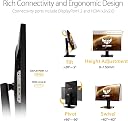
🎮 Elevate Your Game with ASUS TUF – Where Every Pixel Counts!
The ASUS TUF Gaming VG289Q is a 28-inch 4K gaming monitor that delivers stunning visuals with HDR10 support and AMD FreeSync technology, ensuring a smooth and immersive gaming experience. With advanced features like Shadow Boost for enhanced dark scene visibility and flexible connectivity options, this monitor is perfect for gamers and creative professionals alike. Plus, enjoy complimentary access to Adobe Creative Cloud for three months!


| ASIN | B0845NXCXF |
| Adaptive Sync | FreeSync |
| Additional Features | Blue Light Filter, Built-In Speakers, Flicker-Free, Height Adjustment, Pivot Adjustment |
| Aspect Ratio | 16:9 |
| Best Sellers Rank | #24,965 in Electronics ( See Top 100 in Electronics ) #662 in Computer Monitors |
| Brand | ASUS |
| Brightness | 350 cd |
| Color | BLACK |
| Color Gamut | 90 |
| Compatible Devices | Computers or laptops with AMD FreeSync or NVIDIA GeForce graphics cards |
| Connectivity Technology | HDMI, display port |
| Contrast Ratio | 1,000:1 |
| Customer Reviews | 4.6 out of 5 stars 1,533 Reviews |
| Display Resolution Maximum | 3840 x 2160 pixels |
| Display Technology | LCD, LED |
| Display Type | LED |
| Hardware Connectivity | DisplayPort, HDMI |
| Image Contrast Ratio | 1,000:1 |
| Included Components | 1 x Displayport 1.2, 2 x HDMI v2.0 |
| Item Dimensions D x W x H | 15.95"D x 25.18"W x 9.19"H |
| Item Type Name | ASUS TUF Gaming VG289Q 28” HDR Gaming Monitor 4K (3840 x 2160) IPS FreeSync™ Eye Care DisplayPort Dual HDMI HDR 10 |
| Item Weight | 22 pounds |
| Manufacturer | ASUS |
| Model Name | VG289Q |
| Model Number | VG289Q |
| Mounting Type | Wall Mount |
| Native Resolution | 3840x2160 |
| Number of Component Outputs | 2 |
| Picture Quality Enhancement Technology | FreeSync® technology, Shadow Boost technology |
| Pixel Pitch | 0.17 |
| Power Consumption | 65 watts |
| Refresh Rate | 60 hertz |
| Resolution | 4K UHD 2160p |
| Response Time | 5 milliseconds |
| Screen Finish | Matte |
| Screen Size | 28 inches |
| Screen Surface Description | Matte |
| Series Number | 289 |
| Specific Uses For Product | Business, Gaming, Personal |
| Total Number of HDMI Ports | 2 |
| Total USB 3.0 Ports | 2 |
| UPC | 192876460214 |
| Viewing Angle | 178 degrees |
| Voltage | 100240 volts |
| Warranty Description | 3 Year Warranty with ARR |
| Warranty Type | 3 Year Limited Warranty |
T**E
HDR is as good as the LG27UL, UN and UK series that is 400 certified
Finally I found a great monitor with no backlight bleeding. It has some ips glow but that is ok, as the black levels in this monitor is the best I have seen in an ips monitor so far. Second of all, people are complaining about HDR being washed out for 2 reasons 1- They are using HDR on non supported HDR games 2- Or they are playing a game that has terrible HDR implementation to begin with, and a good example for such a game is Red Dead redemption 2 which looks terrible and washed out when HDR is turned on(this is even for the best HDR TVs as it is a game issue and not a monitor or a TV issue), but you can still fix this issue by tinkering with your PS4's HDR calibration settings. Games that I have tried on this monitor and look great with HDR for PS4 pro are(Spider man, God of war, Ghost of Tsushima, Horizon zero of Dawn). Most importantly I do not understand why is this not vesa hdr certified while LG UK, UN and UL series are. For one, the LG monitors in the series I have listed and that have the "400" hdr certification, do not even exceed 350 nits(Their peak brightness is 350 nits, just as high as this Asus monitor) which is funny because both the Asus TUF Gaming VG289Q and the LG 27UK, UN and UL series are all 350 nits max, but for some reason the LG was able to acquire a Vesa 400 certification for its HDR, but the Asus TUF Gaming VG289Q, which has the same amount of nits(350), did not acquire this certification. All in all this is a great monitor that has the best black levels for an IPS monitor and it is of better quality than the more expensive LG27UK, Ul and UN series. Its black levels are very impressive and makes any game that much more atmospheric and immersive, regardless of the resolution. For example, Cyberpunk on PC, set at 1080p, actually looks great on this monitor due to the black levels (without HDR). -The Cons, What are they? 1-The Buttons and the Display options are kinda terrible and inaccessible/nonintuitive. 2-No volume buttons or wheel, so you actually have to go into the OSD(on screen display options) in order to get into the volume section to turn your volume up or down. 3- It does not come with an HDMI cable and only comes with a Display Port cable. 4- Terrible wire connection locations(vertically placed in the back rather than horizontally, which LG monitors win in this department) 5- And lastly there is no quick buttons for input changes. You still have to go into the menu in order to change your input from HDMI 1 to HDMI 2 to Display Port and vice versa. So good thing non of the cons have to do anything with the actual image quality because this monitor performs very well in that department. I feel they skimped on these technical issues in order to give you an Amazing display for this price, so the shortcuts that were made to offer such an amazing picture for this price, are mostly the cons I have listed, and It did not come at the expense of image quality which is great. Of course many people would add 60hertz as a "con" but for gamers who are not planning to play games higher than 60fps, then there is no reason to consider this a con. It is only a con for people who care more about performance in multiplayer games, than about image quality. And no, the new consoles will not take advantage of monitors with higher refresh rates in triple A tittles and only a few games will even run at 4k 120 hertz on the xbox series x or the PS5. It is a gimmick that you should not base your monitor shopping decision on. I mean the PS5 box states "8k"...does that mean that games will run at 8k on PS5 and that you should go out and now buy an 8k TV to "future proof" yourself? lol of course not. Gimmick advertising is a thing children.
A**3
Perfect for me
I just compared a video on another monitor, and was so inspired I logged in here just to review this monitor real quick. Admittedly, I am coming from bad monitors. I've got one of those squarish dell monitors, which I can tweak a little bit to get 2560x2048. The 'monitor' I was upgrading from is a 720p samsung television. But this monitor, for the price point, is everything I could ask for and much more. Things I didn't even know I needed. Height adjustable, swivel left/right/up/down. Looks really sleek. Considerably thin bezel. No dead pixels I've noticed. Ive used for about 2 weeks. Its got different modes for different viewing subjects, movies, fps, racing, etc. It's got an adjustable center dot/crosshair, which I didn't even know was a thing monitors these days do, but it makes aiming a cinch and gives me an edge I definitely didn't have before. Playing RDR2 was awe-inspiring. I am using "scenery mode" which seems to provide eye-popping contrast and makes everything look lush and vivid. I don't remember if this is IPS or what but its certainly got the lumens and the saturation, the definition, lack of bleed, just everything about this I am so impressed with. But again, this was a huge upgrade for me so I can't really compare it honestly to its competition, except to say this was one of the cheapest 4k monitors that didn't seem like total crap, and I am a happy camper.
P**X
A very good purchase
Have you ever purchased something and was extremely pleased with yourself for purchasing the item? Well, that's how I feel about my purchase of this monitor. I'm not a geek but I how what I like and after months of investigating and finally choosing this monitor, I can say for the money spent, this is my best choice. The size is perfect for my ailing eyes. It has all the features I would want in a monitor and then some. It arrived brand new and well packaged. The only issue I have is the connection panel is located on the bottom in the rear and not on the side, which I prefer. So making my connections before placing it where I wanted it was a little challenging but successful. Once made, I don't see the need to move it until I swap out the HDMI cable for the Display Port cable for increased bandwidth. I used the HDMI connection first. The image right out of the box is pretty good and I didn't see the need to fiddle with the the features to get the best image possible just yet. I plan to research on the net to see how others dialed in their monitor for that great image they talk about here in the reviews. There are no dead pixels and the image just looks amazing thus far but It can and will do better. I am just happy to get the monitor set up. I have an Nvidia GTX 3070 display adapter that is more than adequate for this light gamer. I envision lots of fun to come and productivity accomplished with this monitor. Here's the thing. This is why I shop Amazon whenever possible. I purchased the monitor for the advertised price of $309. Two weeks later the price dropped to $249. Amazon made an exception and refunded me the difference. Now the price went up to $269 which is still a great price for this 28" 4K monitor with HDR10 and an IPS panel @60hz. It's like playing the stock market. You've got to stay on top of it to get the best price. Thanks Amazon for allowing me a very good purchase.
A**R
Great option for those seeking quality on a budget, with only one downside
I bought this monitor about four months ago after having done 8+ hours of research. I knew I would be using it on a day to day basis for work (programming, document writing, excel spreadsheets), gaming on my xbox one s, and of course watching netflix like my picture shows. This meant I wanted good color articulation, detail for reading small text, at least a 60hz refresh rate, a decent refresh rate, good height, tilt, and rotation changing, and lastly I did not want it to be very deep since it is pushed up against a wall. Before getting to the negative of this monitor, I would first like to cover what is good about it. The color articulation is quite fantastic. There are plenty of reviews online that go over optimal settings for certain tasks, such as how to adjust brightness, saturation, and which appearance profiles to use. Once I found a decent one, I haven't changed it since. It's kinda annoying to feel like I have to change it all the time when doing something different. Before my usb-c to DisplayPort cable came in the mail for use with my 2019 macbook pro, I was using hdmi and the apple usb-c adapter. Let me tell you, the 30hz max achievable by the hdmi cord that comes with the monitor is dreadful. In this day and age, we are all very used to 60hz. You've gotta get a modern DisplayPort cable that supports 60hz at 4k resolution. I chose this monitor size because at a 4k resolution, a 28" diagonal monitor is fewer pixels per inch than the crappy dell work computer I used over the summer which was about 13" diagonal and 1080p. Anyways, since I wanted text readability to be preserved, I used some reviews online and realized this was the largest screen I would go for to preserve text clarity, and it is more than great. I actually would get this exact same size again. Any larger would be too big for my uses, since I sit with my face 2-3 ft away from the screen. Also, at this size and text clarity I will work on two python jupyter notebooks at once, write an email and have two chrome tabs open, or have three pdfs open (two of which I can read at a time), and that's not including my laptop screen. The screen comes off the wall by 6.5 inches, and the furthest point which is on the base of the monitor comes out 9.5 inches. The monitor has very customizable movement settings, better than most I saw on the market. It's nice because it's very flexible, not that I change it much except for when I am plugging in cables in the back. Height is variable from 1.75 inches off the desk to 8.5 inches off the desk. Tilt, rotation, and cable management is also great. Finally for the downside. If you notice in the picture, the large brightspots at the bottom right and bottom left have been there since day one and have not / will not go away. They are only noticeable when the display is showing darker colors, and I have tried a bunch to edit the settings to make it go away but I haven't been able to. Honestly, I got over it after about a week. Let's be real, had I known these spots would be there I would not have purchased this exact monitor. Was it annoying enough to send it back and ask for another (which honestly would probably have the same defect?) No. Beware tho, this is what ~$350 get's you. Everything about this monitor was great except for this defect. My ultimate suggestion: buy your monitor at an in-person store so that you can test a demo, even see if they will let you plug it in and try it before you walk out of the store. If you order from amazon, accept you might need to deal with sending it back, which is a pain in the ass for something so big and expensive.
D**G
Fantastic quality product with great value
This is a fantastic all around monitor. Really nice, crisp picture and the HDR looks great without blowing out colors. The stand, which I didn’t think I’d appreciate as much, is really smooth operating and provides great viewing angles easily - it’s a way bigger asset than I thought it would be. The brightness and blue light filtering settings are easily and intuitively accessed and can be customized and quickly switched. I have had 3 28” pc monitors - an asus 1080p (10+ years old), a Samsung 4K (no HDR, 3 years old), and this one. My old asus monitor is a tank, built super sturdily and has functioned perfectly with heavy use for well over a decade. Right around the new year, my 4K Samsung monitor had 3 pixels die out and it’s only 3 years old, which prompted me to switch back to asus-brand monitors as my old one is 3x the Samsung’s senior and has no issues. So far, this new monitor is simply a dream; hopefully it holds up as well as my older asus monitor! While this is not one of those ultra high tier gaming monitors with 1ms response time, and I don’t game super seriously, I am personally very picky, so I can imagine for even very discerning professional gamers, this will meet or likely exceed your needs for performance. The only exception I would say is if money is no object and you have an SLI/crossfire setup you want to dedicate its full output to one monitor...in that case I’d say go for one of those ultra high refresh rate/1ms/4K(or higher) systems, but for 99% of people out there, even for most professionals, this is a fantastic monitor. I, at least, couldn’t be more pleased with it so far.
J**N
Great for MOST gaming
Full disclaimer: I am not a professional PC gamer/photo editor/anything of the like. Nor am I a tech genius that can compare every monitor by the most specific numbers. I AM however a PS4 pro gamer and have been slowly making changes to my gaming experience (new headset, kontrolfreeks, and now a gaming monitor). I researched for monitors for maybe a solid month and it came down to this and the BENQ EL2870U. I went for this one and couldn’t be happier with my decision. I mostly play COD: Warzone and for FPS games it works for me. With the PS5 coming out I think 4K and 60hz will do fine (although PS5 rumored to push 120hz). The picture quality is great, ergonomics are great although I don’t move it much, and the monitor itself looks good and is light but feels durable. There are a number of features and visual presets to help you tailor the settings towards whatever you’re doing. If there was one area I would say this monitor lacks is in sound quality as the speakers leave much to be desired but wasn’t a big deal to me because I use a headset anyways. I don’t have the means to test the exact input lag but it’s very responsive to me compared a Samsung monitor I had originally, and especially compared to a TV. For console gaming I would highly recommend this monitor. For PC or for future PC users this monitor probably won’t serve you well.
H**G
Good Product, Buy Used Cautiously
I bought two of these monitors from Amazon Warehouse. One used Very Good and one used Like New. No problems with the Like New one. Even considering the MSRP on these is $300, paying over MSRP for a used one is still a great value to me honestly. The problem came with the Very Good one. Amazon warehouse guidelines say that Very Good has seen limited us and remains in good working conditions, may show some limited signs of wear and could be missing some accessories (but if missing will be listed). This one did not list any missing accessories. The page says new it comes with the monitor Display Port cable and power cable. The Like New one came with an HDMI cable which was surprising. However, the Very Good one came without a DP cable or HDMI cable. After getting the runaround by Amazon support (the first rep literally just rage quit the chat lol) I finally got a senior rep who agreed it was supposed to come with a DP cable and refunded me some money. I noticed a missing chunk out of the Very Good condition one. It looks like someone tried to peel the screen as there are two lines in the bezel as well. While Amazon did agree to do a return/refund, I will now have to pay for a New one at increased cost. The Very Good one also did not ship in original packaging (which was fine) but it shipped pre-assembled (base attached) and what appeared to me to be inadequate padding. Overall, as a product, I rate this monitor very highly, just be careful when buying Used even if it is from Amazon Warehouse. If you are planning to buy a used one as a gift, I would recommend opening it up and making sure it works so you can send it back in the 30 day window if necessary. Update: I then had to order a new one from NSpire Store. I can say the new one works great, however, my gripe is with the seller. I placed an order with them, then three days in they messaged me asking me to cancel my order because they did not have stock (against Amazons policy). I did so and the VERY next day they had 9 units in stock. However, look at that they increased the price. I messaged them asking if I could get the original price I had (when they told me to cancel the order) they said no. 10/10 great monitor, 7/10 for Amazon Warehouse and 3/10 for Nspire.
C**E
Amazing!
Looks like I’m the first to write a review on Amazon for this item! I wanted a solid monitor mainly for casual console gaming that checked all the boxes at a decent price. I was very close to getting the Asus MG28UQ but since this is newer tech I decided to take a chance and I am glad I did! - The order arrived the next day as indicated, thank you Amazon. The packaging was very good, no damage of any kind. The assembly was extremely easy all I had to do was insert the base and twist the screw at the bottom, no tools of any kind required. I was kinda disappointed that it didn’t include a HDMI cable. I have a really good one either way but it would’ve been nice to have another for backup. Included with my order was the monitor, display port, power supply and manual. I quickly got it set up and was ready to go. - Out of the box it looked gorgeous, I made some minor tweaks and was ready to play! I’m coming from a QHD monitor with a lower response time and wasn’t expecting the same performance with this monitor as I mainly bought it for visuals, I was wrong. This monitor handles fast paced gaming very well I was blown away. I played Modern Warfare on my X1X and didn’t miss a beat coming from my larger monitor with better response times. - I’m very happy with my purchase and will continue to look for Asus products in the future. This monitor should even be good for next gen with the series X, I look forward to keeping it for the years to come!
J**.
Great Choice for Non-Competitive Gaming and Casual Content Creation
If you're playing single player titles or just playing for kicks with friends online this screen will meet your needs. The HDR isn't absolutely eye-popping, but I don't find it lacking by any means. I used windows HDR calibration app which I must say really brought it all up to par. I've got this hooked up to a 4090, g-sync enabled. The frame rates are butter. Absolute constant 60 fps. 3D modeling and Photoshop have looked and worked great on this monitor. No complaints there. The 10-bit colour depth coming in with 1.02 billion colours, standard contrast ratio, and slightly above standard brightness all add to the experience. The stand is actually very nice. Great quality, and many angles of adjustment. I've been playing around with the idea of buying two more of these monitors for a triple monitor set-up. Absolutely love it. Highly recommend.
F**U
Monitor 4k super recomendado
Recomiendo ampliamente este monitor, la calidad de imagen me parece excelente dentro de lo que cabe en relación a calidad y precio, lo agarre en una oferta flash por 5,500. - Monitor para gaming Este monitor lo adquirí principal para mi series x, ya que estaba pensando en adquirír un monitor 2k, pero al ver que valían más y este lo encontré por mejor precio fue una decisión que no pude dejar pasar. Ya que pasar a un monitor de 4k con consolas como PS5 y SX es sin duda Indispensable para sacarle el mayor provecho a las consolas. Si bien no corre a más a de 60 fps, lo considero muy bien para jugadores que no exigen tanto en juegos de shooters y que se basan más en la calidad y detalles gráficos de los videojuegos, almenos lo he probado en Fifa 23, RDR 2, Cyberpunk 2077 y Microsoft fight simulator y todos se ven espectacularmente bien. A mi parecer el monitor cumple ampliamente con lo que se ofrece, un calidad excelente de imagen. -Monitor para trabajo/productividad En temas de home office me parece ideal ya que el tamaño de su pantalla es amplio y puedo mantener varias ventanas y trabajar al mismo tiempo, además suelo editar videos y fotos y el detalle de los colores es tan preciso que me siento satisfecho por haber elegido este monitor. -Calidad del sonido Si bien el sonido no es su fuerte ni lo mejor, me parece muy bien que venga incluido, ya que cumple en lo básico para reproducir multimedia y eso es algo que se agredece, ya que muchos monitores por mayor precio no suelen incluirlo. - Contras El único detalle que vi fue que en imágenes muy obscuras suelen verse las famosas fugas de luz en el borde de la pantalla, no es algo que afecte el uso y la calidad de imagen, pero es simplemente algo que ahí esta. - Conclusión Si lo encuentras por menos de 7k no dudes en comprarlo, es la mejor inversión que puedes hacer si sueles ser una persona productiva/gamer y que quiere tener ese balance de calidad y precio, da igual si solo eres una jaja, pero realmente por todo lo mencionado anteriormente es un monitor que cumple muy bien su propósito, brindar un calidad excelente de colores y definición en cuanto a contenido multimedia.
J**Z
Excelente Monitor!
Estoy super contento con este monitor, la base es muy buena, sólida y ergonómica. La imagen es excelente es un monitor 4K. El brillo del monitor es muy potente, me gustó mucho también. Las bocinas no son muy buenas pero como las de cualquier monitor, hay que conectar la laptop a unas bocinas o conectárselas. El monitor es muy espacioso y estoy super contento con él. Yo lo compré aquí en Amazon en aprox 6000 pesos y a MSI así que me salió super super bien. Lo recomiendo ampliamente.
A**N
Great quality and Picture. Easy to set up and great for the price. Great for some games, but not all
Depending on the games you play, this might be the display for you. Resolution, colour and image are awesome. Refresh rate is the only limitation for gaming. Most games do not require higher refresh rates. High resolution is important for games with detailed graphics and menus. Refresh isn't that critical for strategy and similar games. For First Person Shooter, Car Racing or games with real time graphics then this might not be the display..
G**R
Very high quality resolution, beautiful colors
I went on Amazon for hours before deciding to buy this monitor. I was about to buy a curved monitor. The focus of buying a new monitor is not for gaming but rather for productivity. My goal was at least 4k (2560x1080) resolution, AMD Freesync, anti-glare, HDR. Nonetheless, looking for a quality monitor makes a person look for a gaming monitor. This monitor looked even better, 4K UHD 3840x2160 resolution, AMD Freesync, HDR10, blue light filter and has high dynamic range for color and brightness levels. It exceeded all my expectations. Not sure whether it was an open box or not as the seal on the box was broken and not all the items were protected by the thin film and the cables were in unsealed plastic bags kind ziploc. However, not a single scratch or fingerprint made me believe this monitor has been used before. The monitor auto synchronized with my desktop and my computer automatically set the resolution to the highest. The quality of the monitor is excellent, the colors very bright, and the 4k resolution helps a lot for editing photos. The warranty for this monitor is three years with ASUS. The only weak detail that I didn't appreciate is the quality of the built-in speakers but even this monitor didn't have a speaker, I wouldn't mind. It still deserves its five stars because of the high quality resolution it offers.
Trustpilot
1 day ago
1 month ago