Buy anything from 5,000+ international stores. One checkout price. No surprise fees. Join 2M+ shoppers on Desertcart.
Desertcart purchases this item on your behalf and handles shipping, customs, and support to Senegal.
๐ฅ Capture. Stream. Dominate. Your gameplay, your legacy.
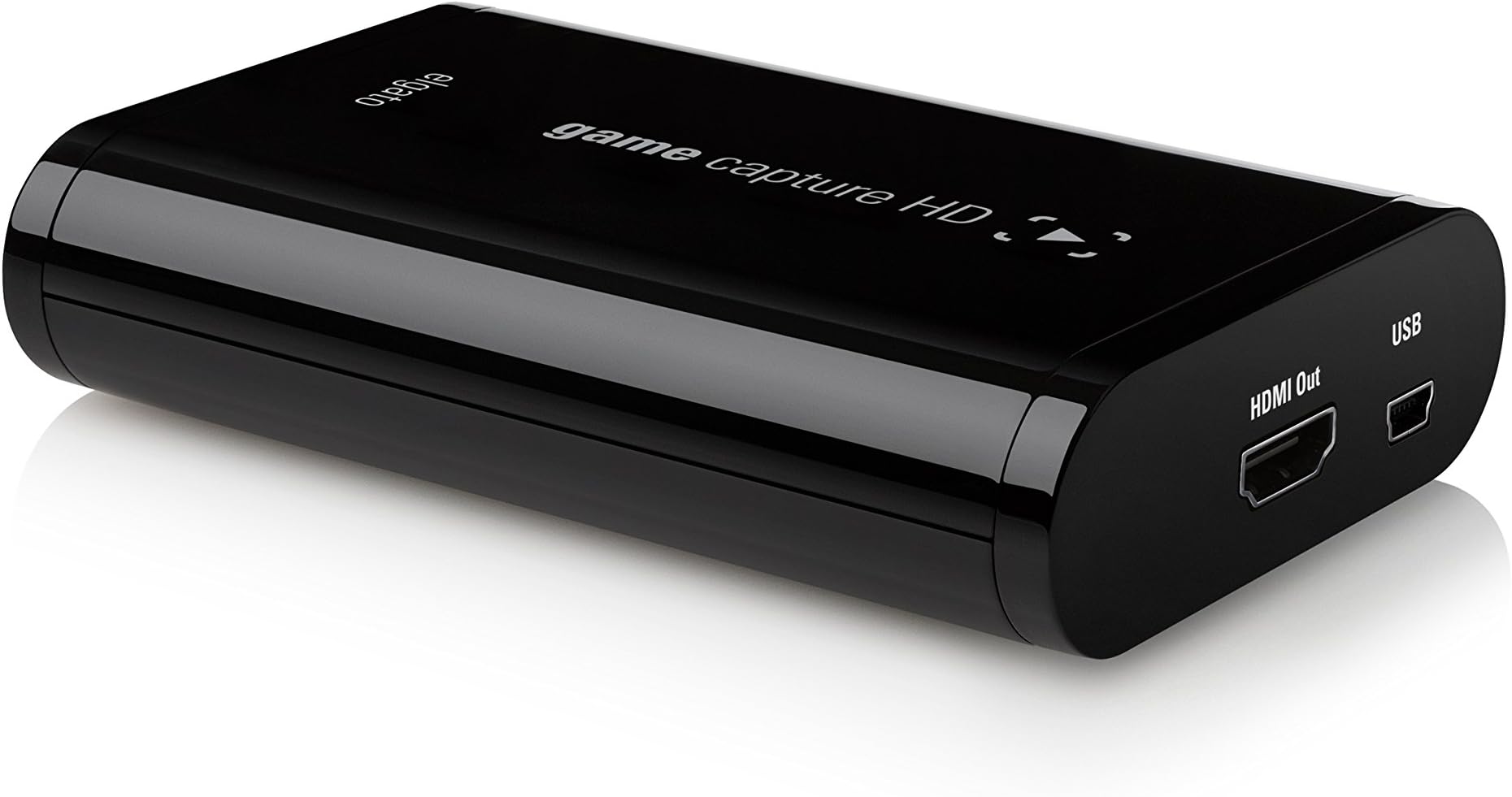
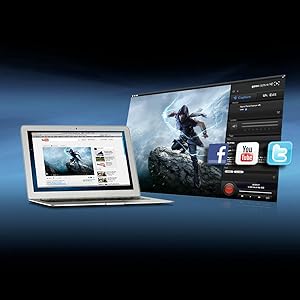
The Elgato Game Capture HD is a compact, USB 2.0 external device designed for professional-quality 1080p Full HD recording and live streaming of Xbox and PlayStation gameplay. Featuring advanced H.264 hardware encoding, lag-free HDMI pass-through, and unique flashback recording, it offers seamless capture and instant sharing to platforms like Twitch, YouTube, and Facebook. Its easy plug-and-play setup and included cables make it the go-to choice for gamers and content creators aiming to elevate their streaming and recording experience.


| ASIN | B00840353W |
| AV Output | MPEG-4 |
| Antenna Location | Video Recording |
| Best Sellers Rank | #333 in Internal TV Tuner & Video Capture Cards |
| Brand | RICLBE |
| Built-In Media | Capture Card |
| Compatible Devices | Nintendo Wii U, Microsoft Xbox 360, Xbox One, Sony PlayStation 3, PlayStation 4 |
| Customer Reviews | 4.5 out of 5 stars 3,282 Reviews |
| Global Trade Identification Number | 00426019539131 |
| Hardware Interface | USB 2.0 |
| Item Dimensions | 4.35 x 3 x 1 inches |
| Item Weight | 1.3 Pounds |
| Manufacturer | Elgato |
| Mfr Part Number | 10025010 |
| Minimum System Requirements | Mac operating system |
| Model Name | 10025010 |
| Model Number | 10025010 |
| Operating System | Mac |
| Other Special Features of the Product | Compact |
| Platform | Nintendo Wii U, PlayStation 3, PlayStation 4, Xbox 360, Xbox One |
| Recommended Uses For Product | Video Recording |
| Special Feature | Compact |
| UPC | 163121433390 803982721464 055555604395 426019539131 |
| Unit Count | 1.0 Count |
| Video Capture Resolution | 1080p |
J**Y
The first game capture I ever owned and it's awesome!
I've researched so many game capture devices on the net for a very long time and I finally decided to get this device. I was going to plan on getting the HD PVR and when they released the HD PVR Gaming Edition 2, I was set on getting it but it never happened. I considered on getting the Avermedia C281 Game Capture HD but it doesn't provide the feature to livestream. While it's not my top priority to livestream a video game that I'm playing, it's a plus for me but the Avermedia one that I was looking into, lost my interest. Then there was the Roxio Game Capture HD Pro. It provides everything that I need, even including the cables so that you can get started right away. That is a very big plus for me as well because I don't like buying extra stuff just to merely record a gameplay and I mean, I'm looking for something that will simply give me the simplest features of all the things that I'm looking for when I record gameplays from the video game systems that I own. Especially, something that already provides the cables for me to get started right away. Of course, record them in high definition. My search for that best game capture device was finally over, when I came across such a simple device and it was called the Elgato Game Capture HD. While a bit pricey to you, I can assure you that your money will not go to waste. I thought so at first and even still thought so when I was trying out because there were some things from the device that didn't work out for me, that's why. More to that later but first let's talk about its awesome features it offers. First off, recording a gameplay. I own a PS3 slim and I've been meaning to record some gameplays and get them up onto Youtube for everyone to watch, for a very long time. The box comes with everything you need: The game capture device, an HDMI cable, a PS3 cable, USB cable, and the component adapter cable. Now, the PS3 slim has this strict HDCP thing that I've been hearing about. What it means is that you can't record gameplays through HDMI connection, only through component cable. Weird, right? Well, do not fret because the PS3 cable that comes in the box is the key to letting you record your gameplay from your PS3 console. Yes, I checked them all the available resolutions on the PS3's display settings, even the 1080p and everything is still fine, recording and gaming all that is still fine. The recording is smooth to me and I'm glad there is no sound delay whatsoever. What I'm really impressed about and I still am, is the file size. It is possible to record to 1080p but I record most of the time in 720p since most games are in 720p. For recording in 720p, in 30 minutes you get about 1-2GB and that's really impressive, the quality of the video still looks great. I've done a 2-hour recording playing Modern Warfare 3 online and it was just about 6GB and I didn't bother to render it or anything but just to cut them in parts by 30 minutes and uploaded each of them to Youtube. It's the longest recording I've done so far. Now, you might be wondering what I'm using to capture gameplay. I'm actually using the Elgato Game Capture software, the one you can download from their official website of the product and it's awesome! It's a very simple software and I really like the editing features it offers. On this time of this review, I have the 1.22 version of the software. Not only you can record gameplays on the PS3 and Xbox 360, now you record gameplays on the Wii, PS2, Gamecube (I own one and it's really great!), NES, Super Nintendo, Sega Genesis, Dreamcast, and retro gaming consoles. All you need to use is the component adapter that comes in the box and they have a website page on step-by-step instructions on how to set up from each specific gaming system. The Elgato Game Capture software can let you do a live commentary. With a compatible microphone, click the drop down menu and choose the name of the mic you're going to use and then enable live commentary by clicking the button that has a picture of a microphone. With all the tweaks and settings you've made for your mic, you are ready to record and start doing a live commentary with ease. I know I say simple a bunch of times but it really is. The software also lets you do a livestream to Twitch.TV and it has never failed me yet, knock on wood. Just create an account on the Twitch website, log in with your Twitch account info on the capture software and set up all the things for your livestream and you're ready to go! One feature that I'm also impressed about is the ability to upload straight to Youtube, even to Facebook. It's a one click share feature and even though I don't use it that much, it's great feature nevertheless. I personally prefer exporting the video to my computer and upload them on the Youtube website. If you're looking for a simple yet great game capture HD device then look no further, Elgato Game Capture HD is the way to go.
M**Y
Big things come in small packages!
As a PS3 gamer, I was a little hesistant about purchasing a video capture device. Sony has a copyright protection on the PS3's bluray drive, which makes it impossible to capture 1080p video. However, I decided to take a chance and purchased the Elgato Game Capture HD over the Hauppauge HD PVR2. My verdict? The Elgato Game Capture HD is as close to perfect as it gets. The setup was very straightforward. There are a few extra steps involved when setting up the device with the PS3, but Elgato supplies a nice step-by-step instruction placard (with pictures!) and is a breeze. Elgato also supplied the AV cable that the PS3 needs to run the device and a USB cable that goes to your computer. There is no power supply to worry with either! My main concern when I first plugged in the device was how the video quality would be, since the PS3 cable runs through the "Component/D-Terminal" instead of HDMI. My concerns were unfounded. The video quality is fantastic. I have already uploaded a few videos to my YouTube channel and the video looks the same as it does on my TV screen as I'm playing. Simply perfect. As far as the actual process of capturing, the device really sucks up a lot of the computer's power. I do not have any other programs running while I'm capturing and everything runs fine. Older computers may have a hard time keeping up with the demand if you have multiple programs running at once, but I have never noticed a slow down in the actual capture. All you need to do is install the Elgato's software to the computer, open the program, hit the big red button, and you're all set! Simple and easy is the name of the game here. The editing portion of the software is really barebones with only an option to cut your video down to size. For the professional video editor, you may want to supplement your editing experience with some software (Adobe, Sony Vegas, etc). I use Sony Vegas Movie Studio 2011 and it adds just enough flair to make my videos pop. It's not a bad choice if you are on a budget. If you want to see the Elgato HD in action, you are more than welcome to check out my YouTube channel at [...]. All of the videos uploaded there are captured by the Elgato from my PS3 system. In conclusion, the Elgato Game Capture HD is the perfect capture device for the console gamer. The ease of use, the price and the quality is top notch. I give it 5 stars, with no hesitation. You will love it!
N**E
Very Impressed
The last game capture device I bought was a Dazzle (by Pinnacle) and boy am I glad I upgraded. This Elgato one is very high quality and has a ton of capture options, including my most coveted 1080p capture. There are a couple features I will admit that I wish it had, but for the price I feel quite happy with everything it does offer. Pros: [+] Supports every gaming platform I tried connecting: Xbox One, Xbox 360, PlayStation 4, Wii U, Wii, GameCube, N64, SNES, and of course basically any device that outputs in analog. Depending on what you're doing, some HDMI devices will not work when they are HDCP encoded, so you can't try to put a Blu-ray in your Xbox One and capture from it. Not a big deal to me since I really did buy this for game capture. [+] Supports all of the most-common capture resolutions: 1080p, 1080i, 720p, 480p, 480i [+] Out of the box has support for HDMI in as well as component/composite in, as long as you have updated their game capture software (free) to the latest version. It's especially cool that the same component adapter can be used for composite input by just plugging the yellow video cable into the red component slot. [+] The free included software is quite nice, and while not perfect, WAY better than Pinnacle's included capture software that I previously used with my Dazzle. It seems stable and has never stuttered or produced a bad video. I haven't used the editing portion of it much, however, as I prefer to capture the video from there then import it into Adobe Premiere/After Effects. [+] Capture quality. My 1080p videos look amazing! The quality of each frame looks just as it does playing uncompressed on my TV. And there are many selectable quality options to choose from in case you want to sacrifice some quality for lower file size. I put the slider somewhere between the middle and high quality, and it still looks nearly perfect! Cons: [-] Only supports up to 30fps, so while many games output in 1080p60, you will only capture in 1080p30. If you're uploading to YouTube, this shouldn't be a deal-breaker though as YouTube currently doesn't support 60fps anyway, and they will get transcoded into 1080p30. But I'm sure in the future they will support that and it would be nice to have this device be more future-proof with 60fps support. [-] Don't forget to close the capture software. I unplugged the capture device from the USB input and left my laptop. Then I came back several hours later to find it running hot as heck. Even if you disconnect the device and there is no active video feed to your PC, it will run up your CPU just the same and prevent it from falling asleep. So you need to remember to close out the software all the way when done using it. [-] Doesn't support S-video input out of the box. They have an adapter listed on their website you can buy to add S-video support, but it is currently out of stock and I can't find it for sale ANYWHERE (not amazon, ebay, etc). [-] Can't be used for live streaming or to game on your laptop/PC. The video capture feed has a delay of about 5 seconds (even if you are just feeding it 480i). So the "live feed" preview is completely unusable if you want to look at that instead of a separately connected display device. Conclusion: Not perfect, but for the price, really pretty satisfied! I'm hoping sometime soon they can release an updated device that addresses the four cons I listed above, and they would easily have another sale from me, even if they priced it higher. I can't find any device at any pricepoint that does everything I want yet, so for the time being, this seems to be the best option out there. UPDATE 2014.06.26! YouTube just announced coming 48 and 60fps support, so just like I mentioned above this is one unfortunate thing the Elgato won't be able to take advantage of. Hopefully by time YouTube actually releases higher fps support there may be an upgraded capture unit I can buy. 1080p60 capture would be awesome!
K**S
Very impressed! Only a few minor issues.
This is my third capture device. Its by far the best, even though its the most expensive. I recently purchased a Macbook Pro with Retina Display which made my Roxio Game Capture useless since it doesnt work with Mac. The El Gato works great on Mac, it seems to be mainly designed for Mac but also works for Windows. The HD recording is really excellent, the quality is very high while the file size remains reasonable. My Roxio Game Capture was 480p only but the file size on high quality was around 1GB per minute. The software works nearly perfect, the only issues I've run into are exporting to iMovie, it gets to the end and just stop working most of the time. But you can always go to the Finder and get your video file there. My biggest complaint about this item is the loss in quality on the TV while its passing through the El Gato. It made my picture look dull and washed out, it was instantly noticeable. The upside is after using the software video settings (which DO affect the TV's look!) and slightly altering the HDTV's settings I was able to get (mostly) back to normal. The last complaint is hard to really complain about, it was a misunderstanding on my part. I read that there was "zero video lag" and thought that was great. I sometimes take my Xbox 360 out of town with me but dont want to rely on a TV being available. So I will use my laptop and a capture device to play my games, that will not work with the El Gato. There is a major lag on your computer screen, up to 2-3 seconds in some cases. Yet the TV seems to have zero lag, as advertised. I use it to record Rock Band videos, Rock Band is a game that relies heavily on everything being in sync. I had to change my games calibration settings by 5 milliseconds, so if there is any lag, its hardly noticeable. It would be very difficult for me to find any real reason to tell someone not to buy this. I cant speak for Windows but its works great on Mac. Its amazing how HDMI 1080p recording has reached an affordable price and not require an outrageously high end machine. Dont go cheap, Roxio makes a decent recording device but save the extra money and get the better product.
R**N
A wonderful game-capture recorder for any device with an HDMI-out.
I purchased the Elgato Game Capture device a few weeks ago so I could start enhancing my FAQs with video footage (HaeravonFAQs for games such as Baldur's Gate, the Witcher, Fallout 3, etc.) After making about eight videos so far, I have to say, this device is pretty amazing. It was simple enough for an idiot like me to figure out, just hook up an HDMI cable from the console to the device, and from the device to the HDTV, and then plug a USB cord from the device to the PC you want to capture with. The software download was simple, and the capture software itself-while being basic, works fine. I'm a little annoyed that you can't stop the streaming video while the capture program is open, but it's a small price to pay to be able to play-and-record, keeping what parts of what videos you want, and editing later. I also bought a microphone to do voice-overs, which works fine with the software, although I prefer to capture the video, export to Movie Makes, watch the video, and do the VO separately, then import the audio over the video. Works wonderfully, and it allows me to be more composed and... well, eliminates the annoying clicking of buttons as I play. Another feature that I haven't heard about-but that I can confirm works-is recording from PC-to-PC. As long as your video card has an HDMI out, you can simply hook the console HDMI cord into the PC you want to record from, and put the USB in the same PC, or another one. Running the capture and recording off the same PC can be memory intensive, and it's a bit funny to let the capture software record the screen of the capture software... which produces an infinite capture-in-capture image. I've been recording videos for my Baldur's Gate Enhanced Edition guide while playing on my laptop, and recording on my desktop, and I'm looking forward to enhancing other guides-like Dragon's Dogma, Fallout 3, and the Witcher with this device. It's expensive, but the software works wonderfully, the HDMI capture quality is fantastic, and all-in-all, it's just a great, no-hassle way to record games from any device with an HDMI-out. You can check out the videos I've made with it on the HaeravonFAQ Youtube channel. I've already recommended this device to a few friends, and felt kind of guilty for not writing up a review and giving it the support it deserves.
J**S
Great product that does the job well!!!
Out of the box, this is a great product. Here are the goods. 1. Small 2. No external power needed 3. Simple connection That's it. Open the box, take out the cable, hook it up and you're ready to record your awesome video game footage within 15 minutes. Also, there's no install CD included with this product. You need to go to this site and download the latest recording software. [...] Now, after testing this product, I found one problem. It might be the cause of my connection or a known problem which is being worked on by Elgato. My connection is through component cable as I own an older Xbox360 system that does not have a HDMI output. (The newer Xbox360 has HDMI output) [Out Of Sync] My Xbox360 is set to 1080p and Elgato software is set to 720p. There is a 1 second video lag meaning the audio is 1 second faster. Tried it with Elgato software set to 1080p but same 1 second vdeo lag problem exists. Firmware used is the latest as of Dec 4th, 2012. Beta 1.2xxxx. Also, when the Xbox360 display setting is set to 1080p, the preview window in the Elgato software is laggy and goes black after a while. However, if the Xbox360 display is set to 720p, no problem with the preview window. [In Sync] Xbox360 display is set to 720p and Elgato software is set to 720p. No problem, everything is in sync. I have captured some game video footage and posted up on youtube. See for yourself. (Please bare with me as English is not my native language, as heard in the game footage. :-) ) [Out Of Sync] => [...] [In Sync] => [...] I have submitted a ticket to their support team. All in all, a great product and VERY HIGHLY RECOMMENDED! (*) BTW, after uploading the clips and viewing it, it seems the Out Of Sync video looks like it's in sync. Kinda weird as it is out of sync when I play it back on my computer. (i7-2600, Win 7 SP1, HD6870 1G, RAM 16G, ASRock Z68 MOBO) *** Update#1 *** Out of curiosity, I tried some other video players for playback of the recorded footage to try and see if the video lag was persistent. . GOM Player : 1 second video lag. . Windows Media Player : 1 second lag. . Adobe Premiere Elements 11 : no lag. in sync. . Youtube (uploaded) : no lag. in sync. So, I don't know if this is a bug or not. I have a farely fast computer atm and never had movie/video playback problems. On another note, when the Xbox360 display is set to 1080p and the game capture hd set to 1080p, the preview screen shows the Xbox360 dashboard for a few minutes (but laggy) and then suddenly goes black. I'll have to come back and give you guys an update on this after fiddling with it a bit more.
J**Z
Great product, works great, but save yourself the trouble and buy an HDMI splitter, the HDMI Bypass on the El Gato sucks.
Fantastic Product- Works wonderful up to 1080p. HDMI Bypass inputs bad dimensions for your screen though. Picture is always too big, and there is no way to fix this if I understand correctly. I'm always recording FFXIV: ARR on my PS3, and I connect the HD Bypass to my HD 1080p screen. I noticed when I have my screen connected to the HDMI bypass the video I get is much darker than what is put in, and if you make it brighter on the El Gato Settings, then it affects your recording-making it too bright. I highly recommend to buy your own HDMI splitter if you are going to use this device, save yourself the trouble. The El Gato lets you configure how much quality each recording will be, the quality chosen will determine how much memory it will use on your HDD. To give an example for 720p, the slider bar goes from "Good" at the lowest point (54 MB/minute video with 224 kbps AAC for audio) up to 200 MB/ minute video with 224 kbps audio with the "best" setting. Streaming and recording are very good, heck- you can add your commentary directly into your recording, you just need a mic for your PC. It's powered by the same cord as a PS3 controller cable (Mini USB Type B), so no stand alone power cable is needed, just connect it to your PC and you're set, which is wonderful. Still being updated, recent update added more sites to stream to, YouTube and Twitch are no longer the only options. When you're streaming, the resolution you can stream depends on the upload speed you have, if you want to stream 1080p, then you'll need at least 5.5 Megabits per second if I remember correctly. If you are streaming, then you CAN stil record at the same time to your HDD, but the El Gato will tell you that the recorded resolution will be much lower since your are doing both. Stop streaming, and only record to your HDD if you want the highest possible quality recording on this device. After you record something, the video will need to be converted on your PC, I notice on long videos (1 + hours) it takes a long time, same thing if you choose any extra options in the menu. Other than that it converts fasts. (Need a decent PC still I believe). I'm very happy with this purchase. The PS4 and X1 will both be able to record on their own, but, with the El Gato, I feel I have more options for recording at my disposal. I would recommend buying this ALONG with an HDMI splitter. If you want to record in 1080p on the PS3 then you'll need a device that strips off the encryption. I use Monoprice's " HDMI Converter", that's how I'm able to record in 1080p. It IS possible, as long as you have something similar to this device.
C**S
GREAT PRODUCT, But.. (Non-Biased Opinion owner of both Hauppauge and ElGato)
The ElGato Game Capture HD is a great product for recording live gameplay on either your ps3 or Xbox 360. Me, Personally I own the PS3 and bought this to replace the Hauppauge HD PVR Gaming Edition (Version 1) It was getting kinda Clumpy and I heard that the ElGato was capable of recording in 1080p so you didn't have to use those big annoying Component cables with the Hauppauge. So, I ordered it, got it, very easy setup and installation that will probably last the average Joe to set it up about 10-15 minutes. (Something to note, The Editing Software that you download from the ElGato Site is pretty standard, no advanced editing) I tested the product out and started recording gameplay in 720p, due to the fact that 1080i is the maximum input for ps3, but it does not function THAT well. 720p still looks fine. That is still considered HD so no issue there. However, after some time of using the ElGato as my standard video input(Done Recording, now just using it to game on so you don't have to switch inputs back and forth between HDMI and Component) I started getting 3-4 sometimes up to 6 seconds of Pitch Black Screens on my HDTV. I tried fiddling with the TV settings assuming that was the issue, but no luck. My Next step was too do some research online and see what I could find possibly fixes or explanations for the issue, and found a great amount of people who experienced the same thing. some suggested fixes and resolutions in the software(a certain tab that had settings for Component Compatibility and TV compatibility scrollers) I fiddled with those as well, and still no luck. some had the Black Screen flickering constantly, while others took some time but still kept going every 15 minutes or so. My last and final step was to contact support. I called them, told them about the issue,(Apparently the issue is somewhat common among ps3 owners) The technician advised me to re-install the software stating that sometimes the software does not install correctly and it glitches the connection, So I did that, he asked me to hang up and call back if the issue re-occurred, and so it did. the flickering came in at about 15 minutes later once again, and so I called back. I advised the new technician that I had called just half an hour ago and told him of the issue I was experiencing and what I was told to do before calling back. he then advises me that I provide him with an email address so that he may send me software to detect my Laptop's specs. I gave him the email(Fully aware that the computer specs were not the issue here considering I have an i5 processor clocking in at up too 3.1 GHz and 8 GB of RAM) so he sent it, I ran the tests on the PC and sent them back. Ever Since then, I have gotten no response. it has been nearly 1 month and I have decided to switch to the new HD PVR 2 by Hauppauge considering they launched it almost nearly when I was getting ready to buy this one. It is HDMI compatible with the ps3 however must do the same thing as I do with the ElGato considering the HDMI input in the ps3 is protected by (HDCP- High Definition Copy Protection) to prevent the recording of High Def movies like Blu-Ray. Once I do this, I am almost certain I will not get the flickering black screen. (The new Hauppauge has also been updated in terms of software and the quality of it. It now has Live Streaming and Live Commentary Features that exist with the ElGato as well.) So, Overall, I see this as the better product as of now considering the features and no issues have been reported of that same category like the ElGato. These things are important to me considering I am getting pretty big on YouTube slowly but surely. I require that the software I use work without any flaws so that I may do the upcoming Gameplays and Walkthrough's of games like the Last Of Us, Grand Theft Auto V, and such. I sure do hope this review helped you. And Please, think about this decision SERIOUSLY if you are a PS3 GAMER. When it comes to the Xbox 360, I cannot tell you anything about that other than the fact that I have not heard many complaints about that system. It seems to be the preferred console of choice considering many big and famous YouTuber's are Xbox Players that use this recording device. THANKS for reading and Good Luck!
Trustpilot
2 weeks ago
2 months ago