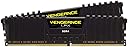
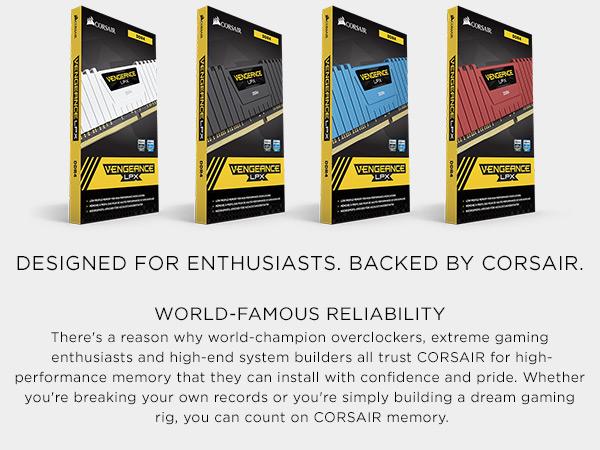
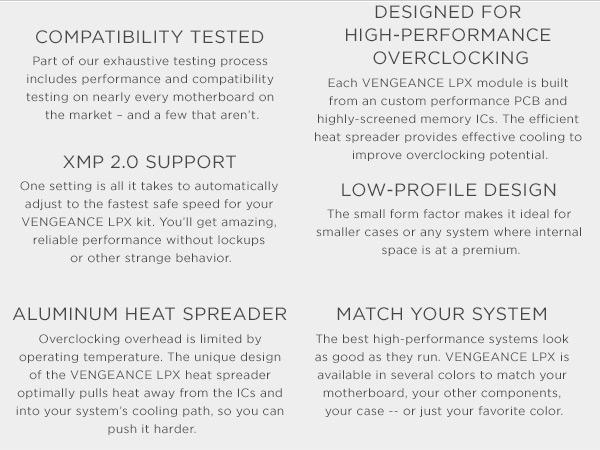
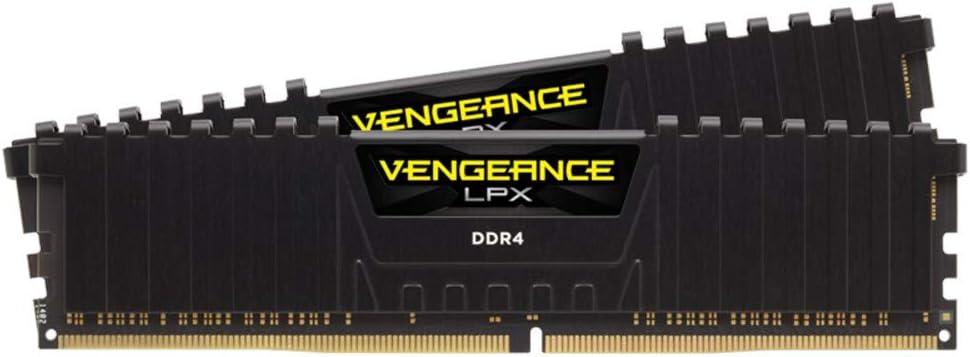
⚡ Power your productivity with CORSAIR VENGEANCE LPX – where speed meets style.
The CORSAIR VENGEANCE LPX DDR4 RAM 16GB (2x8GB) kit delivers high-performance 3000MHz speed with low latency CL15 timings, optimized for Intel and AMD motherboards. Featuring hand-sorted chips and an aluminum heatspreader, it ensures superior overclocking headroom and efficient heat dissipation. Its compact 34mm low-profile design fits most builds, while XMP 2.0 support enables easy, reliable overclocking. Backed by a limited lifetime warranty, this RAM is a top choice for professionals seeking speed, stability, and style.


| ASIN | B0134EW7G8 |
| Additional Features | High Performance |
| Best Sellers Rank | #379 in Computer Memory |
| Brand | Corsair |
| Column Address Strobe Latency | 15 |
| Compatible Devices | Intel 100 Series,Intel 200 Series,Intel 300 Series,Intel 400 Series,Intel 500 Series,Intel 600 Series,Intel X299 Compatible Devices Intel 100 Series,Intel 200 Series,Intel 300 Series,Intel 400 Series,Intel 500 Series,Intel 600 Series,Intel X299 See more |
| Computer Memory Size | 16 GB |
| Customer Reviews | 4.8 out of 5 stars 20,343 Reviews |
| Data Transfer Rate | 3000 megabits_per_second |
| Form Factor | DIMM |
| Global Trade Identification Number | 00843591070010, 05054629834220, 08809321842694 |
| Item Weight | 3.21 ounces |
| Manufacturer | Corsair |
| Memory Form Factor | DIMM |
| Memory Generation | DDR4 |
| Memory Speed | 3000 MHz |
| Mfr Part Number | CMK16GX4M2B3000C15 |
| Model Name | Vengeance LPX |
| Model Number | CMK16GX4M2B3000C15 |
| Number of Items | 1 |
| RAM Memory Technology | DDR4 |
| RAM Size | 16 GB |
| Special Feature | High Performance |
| UPC | 843591070010 |
| Unit Count | 2 Count |
| Voltage | 1.35 volts |
| Warranty Description | Limited lifetime warranty |
E**K
Compatible with MSI X470 Gaming Plus Ryzen 2nd gen Motherbaord with Ryzen 5 CPU - Very fast
At first, I bought and installed a Crucial 16GB Single DDR4 UDIMM CL17 memory into my new MSI X470 Gaming Plus motherboard with Ryzen 5 CPU. I'm experienced with building PC's from scratch, been my hobby since college. When I started the computer for the first time, it would not post or allow me to go into BIOS, and gave out 3 long beeps. Online search found that it's a memory not detected, or faulty. I don't think it's a bad motherboard because I've never had a motherboard fail, but I've had lots of memory cards that did fail even when new. If cheap components are used in a memory card, it will have lots of quality and compatibility issues. After trying to re-seat the 16GB card many times, it finally worked without explanation. In BIOS, I wasn't able to enable my motherboard's XMP to adjust memory speed or settings (all XMP settings were locked out). After running it for a few hours, I shut the PC down to install a new CD-Rom. Then when I turn my PC on, again would not post or allow me to go into BIOS, gave three long beeps, memory issue again. I finally gave up on the Crucial 16GB card and bought a premium gaming memory, CORSAIR 16GB (8GB x 2) Vengeance LPX, CL15, 3000 Mhz. After installing the Corsair memory cards, the computer booted fine the first time, and booted up twice as fast into Windows 10. My first guess is the Crucial memory cards are defective or has compatibility issues. My second guess is the CL17 of the Crucial memory is too slow for the Ryzen 5 2nd gen CPU and motherboard, and Ryzen 5 needs memory cards rated at CL15 and CL16 or faster (the lower the CL the faster the memory). Funny thing is after I purchased the Corsair Vengeance, as I was waiting for it to ship to my house, the Crucial 16GB was working again, computer was able to boot up. It's as if it knows the Crucial memory is getting replaced and it decided to work again. After installing the Corsair Vengeance cards, the default speed was at 2100 Mhz, without XMP configuration. I went into the Bios, enabled A-XMP, set it to profile 2, and it's now operating at 2933 Mhz, close to the advertised speed of 3000 Mhz! Very happy with the Corasir Vengeance memory cards ($110 at time of purchase) even though it was $11 more than the Crucial card. Pro's: 1. Much faster than CL17 cards, noticeable shorter boot time to Windows 10 (10 seconds versus 20 seconds on the CL17 card), faster shut down 2. Very sleek looking and has aluminum heat sinks for cooling, improves durability and life 3. XMP compatible. Easy to configure over clocking using most newer motherboards that has XMP. 4. More reliable and higher quality. Didn't have trouble on first boot. Cons: 1. A bit more expensive than the average memory cards. 2. 8GB x 2 cards used up 2 of my 4 slots on an ATX motherboard. If one is building on a Micro ATX motherboard where there are only 2 memory slots, one will not be able to expand the memory in the future as both slots are used up.
J**N
Still Going Strong Since 2019 — Solid RAM for 4K Editing
I’ve had the CORSAIR VENGEANCE LPX DDR4 3000 MHz (2×8 GB) in my editing system since 2019, now running a total of 32 GB, and it’s still doing its job reliably in 2025. From day one it’s handled 4K footage and heavy editing workloads without crashes or instability. The modules install easily, and BIOS has always detected them properly. Even after years of use, I’ve never had a failure or issue. While it’s not the absolute fastest RAM available today, the performance has been more than adequate for my workflow — rendering, playback, multitasking — everything runs smoothly. It keeps pace well, and the value for what it delivers over time has been great. If I were summarizing: dependable, rock-solid, and long-lasting. For an editing rig that doesn’t demand bleeding-edge specs, this Corsair LPX kit has been a dependable workhorse.
J**N
Tweak BIOS settings on ASUS ROG Strix X370-F Gaming mobo with AMD Ryzen 5 2600X
$72.90 for 16GB of Corsair Vengeance LPX. To get the BIOS stable with this memory stick pair (it was NOT listed on the Asus Qualified Vendor List [QVL], but other Corsair Vengeance LPX sticks were listed) working on an ASUS ROG Strix X370-F Gaming motherboard with an AMD Ryzen 5 2600X processor, I had to manually enter the following memory settings in the BIOS: 16-18-18-18-36 (I did not change any voltage settings). It took me 4 or 5 hours to research and attempt to enter settings (a lot of trial and error) -- the BIOS kept rebooting (i.e. unstable) as I kept trying to enter the memory values that I found somewhere online (I actually had to boot a "cold" machine that had been off for an hour or so and somewhat stable, as it progressively worsened as things warmed up to where the mobo would not pass its POST [power on self test] at all on the default settings). I almost had given up, but once I "cold" started and got lucky enough to quickly enter the above memory timings, it has been rock solid -- NOT A SINGLE GLITCH OR HICCUP !!! (No, I am not planning on any overclocking.)
C**Y
Best Mistake Ever!!!
Take a close look at the Amazon web listing and then look at the attached pictures of what they actually sent me. You will then notice they clearly miss-labeled these RAM sticks. I intended to buy a Vengeance 3000 Mhz C15 Kit. Instead they sent me a 3200 Mhz C16 kit!!!! This is also not the first time Amazon has miss-labeled computer parts, probably because whoever is labeling has no idea what he/she is doing, lol! On Another note, this memory is top notch, I am doing a slight upgrade on my desktop gaming rig, expanding some RAM, updating the GPU from a 980 TI, to a RTX 2080 and a nice 2 TB SSD. This memory is easy to setup in the BIOS, performs very well at baseline speeds, without overclocking and doesn't need any fancy cooling. Its low profile heat spreaders allow clearance for bulky aftermarket CPU fans. With next gen games coming out this fall/winter it seemed liked a good idea to expand to 32 GB of RAM!
D**N
awesome!
I used this in my build with a Ryzen 5 2600 and RX 580. Using the XMP 1 Profile, I was easily able to bump the frequency up a little to 3400mhz and it's totally stable. A lot of these reviews say it won’t even run at 3000, guess I’m just lucky for some reason. (Chips are Hynix Btw) This gets me up to a 118% bench on userbenchmark compared to the average bench of 85%, heck yeah. As far as real world performance, I haven't really benched before vs after in gaming, but according to tech youtubers, I've probably only really gained a few FPS. Ryzen loves fast RAM, though, as the infinity fabric that connects the CCXs (half of the cores are on CCX1, the other half on CCX2) runs at your ram speed. That said, it's nice to know your hardware is performing as well as possible. I didn't mess with the timings from the XMP profile, but it may even be possible to tighten them up as well, I'm just not sure as i've already bumped the frequency up another 400mhz. I've also overclocked my r5 2600 to 4ghz on the stock cooler and it never goes over 70 in games. Very pleased with this kit and its overclocking ability and compatibility with ryzen. I have a samsung 860 evo ssd (sata) and using samsung magician with RAPID which uses RAM caching to speed up your drive, i get about 5000 MB/s sequential read/write. Would buy again for sure
M**S
I would love to be able to say that this is great ...
I bought this to install in a new Ryzen Build. Asus Prime X370-PRO, Ryzen R7 1700, and this ram. I would love to be able to say that this is great ram, but for the first time in my life I actually had ram arrive DOA. It's frustrating trouble shooting bad ram that still posts ok. Spent hours trying to diagnose a refusal to boot the windows 10 installation media. Finally after giving up I started picking apart the pieces and after removing one stick of the ram, instant boot no problems. The ram that is working is working fine, but it's very frustrating to deal with this type of issue. I won't knock it too hard because I know this happens at times, but shipping a dead stick is not cool. So I have to drop a star. Otherwise, it is what it says it is. 16GB of ram. UPDATE: Replaced RAM with a new set sent out by Amazon the next day. Back up and running with a full 16Gb of RAM and no problems. Current motherboard BIOS only recognizes it as 2133MHz, but I understand from the interwebs that a new BIOS is incoming and will fix that. FYI. UPDATE2: MB is on BIOS revision 0515. It will run 2400MHz without blinking an eye. Sometimes I can get it to recognize 2666, but that's as high as I've gotten so far. My Cinebench15 went from 1621 to 1637. Not really that big of a boost, but might add some more f's per s....
V**A
It's RAM! 16 GB of it!
Not really sure what else to say. Bought two sets to replace two sets of 4x4's in my tower. They were the same as the last two I bought to augment the original two sets of 4x4's, so now I've got four sets of 2x8's. I have so many windows open with so many tabs right now, and I can do this while playing Destiny 2 and rendering video in Premier without my computer grinding to a halt. If your mobo is of the type that takes this particular RAM (do consult your motherboard's manual to find out what MHz and which brands and such your board can take before making a RAM decision) then I totally recommend these sets. Sidenote: I gave it 5 stars for ease of install since my motherboard has them just click into place so I don't need to pop the clips in manually or anything like that. It also has them spaced nicely flanking my processor, which has a low profile liquid cooling unit attached so there's plenty of room for my hands to insert them. Depending on where your RAM slots are on your board, and how large the other contents of your tower are, YMMV as far as ease of installation.
T**Y
Works as described
Works as described
A**V
Bra kvalitet och kompatibilitet
Minne började fungera på en gång så fort installerades den i en ganska nyckfull dator!
A**R
Great price for quality product
Ram came as specified, both modules ran without any issues, performs better than expected and advertised at 3266 Mhz C14. Works flawlessly with my Ryzen 2700x system. Ram has improved performance and multitasking capability.
H**A
F/P Ramler
Yorumumu biraz geç yazmak zorunda kaldım ama ürünü ancak yeni kullanmaya başladım. Fiyat performans olarak tavsiye ederim.
R**.
CMK16GX4M2B3000C15 8gbx2
it came with micron chips somehow i get better score in cpu-z with this RAM compared to gskill3200mhzCL14 (R3 2200G)
P**I
A qualidade
Atendeu minhas necessidades
Trustpilot
1 month ago
3 days ago