Desertcart purchases this item on your behalf and handles shipping, customs, and support to Senegal.
🚀 Upgrade your desktop to WiFi 6E & Bluetooth 5.2 — because buffering is so last decade!
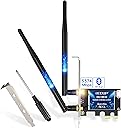
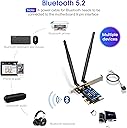
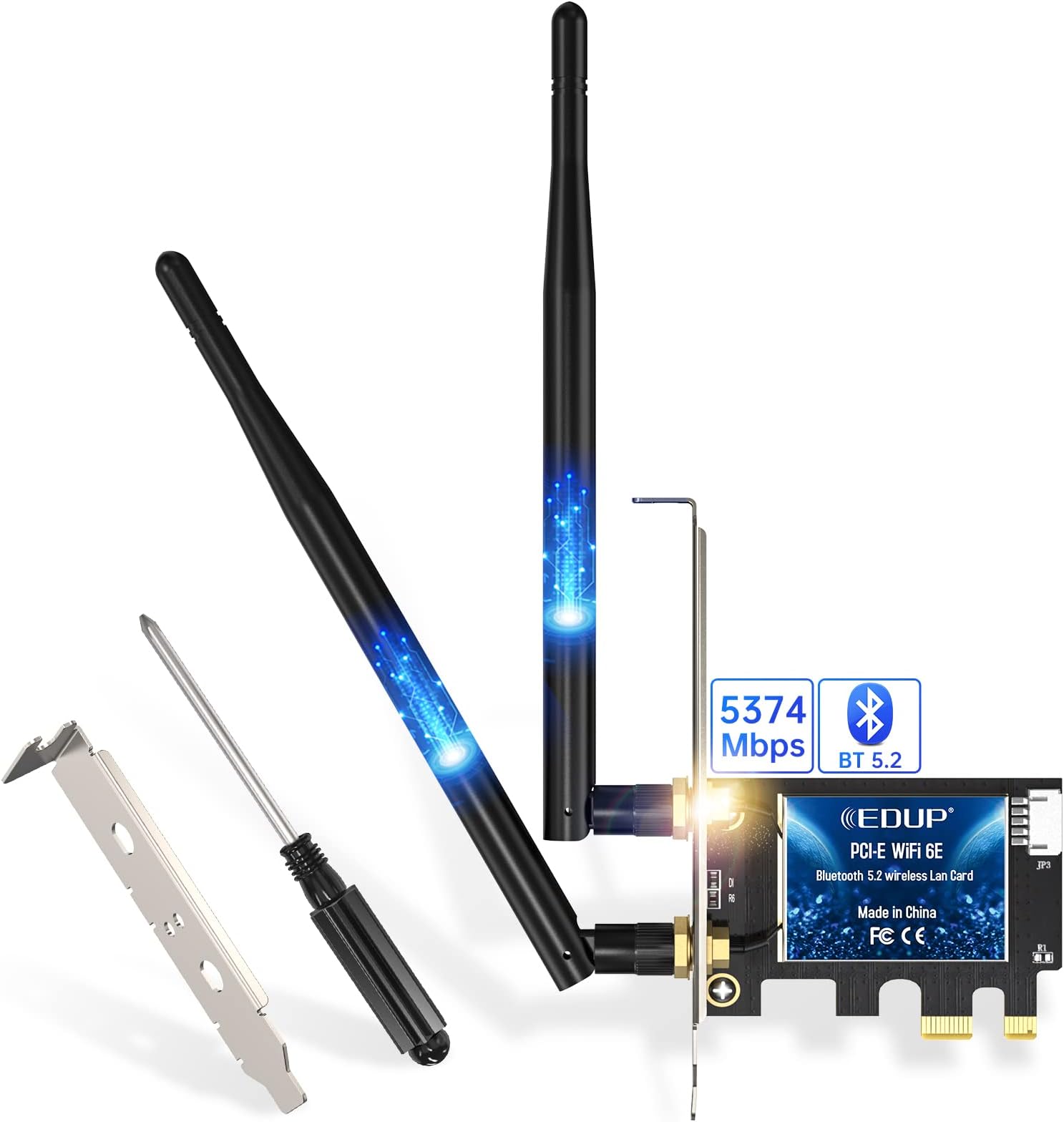
The EDUP® PCIe WiFi 6E Card with Intel AX210 chipset delivers tri-band wireless speeds up to 5400 Mbps, supporting the latest 802.11ax standard including 6GHz band for next-level connectivity. Featuring Bluetooth 5.2 for extended range and faster data transfer, plus MU-MIMO and OFDMA for superior multi-device performance, this card is compatible with Windows 10/11 and fits all PCIe slots with included brackets. Ideal for professionals seeking ultra-fast, reliable desktop networking with easy installation and future-ready tech.


| ASIN | B0832MR4WB |
| Best Sellers Rank | #133 in Internal Computer Networking Cards |
| Brand | EDUP |
| Built-In Media | 1* PCIE Network Card |
| Color | Blue |
| Compatible Devices | Desktop |
| Compatible Operating System Family | Windows |
| Customer Reviews | 4.4 out of 5 stars 3,349 Reviews |
| Data Link Protocol | Bluetooth |
| Data Transfer Rate | 5400 megabits_per_second |
| Global Trade Identification Number | 00723172896812 |
| Hardware Interface | 802.11 ac/b/g/n |
| Item Dimensions L x W x H | 0.01"L |
| Item Type Name | COMPUTER NETWORKING CARD |
| Manufacturer | EDUP |
| Mfr Part Number | EP-AC9636 |
| Minimum Required Operating System Version | Windows 10 |
| Model Number | EP-EP9651 |
| Number of Items | 1 |
| Product Dimensions | 0.01"L |
| UPC | 723172896812 |
| Unit Count | 1 Count |
| Warranty Description | 2 year manufacturer |
T**U
It works!
This review is for the EDUP PCIe WiFi 6 Card Bluetooth 5.0 AX 3000 Mbps AX200 Dual Band 5.GHz/2.4GHz PCI-E Wireless WiFi Network Adapter Card for Desktop Windows 10 64-bit. I was very skeptical at first. The package came with a nice brown box with a small driver CD, a tiny screw driver, 2 screws, and a low profile bracket. My old Dell PC had a 300 Mbps Wireless N with only 2.4Ghz band. My router is a TM-AC1900 with dual band 2.4Ghz and 5Ghz, and my Internet is 240Mbps down and 10Mbps up. My PCI wireless N max download speed was 50-60Mbps. I wanted a faster AX wifi adapter card to max out my Internet speed at 240Mbps. So I searched on Amazon, and this one is lowest price with a 4.4/5 stars and more than 1,000 reviews. I want to try it knowing Amazon would let me return it if things don't work. The AX3000 speed is so tempting. The small CD driver did not work on my PC's optical drive, luckily, they also provided a small manual that tells you to go to their website to download the drivers. My Windows 10 pro PC picked up the wireless AX card without any driver but the Bluetooth did not work. I went to their website and downloaded the driver for the Bluetooth and it works instantly. My Internet speed went from 60Mbps to max out my Internet speed at 240Mbps. The Bluetooth connects easily to my Bluetooth headsets and my Bluetooth speakers without any issues. It's nice to max out my Internet speed, what I pay for.
V**A
Excellent product-way better than USB dongles,not taken advantage of WiFi6 yet,Bluetooth is a bonus
Tired of trying various wi-fi USB dongles that has dependency on USB 3.0 for better throughput, I first started looking for the possibility of adding a USB 3.0 hub in my old refurbished desktop. I ran into this product in Amazon, and although Bluetooth was not my main purpose, I wanted to take a stab at this. First of all, product arrived way much quicker than they originally said, and secondly, it was the easiest thing to install. I was concerned about the fact the product description did not show a smaller mounting bracket, yet I wanted to try thinking that I will run to a local store if it is not there. It was there, and they also added a magnetic screw driver as that additional little bonus. After installation of the product as well as the driver, it all worked like a charm. I wish the UI of the Wi-Fi driver installation was a little more intuitive with a message that installation successful or completed etc. I had to refer to the manual to realize just a spinning icon is all what it takes for the Wi-Fi driver to complete installation. Considering the value I have finally, that little shortcoming can certainly be excused. As far as the final output, refer to the image with results from May 9th onwards. I wanted to purposefully try multiple times over the course of last couple of days, since I used to have Wi-Fi disconnected with my old USB. I live in Dallas with a AT&T Fiber 1 GBPS connection. My modem is only 802.11 ac, and not AX. Obviously I didn't expect any better than 1 gbps; 200 or 300 mbps download / upload may appear to be disappointing, but not at all, considering that I am getting the highest throughput (on a wireless device) now only on my oldest device. Also, it makes me look forward to the point when I will upgrade my router also to Wi-Fi 6. I don't have HUGE expectations, but even if exceeds 1 GBPS at that point, this is all worth it. Bluetooth came in as a bonus, and when I connected one of my old bluetooth headsets, it worked totally fine, but when I walked 5-6 meters away from desktop, I could hear some disturbance. Most likely because the headset doesn't support Bluetooth 5.0, and at this time I am least worried about this. The experience of researching (2-3 hours) and doing something (flat 15 minutes) on my own for the first time with regard to hardware assembly is priceless too!!
G**E
pretty good for the price
works well, just had to search a minute for the right drivers. Also could use a heatsink, I have to boost throughput because of my abhorrent distance from the router and up until I installed one it would regularly overheat and disconnect me.
D**E
Amazing wifi, poor bluetooth
This has overall been a great purchase. Low price, improvement in wifi speeds and quality. I use steam streaming over ethernet with my PC, but I tested it with wifi in my home. My PC was placed in a corner of the basement with bookshelves surrounding it were placed horizontally far from the TV (2nd floor) and router (3rd floor). Very few packets were dropped and the stream maintained sync and playability. I stacked the odds against it and performed well enough. I put it in a more favorable position without blocking the signal beyond still being in the basement and it performing pretty closely to ethernet. Only when the system was struggling in the morn demanding games did any hiccups appears and even then it was still better performance than when I had it blocked off. I had to knock off a star because the Bluetooth isn't that great despite the wifi being wonderful. It's good enough to quickly sync any devices, but in favorable and non-favorable conditions it performed poorly with any sustained usage. Bluetooth controllers inputs would be lost, Bluetooth adhoc networks for using a phone as a modem was spotty and had a very noticeable difference in quality when compared to usb tethering with the same phone and service in the same exact location. Those are 3-8 foot use case tests, it got worse with bluetooth headphones with a 20 foot distance test. It performed well enough when within a few feet, but again you'd lose sound for half of a second at times. Like every few minutes and sometimes multiple times within a minute. At least it's small and fits into the case pretty easy. I bought it for use in my PC as a wifi extender/second wifi network since it already has a direct connection to the router via ethernet. It makes connecting other wifi only devices pretty easy.
I**E
Works and super easy to install plus bluetooth!
I had a USB wifi and it would forever disconnect and malfunction at the times I needed internet. I have a pc with a wifi connection and so I purchased this. It took me 10 mins to install and I have never installed anything on a pc before. Simple plug and play just remember to put the bluetooth cable in too so you get the added benefit of bluetooth so you can connect speakers and your phone super cool. I watched a video on the purchase page and it worked great. Drivers came on a usb stick which is great as I have no CD drive. Worked after I installed rebooted pc loaded the usb software and within 25 mins it was working. Been running great speeds for 2 weeks now no disconnects. Highly recommend!
M**A
Just use intel drivers
Worked great and easy to install, I dual boot catchyos and windows. It was plug and play for linux, but for the windows I had to find the drivers dont use the ones from the paper the website is hard to use and unreliable the wifi card uses intel so you can just use intel wifi and Bluetooth drivers. The wifi is pretty good I use if for games and it workes good, I download things noticeably faster now.
G**M
Getting 80% packet loss with terrible bandwidth and latency
I ordered this to replace a 450Mb/s USB AC adapter and though it'll get me the maximum download from my ISP. Doing some testing and I'm getting about 80% packet loss and 200ms jitter when pinging my router. I can't run a speedtest because connectivity is so bad. I had to plug in the USB Adapter I had to even write this review. Like an idiot, I waited more than a month to install it. It LOOKS legit and installed and detected, but I knew something was up when it took 3 minutes to connect to my wifi. I am a technician by trade and have done everything I can to troubleshoot this adapter. I've updated drivers, played with the antennas, rebooted numerous times and pulled the card and put it into another machine with the same results. I can't find a way to contact the seller from the EDUP site, so I guess I have to write a bad review. It's a standard Intel AX210 chipset and SHOULD work, but the bluetooth portion doesn't even work, giving me a USB Device Not Recognized when the USB header is plugged in. 30 bucks seemed like a deal, but my 3 year old USB adapter runs circles around this one. If someone from EDUP wants to contact me for support, I'd be willing to change my review if we can get this working as advertised.
N**R
Works as described, easy to install
I bought this for my sons desktop computer which was using an external wireless bridge which wasn't giving great performance. The AP he is connecting to is an Ubiquiti AP a couple of rooms over on the same floor. Installing the card only took a few minutes Helpful hint: Go to Intel's website and download the drivers for the AX200 wireless chipset BEFORE installing, especially if installing this required disconnecting your current network. DON'T go to the venders site for drivers or use the Windows default drivers. It took about 30 seconds to install in his PC's PCIE 1x slot and connect the jumper from the card to a USB header on the motherboard (only required for bluetooth). After installation connected the provided antennas to the card. Once the computer was booted I installed the latest drivers from Intels site for both wireless and bluetooth and it started working. Once I had connected to my home network I checked the wireless connection speed by running "netsh wlan show interfaces" and it showed 866Mbs which is the max for a 2x2 wireless card connecting to a 2x2 802.11ac AP . A quick speed test using the xfinity speedtest site (my Internet provider) showed something like 125Mbs which considering this was wireless is very very respectable. Overall this is a great product, performs as expected and requires the bare minimum level of computer knowledge to install.
A**N
Très bon produit!!
Installé sur un tour HP. Connection Wi-Fi et Bluetooth stable et très haute débit en 5Ghz. Disk d'installation des pilotes fournie avec. Installation facile. Je vous le recommande vivement.
P**4
Buena relación calidad/precio con un micro intel
Funcionando perfectamente. Todo perfecto: fácil de instalar y la wifi/bluetooth como un cañón. Un buen opción sería añadir un porta entenas exterior, es verdad que se anuncia sin ello.
C**P
That's nice and easy - Excellent value, excellent speed!
I actually didn't know what to expect since I needed to get a WIFI adapter card into an old 2015 Dell OptiPlex 3020 MiniTower desktop computer that I inherited. The computer has a LAN port but I couldn't drag a CAT6e cable from my office downstairs to upstairs without exposing the network cable. So, I got this WIFI6 network adapter. It's frickin awesome to say the least! I tested this as soon as I got connection to my ASUS RT-AC86u wireless router. My router is only an 802.11ac router, but the Intel AX200 card that's in the EDUP PCIe WIFI6 Card works and has the speed I need on my wireless network to the Internet. The speed is tested through SpeedTest.net and I wanted to see 300+Mbps download speed (my max speed from Shaw's Internet 300) and I got that no problem. I use the 5GHz speed bandwidth only. Here's the deal: Initially, I had connected the PCIe WIFI network card to the PCI-ex16 slot (long PCIe slot). Windows 10 Pro was able to recognize the card but the it detected it had a conflict even after I downloaded the Intel drivers for it. After several tries to let Windows diagnose the issue unsuccessfully, I move the WIFI network adapter card to one of the PCI-ex1 slots (really short PCIe slot). Voila! The card is recognized in Windows 10 and can see all the wireless networks around! I think the seller's description says "This WiFi device not work with the motherboard of Lenovo and Dell". It worked for the Dell OptiPlex motherboard. It should work with all existing desktop MOBO's that has at least one free PCI-ex1 slot and the downloaded drivers from Intel directly. Windows 10 and Intel will recognize and report the hardware as Intel AX200. This upgrade is NICE! Update: March 19, 2021 --------------------------- The Bluetooth 5 for the AX200 chip does work! The USB Bluetooth cable is supplied and has a 4-pin header plug on one end and a 9=pin header plug on the other end. So, here's the deal with plugging this USB cable in. The 4-pin header is a no-brainer. You can only plug this onto the end of the adapter card one way. Here's the other issue where numerous people have said that on the Dell or Lenovo motherboards or even other motherboards, when you plug into the internal 9-pin header (this also goes in one way since the 9th pin hole on one end is blocked and it matches up with the missing pin for the internal USB header on the MOBO), the Bluetooth will not be recognized by Windows no matter what you do. Others have tried unplugging the other internal USB header that connects to the front panel of the computer. That works - HOWEVER, now when you boot your computer, your get a stoppage in the boot saying the front panel USB has been disconnected! That's not a fix. Took me quite some time looking at the USB port wiring layout, but I finally figured it out and it worked. Take a good look at the 9-pin header plug. It will have the letters "USB" labelled. That is the top. If all wires are attached the top row, move then down to the bottom row. You can remove all the wires from the plastic harness by using a pin and lift each plastic slit while slightly applying pull on all wires at the same time. Don't pry out the plastic slits, just lift them up so you can slide all the terminals out. Once you have them all out, rotate each wire 180 degrees so that the terminals will have the barbs turn down. This is to prevent the terminals from sliding out when you put them into the bottom row. The bottom row is where you'll have 5 pin holes instead of 4 (if you look from the header plug end). The wiring should be exactly the same color pattern or location as it did before except it is now moved to the bottom row with the letters "USB" printed at the top. So, from left to right. you'll have: 1) Empty pin hole 2) Black 3) Green 4) White 5) Red Or if you look from Right to Left or if your "USB" is facing down 1) Red 2) White 3) Green 4) Black 5) Empty pin hole (See pictures 11 and 12) Update: March 21, 2021 ---------------------------- I did some tests regarding large and small files transfers on my own home network. The results are really good even using the 802.11ac rather than with WIFI6. My tests are with photo files (around 1-4MB) for a chunk of 1GB is around 45 seconds and Windows throughput is around 19MB/s. Large single file using Windows 10 Media Creation ISO (4.5GB) is around 43MB/s. Just as a comparison test, I plugged a CAT5e and a CAT6e cable to test and for the 1GB multi-file transfer is around 45MB/s and for the ISO 4.5GB, the transfer speed is 111MB/s! The speed for file transferring for 802.11ac is actually not bad at all! The Internet speed I got on the main floor with one wall is a straight pass of 329Mbps and on upstairs with several walls and a door, the download speed is still respectable at 253Mbps. I'm super stoked since now I don't have to purchase one of those 9-pin to USB Type A male cable and wire it from internal to external to a USB port. Overall, I'm pretty happy with this purchase. The quality and the performance is superb! You can't go wrong with this network card.
G**L
Excelente 😎
Excelente producto 👌 Fácil de instalar y da muy buenas velocidades. Para que el Bluetooth funcione hay que conectar el cable (incluído en la caja) al puerto de la tarjeta madre de pins de entrada por USB. CONSEJO IMPORTANTE. antes de instalar quiten de sus manos la estática porque yo por no hacerlo provoqué un corto en la BIOS de la tarjeta madre, fue un descuido mío. Se los platico para que no les suceda.
A**N
Easy to install and works well
Ordered this wifi card for my new self-build desktop PC It is the latest standard with an intel chipset. The card arrived on time. It was easily installed and the drivers were no trouble to install although I had to download them on another computer as the supplied drivers were on a CD and not on a USB thumb drive but this is made clear in the description. It is worth bearing in mind though as most people won't be including a CD drive on a new PC. Once everything was installed and set up the reception was excellent. This card should really come into its own when ISP suppliers' routers are provided with wifi 6 built in. So, if you are building a PC now it is worth spending a few pounds more for this card to build in a bit of future proofing.
Trustpilot
1 week ago
2 weeks ago