

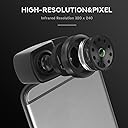
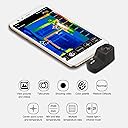


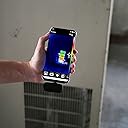
High Resolution Thermal Imaging Camera for Android Smartphones, USB Type-C - Black …
Product ID: 174383280
📸320x240 thermal resolution
🔋Zero battery drain
🖤Sleek, ultra-light design
🔥 See the unseen. Own the moment. 🔥
The Hti-Xintai HT-201 is a cutting-edge thermal imaging camera designed exclusively for Android USB-C smartphones. Featuring a high-resolution 320x240 infrared sensor, it delivers crisp thermal images with 76,800 pixels. Ultra-lightweight at just 35g and powered directly by your device, it offers effortless portability and zero battery hassle. Ideal for professionals in maintenance, HVAC, electrical, and building diagnostics, this tool transforms your phone into a powerful thermal inspection device with plug-and-play ease.


| Asin | B07Y2V3SGG |
| Batteries Included | No |
| Batteries Required | No |
| Colour | Black |
| Customer Reviews | 4.0 4.0 out of 5 stars (60) 4.0 out of 5 stars |
| Date First Available | 13 Oct. 2019 |
| Guaranteed Software Updates Until | unknown |
| Item Model Number | 201 |
| Item Package Quantity | 1 |
| Item Weight | 35 g |
| Manufacturer | Xintest |
| Material | absylux |
| Part Number | 201 |
| Product Dimensions | 5.08 x 3.3 x 1.52 cm; 35 g |
| Special Features | USB C |
L**1
Very pleased
Build quality: Excellent, the outer case is metal not plastic and overall this camera has a more premium look and feel than most others of the same type. The male USB-C plug is a bit longer than normal, this is intended for plugging into a phone or tablet without removing the protective case of your device. It draws power from USB-C so there is no internal battery. I was initially concerned by a frequent "clicking" sound coming from the device, but I later learned this is normal as the shutter must keep compensating for temperature ranges as you move the camera. Image quality: Native resolution is 320x240 which is high for a thermal camera especially at this price point. And it does not disappoint, the images are very high quality. Update rate is 9Hz which is standard for this type of device. It is able to detect Usability & software: Device support is good, you can use it on a Windows laptop, Android tablet or Android phone. Sorry Apple owners IOS does not allow third party devices like this to work. The "Hti-Xintai" app is fairly basic but works well enough, it contains the most common functions such as min/max markers, a center marker, auto-adjusting gradient and a choice of different color palettes. However like a few other reviewers noted there is a better free app available called "Seek Thermal". That app seems to be made for a competitor device but I can confirm it does work with the HT-201 and has more features. I keep both apps installed as each one can do a few extra things the other cannot. Value: This is by far the highest resolution thermal camera you can get for the price. The market is small and choice quite limited, all I can say is you will not be disappointed. 5/5
J**H
Excellent resolution for the price, works well and very reliable so far
Using with a Pixel 4a (5G) it was trivial to get going, and solved the immediate equipment overheating issue I was facing. Looking forward to having this in the toolbox for future projects. Small niggle is the onscreen temperature reading renders in black text, which is no use on a black background. Tip to workaround this is put the palette into "Black Hot" mode (so most the screen is white) and then it's fairly easy to read. The temperature readings look tolerably accurate, certainly enough to get relative scale of temps.
N**T
Brilliant
I've done a lot with thermal imagers over the years compared to most. I've used one for an art installation at EMFcamp, I've learned about them professionally, and I've seen the FlirOne in action as well as several others. So I bought this one, crossing my fingers as despite the good spec and relatively low cost, it has mixed reviews. Fortunately, it is amazingly good. Not just for the money, it is amazingly good by any standard. The images attached show hot and cold drinks and the thermal footprints they leave behind, and the other image shows literal thermal footprints, as well as a pipe duct under the floor. Top tip: forget the "supplied" software, download Seek Thermal, & use that instead. The poor software cost them the 5th star. Seek's software works brilliantly.
A**C
Great product
Nothing to add, as advertised, not a single problem with app.
M**O
Ottimo rapporto prezzo - qualità
Dal prezzo mi aspettavo uno strumento in plastica e molto delicato invece no, sembra molto solido. Il corpo è in alluminio o magnesio (non ho ben capito, comunque metallo), l'attacco usb è stabile e non ha giochi una volta connesso al telefono. Nonostante non abbia l'unione (sovrapposizione) dell'immagine come le Flir il risultato è di tutto rispetto, anche perché è ad "alta risoluzione", molto di più rispetto alle Flir di pari prezzo. Non ho ancora provato ma ho visto altri farlo, la camera potrebbe essere utilizzata anche tramite PC, con appositi software, permettendo di sfruttarla ancora di più. Ha un manuale d'uso molto ristretto, spiega in minimo indispensabile. Arriva con una custodia e un adattatore usb-c -> micro-usb. Il software originale, presente nel PlayStore, fa le cose base: gestisce i colori, puntatori min/max, emissività, doppia visibilità (termo-camera / fotocamera telefono affiancate) e altre piccole cose. Il software permette di fare foto e video, ma non permette il salvataggio da nessuna parte, non troverete le foto scattate da nessuna parte nel telefono, sono solo dentro l'app. Se volete tirarle fuori dovete fare degli screenshot.
B**J
En fonction de l'usage de chacun...
Très facile d'utilisation (Heureusement car la notice est assez succinte). Peut être un bon appareil en fonction de l'usage que l'on a. Résolution utilisable nettement jusqu'à 15m. Au delà, les yeux se battent avec les pixels. Donc pour ce qui est à moins de 15m, impeccable. Résolution même meilleure que certains FLIR plus cher. Mais au delà de cette limite, par exemple l'observation de la faune: c'est mort. Par exemple: un pigeon posé sur une ligne électrique n'est pas visible, un chat se résume à 4 pixels qui se déplacent (et il faut savoir que ce carré est un chat!😅). Si quelqu'un sait comment on règle l'échelle des températures pour n'afficher qu'un créneau précis de températures à l'écran (par exemple entre 30 et 40 degrés, donc ce qui est vivant): je suis preneur de cet avis!😉
C**Y
File location for photos
Photos can be found following this folder chain= in file manager->phone->Android ->data->com.temp.action.thermal->files->pictures Works great, no extra permission needed for app just camera, and storage. Location and microphone aren't needed but then there's just less meta data and no sound.
A**N
Preis- /Leistungssieger mit vernüftiger Software für Huawei P30 pro
Die Kamera ist Plug & Play. Die Auflösung der Kamera ist für den Preis ist besser als bei den Premiummarken! Die Software hat diverse Farbscalen, Min. / Max. Temperatur anzeige & die Möglichkeit einen Splitscreen mit der eingebauten Kamera des Smartphones anzuzeigen. TOLL !!!. Die Kamera arbeitet auch mit der Seek Thermal Software und wird als Seek Kamera erkannt! Die Verarbeitung und das Aufbewahrungscase sind prima! MfG.
A**.
Excellent thermal picture
For a thermal camera, this one has amazing resolution and clarity. It's a fantastic piece of hardware. I have worked professionally with military thermal and IR cameras, and this one had very good imaging at a fraction of the price and size of others. The resolution and refresh rate are higher than comparable products in the same price range, which are the 2 most critical specs to consider. The software is lacking, though. It requires a bunch of unnecessary permissions that appear to be just data harvesting. For the money I saved, I just bought an inexpensive used Android phone to use specifically for this camera. The images don't get saved to standard folders; they appear in the app's own area. There's no way to manually set the temp ranges to "hold the scene" (useful for looking for something warm in a scene including something hot, like a person hiding near a fire), or choose a fixed point to estimate the temperature. There is an option to display the thermal side-by-side with a visible image from the phone's camera, but there is no blending option available to overlay the two. There are a lot of colorization options available. Could not get the camera to work with any app other than the manufacturer's. The native connector is USB-C, and it had barely enough clearance to use with a TPU case. The included micro-USB adapter is a nice touch, to make it compatible with older phones. The rigid case is nice for protection, but the net pocket for the adapter doesn't hold it securely. I ended up using a piece of foam to secure the adapter and keep it from scratching the lens. I originally purchased this to check that some A/C work was performed correctly. Though I ultimately didn't have any issues, you could see the despair in the HVAC technician's face when I pulled this out just after the job had started. I used it to perform an energy audit on my house, and found some cracked caulking around a window, and a spot in the attic where it looks like some rodents lived for a time by looking at the indoor ceiling temps on a cold day. Checked my breaker panel for hot spots, and my HVAC registers for proper temps and balancing. Used it to examine a relative's HVAC on their new house and identify some efficiency issues. It's also neat to let the young kids see heat that they could normally only feel when they burn themselves, like a hot plate of food or a cooking pot that just left the stove. Seems to make their little brains click better. Watching a toasted marshmallow burst into flame is particularly cool; also, watching an engine start up and come to life. I have also used it to scan for wildlife and chickens that would rather hide in a tree than return to their coop. I would give the app a 2, and the device itself a 5+. It's not something you'll use everyday, and pricey for such a limited application, but it makes figuring out problems so much easier. It also has a cool factor; you will find uses for it you never thought about before. Strongly suggest getting a separate device to use as the screen, unless you like shoveling your data straight to China.
Trustpilot
4 days ago
2 months ago