Desertcart purchases this item on your behalf and handles shipping, customs, and support to Senegal.
🔄 Upgrade your vintage drives with modern speed and ease!
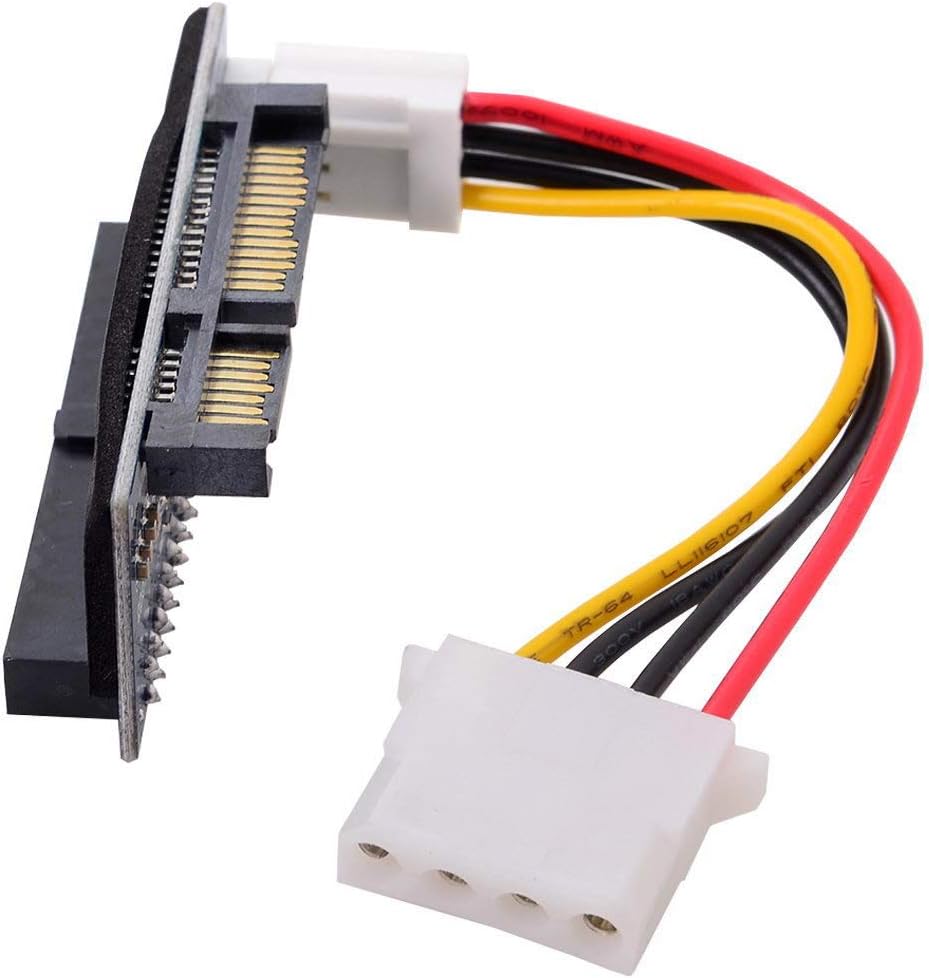
The cablecc IDE/PATA 40Pin to SATA Female Converter Adapter PCBA is a compact, plug-and-play solution designed to convert 3.5" IDE hard drives up to 1000GB into SATA-compatible devices. Supporting IDE transfer rates up to 133MB/s without requiring additional power or drivers, it enables seamless integration with modern motherboards and broad OS compatibility, making it an ideal cost-saving tool for upgrading legacy desktop storage.


| ASIN | B081YP2S5R |
| Best Sellers Rank | #77 in SATA Cables |
| Brand | cablecc |
| Brand Name | cablecc |
| Cable Length | 3.5 inches |
| Cable Type | SATA |
| Color | Blue IDE/PATA 40Pin Disk to SATA |
| Compatible Devices | SSD |
| Connectivity Technology | SATA |
| Connector Gender | Male-to-Female |
| Connector Type | Ide |
| Customer Package Type | Standard Packaging |
| Customer Reviews | 4.1 out of 5 stars 2,064 Reviews |
| Data Transfer Rate | 133 megabits_per_second |
| Ethernet Cable Category | Cat 5 |
| Frequency | 4.13 MHz |
| Indoor Outdoor Usage | Indoor, Outdoor |
| Item Shape | Round |
| Item Weight | 0.01 kg |
| Manufacturer | cablecc |
| Model | EP-096 |
| Model Name | 40Pin Disk to SATA Female Converter Adapter PCBA |
| Number of Items | 1 |
| Number of Pins | 7 |
| Other Special Features of the Product | High Speed |
| Part Number | EP-096 |
| Recommended Uses For Product | computer hard drive upgrade |
| Special Feature | High Speed |
| Unit Count | 1 Count |
S**N
Works fine on old IDE motherboard
If you're trying to re-use your old IDE DVD burners to save yourself the $25 to $30 for a new SATA DVD burner when moving to a new motherboard with only SATA and no PATA IDE (ribbon cable connectors), these adapters will do the job for about 1/3rd the cost of a new burner. Or, if you'd like to switch your BIOS IDE settings over to "SATA -AHCI" instead of "Legacy IDE" or "Native IDE" for newer versions of Windows, these work perfectly. I tested on an old Gigabyte GA-MA790FX-DQ6 DDR2 motherboard running an old Athlon 64 x 2 from back around 2010, now running Win10 Pro 22H2. The motherboard has the old original PATA IDE (Parallel ATA IDE) using ribbon cables, and the old, original version of SATA running at 3GB/s .... ....IDE DVD burner drives installed were the LiteOn DH20A4H and the Sony / OptiArc AD-7200A....with jumper set to MASTER on both of them. ...Tested compatibility and burn speeds with and without SATA adapter installed, using free Nero DiscSpeed test utility, and found burn speeds virtually identicle on both drives, and regardless of BIOS IDE settings : "Legacy IDE" "Native IDE'" or "SATA to AHCI," and left BIOS set to "SATA to AHCI" since Windows since Win7? prefers it. This Win10 installation was originally done in "Native IDE" BIOS mode, so Win10 required one or two restarts after switching BIOS mode to AHCI while it loaded AHCI drivers...but finally came up and running fine. I also noticed a minor point ...with BIOS IDE set to "SATA to AHCI" mode, Win10 seemed to boot faster.... ....and another minor point, the adapters are not mechanically held onto the drives by anything but the adapter, and with all those cables and power hanging off of them, seemed shaky/delicate, so I think I'm going to dab a little hot glue between the adapter and the back of the drives to hold the board on there better and make them stronger. There's also NO printed documentation with each adapter. I tried skipping using the power jumper from adapter to drive, just plugging directly into drive from power supply, instead of SATA power to the adapter, but that did not work....I'm kind of surprised board can pass enough power through it, to the drive, to run it. As for older reports / reviews of poor quality workmanship of the circuit boards, I looked both that I ordered over closely with a magnifying glass before plugging them in and powering up, and found no poor solder, no short-circuits, and no broken power connector or bent pins, despite receiving both in small, unpadded plastic bags....lucky I guess ? They did also have a strip of black foam insulating tape on the back of each board where it goes up against the sheet metal of the back of the DVD burner when plugged in....so make sure that tape is intact and adhering well to the board when you first receive the adapter. I've read that the burning laser diode in CD/DVD burners has a limited lifespan and will burn out or weaken eventually, so I wonder if it's "false economy" to be buying these adapters for old drives I've had for years, instead of just buying new drives for ~$25, but admittedly these adapters do work well to switch over to SATA....So, if you need 'em, they'll do fine.
P**E
Old hardware back to usablity.
Works exactly like expected. Plug interface into PATA connector. Plug the power connector into the drive. Plug the SATA power connector and interface into the MB controller. Boot system into OS and works. Tried this on both an old 80Gb HD and a CD ROM drive. Both worked. HD was slow, but it's been a long time since I last used it. So likely isn't the adapters fault. Transferred data onto and off from the drives. No issues that I saw. Just had these sitting in case I wanted to play around with an old setup. But it's nice to be able to use them with modern hardware.
U**S
Product as advertised
This is a Pata to Sata converter. It allows a SATA connection to read a PATA drive. It worked flawlessly out of the box with absolutely no issues save one. The power connector is in an odd place that makes attaching it to a small Sata to USB converter nearly impossible. It would bend the mini molex power connector. So I could not use it in this way. However it does what it is supposed to. I Purchased this to drag files from a friend's old PATA drives to a USB Thumb Drive so he could get some old pictures printed and it succeeded as incredible throughput. I was impressed with the speeds it transferred at. It maxes out the old PATA drives so you get top performance out of both reads and writes. Pros: Works as advertised Fast Easy to install and use Powers the 3.5" spinners no problem Cons: Mini molex placed in an awkward position that did not allow for it to be attached to a multi hub unit without significant flex. Even when attached to the multi hub unit it still was not able to transfer data which was disappointing. I do not count this against the unit though as this was not what it was intended for. The flex on the mini molex was so severe it wasn't getting power to spin the drive up so it would be detected, but there was no accessible data save the drive properties.
T**M
Didn't work for my DVD drive.
Did not work with my Memorex DVD drive. System recognized it, but its presence slowed all IO ops, it would not read a DVD and it was slow to respond to the eject button. ASUS Intel Gen 14 motherboard, Windows 11 Pro.
W**Y
It works with optical IDE drives
I am using this in a HP 600 G1 that is SATA only hardware. This was a replacement for an old Compac Win 7 that died. I salvaged a Lightscribe IDE drive from it and this adapter allowed it to run as a SATA device. Install was very simple. Set the jumper to master and plug the adapter on to the drive. The only cravat is I get a message saying that an IDE device failed and requires pressing F1 to continue the BOOT. Windows 7 loads the correct driver and the drive works just as a SATA drive would. Used Lightscribe drives are running $40+ on E-bay.
K**M
cablecc IDE/PATA 40Pin Disk to SATA Female Converter Adapter Works as Advertised
I had quite a tussle with this little gadget, trying to put a small DOS capable IDE drive in a Dell Optiplex 755 SATA machine. The Seagate model ST340014A is a 40 gb hd that would allow me to install MS-DOS 6.22. I needed DOS to run some software written in 1986 that the present user thinks he can't do without. I couldn't load dos on a larger drive, so I used the Seagate. This adapter would allow this, but at first I couldn't get the drive to show up in the Dell. Tried all combinations of HD jumper settings, machine settings I could think of, but no luck. Finally, late Sunday I broke down and sent a message to the seller, Cablecc and requested help. To their credit they had responded by next morning. Sent very good photos of it all, properly hooked up, with special interest in the HD jumper. I was busy assuring them in my message back to them that the jumper was placed exactly as they showed it in the picture when I thought I'd better double-check it. I took a real close look and the jumper was as they showed it needed to be. However, I noticed that the jumper picture on my hd specified the opposite location for the Master jumper. I quickly made the correction and fired it up. It worked great. The location where I had previously had the jumper was labeled as the place to put a jumper to limit the 40gb's to 32gbs. During the fracas I didn't get back to the folks at Cablecc to thank them. I tried several times to re-establish contact thru Amazon, without successs, so I hope they read this and know their little gadget has a happy home. Thanks folks.
J**T
Adapter
Help fix my internal equipment connection.
C**M
Unfortunately needed 34 pin
Unfortunately the floppy needed 34 pin not 40 pin and I needed a flat card not 90 degree bend.
J**A
Excelente Adaptador
Muy funcional y ergonómico.
E**.
El acople entre las piezas es bastante bueno.
Funciona bien. El acople entre las piezas es perfecto. El lector/grabador funciona muy bien. Un gran producto.
S**.
Funktioniert
Mit dem Adapter ist es mir ohne Probleme gelungen eine altersschwache IDE-Festplatte auf eine moderne SSD zu klonen. Die alte Festplatte funktionierte damit auch an einer Dockingstation, die über USB am PC angeschlossen war und wurde ohne weitere Schwierigkeiten von Windows erkannt. Sehr gute Qualität und 1-Tages Lieferung.
R**T
Works well with optical drives too
I ordered this item to connect an old, but very special CD-ROM drive with an IDE interface to a more modern computer and it works perfectly: The drive is recognized as an optical drive and works perfectly. Do not forget to set you’re drive’s jumper to ‘Master’, or it won’t work properly. I’m subtracting one star because one of the power wires came out of the Molex connector. I could have returned it for a replacement, but I chose the quicker way and fixed it myself.
K**D
Unusable. Scam.
Scam. Unusable. The part that connects to the drive has a surface that interferes with the drive. The way I see it it has been mounted upside down. You can’t connect the data connection. So, probably a rejected batch from the factory. It came just thrown down into an envelope without anything else. You would expect some quick start guide, registration offer etc. But here nothing.
Trustpilot
2 weeks ago
2 weeks ago