


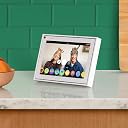
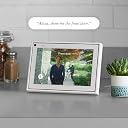

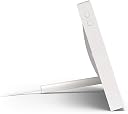

Portal Mini White 8" from Facebook. Smart, Hands-Free Video Calling with Alexa Built-in
Product ID: 157680565
Desertcart purchases this item on your behalf and handles shipping, customs, and support to Senegal.
Portal Mini White 8" from Facebook. Smart, Hands-Free Video Calling with Alexa Built-in
| ASIN | B07XY8CFHJ |
| Age Range Description | Adult |
| Aperture modes | F2.8 |
| Aspect Ratio | 16:9 |
| Auto Focus Technology | Contrast Detection |
| Autofocus Points | 1 |
| Battery Type | Lithium Ion |
| Best Sellers Rank | #24,093 in Video Games ( See Top 100 in Video Games ) #1,809 in Computer Tablets #4,140 in PC Accessories |
| Bit Depth | 8 Bit |
| Brand | |
| Built-In Media | Portal Mini White 8" from Facebook. Smart, Hands-Free Video Calling with Alexa Built-in |
| Camera Flash | Built-In |
| Camera Lens | Wide Angle |
| Color | White |
| Compatible Devices | Devices with Alexa compatibility |
| Compatible Flash Memory Type | SD |
| Compatible Mountings | Alexa |
| Connectivity Technology | Wireless |
| Continuous Shooting | 30 frames_per_second |
| Crop Mode | 16:9 |
| Customer Reviews | 4.0 4.0 out of 5 stars (2,631) |
| Digital Scene Transition | false |
| Display Fixture Type | Fixed |
| Display Maximum Resolution | 1920x1080 pixels |
| Display Resolution Maximum | 1920x1080 pixels |
| Display Type | LCD |
| Dots Per Screen | 332.8 dpi |
| Effective Still Resolution | 12 mp |
| Expanded ISO Maximum | 25600 |
| Expanded ISO Minimum | 100 |
| Exposure Control | Automatic |
| File Format | RAW |
| Flash Modes | Automatic |
| Flash Sync Speed | 1 second |
| Focal Length Description | Wide Angle |
| Focus Features | Active |
| Focus Mode | Continuous-Servo AF (AF-C) |
| Focus Type | Auto Focus |
| Form Factor | Compact |
| Generation | 1 |
| Image Capture Type | Stills & Video |
| Image stabilization | Digital |
| Item Type Name | Portal mini. |
| JPEG Quality Level | Normal |
| Lens Construction | [Integrated/Internal] |
| Lens Type | Wide Angle |
| Manufacturer | |
| Manufacturer Part Number | 899-00077-12 |
| Maximum Aperture | 2.8 millimeters |
| Maximum Image Size | 8 inches |
| Maximum Shutter Speed | 1 seconds |
| Memory Slots Available | 1 |
| Metering Methods | Evaluative |
| Minimum Shutter Speed | 1 seconds |
| Model Name | Portal Mini |
| Model Number | 899-00077-12 |
| Model Series | 899 |
| Number of Items | 1 |
| Number of Packs | 1 |
| Photo Sensor Size | 1/2.3-inch |
| Real Angle Of View | 100 degrees |
| Recording Capacity | 15 minutes |
| Screen Size | 8 inches |
| Sensor Type | CMOS |
| Series Number | 899 |
| Shooting Modes | Automatic |
| Skill Level | Novice |
| Special Feature | Built-In Microphone |
| Specific Uses For Product | Videography |
| Supported Image Format | JPEG, PNG, TIFF, BMP, RAW |
| Total Still Resolution | 12 mp |
| Touch Screen Type | Capacitive |
| UPC | 810387030244 |
| Unit Count | 1 Count |
| Video Capture Format | MP4 |
| Video Output | HDMI |
| Video Resolution | 720p |
| Viewfinder | Electronic |
| White Balance Settings | Auto |
| Wireless Technology | Wi-Fi |
| Write Speed | 30 fps |
| Zoom | Digital Zoom |
M**K
THIS IS A REVIEW FOR UK CUSTOMERS THINKING THE ADVERTISING WAS FOR THEM AND NOT AMERICANS
Terrible for UK customers. In order to use "Hey Portal" voice command you have to set language to US and so you have an American assistant. Alexa does not work in the same way and some skills are not accessible for equal commands (my Alexa sits next to it so can compare). Whatspp requires the phone to be present, which is fine but then it will not show an incoming calls, additionally you cannot use the voice commands to call on whatsapp and have to manually enter it (how quaint and 2015). This is a real turd and needs a lot of polishing. I hope someone reads this and avoids like the plague. I got for camera (which works fine) and talking to family on whatsapp (which it is rubbish for). Probably great in the US for messenger users but rest of the world should avoid.
U**R
Not working
Making calls works fine but receiving calls does NOT.If you have a smartphone then do not bother buying this device.If you do not have a smartphone do NOT bother buying this device either - I bought one for my grandmother, signed up to a new Facebook account for her and logged into the Portal. Calling worked but receiving calls did not. Randomly my grandmother's Facebook account was blocked and under review. I have submitted a photo, her mobile number etc. but it is still blocked. There is no way to contact FB and the Portal helpline who contacted me know very little about the device and cannot unblock FB accounts - even though this thing only works if you have a FB account.Overall AVOID.
J**N
Only the start....
Very easy set up, got one for us and one for parents in late 60s so they can stay involved with new baby. Very easy to pair with Messenger / WhatsApp, even those who don't have the system we're impressed with what they experienced on phones alone. The tech is impressive, automatically locks onto faces / voices, smoothly pans / zooms, ideal for moving about with crying / feeding baby. Will be used for feeding and bathing times, also perfect for Christmas day. Ignore the haters/tinfoil hat wearers. Ideal for far apart friends and family
T**M
Very good quality, and works well for WhatsApp and Facebook video calls.
I wanted a device that would enable me to make WhatsApp video calls using my TV as the local display, and this box does that extremely well.The unit itself feels solid, weighty and very well made. Using the built-in clips, it sits securely atop my Samsung flat screen TV, and the power cable is impressively long. They know the box is likely to be placed on top of a TV, so could be some distance away from the nearest power socket, so that attention to detail is really appreciated and unexpected - I expected to need an extension lead, but didn't.I was a little frustrated that the box spent over an hour updating itself before I could actually start using it. It said the software update may take about 15 minutes, but ended up taking very nearly a full hour. It then rebooted, at which point I thought I'd be able to start playing with my new toy, but no such luck. It then started updating the remote control, which took a further 3-4 minutes, taking the total update time to over an hour. Only then could I start setting the box up.It's a pity the box is WiFi only, as using a wired connection would have been more convenient (no need to enter a WiFi Key) and probably would have sped up the update process.Once I finally managed to start the setup process, this was really easy and intuitive, and only took a few minutes.One slight annoyance is that the on-screen keyboards are not QWERTY - the "keys" are arranged alphabetically, which I found awkward.During the setup process, I was offered a full-screen view of my own camera, so I could position the camera and play with the tracking feature and see what the picture was like. It would be nice to be able to recall this feature after initial setup, especially if I want to move the box to a new position, but I couldn't see any option to.My first call was a WhatsApp call to my mum, who has a fairly old Android phone.The picture quality is very good, even in a fairly dimly-lit room, and the video tracking works extremely well - actually far better than I had expected! If you move to the other side of the room, sit down, stand up, do a dance, whatever, it follows you flawlessly.When the other person turned their phone on its side, the picture filled the TV screen my end, and my picture flipped to horizontal and filled the screen their end as well - perfect!Audio quality was crystal clear both ends. The call audio comes through the TV speakers, but there is also a speaker built into the box itself. This emits the ringing signal, even when the call is being initiated from my end, which seems a bit weird.I was pleasantly surprised to find that the volume buttons on the Portal remote adjusted the volume on my TV - how it knew how to control my TV is a mystery because I never told it, but it worked somehow!My second call was another WhatsApp call, this time to a contact who has a new iPhone XR. Sadly, on this call, when they turned their phone sideways, while their picture flipped and filled my TV screen, my picture remained vertical and displayed as a pillarbox on their end. That was disappointing, but no doubt a bug that will be sorted out at some point. We flipped back and forth several times, but could not make the Portal box flip its image to horizontal.I then tried a Facebook Messenger call to the same contact, and that worked much better - when they turned their phone to horizontal, both pictures flipped to horizontal so we had full screen both ends.I have yet to try a Portal to Portal call, but I have no reason to doubt that this will work well.This box's primary function is to make video calls via a TV, and that job it does very well. I didn't try any of the other features because, frankly, I couldn't care less about them. Hopefully the landscape orientation bug will be sorted out in a future software version, then it'll be perfect.UPDATE - April 2020:Since I bought the Portal TV around 5 months ago, the software has been updated.The inset picture from your own camera is now placed in the bottom right corner of the screen instead of the top left, which is better, but I would still prefer an option to choose which corner to put the picture.There is now an option to force portrait/landscape orientation, so even though the automatic switching still doesn't work reliably, this can be manually overridden to provide a full-screen picture both ends.There is still no option to check the picture from your own camera without starting a video call to someone, but I have discovered that if you go into the "Photo Booth" app from the home screen, you can see what your camera is seeing locally without starting a call.WhatsApp does not work reliably. Incoming calls frequently don't "ring" on the Portal, and after a period of time the Portal TV will stop working altogether with WhatsApp, complaining that my phone is not connected to the Internet (it is). You then have to delete your WhatsApp account from the Portal (which triggers a confirmation code sent to WhatsApp your phone, demonstrating that it really is connected!) and then re-add it again. Of course, this loses hidden contacts list, so you have to set this up again. I've since given up on WhatsApp, and now just use the Portal TV for Facebook calls, which seem to be much more reliable.Portal-to-Portal Facebook calls work brilliantly, and the picture quality is excellent.I have tried out the Alexa functionality, and this seems to work as you would expect, but it's not a feature I use regularly.
Trustpilot
1 month ago
3 weeks ago