


๐ Elevate your security game with crystal-clear vision and smart alerts!
The SV3C 5MP Outdoor Security Camera delivers ultra-high-definition 5MP video with starlight night vision, dual band WiFi for flexible connectivity, and advanced humanoid motion detection to minimize false alarms. Featuring two-way audio for real-time communication and a robust IP66-rated aluminum housing, itโs engineered for reliable outdoor surveillance. Compatible with ONVIF NVRs and multiple viewing platforms, it supports local and cloud storage options, making it a versatile, professional-grade security solution.
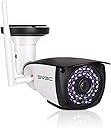


| ASIN | B07VGFDH56 |
| Alert Type | Audio and Motion |
| Antenna Location | Indoor Security, Outdoor Security |
| Batteries are Required | No |
| Best Sellers Rank | 60,937 in Electronics & Photo ( See Top 100 in Electronics & Photo ) 680 in Dome Cameras |
| Brand | SV3C |
| Colour | 5mp |
| Compatible Devices | Desktop, Laptop, Smartphone, Tablet |
| Connectivity Protocol | Ethernet, ONVIF, Wi-Fi |
| Connectivity technology | Ethernet , WiFi |
| Control Method | App, Remote |
| Controller Type | Android, IOS |
| Customer Reviews | 4.3 out of 5 stars 139 Reviews |
| Effective Video Resolution | 5 |
| Flash Memory Supported Size Maximum | 128 GB |
| Flash Memory Type | Micro SD |
| Form Factor | Bullet |
| Frame Rate | 15 frames per second |
| Included Components | Ethernet Cable, Instruction Manual, Mounting Screw, Power Adapter, WiFi Camera |
| Indoor Outdoor Usage | Outdoor |
| Indoor/Outdoor usage | Outdoor |
| Installation Type | Screw In |
| Item Dimensions | 20 x 8 x 10 centimetres |
| Light Source | Infrared |
| Manufacturer | SV3C Technology |
| Material | Aluminium, Metal |
| Model Name | B06W-5MP-HX |
| Model Number | B06W-5MP |
| Model name | B06W-5MP-HX |
| Mount Type | Wall Mount |
| Network Connectivity Technology | Ethernet, WiFi |
| Night Vision | Starlight |
| Night Vision Range | 67 Feet |
| Number of Channels | 2 |
| Number of IR LEDs | 36 |
| Number of Items | 1 |
| Other Special Features of the Product | 2 Way Audio, HD Resolution, Local Recording, Motion Sensor, Night Vision |
| Photo Sensor Technology | CMOS |
| Power source | Corded Electric |
| Rear Webcam Resolution | 5 MP |
| Recommended uses for product | Indoor Security, Outdoor Security |
| Room Type | Classroom, Garage, Hallway, Office, Store Room |
| Special feature | 2 Way Audio , HD Resolution , Local Recording, Motion Sensor, Night Vision |
| UPC | 754429058790 |
| Unit Count | 1.0 count |
| Usage | Surveillance |
| Video Capture Format | MP4 |
| Video Capture Resolution | 5mp |
| Video Encoding Format | H.264 |
| Viewing Angle | 87 Degrees |
| Voltage | 12 Volts (DC) |
| Water Resistance Level | Waterproof |
| Waterproof Rating | IP66 |
| Wattage | 12 Watt-hours |
| Wireless Technology Type | Wi-Fi |
J**M
SV3C 5Mp HD camera , WiFi , ethernet , latest software.
SV3C 5MP HD WiFi , ethernet security camera . Having purchased 4 SV3C cameras over the past 4 years for myself & family , I can give honest feedback to the quality & reliability of the products . Firstly the camera quality is superb no cheap flimsy plastic used here the casing is made from metal & hard plastics which are very durable & I have noticed zero degradation over the 4 years of my other SV3C cameras . All are placed outside . The images are very sharp both daytime & at night . Giving clear concise images is important here . The optional humanoid detection works very well , negating the need for unwanted images of animals walking by . This feature can also be turned off in the app / software therefore capturing all movement. Sound quality is also great , I turn this feature off as not personally needed . But it's a great feature to include . The camera offers both WiFi 2.4g & ethernet connections. The power cable is a good length of approx 2.5 metres , an extender can be used if needed & at minimal costs . SD cards work very well in these cameras upto 128gb . You have everything included , UK power adapter , mounting bracket built into the unit which is fully flexible to achieve the best position. Ethernet cable , wall plugs & screws , instruction manual . The app camhipro gives rock solid performance, is easy to use and that's what one really wants . Having tried other brands , I have found SV3C to be the best of the bunch . To summarize Fantastic build quality solid durable construction that lasts. Image & sound quality are superb. Easy to setup a truly set & forget smooth operation. Flexible installation due the the design of the mounting bracket. A new feature in the firmware , simple to update via the app. App performance is rock solid , with lots of options but simple enough for non tech savvy people to setup . Once again SV3C has designed a great product .
M**P
Great Value Security Camera!
I have seven of these cameras around my property now & so feel well qualified to write a review. The first batch of these was bought around four years ago & they are still functioning perfectly. The camera itself is very well constructed & solid... this is no cheap plastic toy! Image quality both day & night (monochrome at night) is superb & motion sensing works well too, belying the actual price point of this camera! Set-up is simple once you download the free CamHi app, & although only one camera can be viewed at a time on CamHi, this is no real issue as switching between cameras is quick & easy. It's also very simple to expand the number of cameras via the app. as I have done several times. I believe there is also a PC/Mac programme available in which all can be viewed simultaneously, although I've not had the chance to explore that yet. You obviously need fairly good WiFi connection, but once set up, you can view your property from literally anywhere via 4G, as I did from Italy last month... great for peace of mind! If you wish to secure your property with a cost effective, simple & robust security camera system, look no further... Highly Recommended! GY
J**W
A great ip cam very well made and with ON/VIF
I am using this excellent IP cam with 4 other cams with a DVR with ON/VIF and all works great and very stable. The easiest way to set up this or any other type of system is to power up your cam connect the Ethernet cable to your routers LAN port (you may need to press the reset button on the cam) then download the Camhipro app to find the cams IP address then select your cam follow the steps and you then should be able to get a list of details of your cam look for the IP address and enter it into your web browser enter PW and then the cams setup pages will appear from there you can configure everything on the cam. Once all configuration is complete you can remove the Ethernet cable and should be also working wirelessly and stable connection if not usually a network or wireless setting error. A great cam at a very good price Point very well made and good video quality.
P**T
How does this rate five stars
After three hours of trying I could not get this camera to maintain a link to the Internet, even while plugged into the router. It will connect over Ethernet but as soon as I try and view the output or add WiFi details the link drops and it goes through another period of 'connecting' (tried with three different phones). I was able to connect using a PC but any attempt to record or save a picture comes back with a failed message. OK so I may have had a faulty unit but the manual does not leave you with any sort of warm feeling. There is no 'installing the SD card video' on the web site, as instructed in the manual, not that I could find and certainly not where the manual says it is. The file conversion program noes not work and other links are also wrong. The PC viewer needs to run in Internet Explorer again suggesting that the software is bang up to date. Real shame because the quality of the picture is good but the woeful manual lets it down as does the web site. One final note, while I am no expert but I have installed many cameras and still have two indoor cameras still working on the same network. I am also fairly competent and have built an number of my own computers, it really should not take someone like me three hours getting stuff like this to work and failing.
B**S
Great image quality - the rest leaves a lot to be desired
Mixed feelings. The most important thing - image quality - is excellent day or night. Good infrared range and field of view (I've had a lot of cameras that focus too much IR in the middle of the shot but this one has a good even coverage). No issues with WiFi connectivity - though I have an outside access point which gives a good signal. A 5MP camera is going to need good stable bandwidth all the time. There is a smartphone/tablet app that was a bit clunky but did the job of connecting to and setting up the camera. Personally I would not rely on recording to SD card so I haven't tried that - I'm using it with Synology Surveillance Station. Motion detection is hopeless - it triggers when the sun comes out or night vision switches on/off so you get lots of false activations which really defeats the point. The user interface is funtional but slow and outdated. The clock which is supposed to update automatically over the internet goes haywire occasionally and gets completely the wrong time. My other cameras use the same time servers and don't do this. I tried using the remote speaker and it didn't work - not sure if it is me or the camera at fault. By far the most irritating thing about this camera is that I've got five cameras from the same manufacturer (SV3C) and this one is completely different to the rest. Different interface, different smartphone app, different resolution (yes, 5MP is different on this camera to the 5MP on all the others), different on screen display, different settings required. It's a constant irritation. I had a choice of cameras and I chose this one primarily because it was the same as all my other cameras but apart from having the same logo stamped on the outside you'd really have no idea it came from the same company.
A**Y
Slightly above average
Note that a bunch of cables come out the back so when you fix this to a wall you will have too: Drill a large hole on the wall, fit a box as well to put the cables in or leave them dangling below. Given that when used on wi-fi only one of the cables (the power) is used this is silly. But they are all the same and they rarely show the cables in the pictures. Also this camera has to have a different App loaded from my other camera which is the same make etc. Picture quality is above average as this is advertised as HD. Motion detection is god and adjustable.
M**N
Good Camera
All round a nice camera easy to set up with the app on your Phone you can also use the web interface on a pc which will give you more control over the settings Picture is very clear I have included a Video from the camera of a car driving past the house the camera at this time is in a temp position in the window but still works well. The camera has also been added to my blue iris set up without any problem the only issue I have is the key frame rate. I can not get it above 0.50 the other Sv3c cams I have all run at 0.90 or 1.00 but so far this is not having any issues with the it being that low This will not give you any problem if you only want to use the app on your phone Memory card location is easy to get to and insert the card and you can download to your phone or Pc if needed So Over all a good Camera for the price
N**K
excellent camera at a decent price
So i have had the camera installed and running for a couple of months now and so far no problems. I like the fact i can view the camera live through my iphone from anywhere and the features on the app i use are fairly user friendly. I can easily download clips to my phone and also choose to take live video clips or still pictures anytime. setting it up was not the easiest experience but once i had connected it via a lan cable i could then connect via wi-fi and disconnect the lan cable. The picture quality is excellent even at night and i like the fact you can "pinch and zoom" the picture on your phone even on live view. the mic picks up everything and the two way mic also works well , you just have to bring up the icons on the phone screen and hit the mic icon to activate it. overall the whole set up is fine and i am thinking about buying another camera to add to the system.
Trustpilot
2 weeks ago
2 weeks ago