Desertcart purchases this item on your behalf and handles shipping, customs, and support to Senegal.
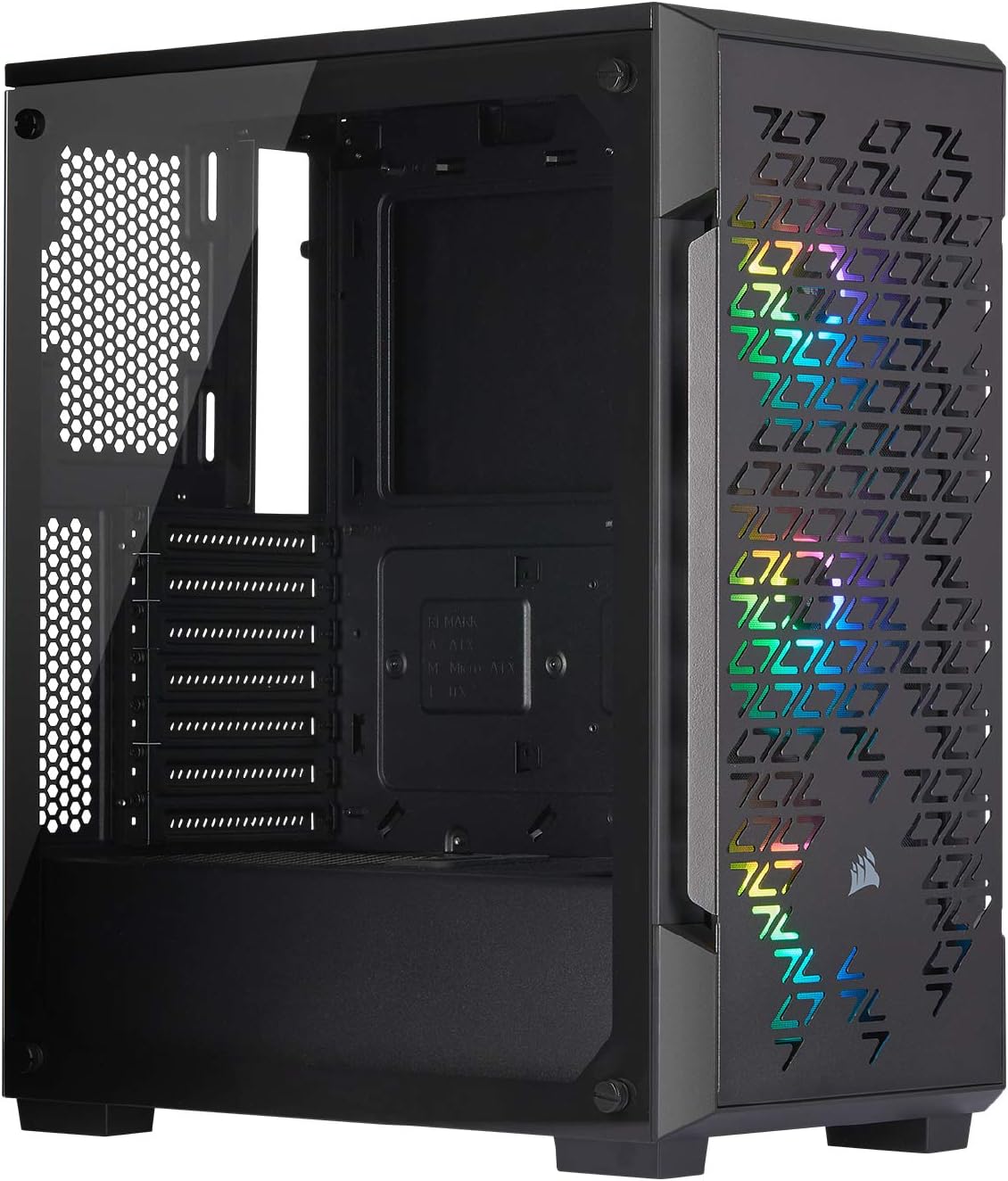
❄️🌈 Showcase your power and style with the iCUE 220T RGB Airflow – where cooling meets brilliance!
The Corsair iCUE 220T RGB Airflow is a mid-tower ATX case engineered for high-performance cooling with a steel grill front panel and three included SP120 RGB PRO fans featuring 24 individually addressable LEDs. Its solid steel frame and edge-to-edge tempered glass side panel combine durability with a premium showcase for your components. Controlled via Corsair's iCUE software, the lighting system offers vibrant, customizable effects right out of the box. Designed for clean builds, it supports up to four drives, six fans or three radiators, and includes removable dust filters, making it the perfect smart case for professionals who demand both style and substance.


| ASIN | B07RW8GLQJ |
| Antenna Location | Gaming |
| Best Sellers Rank | #1,393 in Computer Cases |
| Brand | Corsair |
| Case Type | Full Tower |
| Color | Black |
| Compatible Devices | ATX, MicroATX, Mini-ITX motherboards; Specific Corsair liquid cooler models |
| Cooling Method | Air |
| Customer Reviews | 4.7 out of 5 stars 8,679 Reviews |
| Enclosure Material | Alloy Steel, Tempered Glass |
| Fan Size | 12 centimeters |
| Global Trade Identification Number | 00840006609124 |
| Hard Disk Form Factor | 3.5 inches |
| Internal Bays Quantity | 4 |
| Item Dimensions D x W x H | 15.55"D x 8.27"W x 17.72"H |
| Item Type Name | Computer Case |
| Item Weight | 14.3 pounds |
| Light Color | RGB |
| Manufacturer | Corsair |
| Material | Alloy Steel, Tempered Glass |
| Mfr Part Number | CC-9011173-WW |
| Model Name | CORSAIR iCUE 220T RGB Airflow Tempered Glass Mid-Tower Smart Case, Black |
| Model Number | CC-9011173-WW |
| Motherboard Compatability | ATX |
| Number of Fans | 3, 6 |
| Number of Items | 1 |
| Other Special Features of the Product | RGB Lighting |
| Power Supply Maximum Output | 600 watts |
| Power Supply Mounting Type | Bottom Mount or Rear Mount |
| Recommended Uses For Product | Gaming |
| Supported Motherboard | ATX |
| Total Expansion Slots Quantity | 7 |
| Total USB 3.0 Ports | 2 |
| Total Usb Ports | 2 |
| UPC | 840006609124 |
| Warranty Description | 2 year manufacturer |
C**E
Cute, Flashy, Fully Functional
This is a midsize case. People continue to mention that in reviews, a lot of times in complaint. I absolutely love it though. I have it right beside my monitors to take advantage of the RGB setup inside. The front is gorgeous, especially in the evenings if I turn the room lights down and just have the monitors and case as lighting. I had no issue getting all the components in, I just had to take a moment and look at what I was working with. Motherboard was an easy install, the intel bracket for my AIO cooler also fit on perfectly with no trouble. The cradle for the SSD's is easy to take in and out, and if you're a bit lazy and a bit frustrated with the lack of space in the back of it for cable management you can even gently move some SATA excess into the cradle if you're only running on larger drive in it or if you're going to mount straight onto the back panel. There are several openings on the sides with nice cable covers that can wind PSU connections through to help with the aesthetic aspect, as well as smaller openings on the very top as well. The case worked well with the corsair h100i platinum cooler I installed, with the only downside being that I was unable to mount both fans directly onto the radiator due to the distance that the RAM stuck out from its motherboard slotting. Once again, this was something I anticipated though, and for the size and aesthetic of the case I would not trade that. Only real complaints are the very small amount of cable management space on the back panel which with zip ties and patience you can absolutely make it work, and the fact that the case fans are not white, as every other component is including the AIO cooler fans. It's a small detail that paying a little more for would have ideally gotten you, but in the long run that's also not the biggest sacrifice by any means.
J**I
Perfect Case for 1st time & Advanced Builds
Pros - Perfect case for a minimalist build. Bought this for my first ever build and it was perfect for what I needed: ATX size mobo, no HDDs, no radiators, no disk drives, a GPU with 2 fans, only 1 M.2 being used, and 2 additional Corsair RGB fans for top and rear. - Great overall size, they nailed the dimensions with this one. - Excellent airflow through this case! The front is cool to the touch. - The tempered glass side is nice, the thumbscrews have a rubber washer to prevent scratching which I liked upon constantly opening and reopening the case during tweaks. Cons: - The gap behind the motherboard for wires is very tight! Saying there is 5/8” - 3/4” is a STRETCH but it’s doable to get all the cables routed properly. - My lighting node won’t work to my motherboard. I have all 5 fans plugged (correctly in order) into the node and then all 5 fans with 3 pin connectors into the motherboard. I received a USB overcurrent message at first start up and troubleshot it to the node being plugged into the motherboard USB 9-pin. The node does work because I plugged it in when the PC was running and the iCUE software recognized it - allowing me to program the RGB the one time. If someone has any assistance on this it would be great because I’m not a big computer person and I didn’t see anyone else with this issue on forums and blogs. Unless I’m missing something obvious, it seems like no one else has this issue and the node does work as confirmed outside of startup. It would be a shame to need an additional component from Corsair because them integrating this node in the case was a great touch and one less thing for me to worry about. I reached out to Corsair but no response after almost two weeks. Conclusion: Great mid-sized tower for a minimalist build and excellent airflow. I would recommend to anyone with similar specs below. It will still work with more components and will require the effort to route everything efficiently, but it’s possible. My system specs: Mobo: MSI X570 Gaming Edge CPU: AMD Ryzen 7 3800X (stock Wraith Prism cooler) GPU: Gigabyte GeForce RTX 2070 8 GB (2 fan version) RAM: G Skill 2 X 16GB, 3200 DDR4 PSU: Corsair 850W Storage: 512GB M.2 SSD
J**K
Awesome Case. Lots of space for GPU, no so much for backplate wiring.
TLDR: The Good: Looks great. It's spacious where the motherboard and GPU go. The airflow is great. Easy to build into. The Bad: Space for wiring in the back of the computer if very minimal due to the backplate of the case not being popped out. I absolutely love the look of this PC. I bought it for my wife, and her and I both really like it. I took the parts from her old comp, and put them into this one. Moving all the parts over was easy. It had a LOT of space for the GPU, and has a lot of slots to bring cables in from the back. I was able to route most of the cables so they couldn't really be seen much. I really like the RGB lights. I added 3 of my own as well. The ventilation is great, and the magnetic filter for the top fans is a nice touch. I love the glass plate on the side. It has a nice black bezel, and it feels very premium. It fits into the screw slots nicely as well, which makes it easy to sit there while putting the screws in. My biggest issue was the amount of space behind the case where all of the wires go. I had to really work it to get everything to fit in there right, and get the back plate to go on right. The only things I would ask to change about the case would be: making more space for wire in the back of the computer, and adding a module to plug the 3 included RGB fans into for power. Overall I love the case, and have strongly contemplated buying one for myself. Just haven't yet, because my case is still great, just not as good looking.
N**Y
Good case if you understand the limitations.
I purchased this case because I wanted a compact case that fits in my wife's desk cubby space. It is a compact case and barely fits an ATX motherboard and longer GPU. I could not get a 360mm AIO to fit in the front of the case without having it mounted inside the case with fans so that really intruded on the length of GPU you can use with the cooler in place. I chose to keep the GPU, a 9060XT and stuck with the stock AMD Wraith CPU cooler. I may still add a 240mm AIO on the top panel, but that also seems like it would infringe upon the memory slots and take up a lot of room. The included fans and controller are no longer available as new items anywhere, so if you want to add more 120mm fans keep that in mind. You'll need a new controller and fans if you want to use Corsair's lighting program. I had an old 120mm Corsair fan that was compatible, the fans in the case are SP120 RGB PRO's. The build was easy, I used a 750 watt white Corsair modular PSU, and AMD CPU, cooler, and two sticks of DDR4 from the previous build. The motherboard headers are single leads connections for the power switch +/- etc. so I strongly recommend using an additional adapter cable and plugging in the headers o that and then plugging that into the motherboard. IMHO all cases and motherboards should adopt an industry standard so the case headers can simply plug into the motherboard just like a USB or SPDIF cable. Overall the case is sturdy, decent looking, and compact with good cooling. I have two nvme ssd's and two 5.25" hdd's in it no problem.
W**E
Enjoyable to build.
Let me start with this, “I loved working on this tower for my wife, Looks brilliant.” I am happy that the tower made it without a dent or broken glass. The box took a few hits, but the packing held up. The Pros: The tower runs and looks nice. You can download iCUE, or not, the LED’s will still run. The fact it has 3x RGB fans with a SATA controller for the LED’s and the USB 2.0 to control the fan colors. Plenty of air flow to place more fans or even an AIO. This also arrived with 2x SSD bays at the back. This never took long to put together. This is going to be easy to clean. The Cons: I wanted good cable management. I removed the HD tray at the bottom to give everything more room. Once removed, the cable management was easy. This did not come with power supply screws. I have plenty of them so not a big deal for me. I would have like to have seen more screws in the pack. To keep the 3 fans at the front I installed one at the back, this might be a con for some. Last Thoughts: I am extremely happy with this tower. First time builders and people like me should find this easy. Just take plenty of time and map out the cables.
C**E
Stunning case with A very well thought out builders design implementation
Just remember that this gorgeous case is a mid ATX. It will hold a full ATX motherboard though but it’s very very tight. I have a top mount duel radiator mounted inside and a very large graphics card as well as a full a TXX 570 Asus motherboard. Everything fits perfectly but it is very very tight so just make sure you know what you’re getting. A few times I had to take out the top radiator just to get the ram and take it out safely without pulling too hard on the ram so just know that it’s a wonderful case and it cools amazingly and my AMD 5900 X loves it and runs very cool and I love the lighting affects and the white case with the clear side it looks absolutely stunning by just manager cables very well and take your time because it’s a very tight fit putting a full ATX motherboard in this mid ATX case. Some people had to take their motherboard out a couple times because certain things should be installed in certain orders and if you don’t do it just right you’ll be doing it again lol but I love this case it took the best of the case I had off my desk and now I have a compact nice white very beautiful case sitting there instead of a great big black tank lol this thing is awesome
M**.
Pretty Lights
This is a decent case (if you can find it on sale). I don't care much for the tempered glass side it has. its thick and all, but it collects finger prints like no one's business. i also feel like i'm gonna break it when handling it (i know i probably wont, but it is a possibility i'm not entirely sure i'm comfortable with). other than the side, there isn't much not to dislike about this case. its more than big enough for a matx mobo, it should be alright for a full sized one. it can handle a rtx 2080 well, and the airflow as the title implies is quite a lot. cable management is alright, not as great as i seen on other corsair or other brand cases, but its not a biggie if you have a modular power supply, if you don't have one it could probably been an issue. wouldn't be much of a review without mentioned the 3 beautiful fans it came with. these things are great. i wasn't too big on the whole rgb thing, i'm still not, but colored fans are one thing, rgb everything is another. my computer sets below my desk on a cart, so i don't really ever get to see it, but the fan lights are bright enough they light up the floor under my desk, so there is at least that. if you can get in on sale, i would say go for it, for its regular price, i would honestly say there are better cases for the same price. this one is a little "short" on its length, so i can see it getting a bit crowded if you were using a AIO water cooler or a small custom loop, or using a full size atx mobo, it would leave you with even less space. so if you plan on doing any sort of water cooling, i'd honestly believe you'd be better off with another case in this price range, but if you are like me who goes air cooling, then this will be more than enough.
C**I
NOOB REVIEW: It's very gud.
I'm nowhere near a pro and this is the first PC I've built on my own (with this case serving as an upgrade to my previous Thermaltake) so credibility and whatnot. Anyway, my old case had horrible airflow due to only having ONE back fan. I settled on wanting a fancy glass RGB case like the big boys, but every case I saw had the same complaints of terrible airflow (since most of these cases had glass fronts) which completely defeats the purpose of getting a new case. I was pretty sad, I didn't want to spend hundreds on a case, but I wasn't going to waste 80 dollars on a prettier version of my oven. I found this bad boy and saw the reviews and everything touting the great airflow and the pre-installed RGB front fans so I bought it and it's pretty amazing. The fans are all quiet, the airflow is great (I did have to buy 3 extra fans so I'd have hot air flowing out as well) and I can play Red Dead Redemption 2 without cooking my CPU. The RGB is beautiful, but these are SP120 PRO fans, I bought 3 extras that were SP120 minus the PRO part and now I have unsynced fans ): My fault, but it's still beautiful in there. The wiring was easier than the old case I had due to the plentiful perforations and slots between the side of the case without the glass and the side with it. My wiring is a bit tight, but for a pro who knows what they're doing, I imagine this case would be easy to work with.
V**J
muito bom
gostei muito do produto excelente construção
M**T
Niet goed defect model
Erg slecht, de stoffilter word erin gezogen en komt tegen de fans aan waardoor hij een heel iritant geluid maakt. Dit zelfs wanneer de fans amper draaien. Denk dat ik een kapot kodel heb ontvangen
J**E
Excellent boitier.
Aucun problème sur la livraison, très bien emballé et protégé. Ce boitier, fait partie des meilleurs au niveau Air flow. Le passage de l'air se fait très facilement. Avec des températures très basses. Niveau équipement, vous pouvez mettre pas mal de chose ! Voici ce qu'il y a dans le mien (hors équipement comme processeur etc) : • Carte mère format ATX • Watercooling 240 sur le haut. • Carte graphique Aorus 2070 super (très grande) • 6 ventilateurs Corsair SP120 pro RGB (3 façade/ 2 en haut / 1 arrières). • 2 M2 mvme sur pci x16/ 1 SSD / 1 SSHD • 1 hub RGB (fournis avec 3 ventilateurs, possibilité de brancher 6 connecteurs RGB). • 1 Hub Alimentation 10 ventilateurs • Alimentation Corsair 750w modulaire Donc au final vous pouvez mettre pas mal de chose dans un boitier au format moyen tour ! Par contre, le câble management est assez dur ! Surtout au niveau alimentation. En effet, il y a très peut de passage entre l'alimentation et la cage HDD (voir photos, câbles management pas encore réalisé, la photo etait durant le montage). Il faudra décaler le plus loin possible la cache HDD, au plus près des ventilateurs façade, pour avoir le plus de place possible pour les câbles (cage HDD est tenue par 2 visse sous le boitier pouvant être glissé, et une visse côté arrière du boitier pour le fixer). Après, si vous utilisez que du stockage au format SSD et M2, ils ont des places pour deux SSD à l'arrière et donc plus besoin d'utiliser la cage qui est prévu pour les 3.5". Si vous enlevez cette dernière, ce sera un grand souffle pour le passage ! Personnellement, utilisant un SSHD de 2TO, j'étais dans l'obligation de le garder (avec la cage, possibilité de fixer 4 SSD en tout, ou 2 SSD / 2 HDD 3.5"/2.5"). Je me sert de l'emplacement inférieur pour y mettre le HUB d'alimentation des ventilateurs tenue avec un scratch. Et avoir un câble management propre (car sacré bazars au début comme sur la photo lol). (Avoir un hub alimentation ventilateurs, ça évite de devoir tout relier sur la carte mère. Une prise Sata pour alimenter le tout, puis une prise PWM sur la carte mère pour gérer tout ça et hop le tour est joué...). Obligé de plier et forcé sur le câblage modulaire au niveau de l'alimentation... également forcé sur la fermeture du boitier (plaque arrière sans rien détérioré évidemment) à l'arrière, sinon impossible à fermé. Rien que la prise 24 pin de la carte mère, la gaine étant assez épaisse, cela se joue au millimètre près. Logiquement toutes les pièces sont fournies pour le montage (visses / entretoises compris). Attention de bien maintenir la vitre ! Logiquement elle est sensée tenir malgré les 4 visses enlevées, mais peut tombé à tout moment... je vous suggère de laissé les filmes protecteurs, le temps du montage ! Et de les enlever qu'une fois tout fini. Ça évite les trace de doigts et de poussière (voir toutes rayures...). Au pire, déposé la vitre dans le carton d'emballage, avec le polystyrène etc pour être tranquille. Il y a des filtres anti-poussière sur le haut, en façade, et sous le PC au niveau du ventilateur de l'alimentation. Les filtres de la façade et du dessus, sont aimantés. Très facile de les entretenirs ! (La façade s'enlève en tirant dessus pour déclipser... Pas plus simple). Au final, je recommande fortement ce boitier ! Elle est magnifique esthétiquement, facile au montage et à l'entretien. Les seuls défauts sont vraiment sur le câble management, et si utilisation de la cage HDD, c'est un bazars pour passer les câbles d'alimentation si des composants en supplément. Mais au final tout passe dedans sans bordel. Avec des petits colliers, et le passage au bon endroit, tout ferme et le rendu est nickel. Attention : Carte mère au format ATX le plus large (30.5cm x 27.2cm) Faîtes passé tout vos câbles avant pour plus de facilité. Elle dépasse légèrement sur les fentes avec caoutchouc pour passer les câbles. Et la prise de la carte mère en 24 pin ne passera plus. Elle est trop grosse au vu de la place restante. Donc prenaient ceux-ci en considération... Cartes avec tailles inférieures aucune obligation. J'espère vous avoir éclairé sur se boitier. Faite le moi savoir, à la moindre question, n'hésitez pas, je reçois les notifications, et répondrai sans problème.
B**D
Bien pensé mais un peu petit
Très bonne qualité.. Ventilateur efficace mais l'espace arrière est un peu petit.
C**N
Great buy!
Delivery on time, quality of product is very good. All is as expected
Trustpilot
3 weeks ago
2 weeks ago