Buy anything from 5,000+ international stores. One checkout price. No surprise fees. Join 2M+ shoppers on Desertcart.
Desertcart purchases this item on your behalf and handles shipping, customs, and support to Senegal.
🌡️ Upgrade your airflow, upgrade your lifestyle.
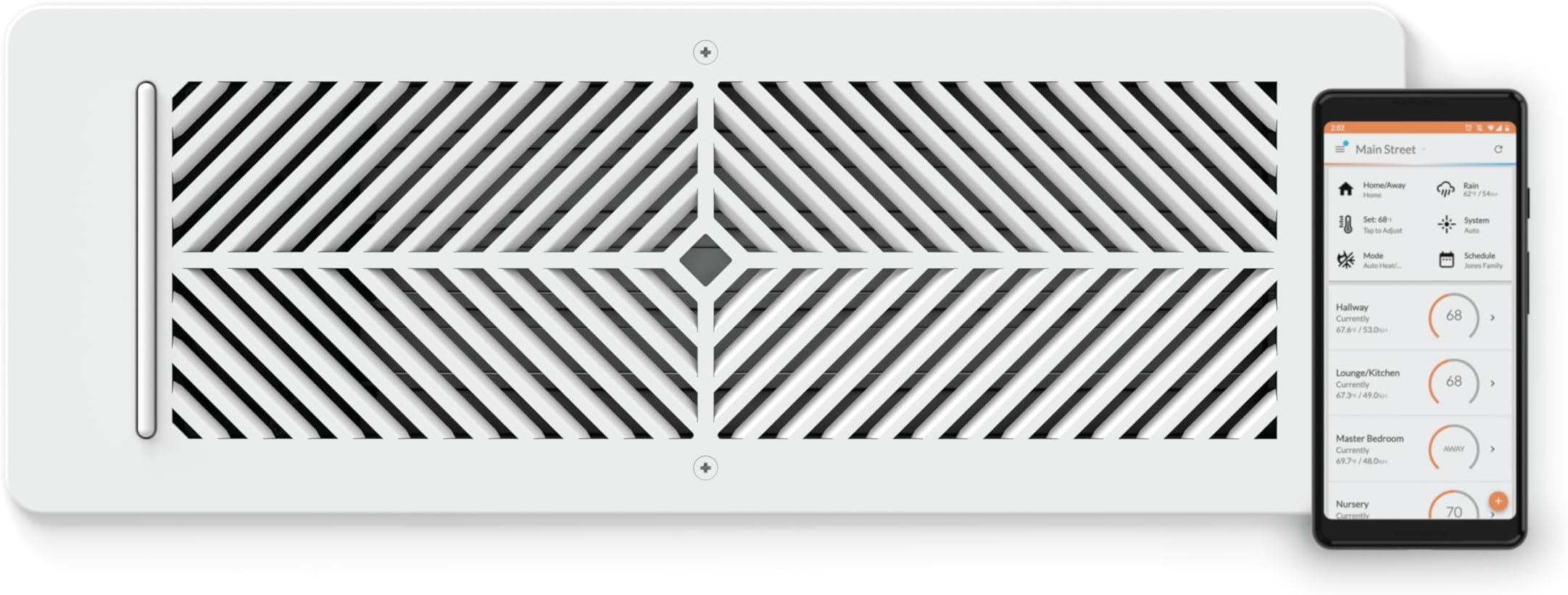
The Flair Smart Vent 4x12 is a sleek, battery-powered vent cover designed for floors, walls, and ceilings that uses ZigBee RF technology to wirelessly communicate with your HVAC system. It automatically adjusts airflow based on smart thermostat and temperature sensor data, enabling precise room-by-room temperature control. Easy to install without tools, it integrates seamlessly with existing thermostats and voice assistants, offering app-based scheduling and remote control to optimize comfort and energy efficiency.


| ASIN | B07TKHXX8S |
| Additional Features | 915 MHz radio for communication, works with Flair Puck, steel construction, attaches to wall and ceiling with screws |
| Backlight | Yes |
| Best Sellers Rank | #61,216 in Tools & Home Improvement ( See Top 100 in Tools & Home Improvement ) #395 in Registers, Grilles & Vents |
| Brand | Flair |
| Brand Name | Flair |
| Color | White |
| Connectivity Protocol | ZigBee |
| Connectivity Technology | RF |
| Control Method | App, Voice |
| Control Type | Voice Control |
| Controller Type | App Control, Voice Control |
| Customer Reviews | 3.8 out of 5 stars 522 Reviews |
| Display Type | LCD |
| Finish Types | Powder Coated |
| Included Components | Batteries |
| Item Dimensions D x W x H | 5.1"D x 14"W x 2.7"H |
| Item Type Name | Vent |
| Item Weight | 2.7 Pounds |
| Manufacturer | Flair |
| Material Type | Alloy Steel |
| Model Name | Flair Smart Vent |
| Model Number | FLAIRVENT412 |
| Mounting Type | Wall, Ceiling, or Floor |
| Number of Batteries | 2 C batteries required. (included) |
| Power Source | Battery Powered |
| Product Dimensions | 5.1"D x 14"W x 2.7"H |
| Product Style | Modern |
| Screen Size | 4 Inches |
| Shape | Rectangular |
| Special Feature | 915 MHz radio for communication, works with Flair Puck, steel construction, attaches to wall and ceiling with screws Special Feature 915 MHz radio for communication, works with Flair Puck, steel construction, attaches to wall and ceiling with screws See more |
| Specific Uses For Product | Residential |
| Temperature Control Type | Automatic, Manual |
| UPC | 868596000244 |
| Unit Count | 1.0 Count |
| Voltage | 24 Volts |
B**N
They work amazing
I love these, super expensive for everything but its nice you can just add extra vents as you buy them. They are built for the price, very sturdy and look nice. They work which is the best part. I always had my room either to hot or to cold and constantly was adjusting my vent. These do it all for me and I dont have to worry about anything. Its always a comfortable temp now. And customer service is great I had an issue with one vent sticking open or closed and they just sent me a brand new one. The fit and size is what you expect. I do wish they had other colors like black, white isnt what I would pick but again I cant complain I love how well they work
D**S
Flair Smart Vent works for zoning & comfort.
This has been a good purchase. It’s a comfort investment. Don’t assume an energy cost savings will cover the money spent on these. These do work well. The install/setup is not a no brainer.
T**9
Great...when it works like it is supposed to.
These are great, when they work like they are intended. For all of the other times, it is extremely frustrating and I really wish I would have looked into the company and their support structure a little further. The single biggest point of frustration for me is that there is no live support option. You have to send an email to their support email box and just wait for a response and then go back and forth with them until your issues are resolved. There's not even a live chat option. The products seem to be extremely touchy. My current problem is the vents keep resetting the mode that the Thermostat is in to Heat, even after I manually update it to Cool. This results in the vents operating off the wrong trigger temperatures and defeating the entire purpose of having them. Great thought and idea for the product, but awful execution in terms of support structure for working through buggy systems and issues. **5/23/2023 Update** Now, when the Air Conditioning is on, half of my vents say they have poor signal and just stay closed. They've not moved, the pucks haven't moved so I'm not sure what is causing it but the problems coincided with the transition from Furnace use to Air Conditioning use. 10/9/2023 Update Flair vents and pucks are doing the exact same thing as before, but in the inverse where they wo t register a change from cooling to heating. Update to reflect 1 star. A "smart" device shouldn't require constant oversight and manual interference for them to work properly. Avoid until they figure out how to offer live tech support and/or build a more reliable back end.
M**C
Good system, but not straight forward to configure.
Having run these vents for over a year now (since September 2022), I've found their functionality to be reliable. A rating of this product with only one star seems unfair and likely stem from a misunderstanding of its technical capabilities and intended function. The basic functionality of the vents is to shut off a room from being heated or cooled. They respond to trigger temperatures, and this will open or close the valve automatically. The vents lack a built-in temperature sensor and need a Flair Puck (available from Flair) or the temperature sensors of the thermostat (in my case Ecobee). Successful operation requires a Flair Puck (as gateway) and a robust Wi-Fi connection. Overall, I found that the Vents/Puck installation does not require an above average technical understanding (though some technical familiarity is necessary). What is very counter intuitive is the app settings. It is clearly made by engineers and is not very user friendly. The software doesn't feel very mature yet. A couple of items which helped me get the system to do what I want. This is for a home with a smart thermostat: 1) After integration of your smart thermostat go to 'home settings/thermostats' and turn off 'Allow flair to adjust thermostat'. The scheduling and temp control of the flair system is significantly less sophisticated than your smart thermostat and you want to prevent this app from overriding your home settings. 2) Stay in 'home setting' and go to the 'System' section. Set 'Set point controller' to 'Thermostat'. Same reason as point 1 3) Only create rooms in the app where you have Flair Vents. I installed Flair vents in rooms which I want to close off from my forced air heating/cooling system when not occupied (I have a larger house 6000 sq.ft.). You will need to have a temp sensor in each of these rooms, either a Puck or a thermostat sensor. The flair Puck is 2x the price of an Ecobee sensor, so it was an easy choice for me. Zones are created automatically by the flair app when you complete the smart thermostat integration. I have two zones as I have two Ecobees in my home. 4) Get a cup of coffee and patiently start making the schedules per room/room group/zone. It is a tedious affair. I had to make one for the winter and one for the summer as Flair works with a single trigger value for both cooling and heating. Normally your trigger temperature for cooling is set higher than your trigger temperature for heating, so a single trigger value didn’t work for me. Set ‘Mode’ to ‘Auto’, the flair system will detect whether the system is heating or cooling, prompting Flair to adjust the open/close action accordingly. 5) Go to 'Device settings' and turn off 'Push notifications' and 'Geofencing'. These functions are redundant when using a smart thermostat. 6) I would recommend to not install Smart vents in Bathrooms. I learned this after my install. You want Bathrooms to be warm. In the winter, the vent has to be all open to let the heat in, in summer fully closed to keep the cold AC out. This can easily be done by a regular (mechanical) vent, which you open/close before the summer and winter period. The issue with using smart vents is that the APP will open vents to ensure a minimum of vents are open to safeguard your AC system. Unfortunately you can not dictate which of the smart vents it will open (or keep closed). This results in frequent freezing bathrooms. Also, the Smart vents are not able to provide a 100% closed vent. The system works great and does what I intended it to do. The flair engineers created an over complicated app by inserting features which are (and should only be) controlled by your smart thermostat. Turn that off. The scheduling is tedious, but you will need to do it to get the max out of your flair system. Best of luck in your implementation! -----###----- Edit: I have been running my system without the bridge for years without any issues. I'm adding this comment because I believe the Flair marketing of the new bridge device is misleading. It suggests you need the device even if you have a solid home Wi-Fi network, which is incorrect. Be aware that this system is cloud based (not sure why) so Flair severs are required to operate the system. If your Internet down so are your vents (open in case of lost connectivity). Even worse if Flair goes out of business your system is inoperable. An alternative to Flair vents are vents from "Keen home". Have a look, read the reviews and make your pick.
A**P
Love this system!!
I waited way too long to purchase my Flair vent system as I was leaning towards a zoned duct control system instead. The costs would have been significantly higher (up to 5 times more in parts alone) but also the install would have been a major pain for me to DIY. The Flair vents were easy to install, the app setup was straightforward with the light layout on the vents used to identify which ones were for which rooms. I love that I can set the schedule to deactivate rooms when they are not in use and have it regulate the temperature in the active ones during those days/times. I did mess up a setting by changing the Default Hold Duration setting to forever (supposed to be the default option Until Next Scheduled Event) which caused my schedule not to work but Flair support got this identified and resolved quickly. I now have everything how I want it and the room leveling is perfect (was up to 5-6 degrees difference in some rooms). It is also awesome to be able to change the temperature on-demand in the rooms when needed. So far I am very happy with my purchase, but wish I had done this sooner.
P**E
One of my vents stopped working after 10 months.
My Flair system worked fine for10 months and then one of my vents wouldn't open. I had to remove and reinsert the batteries to get the vent to work again. My Flair system has 5 vents and one puck. I'm using it in manual mode where I use the app to open or close vents. Even though the vent didn't respond to the open command, I could see the current vent stats with the app so apparently the vent was still communicating with the hub but it refused to open. According to the Flair specs, a vent will automatically open if it stops communicating with the Flair server. This is the default fail condition. But this fail safe apparently doesn't work if the vent is still communicating but the open command doesn't work.
S**N
Works great
For some reason they seem to want everyone to use batteries with these (not sure why you'd want to mess with unscrewing the cover and replacing them, no matter how infrequently), and neglect to mention until you receive the item and look at the manual that for wired operation it requires a 24V AC adapter/transformer plug. It's not convenient to have to go back and order more products after I've received the vents; they need to make this clear in the product info. Also of note is that one 24V AC adapter can power up to 10 smart vents, and the polarity is not important, according to the manual. I hooked up one 24V AC adapter to both of my vents connected in parallel wiring, which was simple enough to do. Just needed to strip and cut the ends of the adapter cord and connect one wire from each of the wires on the adapter to each vent using wire connectors that you crush with pliers to secure. The setup where I live is that there is a regular (non-"smart") thermostat upstairs controlling the HVAC of the house, and in the basement (where it routinely gets quite hot due to 2 PCs and 3 stereo receivers and TV running most of the time), the 2 smart vents, which I hope will help cool it off in the fall/winter here by closing off the heat when it's warm enough already in the room. It works great through the app or website to open and close the vents remotely; currently I don't yet have the necessary thermostat though. It's not the most clear from the description what is needed to make the system work, but I'm going to order an inexpensive Honeywell smart thermostat (RTH6580WF) to hopefully make them work automatically soon. I now have the 2 smart vents, Flair bridge (which is apparently always necessary), and Honeywell room sensor (model FBA C7189R1004). Apparently the room sensor isn't enough to control the system; an actual smart thermostat is needed and room sensors probably add on to that for individual room temps.
P**L
Flair can take over your temperature control and make your house unbearable!
This is going to “potentially” be a good addition to my house. I think it is redirecting the cool air to my hot rooms. It’s still not the dead of summer so I can’t tell for sure. BUT, a BIG, BIG, BIG HOWEVER, I didn’t know that Flair took over control of the thermostat and was changing the temperature on its own. It doesn’t give you the option in the set up to choose the Flair vent as the temperature control point or the thermostat. It automatically chose itself. I have an Ecobee, 2 years now, that has numerous smart features and a personalized schedule. Very predictable. But all of a sudden, I’d have it set at 72 degrees only to have it jump to 80 within a few minutes. Adjust it and it happened again. I’m away and have animals at home and my house temperature is suddenly set to 80 degrees. UNACCEPTABLE! So after HOURS of working at the thermostat trying to make adjustments and even factory resetting it, I FINALLY found out through Ecobee customer service that Flair was doing it. I had to make the change in the settings section of the Flair app to make the Ecobee the control point. So in an effort to make my house more evenly comfortable, Flair made it unbearable! Great concept with poor execution through the programming. They clearly the lack of understanding of the original intent as to why people are buying their product. Fix a small problem. Make hot rooms, cold and cold rooms, hot. NOT make the entire house completely unbearable! I’ll update when summer fully kicks in.
Trustpilot
3 weeks ago
1 month ago