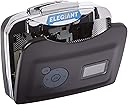
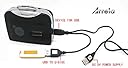
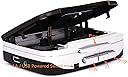
Elegant Review: PLAY CASSETTES IN YOUR CAR THROUGH YOUR SPEAKERS WITH ARRELA - I have well over 500 cassettes that I have recorded going back as far as 35 years. My favorite music is all on those tapes taken from my coveted vinyl collection. I bought a new car last year and wanted to be able to play my thousand of hours of tape through my speakers since cassettes can not be played in any current car stereo system. The Arrela Portable Cassette player works perfectly by simply connecting to the AUX input on my dash. The sound quality is very good and gives me an additional musical option along with CD's, satellite radio and Pandora. I am very satisfied and would highly recommend to any music freak who still has a tons of cassettes on wants to play them in their car. As the Beatles so aptly put on the back of Sgt. Pepper...a splendid time is guaranteed for all. Review: Nice idea, poorly made - When I opened the package, I was excited to see that it would transfer cassette tracks onto a USB drive. It would create separate tracks for each song. (was not sure what it would do with my tapes, which are all spoken word recordings, but excited that it could make separate files). The unit is plastic and is a little flimsy, but that's not a huge worry since it will not be subjected to any difficult environments. The instructions are not written by a native English speaker. Or edited by one. In fact, they are just about incomprehensible the grammar is so bad. But luckily the function is pretty straightforward, so I could figure it out. Unfortunately, the unit ate the first two tapes I put in it. I could not risk putting more in. So it is on its way back. Had high hopes for it. And maybe it was an issue with just this unit. (The tape ended up winding itself around the pinch roller. Maybe there was a defect in the roller.) I don't know but I don't want to risk it. Nice idea but poorly made.
| ASIN | B00YOYPGS4 |
| Best Sellers Rank | #205 in MP3 Cassette Player Adapters |
| Brand | MICROWARE |
| Compatible Devices | Headphone, MP3 Players |
| Component Type | Display, Playback Controls |
| Connectivity Technology | USB |
| Customer Reviews | 3.5 out of 5 stars 162 Reviews |
| Item Weight | 4 ounces |
| Manufacturer | Arrela |
| Memory Storage Capacity | 32 GB |
| Mfr Part Number | FBA_Arrela-EL-2054 |
| Model Name | FBA_Arrela-EL-2054 |
| Model Number | FBA_Arrela-EL-2054 |
| Screen Size | 0.96 Inches |
| Supported Standards | MP3 |
| Unit Count | 1.0 Count |
B**N
PLAY CASSETTES IN YOUR CAR THROUGH YOUR SPEAKERS WITH ARRELA
I have well over 500 cassettes that I have recorded going back as far as 35 years. My favorite music is all on those tapes taken from my coveted vinyl collection. I bought a new car last year and wanted to be able to play my thousand of hours of tape through my speakers since cassettes can not be played in any current car stereo system. The Arrela Portable Cassette player works perfectly by simply connecting to the AUX input on my dash. The sound quality is very good and gives me an additional musical option along with CD's, satellite radio and Pandora. I am very satisfied and would highly recommend to any music freak who still has a tons of cassettes on wants to play them in their car. As the Beatles so aptly put on the back of Sgt. Pepper...a splendid time is guaranteed for all.
S**G
Nice idea, poorly made
When I opened the package, I was excited to see that it would transfer cassette tracks onto a USB drive. It would create separate tracks for each song. (was not sure what it would do with my tapes, which are all spoken word recordings, but excited that it could make separate files). The unit is plastic and is a little flimsy, but that's not a huge worry since it will not be subjected to any difficult environments. The instructions are not written by a native English speaker. Or edited by one. In fact, they are just about incomprehensible the grammar is so bad. But luckily the function is pretty straightforward, so I could figure it out. Unfortunately, the unit ate the first two tapes I put in it. I could not risk putting more in. So it is on its way back. Had high hopes for it. And maybe it was an issue with just this unit. (The tape ended up winding itself around the pinch roller. Maybe there was a defect in the roller.) I don't know but I don't want to risk it. Nice idea but poorly made.
J**O
Meets my expectations.
If you're old enough to remember Sony Walkman cassette players this device is very similar in quality, size and operation. It has the added feature of being able to record to a thumb drive. Treat it carefully and it will hold up. As others have reported, the broken English that the instructions are written in make understanding them a bit of a challenge but after a couple of readings they begin to make sense. Expect to experience a period of trial-and-error time playing with the controls and recording before you're comfortable. I also suggest reading the Q&A's for tips on how to make it do what you expect it to. I'm recording many of my old cassettes (approx. 75) so haven't used the battery power option yet. Nor have I tried using the playback from the thumb drive yet (this is not a feature I would probably use anyway). I've hooked up the device to external speakers using the headphone jack so I can monitor what's being recorded. The device has "hung up" a couple of times after moving my thumb drive back and forth to my computer, never while recording. To un-hang it I simply unplug and replug the USB cable. I think this is because I forgot to turn off the recording before unplugging the thumb drive. I started out by using the Auto recording mode to separate tracks but discovered it didn't always do that correctly. I then used the Manual mode, which copies all songs into one track, and then use Audacity (free download) to label and separate the tracks correctly. I them import them into iTunes on my computer. Next I plan to try recording from the device using the USB connector for the thumb drive directly to my computer using a USB cable. Hope that works. Sound quality is acceptable to me (pre-recorded cassette tapes were never known for their audiophile quality). Recording and using Audacity is a little labor intensive but well worth the effort. I didn't want to just toss my cassettes in the trash. This device meets my expectations. I gave it four stars only because of the poorly written instructions.
O**R
Nice product while it works
Pros: Nicely designed and easy to carry around. Does not need to be hooked to a computer for converting cassette tapes to MP3 files. Provides acceptable sample rate of 44.1 KHz and Bit rate of 128 Kbps Works from AA battery or USB charger (including your computer) Cons: Worked for about three weeks then it start recording sharp clicks every few seconds making the resulting MP3 file useless Recording speed is one and it records only one side so you have to flip the cassette tape to continue recording Does not stop recording when the cassette stops playing so if you forget to stop recording it will continue recording nothing for hours and you will need to edit the recorded file in your computer and remove the empty recording.
C**F
So far so great.
First impression is good; if anything changes I'll come back and update. I took out some old tapes from music lessons 20 years ago, of my teacher laying down tunes for me to learn, that I wanted to recover, stuck one into the machine, popped on a flash drive, and puzzled over the directions till I figured out to press play and then the record button. Basically went off and left it, came back later and turned it off. I had files with long stretches of silence at the end but that was easy enough to snip off in Audacity which is free. Quickly listened to the beginning of one and it sounded good - as good as the original for sure. I can go back via Audacity at my leisure and either snip it into individual tunes, or just create an index so I know where to skip to if I want a particular item. One thing I did to be sure I had as few problems as possible: I put the tapes into my cassette deck in my stereo system and fast-forwarded them all the way through and then rewound them back. That way if there were any sticky spots they'd be cleared up before putting them into the cheaper mechanism here. I don't know if it helped but I am doing fine with this so far. It's not like any of my cassettes were CD quality in the first place so this seems to be a good solution to retrieve some of these irreplaceable recordings. It's not heavy duty so who knows how long it will last, I may have to buy another one before I make it through my huge piles of cassettes, but I plan to treat it gently.
D**W
You can get a USB cord to use auxiliary power to run it and it works fine.
I got this to transfer my wife's audio book cassette tapes to digital form. It works, but not very elegantly, and the sound quality is so-so. Of course it takes real-time to convert tapes to mp3 and you must monitor the recording because it does not automatically stop recording when one side of the tape ends. You will end up with a long silent part on the end which you will have to edit out with other software. Uses batteries quickly if using it to listen to tapes. There is also a constant whine while listening. Also there is a bright green light that is on constantly which you can use for a nightlight if you listen to tapes at night. That may be part of why it uses batteries quickly. You can get a USB cord to use auxiliary power to run it and it works fine.
A**R
It works. Very convenient, and no computer needed.
At first, I was skeptical about direct recording to MP3 files without computer. I never did it. But I saw the good reviews, so I decided to give it a try. I was surprised. The manual is clear, and it's super easy. I finished recording the first 10 songs into 10 MP3 files in less than an hour. Pretty soon, I will throw away all my old cassettes. Make sure you pay attention to the power source: if you see AA batteries, then follow its setting. If you use USB power using your PC as the power source, also follow its setting. As for me, I plug it to my PC, and there wasn't any worry that my recording would be interrupted because of dead battery. You must wait for the recording, though. You have to press stop recording at the end of each song. If you don't, it will record the next song and turn them into one MP3 files. Some reviewers said that the volume must be turned high so that it will produce the same volume in the MP3 files. Problem is, it will damage your ears. So, this is what I did: I turned up the volume all the way, but I didn't put the earphone into my ears. I just put them on the table, and listen attentively. When the song was about to end, then I brought the earphone closer to my ears, then press stop. You will enjoy it.
A**N
Great idea; lousy product
I'm glad some people got units that worked. I read the directions and carefully followed them to copy 12 tapes in about 20 attempts. All tapes had played back perfectly in a tape machine. Two of the tapes copied and played back perfectly from the created USB. Six had random, loud pops that actually hurt my ears. Four others had volume decreases lasting from 2 to 4 minutes randomly. The volume was too low to be heard in a moving car. When I reprocessed the tapes with loud pops, some no longer popped, but developed the low volume problem. I actually was able to get an additional two tapes to be usable, for a total of 4 of the 12. IMPORTANT NOTE: If you take a chance on this device, make sure you use it before the Amazon return period expires. The manufacturer will send you nice emails, but do nothing!
A**I
Pre
Wonderful product to digitalize old casettes having valuable recordings to Pen drive.
A**R
Two Stars
Useless product
Trustpilot
1 month ago
3 days ago