Buy anything from 5,000+ international stores. One checkout price. No surprise fees. Join 2M+ shoppers on Desertcart.
Desertcart purchases this item on your behalf and handles shipping, customs, and support to Senegal.
🚀 Elevate your home network — fast, secure, and built for every device!
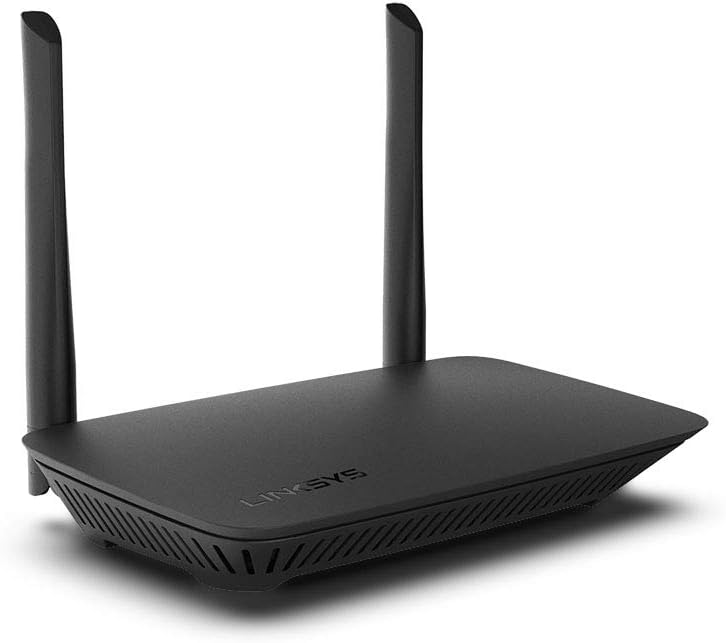
The Linksys E5400 WiFi 5 Dual Band Router delivers reliable AC1200 speeds up to 1.2 Gbps with coverage for 1,500 sq.ft and support for 10+ devices. Featuring advanced parental controls, guest WiFi, WPA2 security, and a simple browser-based setup, it’s designed to keep your home connected, safe, and ready for work, gaming, and streaming. Backed by 35 years of Linksys innovation and an 18-month warranty, it’s the smart choice for modern households.


| ASIN | B07T9FTFX5 |
| Antenna Location | Gaming |
| Antenna Type | Fixed |
| Best Sellers Rank | #29,559 in Electronics ( See Top 100 in Electronics ) #203 in Computer Routers |
| Brand | Linksys |
| Built-In Media | Linksys WiFi Router Dual-Band AC1200 |
| Color | Black |
| Compatible Devices | ['Game Console', 'Smartphone', 'Computer', 'Smart Home Device', Television', 'Printer'] |
| Connectivity Protocol | ethernet, wi-fi |
| Connectivity Range | 1500 Square Feet |
| Connectivity Technology | Ethernet, Wi-Fi |
| Control Method | App |
| Controller Type | vera |
| Coverage | 1,500 square feet |
| Customer Reviews | 4.3 4.3 out of 5 stars (1,543) |
| Data Transfer Rate | 100 Megabits Per Second |
| Frequency | 5 GHz |
| Frequency Band Class | Dual-Band |
| Has Internet Connectivity | Yes |
| Has Security Updates | Yes |
| Is Modem Compatible | Yes |
| Item Dimensions L x W x H | 4.4"L x 6.7"W x 1.3"H |
| Item Type Name | Wireless Router |
| Item Weight | 0.44 Grams |
| LAN Port Bandwidth | Fast Ethernet |
| Manufacturer | Linksys |
| Maximum Upstream Data Transfer Rate | 1200 Megabits Per Second |
| Mfr Part Number | ROULNK920 |
| Model Name | WiFi Router Dual-Band AC1200 (WiFi 5) |
| Model Number | E5400 |
| Number of Antennas | 2 |
| Number of Ports | 4 |
| Operating System | RouterOS |
| Other Special Features of the Product | Desktop |
| Router Firewall Security Level | High |
| Router Network Type | Dual Band |
| Security Protocol | WPA2 |
| Smart Home Compatibility | Smart Home Compatible |
| UPC | 745883774005 745883839537 |
| Unit Count | 1.0 Count |
| Warranty Description | 18 month |
| Wi-Fi Generation | WiFi 5 |
| Wireless Compability | 802.11ac |
M**N
Good price for good product.
It works great at a nice price.
T**.
Yep. That’s a router.
I needed to set up a wireless bridge to some older devices that don’t have WiFi. Linksys is perfect for that because their routers have that option, unlike some competitors 🙄 And as it is tough to find a brick and mortar store that sells Linksys, so Amazon to the rescue! Got exactly what I needed. Works great, setup was simple and quick.
T**D
Good cheap browser, 5Ghz range is too short, 2.4 Ghz is better
As the headline, it is a good Linksys router, easy to configure. Like that the 5 Ghz and 2.4 Ghz bands have different names (even though you can change it of course). Easier this way to setup fast devices, with only 2.4 Ghz ones like smart plugs and WIFI garage doors. The 5 Ghz signal range is very short. You need to be close to the equipment to use it. If you are rooms away it becomes very poor and you would need to rely on the 2.4 Ghz one. But if you need a cheap reliable router then it is OK overall.
J**Y
I needed to replace my old router and this unit does a fantastic job
My old unit was between 5 and 10 years old, I had lost track, but it was beginning to die and not work very well. I was confused as to why my Wi-Fi was acting up more and more, and then after looking into it realized that the router was old and tired. Installing this unit was very, very quick and simple, and the strong signal is constant and reaches everywhere I need it to around my house.
J**E
Top Notch! Works awesome!
No more Xfinity kickouts when you go idle for 5 seconds! This Linksys router solved all our household Wi-fi internet connection issues. Xfinity's wifi modem kicks you off if you go idle for even a few seconds (to save them millions in costs) and this device eliminated that problem. Strong, solid signal. All bars are showing anywhere in and around the house within the modem stated range in square feet. It doesn't matter if you're in the first or second floor, the basement, or outside the house. Great deal for the money! The only negative I can say is that it took a 5 or 10 minutes to set up, because it took a minute for everything to update where I could access the router page on the internet to finalize the settings. But I think that's generally true of all Wi-Fi routers.
J**R
Inexpensive with 2.4 and 5 ghz wifi.
It's a nice little router with 2.4 and 5 ghz wifi had guest account capability. I have it as a router behind a router. My main router is wired only and this adds both wired and wireless capability to my network. Setting this up was straightforward. Instructions can be found on the internet. I have been using it now for months and noted that I have very few wifi drop outs. My old wifi router was losing connection with a fairly consistent frequency.
D**Z
Do Not Buy Used; NO gigabit ethernet WAN support; terrible Linksys tech support
Where do I start? If I hadn't been configuring Linksys routers since about 1998, I would have been hosed. 1) I purchased this router USED from the Linksys store. However, the morons forgot to clear the previous owner's settings, meaning not only could I not enter the zone passwords and names, I could also not even log into the control panel to enter the changes; 2) I figured a quick IM to their tech support could tell me what I was doing wrong, as this was the first time in a decade I set up a Linksys router, so I was a bit rusty. Ironically, although Linksys claims the router will not work until configured, in fact it picked up the DHCP broadcast from Comcast via my DOCSIS 3.0 Surfboard, and NAT worked correctly, creating a Class C subnet with DHCP broadcasts. Although I was #4 in the queue, there was about a 10 minute wait to reach a tech. What happened once I got connected to a "tech" was a 30+ minute exchange with a total MORON who could not comprehend my problem, despite REPEATED explanations, even asking me why I want to get into the configuration pages TO BEGIN WITH, that I should use the "Wizard." Since I had now invested 40 MINUTES(!) with this "tech," I told him "screw it, I'll do a hard reset, and we may get disconnected." So, I performed a hard reset (pressed the red recessed reset button on the bottom for 20 seconds); and was able to log into 192.168.1.1 and use the default password, which brought up the wizard, which is actually pretty good; though I needed to tweak a few settings manually. Surprisingly, I did not lose connection with the "tech," so I let him have it before disconnecting with that schmuck; 3) Much to my surprise, this router has only fast ethernet (100 Mbit) ports... INCLUDING THE WAN PORT!? You may get 1.2 Gb from one wireless device to another (why) but this thing caps out at 95 Mbit on the web. Why would Linksys (Belkin) build a WiFi 5 wireless router with "Speeds up to 1.2 Gb" and then skip the gigabit ethernet?! With my Surfboard showing 60 Mbit running the excellent speed test at DSLreports•com (a tool I've used for 20+ years) plugged directly into my PC (i.e. sans router), the ethernet speed is not an issue—But if you have a faster connection, say, gigabit fiber or cable, IT WILL BE.
M**E
Slow and short distance connections, but it's cheap
If you need a low-speed connection for only 15-20 feet, this is great value. Ie, if you are only checking emails and you are in the same room as this wifi router, you can't beat the price. I bought this to update the software on my washing machine following a recall. I generally to avoid having my entire house connected to the internet, so this was a cheap solution to get things updated without connecting the machine to my main network. Did the job, but I had issues getting the signal about 30 feet away to the laundry room.
M**S
O equipamento é excelente, com uma excelente cobertura e muito fácil de configurar.
J**.
Muy bueno, la señal es muy estable y permite dos señales, se puede configurar para que se conecten por IP o dirección MAC.
R**1
Sencillo de configurar; buen alcance, compacto... muy muy recomendable.
M**O
Fácil de configurar y ofrece las 2 frecuencias de wi-fi, lo malo es que la red 5g solo ofrece a lo más 90mbps. De repente se desconectan mis equipos de la red.
Trustpilot
1 week ago
2 months ago