Desertcart purchases this item on your behalf and handles shipping, customs, and support to Senegal.
🎧 Elevate your audio game—because average sound is so last season.
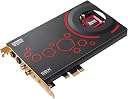
The Creative Sound Blaster ZxR is a flagship PCIe sound card engineered for audiophiles and gamers craving pristine 5.1 surround sound, ultra-high 124dB signal-to-noise ratio, and a powerful headphone amplifier supporting up to 600Ω impedance. Featuring CrystalVoice tech for crystal-clear communication, Dolby Digital Live & DTS Connect for immersive audio, and a desktop control module for easy switching and fine-tuning, it transforms your PC audio experience into a professional-grade soundscape. Ideal for serious gamers, content creators, and audio enthusiasts who demand flawless sound fidelity and tactical advantage.
| ASIN | B00AQ5PK6I |
| Audio Output Mode | 5.1 channel surround |
| Brand | Creative |
| Compatible Devices | Personal Computer, Speaker, Headphone |
| Customer Reviews | 4.1 out of 5 stars 327 Reviews |
| Global Trade Identification Number | 00054651181311 |
| Hardware Connectivity | PCI Express x16 |
| Hardware Interface | PCI Express x16 |
| Hardware Platform | Headphones, PC, Speakers |
| Item Weight | 1 kg |
| Manufacturer | Creative |
| Maximum Sample Rate | 96 KHz |
| Mfr Part Number | 70SB151000000 |
| Model Number | SB1510 |
| Platform | Windows 7, Windows 8 |
| Signal-to-Noise Ratio | 124 db |
| Surround Sound Channel Configuration | 5 1 |
| UPC | 809385181133 172304340240 132018336571 782386505637 054651181311 809185332124 804066547871 163121427535 808111667026 |
| Unit Count | 1 Count |
S**E
One giant leap in the right direction for all things pc sound related
I'm not sure where to begin with this one. I've had this sound card and it's extras setup on my PC for several months now and although it's been an adventure in and of itself I have zero regrets. This sound card is hands down the best I have ever used and I highly recommend it for any individual that is gaming or audio editing or just likes the sound of crisp audio. First off let me explain that I have used good onboard sound for years and then upgraded to the Creative Sound Blaster Recon 3D THX which was great on it's own. When I decided to upgrade from the Recon 3D is when the adventure started. Admittingly I am a fan of Creative's hardware but not so much for their software. More on that in a minute. However, I promise this review will be my honest assessment and not a fan boys biased opinion. Keep in mind I, like many others, have worked with PC hardware and software for a couple of decades now and with that comes the ability to work through some of the common problems with the various PC products on the market. Does it always work and am I always right? No. Have I spent time scouring the internet for clues and directions on how to get things to work. Yes. But, in the end, it pays off. Live and learn with patience. I went from the Recon 3D to a Sound Blaster Zx which I have reviewed here on Amazon. It is an excellent card as well but I find it does fall short on the hardware and sound quality end versus it's sibling, the ZxR. Just a side note, many believe that the Sound Blaster Z and the Zx are the same card with the only defining difference being the ACM module. Not so. Look closer and you realize they are not quite the same. Their hardware differences are minimalistic to say the least, but it does make a difference on the users listening experience under the right conditions. Either way, the ZxR blows both the Z and Zx cards out of the water. For reference my PC specs are as follows: Windows 10 Pro 64bit Asus Rampage IV Black Edition motherboard Intel 4930K Cpu running at stock speed 32GB G.Skill 1600mhz DDR3 memory Evga GeForce 980 Ti graphics card Kingston 128GB SSD as OS drive and a mixture of other Western Digital storage drives Creative T4 Wireless speakers connected to the sound card via optical/toslink cable With that here is my review of the Sound Blaster ZxR sound card: Aesthetically the card is phenomenal. It's beautifully crafted and of an excellent build quality. It has loads of connectivity and versatility as you will often see with many Creative products. The hardware setup process was painless and the software installation took very little effort. It is important to remember for those of you who are upgrading from a previous model or same series card especially that you remove all traces of the old software prior to installing the new. Many people will skip this step as I use to do, but this will prove to be a mistake in many cases, not all, so it's best to just save yourself the headache and start with a clean a slate as you can from the beginning. After everything was installed and I had it all up and running I was back in Windows and immediately noticed the upgrade in sound quality, even from the Zx version card. Also it's important to note at that time I didn't have the Creative T4 Wireless speakers and I was using standard 2.1 speakers running off of 3.5mm setup. However I did use optical connection for my gaming headphones and this where the frustration started. There is a common issue with this card where the Daughter board or the DBPro board is not recognized by the operating system after a reboot . The primary sound card always worked flawlessly but the detection of the Daughter board was intermittent at best. Had I not been using the optical connection for my headphones this would not have been such a problem but I was so it was a big problem. So began the search for a solution and this is where the feverish searching of the internet took place. Googling, product forums, discussions, emails, days, weeks, installs, uninstalls, reinstalls, boot sequence changes, boot priority changes, sweat, blood, tears, loss of sleep, loss of hair, clinical depression, moving of the card from pcie slot to pcie slot, slow software support, an RMA to creative, and lots of time later, it all came down to Windows 10. Under this OS the Creative drivers fight with that of the Windows 10 reference drivers and seeing that Windows 10's driver are newer, to the operating system, it was more logical to install these over the ones that Creative provides from their website. The problem came when Windows detects the sound card as a Sound Blaster Recon 3D Pcie card and installs the driver for that card over the driver for the Daughter board on the ZxR card. "The Sound Blaster Audio Controller" driver is replaced with the "Sound Blaster Recon 3D audio controller" after which the computer fails to see the DBPro board after reboot. Sometimes after a full shutdown and a visit to the bios I could get the board detected again and after a quick look in Device Manager I would see that the correct drivers were working properly, but after a reboot they would revert back to their non-functional state and then came the software hell all over again. So I downloaded the little program from Microsoft that allows you to reject updates from their servers in Windows 10 and changed settings in the OS that checked for driver signing and forced the install of only Microsoft approved drivers (it's my PC, I built it, I'll do what I want :)). After using an uninstaller program, and CCleaner, deleting all traces of all things Creative, and restarting my PC, I started again with the installation of the cards and corresponding software. Everything has worked flawlessly since then. Reboots, cold starts, shutdowns, it works every time, and now that I have the Creative T4 wireless speakers over optical (which is on the Daughter board) the sound is incredible across all ranges and frequencies. I've checked in Device Manager a few times just to make sure that Windows hasn't tried to pull a fast one but it still says the driver provider is CREATIVE and not Microsoft as it said before when I was having the issues. Would I buy this card again? Yes, I would. Can I recommend this card to everybody who owns a PC? No, but then again that depends on the individual. Also, it's no secret that Creative likes to throw that word "Audiophile" around like there is no tomorrow as if it is a standard of excellence. But people need to remember that that word does not describe a status for an enthusiast or even a professional. It's not a rank or position but rather an individual's own perception of sound that separates one listener from the next. An audiophile can hear the subtle changes and alterations in audio of various kinds and sources but make no mistake that does not define the experience for the next guy. What this all means is, at least for me, the ZxR is worth the price and even the hassle for the end result that it produces, it's sound processing and quality. But to some others, maybe not, and that's cool. For gaming, music, and movies it does an excellent job and it far surpasses all of the other sound processors I have had previously. Highs, mids, and lows are all processed very well and allows for a very immersive experience be it during a hardcore gaming session, the watching of the latest movie, or listening to your favorite score from your artist of choice. Something else that is important to keep in mind when you are getting a high end card you need to remember the piece of hardware standing between you and the sound card, e.g. your speakers and headphones. If you have crappy speakers or headphones you won't ever realize the sound quality of this or any other sound card. It can process the greatest sound ever but if that "bottlenecks" at the user end where it is projected to your ears your efforts and money are null. Something else that is important to note, the ACM module muffles the sound when connected to the sound card. What this means is not a drop in the sound quality but rather shear volume. What was once 40% volume is now 25% with the ACM module plugged in. Pump up the volume and little more than normal and you'll be back to normal. Also all of the Creative sound cards from the Recon 3D to the ZxR can handle 600ohm headphones but only the ZxR gives you the ability to switch between standard and High End amperage in the DBPro software. The sound card and the ACM module have connectivity for studio quality headphones as well as the standard 3.5mm jacks. The card is quick and responsive with very little to no latency. I'm not a big fan of the software. I'm sorry Creative, but this has proven to be your greatest downfall. The software race is just as important as the hardware race (e.g. Logitech G933 gaming headset...separate review). The software of any PC hardware product is what allows interaction between the user and that product. The DBPro software works, but I feel it could be a little more robust and allow the user more control. Again, they got it with the hardware side of things with the ability to swap out op amps and all. That's a great feature, but for those of you with 5.1 surround sound setups you will find that there is no way to adjust the individual channels of each speaker, whether physical, or virtual over headphones. Which brings up another con I guess. This card is rated for 5.1 surround sound setups, not 7.1. Why? I have no idea. It could surely run a 7.1 setup but for some odd reason it is advertised for only a 5.1. Not a huge deal which is why I'm not knocking a star off, but something for a new buyer to consider if it applies to you. Final thoughts. If you have a knack for awesome listening experiences and speakers and/or headphones that you already know sound great, and you fill you need an upgrade from whatever you have now, the ZxR is a great choice in my book. Be careful if you are running Windows 10 as you will probably have a small fight on your hands. If you aren't a fighter, this isn't for you and that's okay. I personally would much rather things just work out of the box, but I'm too stubborn to let something, especially technical things, beat me without a fight.
B**N
Worth the upgrade over Sound Blaster Z or Zx
You can read my other review on the Sound Blaster Z and see that I was pretty disappointed with it. I had the following problems: - First of all, there was some red dust from the package caked all over the card and in the contacts and everything which can't be good... They could have at least put it in an anti-static bag. (The ZxR package had no red dust!) - There is a crackling/static/hissing noise which seems to be caused by the RAM from my video card as it only happens when more complex graphics appear like in video games or while viewing large pictures or flash objects. I tried pretty much every suggestion such as disabling my onboard audio in the BIOS, reloading drivers, updating drivers, cleaning off the contacts on the card and reinserting it, underclocking the memory on my graphics card, etc. The problem is, I can't move the sound card to any other spot and the metal shield has large openings so there is still plenty of room for EMI to seep through and cause that noise. I wish they would have just covered the whole card in that shielding. I am considering trying to add my own shielding around it to hopefully solve this super annoying noise which didn't ever happen with my onboard sound. (The ZxR has no distortion despite being in the same spot as the Z - clearly it has better shielding!) - The red LED light is bright and annoying since I have my computer on my desk and it has a window. You cannot disable it. I put something in front of my case to block out the light though. (The ZxR has no annoying LED light!) - The headphone/speaker mode switching doesn't seem to work properly which was a big reason I bought this card. Now to be fair, it may have something to do with my graphics card HDMI controls interfering with it but even so, I was hoping the Sound Blaster would override that so I could simply click one button to switch. Sometimes it even messes up so much that I have to restart. (This seemed to work better but I found a workaround for it either way so no biggie.) - The volume leveling is a mess. Some applications are very loud while others are not. So I constantly have to adjust my volume and occasionally get my ears blown out. With the Windows (8) controls, anything over "30" is too loud. Although I'm glad you can always get sufficient volume, it's still too loud at "1" sometimes so it's not well matched/balanced in that regard and thus yet another annoyance. (With the ZxR, the external volume adjuster allows me to fine tune the level of audio so I am able to get it much quieter than before!) - There is a little bit of lag and some distortion which cuts out/off your voice when you turn on some of the CrystalVoice enhancements such as noise reduction, smart volume, and echo cancellation which is too bad so it's not worth using them. (With the ZxR, others have said I sound much clearer than before so the mic is definitely better!) - Lastly, it doesn't actually sound that great. I kid you not, my phone (with headphones plugged in it) actually sounds better with most things. It just doesn't sound well balanced no matter how much I mess with the equalizer or SBX settings. I mean, it's not terrible - I have found some settings which do give it more punch overall than the onboard Realtek audio did but that's not saying too much. Now it could be that these headphones are not ideal for this card. They are high quality studio monitoring headphones which generally make things sound really good but maybe they just aren't a good match for this card. I also compared it to my old my old X-Fi card (PCI on Windows XP) and I think it sounded a little better than this new one and it didn't have any of these problems. I'm not sure but the point is it's probably not worth upgrading if you're coming from an X-Fi. (The ZxR also seems to sound a little better than the Z. I wouldn't say there is a huge difference but it does at least sound better than my older X-Fi now.) I'd like to add one more comment about the Z that I had. I did not mention this in my original review because I thought that it may have something to do with my motherboard or chassis but the card would not fit properly in the board. It was a little off centered and it drove me mad trying to fully get it seated in there. It just wouldn't properly line up and even wore some of my contacts down trying to fit it in there. With the new ZxR, it fit in the slot and chassis perfectly the very first time - so it was the card's fault after all. So in summary, the Sound Blaster Z is a junky sound card while the ZxR is a great sound card. I was very hesitant spending the extra money and was about to give up on Creative all together but decided to give them one last try and am very glad I did. This card is well worth the money in my opinion and I hope it continues to work well for me in the years to come.
R**J
Impressed over new motherboard Audio
I have a new pc build and just added this card. I thought my new onboard card was great until I installed the ZXR. After a night of listening to music and calling friends on Skype I have no regrets on buying this card other than cost and concern related to the reliability of the hard ware over the long haul after noting several other reviews on reliability. If this card lasts as long as some of my old sound cards then I might consider it 5 start purchase. It made me happier with my old Logitech speakers purchase due to the improved sound quality. I just have to say wow on how overall music reproduction, voice clarity, and instrumental separation now sound. Improvements also noted with gaming reality, notably with clarity, sound separation, and location sounding. There are several settings issues you can run into depending on your set up. I had an install error on my TV tuner card after swapping card slots to install the ZXR. I had to uninstall all my media drivers then install the TV tuner card drivers and then add Sound Blaster drivers and software after rebooting. Second issue I ran into with was a setting issue in Sound Blaster software. I had to change the speaker setting to Stereo and then Windows finally recognized my speaker set up as 5.1. Before this change Media Player and various music players sounded great but Skype and couple other programs sounded extremely low volume, muffled, and distorted. Windows also did not play rear channels in the control panel's sound speaker configuration until the setting change. This fix was found totally by accident to boot. Other reviews note microphone issues I have had none here so far and actually quit using my old trusted USB microphone at this point. Wish software had a task bar for easier muting. Other than this very happy with card. Is it worth it? Yes if it lasts a long time I think was great purchase for myself and the broad range of use. If the card croaks in next year or so it way over priced. This card has pretty good depth and range of use that brings down cost issues if it lasts and you can put it all to use. If all the extras are not needed, one of the lower Soundblaster Z cards might be a better choice and sound about as good after reading through comparison reviews.
U**D
Awesome Card for Audiophiles - Updated
I wanted to improve the quality of sound sound from my computer, so at first I got the Soundblaster Zx and was amazed, but it fell short of a few options I really wanted. Instantly I knew I needed new speakers to support the improved sound. The speakers I chose had RCA inputs and my Zx card did not have RCA outs...only 1 3.5mm noted as headphone jack. So whenever I wanted to switch from headphones to speakers, I had to unplug 1 from the ACM and then plug in the other....kind of a pain. Also becaquse it was identifying my speakers as headphones, I did not have access to the Dolby settings. I also may add that prior to the Soundblaster and used a Asus Xonar card and was not impressed with the sound or the software at all. I looked up soundcards again and this model fit all my needs...even has better sound then Zx model. I now have my speakers wired directly to the card and headphones through the ACM module. After installing and hooking up to my speakers and headphones I was amazed at the sound difference between the lower model Zx and the ZxR. Everything was much clearer, more defined, precise and there was no hiss between songs anymore. I found it best for my speakers to run without using the equalizer - much cleaner and no distortion to the sound at all. Being able to connect to both my speakers and headphones through the ACM is awesome to. Now when I switch I just open the software and switch from speaker to headphone or vice versa. I installed both cards because eventually, I will be connecting a digital amp via the optical output for my front speakers and a powered sub through the card as well. I will update once I am done with that project. The only thing I was not happy with is there is no front jack connection on the card. I don't use the jacks, I just don't like unused plugs hanging around. Overall this is a great card. The sound quality is definitely audiophile quality and the inputs and outputs are great for almost any setup you choose. The ACM Module is nice as well, I like the volume control while using headphones and it has both 3.5mm jacks and 1'4" jacks. The ACM also has a microphone but I have never used it so cannot rate that in any way. So basically if want really want to hear a difference in sound quality, this is your best choice....it is well worth spending the extra money over the Soundblaster Zx and the latest Asus Xonar Essence card. Update: I have my 2.1 system all done and it sounds great! I ended up purchasing the SMSL Q5 50 watts x2 Digital Amplifier and have it connected through the Optical output from the card. From the amplifier I am running speaker wires into a 10" Active Sony Sub Woofer and then into 2 Sony SBD !000 5.25" speakers using the speaker inputs/outputs from the sub woofer itself. I finally have all the bass, mids and highs I have been looking for. My setup is definitely audiophile set up with a lot of room for improvement in both the Sub Woofer and Speakers. The combination of this sound card and the digital amplifier I chose is a perfect match. More then loud enough to hear throughout the house and even outside! The sound is full, clear, bright and I am using no EQ settings...no need to since it sounds best without them. Actually using the Optical port does not allow the use of the EQ to work anyways, no biggie since it sounds so perfect already for all types of music. This set up rocks so much you will always want the volume raised higher and higher the more you listen to it!
C**L
Go elsewhere or use simple onboard sound if having sound that always works is important to you!
I've installed, probably..... 5,000 sound cards over the years being a PC store owner. I like having good hardware in my own personal PC but HERE IT IS.....THIS AIN'T GOOD HARDWARE! On paper, yes!, once in a while when it works, yes! When it works, the sound is stellar for sure but I have now thrown in the towel.... removed the card, and software, gone into the BIOS and enabled my feeble onboard Realtek based sound chip. I meandered to biostar's website, downloaded the Windows 10 x64 drivers for it and put the little male green 3.5mm plug into the little green female 3.5mm port on the back of the computer and gee, what do ya know, my sound works again! Sure.... it doesn't sound as good as the Zxr (when I heard it) but I have good speakers (Logi Z5500) and the onboard sound is fine. It friggin works! I am done with Creative and their non functional rubbish. I have been battling with this card for years now and NOW I say good bye. I will settle for the peace of mine of always on, (onboard) sound. It has been a week or two and this onboard setup has yet to fail. The ZXR would fail if I rebooted, updated drivers, sound apps or just about anything. Heck, if I farted, it'd go out and though I could usually fiddle with it and get it back up and running, I just go tired of it. I recommend staying clear of Creative and their lousy software and driver support. When calling, Creative is of zero assistance as usual. It's weird that they are still in business to be honest.
D**C
Excellent for Both Recording and Playback
I have found very few reviews that address the recording capability and stereo playback of this card, therefore I emphasize these features of the card. I collect vinyl LP's 45's and 78's. I have audio restoration software which I use primarily to restore my 78's. I used a M-Audio 24/96 card for years, but when I recently built a new computer, the motherboard would not support it. I found myself in the soundcard market, and my path to this card has been lengthy and somewhat painful. I originally bought an Asus Xonar Essence STX. It has received good reviews, although I was concerned about driver problems that some have had. Since I'm using an Asus motherboard, I thought they would play nice. I could never get the card to work under Windows 8.1, even after reading various fixes and contacting Asus (who never called me back). I gave up and returned the card. I was concerned that PCI slots on my motherboard were defective, so I bought a Creative SoundBlaster Audigy RX7. Luckily I had no problem installing it and it proved that my MB is fine. I was pretty happy with this card, it sounds good. I'm sending optical digital out to my NAD AVR and I noticed that there was some noise (hiss) at moderate listening levels. This noise does not appear on analog out. Even though I thought it sounded good, I felt I needed something more professional for my use. That led me to the ZxR. I've been wary of Creative since the days they weren't considered high quality, but the components on this card and the reviews indicated it was "audiophile" quality. I have not been disappointed. I swapped out the Audigy Rx and installed this card. Installation was easy and my PC recognized the card as soon as I installed the drivers. I hooked it up via optical digital to my AVR and there is absolutely no noise, even at reference levels. I tested it using a CD of "Rubber Soul" and I don't think I've heard "Norwegian Wood" sound any better. I use Grado and Sennheiser headphones and the headphone amp sounds wonderful. The desktop audio control module is very convenient. I then tried recording source material, both from an LP and a 78. The quality of recording was excellent, even better than my old M-Audio 24/96. I compared the results to other recordings of the same material using the same turntable and cart and I think the new recording was an improvement. I really appreciate the RCA connectors instead of the small 3.5mm jacks. I look forward to using this in my restoration efforts. I don't play computer games, nor am I using it for multi-channel, therefore I can't speak to its performance in those areas. I also did not test the microphone in the desktop unit. Pros - Excellent sound quality, both in recording and playback. Cons - This is a nit, but the default settings in the GUI control panel make the card sound awful when played through a true high fidelity system. You have to turn off all the DSP, then it starts to sing. Cons -
A**R
Creative Soundblaster ZxR Listen UP, Seriously !
I've heard the same story since 2000. "Why do I need a sound card my Motherboard on my computer is just as good, Why spend the money on a sound card"? Even over the last year, Motherboard Audio has gotten much better, so I've heard? Finally I proved to myself what I've always suspected... that I am right, and Sound Cards do make a difference. I built my first Great Computer in March of 2014. Trust me, It cost me $5000 and thats not counting the Monitor. I listened to all the critics and left the sound card as my last purchase. The Motherboard has the Realtek ALC1150 with 115 SNR DAC, the highest in the industry. No need for all the technical information to bore most of you. My old Dell Dimension 8200 computer had the Creative Sound Blaster Audigy2Zs so my ears didn't know anything different. The Breakout box for the 2Zs finally failed me and this prompted my decision that it finally was time to build my own computer. Enough said... I was shocked to hear what was coming through my Sennheiser HD 555 headphones with the new computer build with the "Asrock Purity Sound with the Realtek ALC1150" on the motherboard. I couldn't stand it. I purchased the Creative Soundblaster ZxR and its incredible! The only way I can explain it is like back in the day I would hear people say they have a great TV and you'd go over there and the picture was snowy... Dah! One more analogy would be people buying a factory installed upgraded stereo system in their car, and bragging how great it was... when I've been used to special systems that I added myself through car stereo specialists for the last 30 years in each new car. Enough said, I hope !!! You'll love this card. It'll want you to upgrade your headphones. You'll also love the added audio knob on your desk (No not your Computer Desktop). I couldn't imagine me looking around the desktop to open software just to change my volume. I can't honestly tell you how it sounds through good speakers... thats another story that I've heard the same rants about. Of course they were the ones who didn't have sound cards either. Have fun, enjoy your sound, buy this card and never look back. UPDATE: That Was then... this is Now April 18-2014 Ok... the bulk of above review was good at the time. Good because I couldn't compare it to anything else except what I heard through the headphones. Good because it definitely sounded better than the motherboard only. Now that I getting into doing the same things I did with my Audigy 2ZS, I can only say its about 75% as good as Audigy 2zs. I'm lacking the "Ummph" if you can understand? Shocking results came when I finally attached the same speakers I had attached to my dell with the Audigy 2zs. The same comparisons above can also be related to the speaker experience I'm having now. Listening to the speakers, I am now seeing that I'm missing the same in my headphones too. Just not Enough "UmmPH" PERIOD. I shouldn't have to wish for this or hope for more. Its just not there. Now I've been searching for a amp or a distribution amp. If I could compare... I would be sending the Creative back... But I don't know how to compare it without purchasing all the cards to compare. I really get no help from Creative. There answers in emails are its superior than the Audigy 2ZS... BUT IT ISN'T !!!!! I mean how can I compare this with what I had. How can you trouble shoot this without another duplicate computer sitting next to it? I think the only thing I can do is buy a superior Hi FI receiver, plug the output jacks into it and then route my speakers and headphone into it. I've tried all the settings, all the mixer profiles, all the equalizer positions. I tried using the settings I had with the Audigy 2Zs and it sounds pathetic. How much more can you expect? You know, you just can't trust anyone today... ! ! ! If you are not that particular... or just don't know how good something should sound, then you are better off with the new Audigy Card... if not, I really can't help you. I really think I'm going to have to buy a new Audio/Video receiver with all the bells and whistles, then and only then will this Creative Card sound better.
P**R
Incredible Stereo Fidelity
I have a Dell Optiplex 9010 mini-tower. I'm running Windows 8.1 64-Bit. It came with an integrated RealTek Audio system. Pretty good but I felt my AudioEngine A5's with subwoofer might be even better with this card or the Asus. Went with the SB owing to reviews on its software. Had to enter bios and disable integrated RealTek integrated hardware as the Creative Labs driver install was telling me it could not recognize any Sound Blaster hardware present in my system. At first I went into devices and disabled the Realtek and restarted but this did not work so for those in a similar predicament - bios settings are your friend. I did not install the DB Pro card as there's no more room in my mini tower and I do not need to hook this card up to a larger stereo as I have a stonking good one and anything I want to hear on it from my PC I can via iTunes bluetooth pickup by my amp. so I cannot attest to the DB Pro. This card is really, really good. You have to play with all the software settings to get the right setup for your unique ...well, ..set up! The Stereo window is amazing. My monitors are finally singing with incredible clarity. Speakers are there on my desk and I think the sound is coming from them but if you couldn't see them you'd swear its the best stereo you've heard from such a small system. As someone else said it you are on the wall about this card, do for it. I can't speak to movies or gaming as I have only used it for music (the full range, rock, classical, Spanish guitar, soul, rap,...etc - but mostly rock) so far. Yes, it's a costly investment but I am so far very, very impressed. As for the headphones. Spectacular but be careful as its uber loud and your ears might suffer...keep it really low to begin with until you get a handle on your settings. I have a set of really high end Sony Professional studio thingies. They were v. expensive and as you'd expect are very good irrespective of audio card but now they are insanely excellent!!! Hope this helps anyone with uncertainties.
M**S
SONIDO DE GAMA ALTA!!
al instalarlas el cambio es notorio en cuanto a relacion calidad sonido, he visto que en foros se pueden modificar algunos capacitores para modificarles la calidad de audio aun mas, sin embargo no me atreveria a serlo ya que eso requiere cierto conocimiento en circuiteria y yo no tengo ni la o por lo redondo en cuanto a eso. recomiendo estas tarjetitas si eres un audiofilo y no te estorban 5.5 K de tu bolsillo. lo malo -no tiene ni un led nada se miran muy sin chiste lo bueno *alta calidad de sonido *crystal voice *scout mode etc etc.
C**Y
Flawless
If you have a nice pair of headphones you shoukd greatly appreciate a higher end sound card. If you only have $50 headphones don't be expecting this to "make them sound better". I just bought my AKG K712 Pros that I run on this! It is great. The 127SNR is excellent. I much prefer SBX Surround over Dolby Headphone (Astro Mixamp for example or Asus STX). I find that the bass boost doesn't do much for headphones, seems more for a subwoofer. I haven't used Scout Mode much yet. The optical in works great with my PS4. I can run SBX Surround with it aswell, you just have to make sure that in the audio settings on the PS4 that you have it set to 2.0. Overall this card is great, I'm very pleased. Regarding the software it's been running fine on Windows 8.1. I don't know why people are saying they're having issues, maybe it's because they have installed a bunch of junk on theirs. Who knows. I don't know if the other review was on here regarding this as an external sound card, I dont understand how you could get that from the picture alone and yet spend that money without looking anything...
K**S
Great, not perfect
-4 stars because it cant drive 600ohms headphones that well even though it is advertised it can. If you have 600ohms headphones i suggest a high end Xonar Essence STX or something audiophile approved. -Probably one of the best surround sound cards you can get, perfect for gaming. -The quad core sound processor in this card is fast enough to render many sounds at once. Why more efficient then standard on boards. This means you can do some sound processing on this card along with hearing every footstep in video games. -The Sound Blaster "Pro Studio" is well done with good presets and easy to use. Supports Dolby digital and DTS Neo encoding. -This a great card for the movie watcher, and probably the best card you can put into a media PC paired with a program like powerDVD that supports DTS Neo. The 5.1ch is perfect, I dont own a 7.1 setup, but the card it able to it. -No coaxial digital out :/ not the end of the world as adapters for the 3.5mm 7.1ch out exist. -The Scout Mode feature sucks. Its over amplifies the higher mids and makes bass sound terrible. Only for the Pro gamer. -The CrystalVoice is Great. it has a voice modifier and software noise cancellation. However the mic on that comes with the volume knob is very terrible. -The Volume knob IS THE BEST KNOB(oh the irony). it is. While the mic is crappy is very usable if the room you're in is quite. it has 1/4 inch and 3.5 mm headphone and mic jacks which can be simultaneously used. so you can connect 2 mics and 2 headphones if you want. Plus when turning the knob itself there is little noise. -Must buy for regular Speaker use. makes them sound their best.
D**L
Excelente producto
La calidad de sonido es buena como viene de fabrica, pero si pones en los buffers los op-amp muses 8820 y en la etapa I/V los op-amp lme 4720, se transforma por completo(vídeo juegos y películas, para música en la etapa I/V burson v4 es mejor), muy buena separación de sonidos, todos los rangos de sonido bien definidos.
J**S
Beautiful sound an audiophiles dream
Beautiful sound an audiophiles dream, one downside though, i don't like the necessity to go into the app and switch from speaker to headphones and vice versa manually as opposed to just plugging headphones in or out .. otherwise a fantastic piece of kit.
Trustpilot
3 weeks ago
2 days ago