๐ Power meets portability โ Own the future of work today!
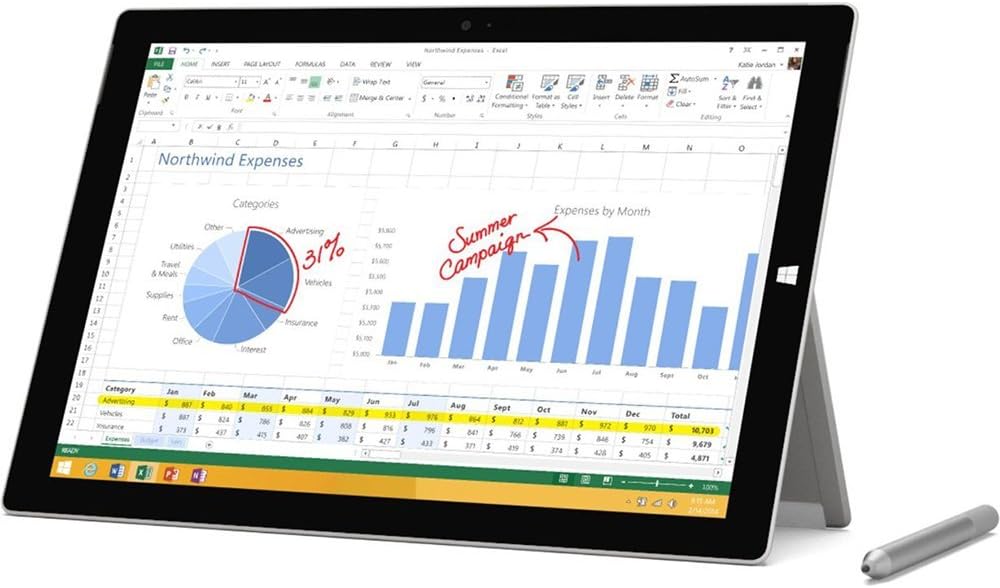
The Microsoft Surface Pro 3 MQ2-00001 is a versatile 12-inch Full HD Plus multi-touch tablet powered by a 4th Gen Intel Core i5 processor, 4GB RAM, and 128GB storage. Weighing only 1.76 lbs with up to 9 hours of battery life, it runs Windows 8.1 Pro and includes a Surface Pen for natural writing and drawing. Its high-resolution 2160 x 1440 display and multi-position kickstand make it the ultimate device to replace your laptop for professional and creative tasks.
| ASIN | B00KHR4T8U |
| Age Range Description | Adult |
| Aspect Ratio | Unknown |
| Battery Average Life | 9 Hours |
| Battery Capacity | 100 Watt Hours |
| Battery Cell Type | Lithium Ion |
| Battery Power | 9 Hours |
| Best Sellers Rank | #889,711 in Electronics ( See Top 100 in Electronics ) #7,515 in Computer Tablets |
| Brand | Microsoft |
| Built-In Media | 36W Power Supply, Microsoft Surface Pro 3, Quick Start Guide, Safety And Warranty Documents, Surface Pen |
| CPU Model Number | Core i5-4300U |
| Camera Description | Front, Rear |
| Cellular Technology | 4G |
| Color | Silver |
| Compatible Devices | Keyboard, Docking Station, Laptop |
| Compatible Flash Memory Type | microSD |
| Configuration | Intel Core i5, 128 GB |
| Connectivity Technology | Bluetooth, USB, Wi-Fi |
| Customer Reviews | 4.1 out of 5 stars 876 Reviews |
| Display Resolution Maximum | 2160 x 1440 |
| Display Type | LCD |
| Front Photo Sensor Resolution | 5 MP |
| Generation | 4th Generation |
| Global Trade Identification Number | 00885370757903 |
| Graphics Coprocessor | Intel |
| Graphics Description | Integrated |
| Hard-Drive Size | 128 GB |
| Hardware Interface | Mini-DisplayPort, USB, USB 3.0 |
| Human-Interface Input | Keyboard, Keypad, Touchscreen, Touchscreen with Stylus Support |
| Item Weight | 1.8 Pounds |
| Lithium-Battery Energy Content | 100 Watt Hours |
| Manufacturer | Microsoft |
| Memory Slots Available | 1 |
| Memory Storage Capacity | 128 GB |
| Mfr Part Number | MAIN-154958 |
| Model Name | Surface Pro 3 |
| Model Number | MQ2-00001 |
| Model Year | 2014 |
| Native Resolution | 2160x1440 |
| Operating System | Windows 8.1 Pro |
| Operating System Family | Windows |
| Other Special Features of the Product | Stereo Speakers |
| Photo Sensor Resolution | 5 MP |
| Processor Brand | Intel |
| Processor Description | Intel 4th Generation Core i5 Processor |
| Processor Speed | 1.9 GHz |
| RAM Memory Installed | 4 GB |
| RAM Size | 4 GB |
| Rear Facing Camera Photo Sensor Resolution | 8 MP |
| Screen Size | 12 Inches |
| Sensor Type | Ambient Light Sensor, Accelerometer, Gyroscope |
| Set Name | Surface Pro 3 Essentials Set (Tablet, Pen, Power Supply) |
| Size | 12 inches |
| Speaker Description | Stereo Speakers |
| Specific Uses For Product | personal |
| Style Name | Windows 8.1 |
| Total Usb Ports | 1 |
| UPC | 885370757903 |
| Unit Count | 1.0 Count |
| Video Capture Resolution | FHD 1080p |
| Video Processor | Intel |
| Warranty Type | Limited |
| Wireless Compability | 802.11b, 802.11g, 802.11n |
| Wireless Technology | Bluetooth, Wi-Fi |
J**R
Best Tablet by FAR
I'm writing this review from a college student's perspective: This is the best tablet on the market right now, and for good reason. The biggest reason why I wanted this tablet was for OneNote (which comes free and already installed, ready to go). I was curious if I would actually use it in class or if it just looked cool but I would go back to a regular notebook a week after buying it. NOPE! I can say without a doubt that OneNote is by far my favorite feature. The ease of writing on it, importing pdf's to write/ highlight on them, and exporting to word or pdf is nothing short of amazing. I have created folders for all of my classes so now instead of having a notebook for each class, it's all stored on my tablet (I do carry one notebook with me just in case we actually have to turn in something in class or if we get handouts or something). My only regret is thinking I wouldn't use it bc so many of my previous classes (calculus, theory classes, extensive pdf hand out classes) would have been so great for OneNote. The other golden thing about it is that it syncs up to my big laptop (both windows of course) so whatever I write in class instantly shows up on my big laptop, I don't have to send it manually (again if you sync it up). The only odd thing is I can't figure out how to export OneNote to say word or pdf from my tablet. From my laptop no problem, but for some reason I can't find (if there is a way) to do it on the tablet (One of my issues with Windows 8 actually but that's another story). The other thing that wins big is its portability. It is light and compact with a decent screen size(biggest without becoming a laptop I believe). I hate lugging my big laptop to class but also knew I needed a screen bigger than a 8-10 inch. I bought a sleeve when I ordered this and I have had no problems transporting it. For trips it is GOLDEN. Don't have to remove it through security, small and compact enough to use on a tight airplane, etc.... I also am much less worried about this getting hurt than my big gaming laptop bc it's so compact. What specs to get? I decided to get the i5 version because I have a bigger gaming laptop and decided for what I would use it for (netflix, notes, facebook, etc...). So far, I have had no problems running anything currently using the i5. I can even play less intensive games with it (Risk of Rain if you know it is the one I tested it with). I felt the i3 was a little bit too far removed from the processor capabilities I was used to. GB wise, I like the 128. Keep in mind: whatever memory size you get, a junk will be used for the OS/ apps/ etc... preinstalled. Should this replace your current laptop? In my opinion, no, it really shouldn't. At least for me, I really need my bigger laptop for things like programming (I'm a CS major), and for working on reports/ assignments, etc... And obviously I need the gaming one, for, you know, gaming :p. The Surface is FANTASTIC if you can spend the money on it and use it as a second and more portable laptop. But, honestly, if you really just need a laptop to look at facebook and watch Netflix, buy a cheaper, normal laptop for around 400 bucks. This is an amazing toy but you pay a lot for the compactness of it. And again, screen size for assignments for me would be an issue on it. But again, that's just my opinion. Go try it out at Best Buy or something to get a feel of the screen size. Should you get the keyboard? YES. Yes you should. If you want to use this at all like an actual laptop, the keyboard is needed. I got the surface type one (the one that's raised) because I knew I couldn't handling typing on a flat surface. I will say that the keyboard is overprices for what it is. But there isn't anything else like it on the market and to be honest, if you are buying this than throw the extra 100 into getting the keyboard. The stylus that comes with it is great. Took me a few tries but finally got it synced up (its bluetooth enabled). The only problem is I accidentally touch the two buttons on the side since that's where I naturally rest my hand but it's not too big of a deal. I have heard the complaint that the Surface doesn't have somewhere to hold the stylus. The keyboard actually came with a little tab that you put in the keyboard that will hold the stylus in place. I always put it back there when I'm done using it and it's a great little feature. Wrap up: If you are a tech nut that loves new shiny toys, travel a lot, and perhaps need a way to write a lot of notes, this baby is for you. It is honestly the best and most exciting new tech I've gotten in a long time. It's sleek and powerful and makes my life that much easier. It is, however, pricey, running the same amount as even some gaming laptops. You are paying a premium for its size and basically OneNote. Now, if you're like me, its worth it. I have not regretted buying this at all. My sister? Yeah, could probably just get her that 400 laptop and she'd be totally fine with it. Again, I really think this should be an addition, not a replacement, to an actual laptop (or desktop) but hey, who am I to judge, you do you :)
N**.
Surface is a really poor quality product and a customer services even worse, for a premium device price.
I bought surface pro 3 a few months ago and this is my story. With high expectations to this product, I knew that the reviews were not good but I arriesge because i was looking for something that is mobile and compatible with my life on the go, and it promised. The experience was painful, the first week of using the it pen stopped working. I change the batteries several times but the pencil sometimes worked ok and suddenly stopped working, even with new batteries. Then overheating. Use the device on your lap was a hell, this device burns like hell, especially on the right side. Decided to enter customer service page support for surface. If you buy this product get used to being in customer service (and one very bad). First the pencil, since the batteries were recently changed, the agent promised to send me a new pen to my address, this never came. After the overheating, the agent made me restore my device manufactures, overheating never fixed. After a few months of very bad performance, one day when get my tablet out of my bag, a reinforced bag of a ultra recognized brand, i find the broken tablet. If otherwise I would say: OK, it's my fault. But in view of the above problems, this device is really really poor quality, very bad. It is a toy priced as a premium device. Enter again to the support Surface site, ask the agent to immediately refund my money because the quality of this product was terrible. Bearing in mind that before i had two issues and had to enter support two times before. The agent beg me not to take the stand, pledging to seek a solution to the problem as soon as possible. So i agree with replacing the device for a brand new one, without charge, only had to send the device from my address. I ask again, this will be free ?. He answers yes, completely free of charge. Have all this conversation registered. For reasons of lack of time, never request the withdrawal until today. Entering the page to request the withdrawal, where I have to explain it again to the agent. Then the agent tells me that Surface will not performed replacements of equipment. I show the entire conversation, but the agent deny the commitment take by the previous agent. After hours of discussion, the agents says to me that Surface only takes replacement is when the broken screen is accidental. I was saying to him that my broken was accidental since the begin. So i can't take it more and ask to a supervisor. I explaint all the issue since the begining again, and the Supervisor Agent says to me that Surface doesn't take replacement for breaking screen, deny the version of two of his agents. Finally after hours of discussion and complacent sentences prescribed scripts i decided go away. I have all the record of the conversations, and all the warranty documentation. In conclusion, Surface is a really poor quality product and a customer services even worse.
G**T
Nice viewing device
I'm building a house and needed a device to use on site to view pdf's, websites, Sketchup files, and images. Android tablets were out because I need to run Sketchup and I wanted to easily transfer files within my existing Windows homegroup. I considered an inexpensive tablet like the Asus Transformer but I went with the Surface because of the built-in kickstand and good reviews about the build quality. So far, I haven't been disappointed. Using a tablet as a viewing device is far superior to a traditional laptop with keyboard because you don't have that keyboard getting in the way. It's much easier to walk around holding a tablet. When you want to show someone something, it's nice to hand them a tablet which is as simple as handing them a piece of paper. When you set the tablet down, you can lean it against a wall or use the kickstand to put it unobtrusively on a desk. Don't discount how valuable the built-in kickstand is. It allows you to prop it on a table for hands-free viewing. It takes up much less desk space propped up which is nice when you are just charging it. The kickstand is THE key feature differentiating the Surface from all the competitors at this time. This is my first foray into Windows 8 and there is definitely a learning curve coming from Windows 7. I would recommend actually reading the "Surface Pro 3 User Guide" available at the Microsoft website. Once you figure out what all the different swiping motions do, things get a lot easier. Booting up from a cold start takes only seconds which is a key feature. If you are simply turning the screen on and off throughout the day (and not letting the computer go to sleep), the display will turn on in less than a second. Basically, the Surface acts more like a quick-start tablet than a traditional laptop computer. Networking a Windows 8 tablet with my existing Windows 7 homegroup was a snap. No issues there whatsoever. The Surface connects easily to my Verizon phone "Mobile Hotspot" giving me internet access on the road. Surfing the internet is fast and accurate just like a desktop. Signing in to Chrome allows me to have all my bookmarks and settings instantly up to date. It's much better in this regard than my Kindle Fire HDX which can't run Chrome and has a slow and clunky browser. Viewing Sketchup files works very well. It's easy to move, rotate, and pinch-to-zoom. To create content, you'll want a keyboard and mouse though. Minor negatives: -Proprietary charger. -The fan can get a bit whiny. -It is a little heavier than expected but not a big deal. -Windows 8 can be a pain to deal with until you get everything configured the way you want and even then. -Pen buttons not customizable. -Because the screen is so big, typing on the virtual keyboard takes a lot longer than on your smartphone. Typing in websites and short emails is no problem but you won't want to do anything more than that without the hard keyboard. Overall, this is a fantastic viewing device. It runs all your windows programs so anything you view on your desktop, you can view on the Surface. It is thin, well-built, and has a great screen. The built-in kickstand is extremely useful and I can't imagine being without it. UPDATE August 2014: Battery life has been excellent. I can get through an 8-10 hour day without a problem.
J**K
Good but way too many overlooked details
I am an engineering student and wanted something to replace my heavy/aging 2009 macbook pro. I needed something light to take to school and did not need a heavy duty computer. I picked the Surface Pro 3 128gb/i5 model and used it for a few days. Here is my opinion.. Hardware: Pros - The hardware is great. Screen is bright and crisp, touch screen is pretty precise, kick stand is surprisingly sturdy, and the build feels solid. Cons - The haptic feedback motor is loud. Very loud. When it is on a desk, bumping that windows button will cause it to vibrate which will resonate with what ever it is touching. There is no way to disable this "feature" unless if you disable the windows button. But it seems the volume/power/windows button is all on the same I2C bus, disabling one with device manager will disable them all. You will bump this key at some point, especially if you use the pen to write with. The keyboard: I will talk about the type cover here too, since the thing is almost useless without it. Pros - The keyboard is very light and adds only a tiny bit of thickness to the SP3. I did not have much trouble adapting to it and I can type on it at a normal rate. Cons - When on a desk and the keyboard is angled, it is INCREDIBLY loud, it sounds like a 1940's type writer. If you are in a quite area, you WILL disturb people around you. Microsoft also chose to use some type of weird felt like cloth covering. It will get dirty eventually and be difficult to clean. The mouse pad is located slightly to the left, and as I result I am always hitting it with my palm. I have also noticed that laying sideways in bed will make the SP3 think it is being used like a tablet and automatically disable the keyboard. The pen: Pros - The pen and palm rejection surpassed my (high) expectations. The pen feels pretty close to using a ball point on glass except the ink is electronic. There is also a feature to convert handwriting to text that is pretty useful and accurate. Cons - The buttons are a little awkward to use, the magnetic holder at the bottom is not strong enough to hold it, and there is no symbol support for the handwriting input. The charger: Pros - Has a USB port! The software: Now, I use both windows and mac and I might be used to the extra polish of OS X. I thought I could try to adapt to windows 8 but I can't. It is just too awkward of an operating system, having to manage programs and apps, having tablet settings and then desktop settings. There are too many little things that could just be better. For example, in desktop mode I have to bring up the digital keyboard every time I want to type and X it out once I am done. Windows get resized but do not go back to normal once the digital keyboard is gone. Desktop items often end up shuffled too. The absolute worst part is that I cannot get over is the fact that the stock microsoft apps have 3rd party ads built into them! I paid $900 for this machine, I do not want to have advertisements! Overall, it is a great idea and could have completely changed the way I work. Unfortunately typical microsoft blundered it by missing out the tiny but ever so annoying details. Usable? Totally. Perfect? Not at all.
C**.
I love this thing!
I've been a mac user for nearly 10 years, but I have to say that Microsoft has been working hard to step up their game. I find myself more frequently using this device then my 15" retina macbook pro simply because it's small enough bring with me, has good battery life and is very versatile. Not to mention, this is a very fast windows computer. I have the Core i5 128gb model with 4gb of ram. I would have liked the 8gb of ram but I couldn't justify the extra $300. The price is high when compared to an ipad, but this really isn't meant as direct competition even though that is what most people would use this for. This is truly a premium laptop. I choose this device because Apple is too stubborn to admit that people still like using a stylus, especially for writing. Using one on the ipad feels like writing with a big crayon. Similarly, the Samsung tablet's stylus is too small and has considerably more screen lag which reduces its appeal. The SP3 + Pen + Onenote are a winning combination. Not without it's flaws, but definitely the best note taking experience in my opinion and a great multi-functional computer. * BTW, The SquareTrade warranty for this device has great coverage and is a bargain! Pros: - Excellent, if not the best handwriting and note taking experience on a tablet. - Very fast computer - USB 3 for flash drives and port replicators - Great Versatility - Size/Weight for performance and use is great. - Full desktop applications and Win8 apps. - Functions as a laptop Cons: (Still love and would recommend the SP3) - Terrible rear camera, ok front camera. Fixed-focus lens. 5mp doesn't mean anything if you can't focus on the subject. (The rear is almost useless, but I'd use my phone first anyway...) - Win 8.1 still has DPI scaling issues and some buttons are too small, others too big. - Where do I put the Pen? You need to buy a case or Type cover to address this issue. - The box should include extra pen nibs. Although I'm told Microsoft will send replacement nibs for free. - The windows button on the bezel should not be touch sensitive. Very annoying while writing on or holding the device. - Gaming - Not really a con as the market games run great, but desktop games fall short. However this is probably the best available given performance/size/wattage. Suggestions for next version - Option to charge off USB when the power adapter isn't available. - Place to store the pen on the tablet itself. Perhaps on the side, in a groove or stronger magnets. - Better DPI scaling for windows 8.1 or 9... - Inset the Windows button and remove the touch sense. - Fix the cameras! Add a variable auto-focus at the very least. Better light sensitivity. - Finger print reader would be really cool.
S**E
Semi-Impressed, but a lil' heavy and large for Tablets
Eh, it's not bad, but doesn't come with a keyboard!?! Boom, you're in for another 100 bucks or so. HAD to purchase a cover/protective case, too ... see where this is going? Expensive!! Especially expensive for what it is, too. I rarely undock it and use it as a full blown tablet anymore. I felt I'd wait a month or so and let the 'new-ness' wear off before laying a review down. I pulled it out, turned it on (like a kid on Christmas morning EXCITED!) and went through the setup, comes with a bluetooth pen, set that up, joined a network and {POOF!} you're in! Windows 8, didn't take too long to get up 'n going. Now what ... !?! I mean, Windows store looks pretty sad coming from an Apple and Android device user. Not much worth messing with, but I downloaded a few games and test drove this guy. Ugh! The tablet is a bit large for tablet use. You get used to it, but it's wonky and clumsy IMHO. I docked it to the keyboard within a few minutes of playing. Eh, it's a highly mobile laptop. Rarely used it as a tablet since, really. I have other lower priced, high quality tablets that do more and feel better in my hands. Well now ... For the word the tablet feels of high quality and looks great. But still, I feel it'll most likely take a back seat to my iPads and Androids. Sorry, but it has ... I like the keyboard/dock/cover, it's nice. Nothing to write home over, but good nonetheless. I purchased a 128gb micro SD card for it right away. Came in the mail powered the tablet down, popped the card in and VIOLA! I get another 128gb of space to ... install ... I don't know, movies, Office? Pft! I played a few movies, looked great. Yay. I went a few weeks on Windows 8 before downloading n' installing Windows 10. Why not. Works a lil' better in Windows 8 as a tablet (annoying metro screen), but Windows 10 is getting there. By the way I had no problems with Windows 10 install. Went smooth. WiFi is noce and strong, tablet speed seems pretty snappy, no complaints here ... I wanted to put it through its paces as a gaming device! Ha! I downloaded Steam to put a few games on it, attached a gaming mouse and started off with an old game called Far Cry. Wanna see if play something classic. Well, I mean it played it, it worked ... but I had to lower the game settings to really enjoy. Didn't take long for me to realize this was a waste of a tablet purchase. This isn't what it's designed for. Hmmm ... I'm an IT guy and Tech geek, but I just don't feel this tablet fitting my "needs" unless I'm planning on releasing my desktop, laptop and "maybe" my cute lil' HP Stream Windows 8 tablet. Well, that sounds about right. It very well, could possibly replace all of those. But ... it's not replacing my iPad and Android devices by any means. I would use this as my work laptop/PC/travel device. This'll get taken to work and implemented into my office environment nicely. Not really using it at the house now. Might update this review ... When my corporate office releases Windows 10 as our OS standard for use. There ya' go.
J**E
A few bumps in the beginning, but very pleased with the end result!
The surface is a great piece of technology that has left me both very satisfied and very cautious. I bought the surface because I was pretty much done with my laptop. I wanted something I could take to school, work, and have at home as a form of everyday use and entertainment. Plus the fact that it can handle programs like MS Office like a regular PC really sold it for me. I ordered and had my surface within the week. What followed was not so great. My surface was defective! I had what surface users dubbed the "phantom touch". This is when your touch screen is rendered completely useless, because it is as if some one is touching your screen already. The touch bubble just continuously touches a specific part of the screen (bottom right corner in my case). I was very upset especially when I thought about the amount of money I paid for the product. I was trouble shooting the device the next day, and found nothing I did worked. I called MS support (very friendly, and patient) and went through the same trouble shooting procedures. Finally they determined there was nothing more to do. They scheduled for a new surface to be delivered to me. I sent them my defective surface and I had my new surface within the next week. Besides the hassle and waste of time that the first surface put me through I still have to give this 5 stars because the product is fantastic. I don't know if "hybrid" is a proper word to describe it, but its a mix between a laptop and a tablet. I was excited because I could use MS without having to worry about converting or anything. I downloaded iTunes and put all my music, pictures and documents in this machine. The operating system is windows 8, and as we all know its app based. The cool thing is that if there is an app for a specific job, task, program, or website you want, its at your fingertips. The downside is that sometimes those apps are not very responsive (like the YouTube app), or they don't have the app for the thing your looking for (no app for the bank I use for instance), but the little hiccups are out-shined by everything else you can do on the surface. The One Note app (program) is fantastic. I can write notes using the wireless stylus and convert those notes over to MS Word, I can create spreadsheets for work and graphs without having to worry about converting and loosing certain things. There are still more things you can do that I have yet done, but over all I would say the Surface Pro 3 has made quite the impression on me. I'am both impressed and aware of what products like these are capable of doing, but the good sides of it have out weighed the bad. I would really consider looking into this if you want a tablet and still have the functionality of a laptop.
M**K
Horrible Quality Control, Beware! Returned after less than 12 hours.
Absolutely disappointed. After paying for 2-day shipping and receiving one that had multiple issues, I opted for a refund instead of an exchange. Your mileage may vary, as demonstrated by the multitude of positive reviews. Pros: Nice design Snappy (when I was able to use it) Has a stylus pen thing Cons: Stylus operates through bluetooth and requires two separate types of batteries: 2 coin cell batteries for the bluetooth pairer top part (don't know which type), and a AAAA battery for the pen itself (no that's not a typo, that's a Quadruple-A battery. For reference, the only place I've seen these batteries are inside 9V batteries. I've never seen them for sale.) INCREDIBLY finicky about actually going into standby INCREDIBLY finicky about waking UP from standby when it actually decided to standby Shuts off while you're using it if awoken from sleep with the power button No way to simply turn the screen off (or even dim it) thanks to InstantOn. On every occasion when I left the device in sleep mode for more than about an hour and a half, it would go into a very deep sleep, which would require me to do a hard reset on it. Further, upon coming out of that deep sleep, it would then shut off after 2 minutes. NOT go back into standby, it would completely shut off (confirmed through the event logs). And this would happen even if I was in the middle of using it. The power management seems awful as well. There's no option to dim the screen after X period of time, and there's no option to simply turn off/lock the screen after an inactive period; the only option you have is to go into standby. After charging it to 100%, after about 3 hours I was down to 30% battery, and I wasn't using it for anything I'd call strenuous. After doing some research while these problems manifested, I found that my unit may have been defective, and repair may have taken up to 3 weeks to just process. As such, I instead decided to return it, and I will look elsewhere for a 2-in-1 ultrabook offering. It's a shame because there's plenty of people who have reviewed this that haven't had a single problem, and I envy them, because this is a very nice looking product. Microsoft needs to step up their quality control, since these problems are known to them and they still choose to ignore them (or simply say "Please reinstall windows" which is an unacceptable solution).
C**R
That's how amazing the pro 3 is
I've completely replaced my macbook pro with my surface pro 3. That's how amazing the pro 3 is! If you can afford it, I'd definitely recommend the pro 3 or even the pro 4. It's portable, efficient, and overall a brilliant device.
D**N
Y U No include type cover
Great product from micrososft. Loved everything about it. Perfect for a student which is who i am :) Taking one star off due to the price of the official tye coer being bonkers expensive causing me to get a third party bluetooth keyboard.
R**L
Five Stars
Works great!!
M**D
but overall i am satisfied: )))
so powerfull product. but i notice one problem, i can hear fan noise ,it is always works with high speed . but overall i am satisfied :)))
S**2
Awesome product! Finally a laptop that is lightweight and ...
Awesome product! Finally a laptop that is lightweight and easy to bring along with me. Fastest start up I've ever seen.
Trustpilot
4 days ago
2 weeks ago