Desertcart purchases this item on your behalf and handles shipping, customs, and support to Senegal.
๐ Elevate your home network game with speed and stability that keeps you connected!
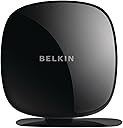
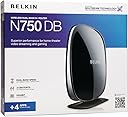
The Belkin N750 DB Wi-Fi Dual-Band N+ Gigabit Router delivers combined wireless speeds up to 750 Mbps across dual 2.4GHz and 5GHz bands, featuring 6 gigabit LAN ports for high-speed wired connections. Designed for seamless home theater streaming and online gaming, it includes a self-healing network function to automatically fix connectivity issues. Easy to set up and optimized for wide home coverage, this router supports multiple smart devices with Wi-Fi 4 (802.11n) technology, making it a reliable and affordable choice for modern households.
| ASIN | B004N625AK |
| Antenna Location | Gaming, Home |
| Antenna Type | Internal |
| Best Sellers Rank | #50,573 in Computers & Accessories ( See Top 100 in Computers & Accessories ) #1,271 in Computer Routers |
| Brand | Belkin |
| Color | Black |
| Compatible Devices | Gaming Console, Printer, Smart Television, Smartphone, Tablet |
| Connectivity Protocol | Wi-Fi |
| Connectivity Technology | Wi-Fi |
| Control Method | Touch |
| Controller Type | Google Assistant |
| Coverage | Home network wide coverage |
| Customer Reviews | 4.0 out of 5 stars 492 Reviews |
| Data Transfer Rate | 450 megabits_per_second |
| Frequency | 5 GHz |
| Frequency Band Class | Dual-Band |
| Global Trade Identification Number | 00722868817872 |
| Item Weight | 7.52 ounces |
| LAN Port Bandwidth | 10/100/1000 megabits_per_second |
| Manufacturer | Belkin |
| Maximum Upstream Data Transfer Rate | 450 megabits_per_second |
| Mfr Part Number | F9K1103 |
| Model Name | N750 DB Wi-Fi Dual-Band N+ Gigabit Router |
| Model Number | F9K1103 |
| Number of Items | 1 |
| Number of Ports | 6 |
| Operating System | ZyNOS |
| Other Special Features of the Product | WPS |
| Router Network Type | hybrid |
| Security Protocol | WPS |
| Special Feature | WPS |
| UPC | 722868817872 |
| Unit Count | 1 Count |
| Warranty Description | 2 Years |
| Wi-Fi Generation | Wi-Fi 4 |
| Wireless Communication Standard | 802.11a/b/g/n |
| Wireless Compability | 802.11a/b/g/n |
J**E
Great Buy! (before you say no to buying, make sure you look at the dates of bad reviews, and be sure you're comparing to recent)
I previously had a different Belkin router before this, so I trusted them for the most part as good in value without having to pay crazy for a Netgear. The one I had previous was basic, though, since I just needed a router at the time with a USB plug-in and range to literally the room next door where the router sat. Now we had to move the router to the opposite end of the house, and I couldn't pick up a range that it would stick to without having to sit in a different area of the house, which with kids running around meant I couldn't get done what I needed to without interruption. So the main reason for this buy was to get a better range. I just got this all set up (I knew how to set it up since I had one previous, but still the instructions that come with it are short and sweet and to the point, and took 20 minutes, max, to get all of our devices hooked up to it). I am currently sitting in the other end of the house and I almost have a full connection, and my internet is running faster as well, which is also a big bonus. I decided to buy this despite some bad reviews because I noticed that most of the 1 stars where older, 2011. Most of the 5 star where newer, 2014. I hadn't seen any bad reviews from recent years (not saying there isn't any!) and decided worse case scenario I could send it back. So far it's working great. It takes up less room than the old one, has better range, and is handling all of our device hookups a lot better. So far I would say I'm pretty satisfied, and would encourage anyone that needs the basics for a big home without having to pay 150 for it, this is a great deal!
E**M
Great router, no dropped connections
Got this to replace an ASUS RT-65R. That router was fast and had good range but for whatever reason would lose the Internet connection every week or two and I had to jump through multiple hoops to get it set back up. Finally got tired of this and researched routers on smallnetbuilder and found this one had good 2.4 GHz range and speed (I don't care about any of the other stuff, or 5GHz). This one has been rock solid for a month (I'm not using the self healing), needed one reboot but I can't be sure that wasn't my ISP. The main thing is that it reconnected immediately with all my devices still plugged in. When this happened with the ASUS I had to disconnect everything except one computer and fiddle with it for 30 minutes. The range is better than the ASUS in the hard to reach areas of my house,and the speed is the same and this one cost 1/3 the price of the ASUS. Sorry ASUS. If you are wanting all the bells and whistles I can't comment, but for 2.4GHz stability, range and speed this Belkin can't be beat. Your mileage may vary as wireless is very dependent on location, other wireless in the area, your ISP, etc.
K**E
Excellent router for simple home use
**Update Jan 2 2012** there was a new firmware release - 1.00.46 - that was recently posted to the Belkin site. Since applying this update, the periodic slowdown mentioned in the review below seems to be resolved. Still no DHCP reservations, though. **Original review** I have a ~2000 sqft single story home. We're a very connected family, with lots of devices and a heavy dependency on the internet. My goals were: have complete wireless coverage in the house that allowed me full usage of my 30mb/5mb internet connection; allow streaming of video content from a centralized server to multiple devices throughout the house, and have a stable product I didn't have to mess with once set up. My technical level is above average. I tried some of the nicer ASUS and Linksys products. The asus would lose the WAN connection every 30 minutes or so for about 5 seconds. The linksys had the 5ghz radio stop working after a week. I decided to try the belkin after reading a mostly positive review on a very credible networking website - and figured it was hard to go wrong with the price. Amazon had the router to me the next day. Setup took about 5 minutes - I didn't use the included CD - just set it up via the web interface. I can't imagine people having difficulty setting up this router - it even comes with the ethernet cable and power supply already plugged in. First, if you're looking for a router with a ton of configuration capability - look elsewhere. The firmware here is very basic, and is even missing some surprising 'standard' features such as DHCP reservations. For -most- home situations, though, it has what you need, and it's presented in a relatively simply and easy to understand way. This router also uses a chipset that's not supported by 3rd party firmware, so you're stuck with what belkin provides. Range for 2.4ghz is superb. I have complete, full speed connection in every room in the house, and all through my small yard. 5ghz is not as strong. 5ghz is always going to have more difficulty penetrating walls than 2.4gz - so you should expect some drop-off in range. However, compared to the Asus and Linksys I tried, the Belkin 5ghz is weak. My htpc has line-of-sight to the router, about 30' away - so it works fine for my purposes, but the signal drops off sharply once you leave the room. Speed is good. While I have seen > 300mb connection reported in Windows on 5ghz channels, you obviously won't get anywhere near that speed in use. At best, I see ~ 12-14MB/sec, which is actually really, really good for wireless. I can stream HD across my internal network, and max out my internet connection at the same time with zero issues. I have had one issue where the router will slow down after a period of use. My max internet speed will top out around 17mb/down, instead of the 30 I usually see. This only seems to happen after extended periods of heavy internet use - ex: watching several hours of streamed HD from netflix. Making any change on the router (ex - changing DNS settings) 'fixes' the issue. Belkin has a 'self healing' option, which is really just a scheduled router reboot, which can be used to work around this issue. It also does not occur if the router is used in AP mode. Beyond this issue, I've had zero stability issues. I had the router since July, and we use the internet heavily every day - so issues would be readily apparent. I do wish belkin would address the firmware issue mentioned above, and add DHCP reservations - but I'm able to get the device set up as it to do exactly what I want - which is more than I can say from some of the "better", more expensive options I've tried. All in all, it's an inexpensive router that performs well and does what it's supposed to do. I'm happy with my purchase.
T**M
Nothing special
I am a Belkin fan from way back but I have to say I was kind of disappointed in the performance of this router. I put it up against my Netgear N900 and it didn't hold a candle to it. From across the street it only gave me 2 wireless bars as opposed to the Netgear which gave me 5 bars. It was easy to set up and I like the style of it I just believe the performance was sub par for an AC router. I was hoping it would blow me out of the water and it did not. It gave good performance but nothing special at all. Not sure I would purchase it again or not with better routers out there like the Netgear N900 and the Dlink AC1750 routers. Tom
J**Y
Solves a big problem for me......
I bought this router to replace a 7-year old Netgear wireless router that was on its way out. The Belkin came on Saturday and was as easy to set up as advertised. I had it up and runnning with all my various wireless devices (a desktop and two laptop PCs, Roku, Wii, iPods, etc.)in a matter of 20 minutes or so. The big test of how good it is came this morning. I work from home using a VPN/VOIP setup and the VOIP was prone to fading in and out leaving gaps in my conversations, which is really irritating as we were continually having to ask each other to repeat ourselves. The old G router was just not up to the bandwidth needs of the VOIP. Getting down to work this morning I had several calls to make and the VOIP performed without so much as a hiccup over the new Belkin wireless network. From that point of view alone it was a worthwhile investment. Overall, my network performance is vastly improved. Web browsing is faster and as far as I've been able to determine. streaming video over the ROKU device is much improved as well. There are no more pauses while the box waits for the network to catch up.
B**G
Heed the warnings! Unreliable router, with frustrating tech support.
I knew I was taking a chance buying this device, with the inconsistency of the reviews on Amazon. However, I was tempted by some of the features on this router and decided to take a chance. BIG FAIL! This router worked wonderfully for me for about two and a half months- then it began giving me problems with an amber/orange light, and now no longer connects reliably to the internet. All those dropped Starcraft 2 matches... plus I can't get any work done at home! When you call tech support, they will run you through the usual steps of resetting your equipment, power cycling your modem, cloning your mac address, changing channels, etc etc. At first this worked, and I was able to use the router and only have to repeat these processes once a day. Now it is completely unusable, with this orange light coming on about every 30 minutes. I stopped using this router and went back to using my old one, with no problems on my internet connection. For anyone having issues with the orange light, one of their fixes is to go to the router setup. Under Connection type>Dynamic>Change WAN MAC Address>Clone Address, apply changes and then restart all your equipment. This worked for me at first. Dealing with tech support is a very frustrating experience. I had to call five times in one day, with the resolution of each tech being to 'monitor your connection'. The first three techs were polite and helpful, fourth was rude and did not know what she was talking about when it came to the menu options. She made me go through all the same steps the other techs made me do, and then began coming up with excuses that the router was fine and it was my internet connection that was the problem. Were it not for the router turning amber again while we were talking, I'm sure I would have been told to 'monitor the connection' and forced to repeat and call back. They are finally sending me a replacement after five phone calls, and we will see if I just got one from a bad batch. However, after this experience, I will never buy another router from this company (their usb hubs have served me well though). I will update this review if anything changes. My overall experience with this router is that you're taking a really big chance by purchasing it, because you could end up with a shiny, not-so-heavy brick with a pretty orange light :)
D**R
Product is great but their support stinks.
The Belkin N750 Wireless router is as good as advertised. The only problem I encountered is not reading the instructions and my connections were switched on my old router. I called Belkin and got a nice man . The only problem is , all he knew to do is read from the instructions or script he had. He never had me check to make sure where my connections were connected. I gave him the error messages I received on the computer that included serve not found. He never asked me which connection were to what connection. In fact, he told me he would talk to his supervisor and call me back in about 15 minutes. After a couple of hours I figured he wasn't calling back. I waited a couple of days, trying to find the problem on my own. I looked at the pictures with the hook ups shown and I never realized I had the connection from my computer should have been hooked to the modem input instead of the lan input. It never dawned on me to check the connections even when I could hook the one from the computer directly to the modem and I would have internet. My wife said she had spent a couple of hours trying to get the internet to work on her computer in another room. I never checked to see if the connections were switched because the old router was working when I went to bed. The old router had fallen to the floor and I thought it was broken by the fall. I called Belkin back, they told me they were very busy and they would call me back, by a supervisor. I finally called cable and within 10 minutes he told me to check the back of the router and read where the connections where hooked into. I had explain the error messages and how I hooked up to the modem and get a connection on my computer only. It didn't take him long to diagnose the problem because he could see if I had a connection to the server. I would recommend you go to your internet provider rather than wasting your time calling Belkin first. Don't count on Belkin calling you back like they promise. I had them repeat my phone number both times and I still didn't receive a returned call. The last time they promised to call me back was around 2 weeks ago and I'm still waiting. Their product is great but their support isn't.
A**Y
Disregard most of the negative reviews.
I was replacing a 12 year old wireless 802.11b router, so I spent several days doing online research to find what I considered to be the best router for my money. In our home, we have a variety of computers, from a 10 year old Windows ME desktop, to several XP's, and a 1 year old Windows 7. We even have a brand new wireless all in one. Our wireless cards were everything from 802.11b, g and n. This router took them all on, and everything is running perfect. We went from a 2.5K download to 17K on the Windows 7. I'm even getting 8K on one of the older 802.11g machines. All of this was done through the network connections on the computers, but if you're not a techie, Belkin supplies you with a software disk that guides you through it. Phhhtt...couldn't get any easier than that. Setup is a snap... (1) Unplug your cable modem and remove your old router if you had one. (2) Put the N750 router on your desk and connect the supplied Ethernet cable to your modem. (3) Plug in your modem and wait a couple of minutes for it to come online. (4) Plug in your N750 router and wait a couple of minutes for it to begin working. (5) Belkin supplies you with a little card that has your unique wireless name (SSID) and your unique wireless password on it. This data is in the router, so all you have to do is insert the software disk into your computer and follow a few easy steps. (6) Done! Now let's go fire up the grill! And surf the internet on the back deck while we burn some chops. Cheers!
S**E
piece of junk
piece of junk, once set doesnt connect to the admin panel. no wonder its so cheap.
Trustpilot
4 days ago
1 month ago