🚀 Elevate your on-the-go lifestyle with the Galaxy Tab S5e — slim, smart, and seriously stunning!
The Samsung Galaxy Tab S5e is a sleek, ultra-lightweight 10.5-inch tablet featuring a stunning Super AMOLED display with 2560x1600 resolution. It offers up to 15 hours of battery life, fast charging, and smart home device control via SmartThings. Equipped with quad AKG-tuned speakers with Dolby Atmos, a powerful Qualcomm processor, and 64GB storage expandable via microSD, it’s designed for professionals and media lovers seeking premium performance and portability at a competitive price.


| ASIN | B07Q5VPXG4 |
| Age Range Description | Adult |
| Aspect Ratio | 16:10 |
| Battery Average Life | 15 Hours |
| Battery Cell Type | Lithium Ion |
| Best Sellers Rank | #113,263 in Electronics ( See Top 100 in Electronics ) #1,507 in Computer Tablets |
| Brand | Samsung |
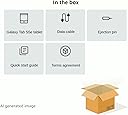
| Built-In Media | Data Cable, Ejection Pin, Quick Start Guide, Terms Agreement, Type C to 3.5mm Adapter |
| CPU Model Speed Maximum | 2 GHz |
| Camera Description | Front, Rear |
| Cellular Technology | 4G |
| Color | Silver |
| Compatible Devices | samsung galaxy tab |
| Configuration | Wifi |
| Connectivity Technology | Bluetooth, USB, Wi-Fi |
| Customer Reviews | 4.7 out of 5 stars 3,115 Reviews |
| Display Resolution Maximum | 2560x1600 Pixels |
| Display Type | OLED |
| Front Photo Sensor Resolution | 8 MP |
| GPS Geotagging Functionality | GPS |
| Generation | 1st Generation |
| Global Trade Identification Number | 00887276331065 |
| Graphics Coprocessor | Qualcomm Adreno |
| Graphics Description | Integrated |
| Hard-Drive Size | 64 GB |
| Hardware Interface | USB 3.1 Type A |
| Human-Interface Input | Touchscreen |
| Item Type Name | Tablet |
| Item Weight | 0.1 Kilograms |
| Lithium-Battery Energy Content | 27.11 Watt Hours |
| Manufacturer | Samsung |
| Memory Slots Available | 1 |
| Memory Storage Capacity | 64 GB |
| Mfr Part Number | SM-T720NZSAXAR |
| Model Name | Galaxy Tab S5e 10.5" (T720) |
| Model Number | SM-T720NZSAXAR |
| Model Year | 2019 |
| Native Resolution | 2560 x 1600 pixels |
| Operating System | Android 9 Pie |
| Operating System Family | Android |
| Other Special Features of the Product | Fast Charging |
| Photo Sensor Resolution | 13 MP |
| Processor Brand | Qualcomm |
| Processor Description | Dual-core (2 Core) 2 GHz |
| Processor Speed | 2 GHz |
| RAM Memory Installed | 64 GB |
| RAM Size | 4 GB |
| Rear Facing Camera Photo Sensor Resolution | 13 MP |
| Screen Size | 10.5 Inches |
| Size | 64 GB |
| Style Name | Tablet only |
| Supported Audio Format | MP4 |
| UPC | 887276331065 |
| Video Capture Resolution | 1600 |
| Video Processor | Qualcomm |
| Warranty Description | 1 year manufacturer |
| Warranty Type | Limited |
| Wireless Compability | 2.4 GHz Radio Frequency, 5 GHz Radio Frequency, 802.11a/b/g/n/ac |
| Wireless Provider | Unlocked for All Carriers |
| Wireless Technology | Bluetooth, GPS, Wi-Fi |
K**Y
SUPERB & DYNAMIC!.....#1 for Bang for the Buck. Period....Samsung Galaxy Tab S 5e!
First off---I am NOT affiliated with Samsung whatsoever . I am a previous owner of the original Samsung Tab S 10.5 wifi model. I simply wanted this new highly upgraded Tab S 5e with all the new superior features and especially more RAM in this particular model---it doubled my previous Ram from 3 to 6 GB! This new baby BLAZES--- PERFORMS LIKE IT'S HAIR IS ON FIRE. I gave my original Tab S to someone who does not have much money-- a solid Samsung and still working wonderfully tablet. You'd have thought I had given him a new car, the way he reacted. I bought my brand new Samsung Galaxy Tab S 5e directly from Amazon...also I have included a little comparison vs the Apple iPad ( all iPad models not compared one by one here because of space.... yet you will pick up on my intent here ) ------The inutile iPad that can't even expand internal storage up to 1 TB forcing you to buy higher storage at obscene prices? The dumb iPad with Wifi only that doesn't even have a screen that comes remotely close to the gorgeous Super Amoled display in this 'half the price' Samsung tablet with LTE? ( compared to an iPad )... (An iPad with LTE costs insanely even more!) The jurassic iPad that doesn't even allow seamless file transfers and file sharing to and from Windows PC's and many other accessories, thumb drives, external store and peripheral devices? Many Apple buyers I speak with are proud of their overkill, (largely superfluous for 99% of tablet users) they brag about their ultrafast bionic processor equipped iPad, however, it doesn't even offer a superb multimedia experience with AKG tuned, Dolby Atmos sound quality from four, yes, that's f-o-u-r high quality speakers like the Tab S 5e has. The iPad you say that doesn't even allow the simplest of customizations and flexibility like the Samsung tab's DEX mode or an equivalent desktop mode with multiple windows open for true multitasking and productivity? An iPad that can't even wirelessly mirror its screen to smart TV's without resorting to a wired dongle or an overpriced Apple TV accessory? Please do more research next time. A super powerful processor that is locked up in a jurassic, restrictive and suffocating system called a 'walled garden' which actually is more like a walled prison is just that: Another Apple product meant for just bragging rights--primarily. With the younger people ( 18 to 35ish )....it's their peer groups that usually render the "Apple Sway" to buy Apple products...I have seen this many times Only 1% of iPad users actually do some productivity work on it, but still 99% of the time its for media consumption, which gives you a TRULY AND HONESTLY INFERIOR experience compared to this less expensive Samsung tablet that costs less than half the iPad Pro. ( The previous sentence most likely says it all when comparing Apple iPads vs this Samsung Tablet model....oh the pen??....surveys say those devises that come with the pen are once again are very rarely used be it Apple or Samsung..its a knee jerk "gimmick addition" to get you to buy it---to spend more $$$. Do NOT get it. The extra gadgetry newness of it wears off quickly. Once again in summation--- THIS TABLET is the best tablet right now.---in comparing everything.. Much better than the cheapest iPad Pro for half the price or even less than half. Loud, excellent quad speakers with Dolby Atmos, beautiful Amoled display, long battery life, accepts 1 TB micro sd cards, Widevine L1 certified so offline movie downloads get played at full HD. DEX mode is excellent too! Tablet allows both wired and wireless connections to smart TV. Just use DEX mode if you use wired connection for sending video out from Netflix offline download to TV so video doesn't get resized (common problem when device is at an aspect ratio other than the TV standard of 16:9). A word of warning for Google Play Movie users: For wireless mirroring of Google Play Movies, don't update the tablet's built in Google Play Movies app. The newest Google play movie app version disables wireless screen sharing and also disables wired screen sharing so that you will be forced to buy a Chromecast. If you have accidentally updated Google Play Movies app, just uninstall it and it should revert back to the older factory version. Disable auto update to avoid Playstore from updating automatically your Google Play Movies app and other apps. (You can manually update the other apps).
L**W
This is a great tablet. *Finesse*
So my old Samsung Tab S2 finally broke -- it was still working fine but it fell. I then thought: "It's 2020, I should try out a cheap low-to-mid-range brand, surely they've come a long way." Well, not really. I spend $200 on a Vankhyo tablet with case and pen (P31); when I first got it, the heft of the tablet, the pre-applied screen protectors (front and back, back is glass too), the fact that it came with Android 10 pre-installed, etc., gave me a somewhat good impression. But the quality of the IPS screen and UI and many other things on the cheaper tablet left much to be desired. There is one thing that econo-tablets lack: finesse. Well, that and just good hardware. This Samsung S5e tablet has all that and it makes a huge difference. The screen of the S5e is just leagues above cheap tablets. It is, of course, an AMOLED display which allows for very deep blacks. I'm talking about black as night blacks. Most of my reading I do at night, and the fact that (when you invert the text) the black can get pretty much as deep black as the bezels is just incredible. The resolution is 2560 x 1600 with pretty high pixel density and that makes for fine/crips lines and detail. My Tab S2 had all this too (and at only 8 inches!) and it's a must if you're reading with the lights off because you don't want a light-haze to blast your eyes right before you're going to sleep. The Vankhyo tablet, even though it had a pretty good resolution at 1200x1920 (IPS screen), could not achieve deep blacks. In fact, everything including videos just looked washed out. So if you're using your tablet to read at night or you appreciate good contrast in videos I would really recommend you get a tablet with an AMOLED (or: OLED) display that can achieve deep blacks. Cheaper tablets from Samsung that have IPS/TFT screens, although quite good, also can't achieve deep blacks like AMOLED can, although they're probably better than cheaper non-brand tablets. For example the new Samsung A7 does not have an AMOLED screen and it achieves a minimum brightness (or maximum darkness) of: 3.66 cd/m², whereas the S5e gets: 1.74 cd/m² -- so from that you can see how much darker the screen of the S5e can get at half the A7's value. A 10.5 screen is quite big for a tablet, especially when mainly used for reading books. In a way I prefer the 8 inch Tab S2 that I had because it's such a good size to hold in your hand and move around and has a better aspect ration for my use. Samsung has stopped making high end 8 inch tablets, but I'm hoping they'll return to that because there is utility to these. The Tab S2 has 4:3 ratio which is better suited to reading/editing documents and books. Widescreen tablets are really geared toward media consumption (i.e., movies, series, videos) but there is so much else you can do with a tablet that I think it shouldn't be given that much emphasis -- or at least they should offer 4:3 options as well. The S5e has a 16:10 ratio and if you read books in contiguous mode it is quite enjoyable. Since it's quite a large screen, you can keep the tablet at a greater distance which, depending on your position, can be useful. Everything from the material finish to the UI to the smoothness of operation to the overall feel just exudes quality and finesse. Yes, it cost $349 at my time of buying but the extra $ over the econo-tablets is more than worth it. I am sure that, for most people, the new Samsung A7 will be just fine as well and it currently sells at $249 and is going to be better than any cheap- or non-brand tablet. No. 1 for tablets are Samsung and Apple, of course; if you're already tied into the Apple eco-system it makes sense to go with Apple, but otherwise Samsung is king. If you have a PC and just want to drop some music or PDFs onto the tablet, it is way easier with an Android device. Apple's closed system makes it so you have to install iTunes on PC, etc.; just a hassle really, so I'd recommend going with Samsung for ease of use unless you have all Apple devices already. I think it's a sport for Samsung and Apple to make devices as thin and feature-rich as possible, but personally I wouldn't mind having the device a little thicker if it somehow increases longevity. I would also rather have a 3.5mm headphone jack rather than only the USB-C port and the headphone converter dongle. I did test the USB-to-3.5mm dongle with some Sennheiser corded headphones and the sound was good. The sound over the tablet speakers is surprisingly good. The A7 does have a 3.5 jack still so if that is important to you maybe get the A7 instead. All high-end tablets by Samsung have left behind the 3.5mm jack in favor of just a USB port. I don't like having wireless devices *on my head* for any great length of time so I'll always want wired headphones. The S5e is kind of the sweet spot right now. Its price is much lower than the newer high-spec tablets but you get a premium tablet with great picture and sound, and it is still getting Android updates from Samsung. When I received the tablet, Android 9 was installed on it. After configuring I checked for updates and it downloaded Android 10 (~2gb in size). After this installed and I rebooted, I checked for updates again and a 700mb November update was then installed. I read that this tablet is also slated to receive Android 11 (and UI 3.0 that comes with it) so it is still future proof for a while. If I had to find some negatives, I'd probably say that the touch swipes and such don't always quite register as I intend, but I don't think it's due to any hardware issue with the screen so it could just be an Android 10 thing. When I swipe up to get past the lock screen, it will require a more thorough (greater distance) swipe upwards to actually unlock it, while I would think that the movement in itself should indicate what I want to achieve and that it shouldn't require me to travel as great a distance. One the Tab S2 I would just do a half-hearted swipe up with my thumb while holding the tablet with the same hand and that would unlock it, but not so much with this tablet. I like the power button being inverted, whilst the volume button lever is extraverted (so you can easily tell the difference between the two) but, at least with a case around it, I often find myself having to feel around and then use my nail to "get in there" to press the power button. In summary: this is a great, high quality tablet and is the current sweet spot for people wanting a Samsung tablet with high-res AMOLED display. It is worth the extra money over cheap exotic brand "high spec" tablets. If an unknown brand tablet has similar specs like 4gb of RAM, 64gb of storage, etc., it doesn't mean it will perform the same -- it won't. Samsung tablets are at another level. This performs better in most things than a Samsung S6 Lite (it being in the price range of the S5e). The processor and graphics on the S5e are better, however the S6 Lite has an S-Pen included. The S5e does not support the S-Pen and doesn't offer palm-rejection, so if you need S-Pen functionality in this price range you're better off with the S6 Lite.
D**S
Great build quality, screen, and sound!
Bought this very one last week. This is the 2nd purchase of this tablet. 1st one was bought elsewhere but was the 6gb/128gb model that came with a free 128gb microsd card and paid exactly the same $349. But I returned it because the free microsd card was unreadable/defective on all devices. No big deal, it was free and they are cheap now. But main reason was the included fast charger stopped working (all my other chargers worked) and samung wanted me to return everything in package, which was inconvenient and I saw no point in doing that. PROS - Display is fantastic, you have to see it. Words cannot express how it looks. - Sound is great for a tablet, best I have heard. - Very thin and light, under 1 pound. - High end look and feel for an upper midrange model. - Performance is exceptional for me, smooth as butter with no lag or hitches. Oddly, this 4gb/64gb is a better than previous 6gb/128gb one. Unsure why, running same apps and software (both updated to android 10 out of box), thinking there was small latency issue with previous tab or was defective. - Supports HDMI output with an adapter, which I already had for my S10e phone. This was a MAJOR issue for my use, mostly watching videos and moderate games. It seems to use Dex mode for this but you can easily get back to normal homescreen and continues to stream just fine. - Better value, performance, features, and capability than the S6 Lite if do not need Spen for comparable price. Also better than newly introduced Tab A7 (but A7 is much lower price). - My S10e works thru this for calls and txt messages > I think this is only for S8 and above. - Everything works so far. - So thin and light you really need a case, but I used the one I bought for previous one. CONS - not much to quibble - No Spen but I have no use for that. - No dedicated headphone jack. Issue for some folks but included usb-c adapter is fine for me. - Other tablets may have longer lasting battery use but 8-10 hrs plenty for me. - Price could be lower as always but I would gladly pay more for the screen. Upgraded from Tab S2 9.7 (2nd gen). Honestly not a huge move for me except slightly faster and smoother operation. But prefer the 16x10 ratio of S5e for videos vs the 4x3 on S2. S2 still perfect after buying new 2 yrs ago. Also have a Tab Pro 8.4 and Tab S 8.4 that still function fine, except slowing down. Did buy 3 yr accident protection for S5e.
S**E
Outstanding Tablet - from an Apple Fan
I have mostly Apple and some Windows stuff, including a MS Surface Go tablet w/MS keyboard, and an iPad Pro 10.5" with Apple keyboard. I always wanted to try a Samsung tablet, but didn't want to spend a lot for an S6, so compromised with an S5e for a significantly lower price, but which still has great specs and terrific reviews. I have to say I'm very, very impressed. As an Apple guy, I seldom find products that match Apple's in quality - this clearly does. I like my Windows Surface Go - with its excellent Microsoft keyboard with embedded touchpad and mouse capability, it's the closest small tablet I have seen in approximating a desktop environment and usability. However, the processor is decent but not extremely strong, and battery life is just OK. I absolutely LOVE my iPad Pro as an entertainment and communication device, and it's extremely powerful, but it's awkward to use as a laptop replacement. This Samsung does all of it well. The keyboard doesn't have a touchpad, but you can easily add a bluetooth mouse, and in DEx mode, it's just like using a laptop - it may be Android based, but it's fast, slick, and runs all the critical stuff (MS Office, Chrome, my many home control apps, email, etc). I added some pictures of the Surface Go, the iPad Pro (last gen., not the newest one), and the Samsung S5e in the middle. I initially bought an aftermarket keyboard which I wasn't crazy about, and found the Samsung keyboard for this device at a local store on sale and have to say it's the best fit. It clasps to the tablet in much the same way the iPad does with connectors, and doesn't require a bluetooth connection or charging. Plus, the Samsung keyboard cover folds to a much slimmer profile than the aftermarket ones do. Screen quality - phenomenal - every bit as good as an iPad, maybe even better in terms of color saturation. The Samsung device is noticeably smaller than an iPad Pro, but actually has more usable screen area due to its different aspect ratio and smaller bezels. All three machines here actually have good retina-like screen quality, though the iPad and the Samsung are both brighter than the Surface Go. Sound - plenty loud and clear. Four speakers. Comparable to what an iPad offers. Battery life - haven't had this long enough to fully evaluate, but it's been booted up and on battery power for about 5 hours and is still at 71% charge with mixed use. As good as or better than my iPad. Seems excellent so far. The Surface Go is the weakest of the three, probably lasting 5-6 hours on a full charge. Have not had a chance to determine how well it holds a charge when off; Apple devices are typically outstanding. Interface - The Samsung in standard mode has a typical Android interface. Not QUITE as slick as the iPad's, but close. However, I fell in love with the DeX mode (first picture), which is as usable as any Windows or Mac desktop. In fact, I had a small Logitech bluetooth mouse, and it installed easily and I can click around on the desktop like a regular laptop. It's fast and responsive. I plan on using mine in DeX mode 100% of the time. You can customize the desktop and place icons on it just as in any desktop environment. I downloaded MS Office, and Excel and Word open quickly and are completely usable - and with a mouse, it's much easier to use them, especially Excel, than it is on an iPad, despite the iPad Pro's stellar processor. Specs - This S5e is extremely thin, about as thin as an iPad, and much thinner than the S4. Much thinner than the Surface Go, but about the same weight. I got the 128GB version, which comes with 6 GB RAM. Has a gorgeous, bright 2560x1600 screen. The iPad Pro has 4GB for comparison. Comes with adaptive brightness turned on by default, but you can turn it off. Has a strong Qualcomm 670 processor which seems responsive and quick. EVERYTHING responds and opens quickly. The S6 tablet does have somewhat better specs, but I find the S5e completely satisfying in terms of speed, and this is coming from an iPad Pro. Storage - the base S5e comes with 64 GB on-board storage and 4 GB RAM. The next level up comes with 128GB and 6 GB RAM., which is what mine has. To get more base storage, you need to move to the S6. It also has a slot that holds a micro SD card, behind a door on the side you have to pull off with a little pin (included), similar to the door that hides a SIM card on a phone. So, the SD card is not visible at all when inserted, which is nice. There is a "My Files" app that allows you to access and copy files. I even transferred about 15 GB of files to the SD card on this tablet with a USB-C drive from my Mac without issue. It's a bit strange in that there's no "Paste" function; you "Copy" from one drive/folder and then "Copy" TO the target drive/folder. When I had the external drive attached, the internal storage, SD card, and the external USB drive all showed up in the File manager. You can also download and install a OneDrive app to allow access to your Microsoft files. I installed it and it works well. I also installed Google Drive with no issue. There's a third-party iCloud app which I didn't try. You can install apps from Google Play or the Samsung app store. Accessories - as stated, I got the Samsung keyboard, which seems to be a better fit and slimmer than the aftermarket keyboards, and allows connection via the connectors on the side of the tablet and therefore doesn't require a battery powered, bluetooth connection. I also got a capacitive stylus which doesn't require a battery like many of the pends out there. I read the Samsung S-pen does NOT work with this device, so make sure you get a compatible pen. Security - this tablet allows you to set up access via a PIN, facial recognition, or fingerprint reader. The Surface Go allows a PIN< password, or facial recognition (Windows Hello) but the iPad doesn't do facial recognition. The iPad allows fingerprint authentication, but the Windows Surface Go doesn't. The Samsung allows all of it. In addition, there are numerous security features that will allow you to keep the screen unlocked if you have a trusted device nearby, or if you designate a trusted location, like your address. Cool as heck and neither the Apple nor windows versions have that. I will say the Samsung facial recognition doesn't work well when I have reading glasses on, and I have to remove them to use it - Windows Hello seems to work equally well whether I have glasses on or not. All in all, I am loving this thing, For the price, it's an absolute bargain relative to its competition, and the quality feel and fit and finish are easily equal to any Apple product. If you have a Samsung infrastructure but don't want to spend big bucks on an S6, get this - you won't be sorry.
U**R
Good hardware, irritating bloatware
This is a good piece of hardware: Thin, light, with a good display. The touch can be somewhat unpredictable, sometimes responding to a hovering or passing finger and sometimes not responding to a decisive tap, but I'm getting used to it. I don't listen to tablet speakers, and I don't really understand why they're included, and I feel pretty much the same about cameras: I'm OK with the screenside one for Zooming, etc., but who takes snapshots with a big, clunky tablet? Anyway, they both seem to work OK, but I've used them minimally. The sound output quality is fine (I use various headphones, and/or stream to external speakers via bluetooth--I listen to a good bit of music from online sites). Bluetooth and wifi have given no problems (after I figured out that I needed to protect the web browser from sleep while streaming music with the cover closed). It serves well as an e-book reader, which is also significant for my use. I don't watch movies or TV on tablets so I can't address its performance for that. The downside is all the stupid bloatware that needs to be removed. Way too much of it is complete crap, useful only to Samsung (Google gets some blame, too) for generating traffic to its mostly-useless website, and much of it is redundant--who needs a browser from Samsung with so many better alternatives? I'm technically oriented, so I did a little web research and figured out which bits I needed to keep and which could be removed, and how to remove the ones that Samsung irritatingly protects from simple removal, so now I've got a more secure and private tablet that gets great battery life because it isn't wasting bandwidth on pointless Samsung background traffic. The bloatware removal is nontrivial, however, and most users will be stuck with a tablet bogged down with vendor junk. But then I don't know if there are good tablets that don't have this problem--Apple has its own "we know how you should configure and use your Ipad" problem--so what's a buyer to do?
J**M
Sweet tablet!
I am really enjoying my 10" Galaxy Tab S5e tablet. I chose the rose gold back and was pleasantly surprised to find it very attractive indeed. I ordered the 128 GB to give myself plenty of future space. Before I unpacked it I waited for the Omotion tempered glass screen protectors, that I ordered with the tablet, to arrive so my new tablet could start out fresh with no fingerprints all over the screen. Glad I did cause it turned out amazing. Those are wonderful glass screen protectors and I am very pleased. They are very clear and do not hamper the clarity of the screen in the least. Very easy to install, with very clear instructions. The tablet is wonderful. I had no trouble loading on the apps I use and there does not seem to be any lag time in what I have used so far. The battery life is very good. I read reviews complaining about the fact that there is no 3.5 headphone jack in the tablet, which made me do further research before I bought it. What I learned convinced me it would be OK. And it is OK. It comes with a 3 & 3/4 inch dongle adapter that has a 3.5 connector on one end and a plug-in that attaches to the charging (multi-purpose) port on the other end. I just leave the dongle attached to my earbuds and it works very well. The only drawback might be that you wouldn't be able to charge the tablet and listen through earphones at the same time. I just keep it charged when I am not using it and have not had an issue with it so far. I have used the tablet for online shopping at Amazon and other sites, and for watching movies on Netflix and Amazon Prime, and for reading eBooks and listening to audio books on Nook and Walmart eBooks, and I play a few simple games like 7 Little Words and Solitaire. Of course I have to also check out the weather report regularly. I am having fun exploring the possibilities of new apps. So far it has responded admirably to every task I have asked of it. I do recommend this tablet, and the shipping was really fast too, even before I signed up for Amazon Prime and their fast shipping promise. I am very satisfied with my S5e.
N**.
Solid tablet for most people; Good iPad Air alternative
For many years I had android phones and iPad tablets. It was time for me to just stick with one ecosystem, and when I saw the S5e, I figured I would give android tablets another shot. The first thing I noticed is the size: While having the same screen size as my iPad Pro 10.5, the Galaxy Tab is noticeably shorter, narrower, thinner, and lighter. It uses a wider aspect ratio on the screen (which has pros and cons), but for most movies and TV shows, than means the image you see on the Galaxy Tab will be larger than what you would see on the same size iPad due to it's more square-ish screen. (See my photo for size comparison -- the video is also about .6" larger diagonally on the Galaxy Tab.) I spent a lot of time setting up the tablet just how I wanted, which for now kind of replicates an iPad. I chose the option to remove the app drawer and stuck with having folders of apps on my home screen. I then spent some time with the various apps I'm used to running on iOS along with apps that I normally ran on my phone. I have to say I am overall happy with the performance of the tablet. It is not quite as fluid as an iPad -- for example, when rotating the screen or opening app folders, the animation is occasionally ever so slightly jumpy rather than totally smooth. (I have the 128/6GB version, as I wanted the extra RAM.) The speakers are really good, and there is no headphone jack. I have to say, given how thin this tablet is, I just might buy the argument that one wouldn't fit inside. (But I'd still rather have one.) A PASSIVE USB-C headphone dongle is included. This means that the included dongle will not work on many other USB-C phones. On the other hand, an active adapter like the one from my Google Pixel 3 will still work on the Galaxy Tab. I am enjoying the screen -- it is bright and readable outdoors. It dims pretty low too, which is good for night reading. I'm not a big gamer, and so my various casual games have no problems running on the tablet. About the only issue I've been having is that I'm finding the fingerprint scanner/button a bit finicky. It's not clear to me the right way to turn on the tablet. Sometimes it seems like I need to press and hold, other times, just touch my finger to it, and other times it has trouble reading my finger on the first attempt. Some of this might be getting used to a very small/narrow reader, but it is a little annoying. At the time I wrote this, some other reviewers are saying there is a problem with the wifi when you hold the tablet sideways and cover the antenna with your hands. I could not recreate that issue on my device. So, I'm pretty pleased and I think this will let me finally ditch the iOS ecosystem (and lightning cables). My actual star rating would be 4.5. PS -- I do think a case is needed for this. It is very thin and, while it doesn't feel flimsy, some reinforcement is good. At the moment, Samsung's official (non-keyboard) case is a mind boggling $70 for a basic plastic folio case. I ordered one elsewhere, but I do think the official one looks good. Maybe if it goes on sale sometime.
D**S
Great Tablet.
My second tablet replacing the one that was damaged by falling. These tablets work great. Definitely will buy another when needed. The only issue is operating system updates during the life of the product. Updates stop after a while. Apps do get updated.
D**C
It's a Samsung, never been disappointed .
Excellent display, great performance, runs absolutely cool, screen stays clean, no fingerprints, super lightweight . All around great purchase . Received within 5 days of ordering, 1-3 weeks ahead of projected delivery date .
A**ー
画質が綺麗
コロナ問題のこの時期一週間程で問題なく届きました。タッチペンとコンセント変換プラグが入っていました。 最初のスマホのGalaxyから2回目のGalaxyTabletです。薄くて軽くてオシャレでスマホもそうでしたが有機ELの画質がとても綺麗です。 個人的にはハードに使うことはないのでお安く充分過ぎるスペックです。 まだまだこれからですので楽しみです。
B**B
thumbs up
Very Good tablet, no problem at all. I recommend this product you wont regret it.
R**A
Perfecta para Productividad
Es perfecta en su versión 128rom y 6ram, muy rápida, calidad de sonido impresionante con sus 4 bocinas, la nitidez de la pantalla y para ser tablet la cámara es muy buena. El teclado lo compre aparte pero de seguro es imprescindible.
D**O
Badass Android tablet for mid-budget
I was very sceptic at first, but it appeared to be best value for money. Screen is Super AMOLED, battery is good enough for at least 1 day of use, it has native Android 10 out of the box. With little efforts you can easily get it on well-tuned LineageOS 17.1 or even LineageOS 18 (Android 11). Tablet is Qualcomm based with Snapdragon 670 CPU that you can find in Google Pixel 3a, so you can expect perks of that cpu. It's good enough to play even 4K videos, but with this size of screen you will probably barely see difference from classic 1080p (so 1080p is best choice for most content on such tablet). HDR is half-broken, so it means sometimes it works sometimes it doesn't, I guess that's some Samsung's impact on this mid-budget price. Don't expect HDR from this tablet. Built-in speaker is okay, built-in microphone is absolute junk (sorry Zoom/Skype) It's well-made tablet honestly, and if you're looking for some solution for plain browsing websites + movies, it worth every penny spent.
Trustpilot
2 months ago
2 months ago