Buy anything from 5,000+ international stores. One checkout price. No surprise fees. Join 2M+ shoppers on Desertcart.
Desertcart purchases this item on your behalf and handles shipping, customs, and support to Senegal.
🚀 Power Your Productivity with the Ultimate Dual Monitor Dock!
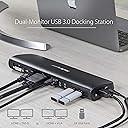
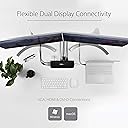
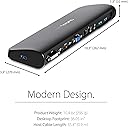
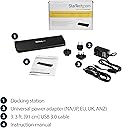
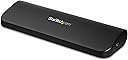
The StarTech.com USB3SDOCKHDV is a versatile dual monitor docking station featuring HDMI, DVI, and VGA outputs supporting up to 2048x1152 resolution. It includes three USB 3.2 Gen 1 ports for high-speed data transfer, a Gigabit Ethernet port for reliable wired networking, and audio jacks. Compatible with Windows, macOS, and ChromeOS, this sleek, TAA-compliant dock enhances any professional workspace by consolidating multiple connections into one compact hub.


| ASIN | B00DNULJHW |
| Best Sellers Rank | #4,121 in Computers & Accessories ( See Top 100 in Computers & Accessories ) #332 in Laptop Docking Stations |
| Brand | StarTech.com |
| Built-In Media | Dual-Monitor USB 3. |
| Color | Black |
| Compatible Devices | Apple MacBook Air M1/M2/M3/M4, Apple MacBook Pro 13 M1/M2/M3, Apple MacBook Pro 14 M1 Pro/M2 Pro/M3 Pro, Apple MacBook Pro 16 M1 Pro/M2 Pro/M1 Max/M2 Max/M3 Pro, Apple MacBook Pro 15 2019/2018/2017/2016, Apple MacBook Pro 13 2020 Intel/M1, Apple MacBook Pro 13 2021 M1 Pro/M1 Max, Apple MacBook Air 2022 M2, Apple MacBook Pro 14 2021 M1 Pro/M1 Max, Apple MacBook Pro 16 2021 M1 Pro/M1 Max, HP Spectre x360 13-aw0000/13-df0000/13-af0000/13-ap0000/13-ba0000/14-ea0000/14-df0000/14-cd0000/14-bc0000/14-bd0000/15-df0000/15-eb0000/15-bl0000/15-ds0000/15-ch0000, HP Elite Dragonfly G2 2B5G1AV/2B5G2AV/2B5G3AV, HP Elite Dragonfly G3 3B5G1AV/3B5G2AV, HP EliteBook 830 G7 Intel/AMD, HP EliteBook 830 G8 Intel/AMD, HP EliteBook 840 G7 Intel/AMD, HP EliteBook 840 G8 Intel/AMD, HP EliteBook 850 G7 Intel/AMD, HP EliteBook 850 G8 Intel/AMD, HP Envy 13-ba0000/13-df0000/13-ap0000/14-eb0000/14-df0000/15-df0000/15-cd0000/15-bc0000, HP Envy x360 13-bd0000/13-dq0000/13-cb0000/14-bd0000/14-ce000 Compatible Devices Apple MacBook Air M1/M2/M3/M4, Apple MacBook Pro 13 M1/M2/M3, Apple MacBook Pro 14 M1 Pro/M2 Pro/M3 Pro, Apple MacBook Pro 16 M1 Pro/M2 Pro/M1 Max/M2 Max/M3 Pro, Apple MacBook Pro 15 2019/2018/2017/2016, Apple MacBook Pro 13 2020 Intel/M1, Apple MacBook Pro 13 2021 M1 Pro/M1 Max, Apple MacBook Air 2022 M2, Apple MacBook Pro 14 2021 M1 Pro/M1 Max, Apple MacBook Pro 16 2021 M1 Pro/M1 Max, HP Spectre x360 13-aw0000/13-df0000/13-af0000/13-ap0000/13-ba0000/14-ea0000/14-df0000/14-cd0000/14-bc0000/14-bd0000/15-df0000/15-eb0000/15-bl0000/15-ds0000/15-ch0000, HP Elite Dragonfly G2 2B5G1AV/2B5G2AV/2B5G3AV, HP Elite Dragonfly G3 3B5G1AV/3B5G2AV, HP EliteBook 830 G7 Intel/AMD, HP EliteBook 830 G8 Intel/AMD, HP EliteBook 840 G7 Intel/AMD, HP EliteBook 840 G8 Intel/AMD, HP EliteBook 850 G7 Intel/AMD, HP EliteBook 850 G8 Intel/AMD, HP Envy 13-ba0000/13-df0000/13-ap0000/14-eb0000/14-df0000/15-df0000/15-cd0000/15-bc0000, HP Envy x360 13-bd0000/13-dq0000/13-cb0000/14-bd0000/14-ce000 See more |
| Customer Reviews | 4.2 out of 5 stars 412 Reviews |
| Global Trade Identification Number | 00065030851299 |
| Hardware Interface | HDMI , USB 3.0, VGA |
| Item Dimensions L x W x H | 12"L x 7"W x 1.7"H |
| Item Type Name | Docking Station |
| Item Weight | 0.3 Kilograms |
| Manufacturer | StarTech.com |
| Mfr Part Number | USB3SDOCKHDV |
| Model Number | USB3SDOCKHDV |
| Number of Ports | 5 |
| Product Dimensions | 12"L x 7"W x 1.7"H |
| Smart Home Compatibility | Not Smart Home Compatible |
| Total Number of HDMI Ports | 1 |
| Total USB Ports | 4 |
| Total Usb Ports | 4 |
| UPC | 065030851299 |
| Unit Count | 1.0 Count |
| Warranty Description | 3 Year |
| Wattage | 20 watts |
A**S
Great Startech dock and customer service
This product is a godsend for a desktop replacement laptop. I use an msi gs60 ghost pro as my laptop and gaming computer. I have to plug in a keyboard, mouse, hdmi monitor, gigabit ethernet, and charge my phone. with this dock I am able to do all of this. The drivers are picked up and installed by windows very quickly. Also, startech has a great little utility for changing the monitor output, the way it is oriented, etc. Also, a shout-out to startech representative Gordon, who helped me trouble shoot my dock when the fast charge port wasn't working. It turns out you should always double check that the power brick is plugged in all the way. also in terms of gaming performance this docks works fine. I can push gta V out at medium settings to and an HD asus monitor at 60fps no problem with no noticeable input lag (although I'm sure the response of the monitor is now about ten ms). The reason why it works so well is that windows picks up the monitor as a generic pnp monitor so it works just fine. Overall great buy for $100. Also don't spend more money for the display port one if you don't need to. In the future i would have preferred a few more usb ports but that's nothing a good old usb 3.0 hub can't fix.
L**.
Finally worked for older monitors, but took a lot of fiddling
EDIT FROM BELOW: after I plugged and unplugged everything one more time because my monitor gave a weird message and I just can't give up, now suddenly it's working exactly the way it should and all three monitors are showing up and separately and independently usable. I will say that this has taken me something like almost 4 hours to make work but now that it's working I guess that's what I wanted, especially since this was out of return window. So I will give it four stars and a caveat that you might need to fiddle with this for quite a while to get what you're looking for . But given that I have two quite old monitors and a relatively old laptop I'm glad I was able to get it working (though God knows what finally did the trick - Copilot and GPT sure don't). This product was recommended by ChatGPT as the right docking station to use with a Lenovo X1 laptop in order to attach 2 external older Planar monitors: one with DVI and one with VGA. Despite this the dock does not actually have the capacity to show two external monitors along with my computer's regular screen. I don't know if that's a defect in the dock or a defect in the ChatGPT recommendation or the computer, which is entirely possible. That said I got an adapter to try to use the HDMI port in the dock, as suggested also by CoPilot and ChatGPT to resolve the mirroring issue that using both in one dock at once raised, and that didn't work either. This was not a good choice to try to attach two external monitors on top of your main screen. It also doesn't have very many USB ports. I had to buy a secondary USB to add onto it to accommodate keyboard, mouse, headset (USB) and camera light, which did work fine through this dock for those externals. In the end this unit doesn't seem to be as useful as it could have been. It also comes with a DVD and CD for instructions and drivers and who's laptop computer has a cd/DVD anymore? It was a strange setup and unfortunately it's too late to return either unit.
S**R
Extend Video to multiple screens when your laptop doesn't have the ports
This product allows me to run multiple monitors from a laptop that does not has neither a 'docking station port' nor multiple video out connections. Although there are 3 video out (1 DVI, 1 HDMI, and 1 VGA) it will only support two video signals--either 2 'digital' signals, or 1 VGA and one digital signal. However, by using the laptop screen, it is possible to get a three-screen display. The price was lower than multiple other brands that claim to do the same thing. I have not checked the refresh rate of the extended screens. I do not use this computer for gaming, so I have no idea how suitable for such this would be. It works fine for e-mail and web sites. StarTech.com Universal USB 3.0 Laptop Docking Station - Dual Video HDMI DVI VGA -Ultrabook Docking Station -Laptop Dock - Port Replicator
O**L
DOESN'T REALLY WORK ON MAC. Not convenient.
I bought it hoping to make my MacBook Pro easier to use in my desk with two external monitors. First the displays were really slow. Second only one external monitor was working at the time. I called technical support and they guide thru fixing that but now i have a problem where this device makes my mac not know what screens are on or off. The drivers fool the operating system into thinking the laptops screen is on even when is off. so i am always force to use 3 screens even when i only want to use my two external monitors. i talked to technical support and they have no idea how to fix this issue but they said they are working on it. I am currently waiting to see if theres a way i can actually make this docking station convenient enough to be usable.
V**C
Nice Unit
This docking station did exactly what the specification's and description said. I needed to use my laptop for a desktop replacement and still be portable. I also wanted to connect two monitors to the dock and it is performing well with no glitches. My laptop does not have any jacks or ports, only USB. This unit solved my connection problems.
C**J
Works like a champ for MacBook Air, Early 2015 = 3 Screens of Content: 2 Large Monitors + Mac Screen
I have a 2015 Macbook Air, 2.2 GHz Intel Core i7, 8 GB 1600 MHz DDR3, Intel HD Graphics 6000 1536 MB that I wanted to run in dual-monitor extended display mode with HP 24F monitors. This is the only product I found on Amazon that claimed to do what I needed. And it works like a champ. NOTE: You can not run dual HDMI. One monitor can be HDMI and the other must be DVI or VGA. I have mine running HDMI/DVI and they look and perform identically. I did have a small issue, in that I chose the wrong driver. I called StarTech's 800 Number and it was answered on the 3rd ring but Justin, in Ohio. Justin quickly diagnosed the driver issue and had me up and going in minutes. Could not be happier.
J**M
Cvoers all the bases
This will depend on what you really need. The docking station is well made and should last for a long time. The set-up on my tablet was easy and took only a few minutes to get it ready for use. It is multi-functional. One of the reasons I looked at this was to be able to use multiple ports including connecting to a larger screen TV in hotels while I was traveling. I purchased a large storage container designed for tools to hold the product and the charger. If you need more than one port to connect to, this could be the product for you. you have the HDMI ports as well as multiple USB ports and several other connectors. It is a little bigger than I expected and needs the charger to operate. I you are good with this, you are in good shape and I would recommend the product.
S**M
Works with MacAir
I've only had this a week, at first I had some issues but they helped me out via chat! Super awesome customer service Anyway, I use this with my MacBook Air and 2 screens. It works fine! Just 2 issues: Once the laptop screen goes to "screen saver" I can't enter my log in. Well, I can, but the laptop screen stays dormant. It's fine if I don't need anything on that screen, but I use screenshots...bringing me to my second issue: You have to leave the laptop open in order for you to continue working . They are working on fixing that...but no timeframe for when an upgrade would happen Oh, so when it goes to screensaver, I have to disconnect and reconnect the USB connection...not TOO bad, but still a pain. But overall, it works with my MacBook Air, keyboard and mouse tracker ***UPDATE** they must have made an update, I can use with no issues now, works great!! updated to 5 stars!!
K**Z
ノートだけですべてを行う方へ
この商品の優れたところは、ディスプレイへのポートを机の上で出せるという点です。 ノートを主体に使う僕ですが、家ではやはり大きい画面で見たいので22インチディスプレイを 机の上に置いていますが、今まではそこからhdmiケーブルを引っ張ってきて端子むき出しで その都度差し込んで使っていました。 でも、この商品のおかげでいくつかの(古いものも含め)ディスプレイを上手にまとめることができますし 見た目もきちんとしています。 必要性を感じなかったのですが、整理整頓のためには優秀な商品だと感じました。
T**.
Gutes Gerät, das macht was es soll
Habe ich günstig als Warehouse Deal erworben. Funktion einwandfrei, insbesondere kann ich her wirklich 2 Monitore mittels VGA und HDMI unabhängig voneinander betreiben. Mit den preiswerteren USB-C Adaptern hat das nicht funktioniert. Kann das Gerät nur empfehlen.
G**S
Sans défaut
Répond parfaitement aux attentes avec un ultraportable Sony Windows 8.1. Il faut juste télécharger la version du driver qui va avec Windows 8+, non incluse. Si pas de wifi pour un PC portable sans prise ethernet, ça peut compliquer. Sinon, pas de souci 2ème écran HD ou usb,... Ca marche tout seul.
J**N
Cumple!
Lo probe con una Thinkpad Lenovo, Windows 8 y trabaja sin problemas. Lo uso para conectar otros 2 monitores, uno con VGA y otro HDMI. Tambien probe el puerto Ethernet. Le pongo 4 estrellas por que creo que le falta tener un led indicador de encendido. Entrega sin problemas.
J**R
Laptop Docking
Excellent hub accessory. Performs the function I required namely to use Two monitors via various laptops. Straight forward to set up, compact when in place. Good value for money
Trustpilot
2 days ago
2 weeks ago